
Python3 tkinter基础 Menu Frame 创建右键菜单
- Python : 3.7.0
- OS : Ubuntu 18.04.1 LTS
- IDE : PyCharm 2018.2.4
- Conda : 4.5.11
- typesetting : Markdown
example_1
code
"""

@Author : 行初心

@Date   : 18-9-30

@Blog   : www.cnblogs.com/xingchuxin

@Gitee  : gitee.com/zhichengjiu

"""

from tkinter import *

def main():

    root = Tk()

    # tearoff=False

    menubar = Menu(root, tearoff=False)

    menubar.add_command(label='果部')

    menubar.add_command(label='菜部')

    frame = Frame(root,

                  width=100, height=100,

                  background='red')

    frame.pack()

    def _right_key(event):

        menubar.post(event.x_root, event.y_root)

    # frame框绑定鼠标右键

    frame.bind("<Button-3>", _right_key)

    mainloop()

if __name__ == '__main__':

    main()
result
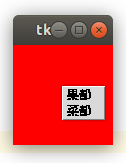
example_2
code
"""

@Author : 行初心

@Date   : 18-9-30

@Blog   : www.cnblogs.com/xingchuxin

@Gitee  : gitee.com/zhichengjiu

"""

from tkinter import *

def main():

    root = Tk()

    # tearoff=True

    menubar = Menu(root, tearoff=True)

    menubar.add_command(label='果部')

    menubar.add_command(label='菜部')

    frame = Frame(root,

                  width=100, height=100,

                  background='red')

    frame.pack()

    def _right_key(event):

        menubar.post(event.x_root, event.y_root)

    # frame框绑定鼠标右键

    frame.bind("<Button-3>", _right_key)

    mainloop()

if __name__ == '__main__':

    main()
result

reference
- [文档] docs.python.org/3/library/tkinter.html
resource
- [文档] docs.python.org/3
- [规范] www.python.org/dev/peps/pep-0008
- [规范] zh-google-styleguide.readthedocs.io/en/latest/google-python-styleguide/python_language_rules
- [源码] www.python.org/downloads/source
- [ PEP ] www.python.org/dev/peps
- [平台] www.cnblogs.com
- [平台] gitee.com
Python具有开源、跨平台、解释型和交互式等特性,值得学习。
Python的设计哲学:优雅,明确,简单。提倡用一种方法,最好是只有一种方法来做一件事。
GUI可以选择PyQt5、PySide2、wxPython、PyGObject、wxWidgets等进行创作。
代码的书写要遵守规范,这样有助于沟通和理解。
每种语言都有独特的思想,初学者需要转变思维、踏实践行、坚持积累。
Python3 tkinter基础 Menu Frame 创建右键菜单的更多相关文章
- Python3 tkinter基础 Menu add_cascade 多级菜单 add_separator 分割线
Python : 3.7.0 OS : Ubuntu 18.04.1 LTS IDE : PyCharm 2018.2.4 Conda ...
- Python3 tkinter基础 Menu add_checkbutton 多选的下拉菜单
Python : 3.7.0 OS : Ubuntu 18.04.1 LTS IDE : PyCharm 2018.2.4 Conda ...
- Python3 tkinter基础 Menu add_radiobutton 单选的下拉菜单
Python : 3.7.0 OS : Ubuntu 18.04.1 LTS IDE : PyCharm 2018.2.4 Conda ...
- Python3 tkinter基础 Menu 添加菜单栏
Python : 3.7.0 OS : Ubuntu 18.04.1 LTS IDE : PyCharm 2018.2.4 Conda ...
- Python3 tkinter基础 Scrollbar pack 创建靠右、充满Y轴的垂直滚动条
Python : 3.7.0 OS : Ubuntu 18.04.1 LTS IDE : PyCharm 2018.2.4 Conda ...
- Python3 tkinter基础 Listbox Scrollbar 创建垂直滚动条
Python : 3.7.0 OS : Ubuntu 18.04.1 LTS IDE : PyCharm 2018.2.4 Conda ...
- Python3 tkinter基础 Canvas background 创建白色的画布 create_line width 画宽的线
Python : 3.7.0 OS : Ubuntu 18.04.1 LTS IDE : PyCharm 2018.2.4 Conda ...
- 跟我一起玩Win32开发(6):创建右键菜单
快捷菜单,说得容易理解一点,就是右键菜单,当我们在某个区域内单击鼠标右键,会弹出一些菜单项.这种类型的菜单,是随处可见的,我们在桌面上右击一下,也会弹出一个菜单. 右键菜单的好处就是方便,它经常和我们 ...
- electron 创建右键菜单
1.引入模块 const Electron = require('electron'); const remote = Electron.remote; const Menu = remote.Men ...
随机推荐
- N - Asteroids
Bessie wants to navigate her spaceship through a dangerous asteroid field in the shape of an N x N g ...
- cf 893 E
有 次询问,第 次询问包含两个数 . 求满足下面两个要求的 数组的方案数. 1. 数组由 个整数构成 2. A与B不同当且仅当至少存在一个数 满足 .答案对 取模 数据范围: 显 ...
- Hudson持续集成服务器的安装配置与使用
Hudson只是一个持续集成服务器(持续集成工具),要想搭建一套完整的持续集成管理平台, 还需要用到前面课程中所讲到的 SVN.Maven.Sonar等工具,按需求整合则可. 1.安装 JDK并配置 ...
- filter的知识点 和 实例
一.过滤器Filter 1.filter的简介 filter是对客户端访问资源的过滤,符合条件放行,不符合条件不放行,并且可以对目 标资源访问前后进行逻辑处理 2.快速入门 步骤: 1)编写一个 ...
- 使用call、apply和bind解决js中烦人的this,事件绑定时的this和传参问题
1.什么是this 在JavaScript中this可以是全局对象.当前对象或者任意对象,这完全取决于函数的调用方式,this 绑定的对象即函数执行的上下文环境(context). 为了帮助理解,让我 ...
- Oracle管理常用查询语句
1.查看表空间的名称及大小 select t.tablespace_name, round(sum(bytes/(1024*1024)),0) ts_sizefrom dba_tablespaces ...
- javascript 缩写技巧
19种JS高(炫)效(技)缩写法 https://segmentfault.com/a/1190000011229633
- eclipse安装反编译decompiler方式一
(转发位置:https://www.cnblogs.com/zs-notes/p/8991503.html) eclipse安装JD-eclipse反编译插件 1.在eclipse的help中选择In ...
- c++课设
#include <stdio.h>#include <time.h>#include <math.h>#define C 60000;struct Student ...
- linux命令:压缩解压打包工具大集合
目录 (1)zip 压缩.解压缩及归档工具有很多,今天小编就整理几个大家较为常用的. compress gzip bzip2 xz zip tar cpio 一.压缩.解压工具 用法 压缩 工具 压 ...