
java前端传入的json字符串保存到表中的方法
表 service_goods_base 字段如下:
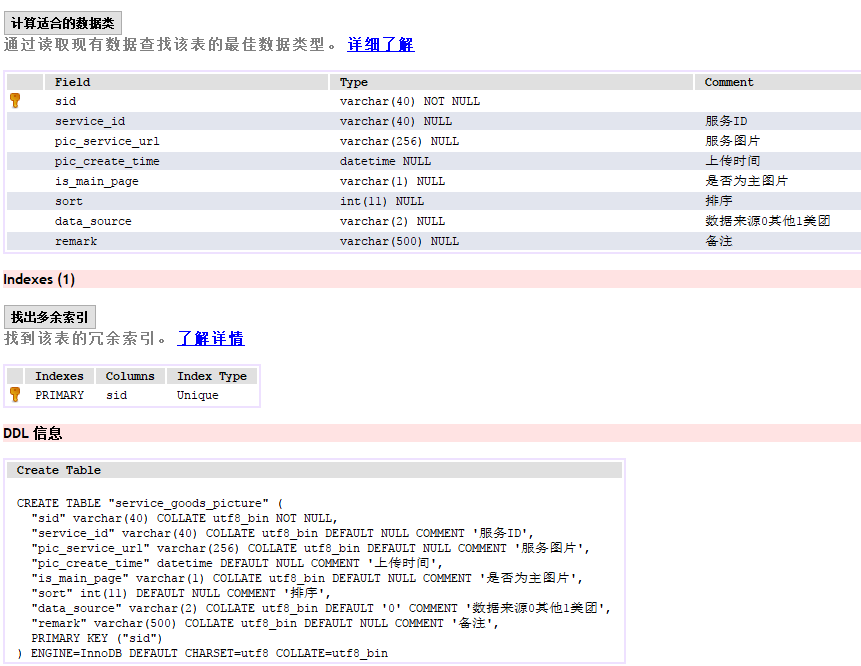
传入的json 字符串: servicePictureArray : [{"picServiceUrl": "http://qimg.app.yiguanjiaclub.org/20180308/a48210dc7bfe4b34b3d7de114ef01f85","mainPage": "1"}]
方法如下:
          if(StringUtil.isNotEmpty(servicePictureArray))

                {

                    JSONArray array = JSONArray.fromObject(servicePictureArray);

                    List<ServiceGoodsPicture> list = new ArrayList<ServiceGoodsPicture>();

                    for (int i = 0; i < array.size(); i++) {

                        Map<String, Object> object = (Map<String, Object>) array

                                .get(i);

                        ServiceGoodsPicture entity = ClassUtil.mapToEntity(ServiceGoodsPicture.class, object);

                        list.add(entity);

                    }

                    List<ServiceGoodsPicture> picList=serviceGoodsPictureService.saveServicePicBase(list, serviceId);

                    sgbEntity.setPicList(picList);

                }
先用 JSONArray.fromObject(servicePictureArray) 把json 字符串转化成 一个json数组array。 对应一个 bean 的 list 。
获取array数组中的每个元素,保存在 object 中。 再通过 mapToEntity 方法 把 map 的对象 object 转化成 表的对象 entity 。 并且把这个对象保存在list 中。
调用另一个service 的方法,获取list 的每个元素,保存在 bean 的 picture 对象中,并给picture 对象其他的属性赋值。最后 调用mybatis 的方法, 插入picture 对象。保存在表中。
public List<ServiceGoodsPicture>  saveServicePicBase(List<ServiceGoodsPicture> list, String goodsId) {

		List<ServiceGoodsPicture> restList=new ArrayList<ServiceGoodsPicture>();

		for(int i = 0; i < list.size();i++)

		{

			ServiceGoodsPicture restPic=new ServiceGoodsPicture();

			ServiceGoodsPicture picture = list.get(i);

			picture.setSid(UUIDUtil.getUUID());

			picture.setPicCreateTime(new Date());

			picture.setServiceId(goodsId);

			picture.setSort(i);

			serviceGoodsPictureMapper.insertSelective(picture);

		}

		return restList;

	}
map 与对象的转化函数:
    public static <T> T mapToEntity(Class<T> objClass,Map<String,Object> map){

        T entity = null;

        try {

            entity = objClass.newInstance();

            BeanInfo beanInfo = Introspector.getBeanInfo(entity.getClass());

            PropertyDescriptor[] propertyDescriptors = beanInfo.getPropertyDescriptors();

            for (PropertyDescriptor property : propertyDescriptors) {

                String key = property.getName();

                if (map.containsKey(key)) {

                    Object value = map.get(key);

                    if(value instanceof JSONNull){

                        value = null;

                    }

                    Object convertValue = value;

                    // 得到property对应的setter方法

                    Method setter = property.getWriteMethod();

                    Class<?> propertyType = property.getPropertyType();

                    if ((propertyType == Double.class) || (propertyType == Double.TYPE)) {

                        if (!(value instanceof Double))
if (!(value.toString()).matches("[0-9.]+"))
convertValue = 0;
else
convertValue = Double.valueOf(value.toString());
                    } else if ((propertyType == Long.class) || (propertyType == Long.TYPE)) {

                        if (!(value instanceof Long))

                            convertValue = 0.0;

                    } else if ((propertyType == Integer.class) || (propertyType == Integer.TYPE)) {

                        if (!(value instanceof Integer) )

                            if (!(value.toString()).matches("[0-9]+"))

                                convertValue = 0;

                            else

                                convertValue = Integer.valueOf((String) value);

                    } else if ((propertyType == Float.class) || (propertyType == Float.TYPE)) {

                        if (!(value instanceof Float))

                            convertValue = 0.0;

                    } else if ((propertyType == Boolean.TYPE) || (propertyType == Boolean.class)) {

                        if (!(value instanceof Boolean)) {

                            if (("1".equals(value)) || ("Y".equalsIgnoreCase(value + "")) || ("Yes".equalsIgnoreCase(value + "")))

                                convertValue = true;

                            else

                                convertValue = false;

                        }

                    } else if (propertyType == Date.class) {

                        if ((!(value instanceof Date)) && (value != null)) {

                            convertValue = null;

                        }

                    } else if (value instanceof net.sf.json.JSONNull){

                    }

                    setter.invoke(entity, convertValue);

                }

            }

        } catch (InstantiationException e) {

            e.printStackTrace();

        } catch (IllegalAccessException e) {

            e.printStackTrace();

        } catch (IllegalArgumentException e) {

            e.printStackTrace();

        } catch (InvocationTargetException e) {

            e.printStackTrace();

        } catch (IntrospectionException e) {

            e.printStackTrace();

        }

        return entity;

    }

    public static Map<String, Object> entityToMap(Object obj){

        if(obj == null)

            return null;

        Map<String, Object> map = new HashMap<String, Object>();

        try {

            BeanInfo beanInfo = Introspector.getBeanInfo(obj.getClass());

            PropertyDescriptor[] propertyDescriptors = beanInfo.getPropertyDescriptors();

            for (PropertyDescriptor property : propertyDescriptors) {

                String key = property.getName();

                if (key.compareToIgnoreCase("class") == 0) {

                    continue;

                }

                Method getter = property.getReadMethod();

                Object value = getter!=null ? getter.invoke(obj) : null;

                map.put(key, value);

            }

        } catch (Exception e) {

        }

        return map;

    }
如果 bean 的 propertyType 是 Integer ,map 中的value 传的不是 Integer : 则做一下判断:
如果value 是只包括 0-9 的字符,则把 value 转化成 Integer ,赋值给 convertValue , 否则 convertValue 赋值是 0.
          else if ((propertyType == Integer.class) || (propertyType == Integer.TYPE)) {

                        if (!(value instanceof Integer) )

                            if (!(value.toString()).matches("[0-9]+"))

                                convertValue = 0;

                            else

                                convertValue = Integer.valueOf((String) value);

                    }
java前端传入的json字符串保存到表中的方法的更多相关文章
- java解析json字符串详解(两种方法)
一.使用JSONObject来解析JSON数据官方提供的,所以不需要导入第三方jar包:直接上代码,如下 private void parseJSONWithJSONObject(String Jso ...
- java普通对象和json字符串的互转
一.java普通对象和json字符串的互转 java对象---->json 首先创建一个java对象: ? 1 2 3 4 5 6 7 8 9 10 11 12 13 14 15 16 17 1 ...
- Java实现微信菜单json字符串拼接
Java实现微信菜单json字符串拼接 微信菜单拼接json字符串方法 >>>>>>>>>>>>>>>> ...
- <摘录>Gson对Java嵌套对象和JSON字符串之间的转换
JSON(JavaScript Object Notation) 是一种轻量级的数据交换格式,具有良好的跨平台特性.近几年来已经和XML一样成为C/S架构中广泛采用的数据格式.有关JSON的更多知识, ...
- Java对象转换成Json字符串是无法获得对应字段名
问题: 代码中已经标注 @JSONField(name = "attrs") private String abc; public String getA() { return a ...
- 【Java_Spring】java解析多层嵌套json字符串
java解析多层嵌套json字符串
- JS解析json数据并将json字符串转化为数组的实现方法
json数据在ajax实现异步交互时起到了很重要的作用,他可以返回请求的数据,然后利用客户端的js进行解析,这一点体现出js的强大,本文介绍JS解析json数据并将json字符串转化为数组的实现方法, ...
- 通过js获取前台数据向一般处理程序传递Json数据,并解析Json数据,将前台传来的Json数据写入数据库表中
摘自:http://blog.csdn.net/mazhaojuan/article/details/8592015 通过js获取前台数据向一般处理程序传递Json数据,并解析Json数据,将前台传来 ...
- mssql sqlserver sql对使用逗号分隔的字符串 转换为数据表的另类方法实现
转自:http://www.maomao365.com/?p=10739 摘要: 下文讲述在sqlserver 对逗号分隔的字符串转换为数据表的另类方法实现,如下所示: 实验环境:sql server ...
随机推荐
- fl2440字符设备led驱动
首先要明白字符设备驱动注册的基本流程 当我们调用insomd命令加载驱动后,驱动程序从module_init函数开始执行:硬件初始化 -> 申请主次设备号 -> 定义fops(file_o ...
- Druid对比Impala/Shark
Druid 和 Impala Shark 的对比取决于产品要求, 取决于系统是设计成做什么的 Druid 被设计成 一直在线, 高可用性 实时插入数据 分片分块形式的任意查询据我所知 Im ...
- ELK学习笔记
一.elk框架和java1.8环境搭建 1.1: 环境说明 约定: centos6 iptables关闭 如果不关闭的话,需要开放对应的端口访问 selinux关闭 1.2: ELK简介 els:El ...
- ios app在itunesConnect里面的几种状态
原地址:http://blog.csdn.net/dean19900504/article/details/8164734 Waiting for Upload (Yellow) Appears wh ...
- HDU1157 Who's in the Middle
Who's in the Middle Time Limit: 2000/1000 MS (Java/Others) Memory Limit: 65536/32768 K (Java/Othe ...
- OpenStack-Heat中的AWS::WaitCondition的使用
在heat中.一个instance的创建成功信号是在这个instance状态成为active之后发出的,这时候user-data可能还没有运行.可是heat已经觉得这个resource创建成功了,開始 ...
- tomcat war包自动化部署脚本
#/bin/bash #带发布build的war包名称 war_name="weiFeng.war" war_dir="/home/deploy/wei_feng_tar ...
- 使用sql语句实现添加、删除约束
--主键约束(Primary Key constraint):要求主键列的数据唯一,并且不允许为空. --唯一约束(Unique Constraint):要求该列唯一,允许为空,但只能出现一个空值. ...
- 【Akka】在并发程序中使用Future
引言 在Akka中, 一个Future是用来获取某个并发操作的结果的数据结构.这个操作一般是由Actor运行或由Dispatcher直接运行的. 这个结果能够以同步(堵塞)或异步(非堵塞)的方式訪问. ...
- Python内置函数之len()
len(s)用来判断对象的长度. 需要说明的是,整型,布尔等是没有长度这一说法的.字符串.字典.列表和元组都有长度. 例子: >>> len() Traceback (most re ...