
html元素li移动动态效果
在日常工作当中遇到了一个问题,平铺型列表修改单个内容设置排序时列表排序应与之对应。一下是一个小小的例子;简单的解决了此类问题,以浮动的形式改变当前的数据的显示顺序。有不足之处欢迎指点,后期还会做一个更完善的版本。敬请期待!
效果预览:
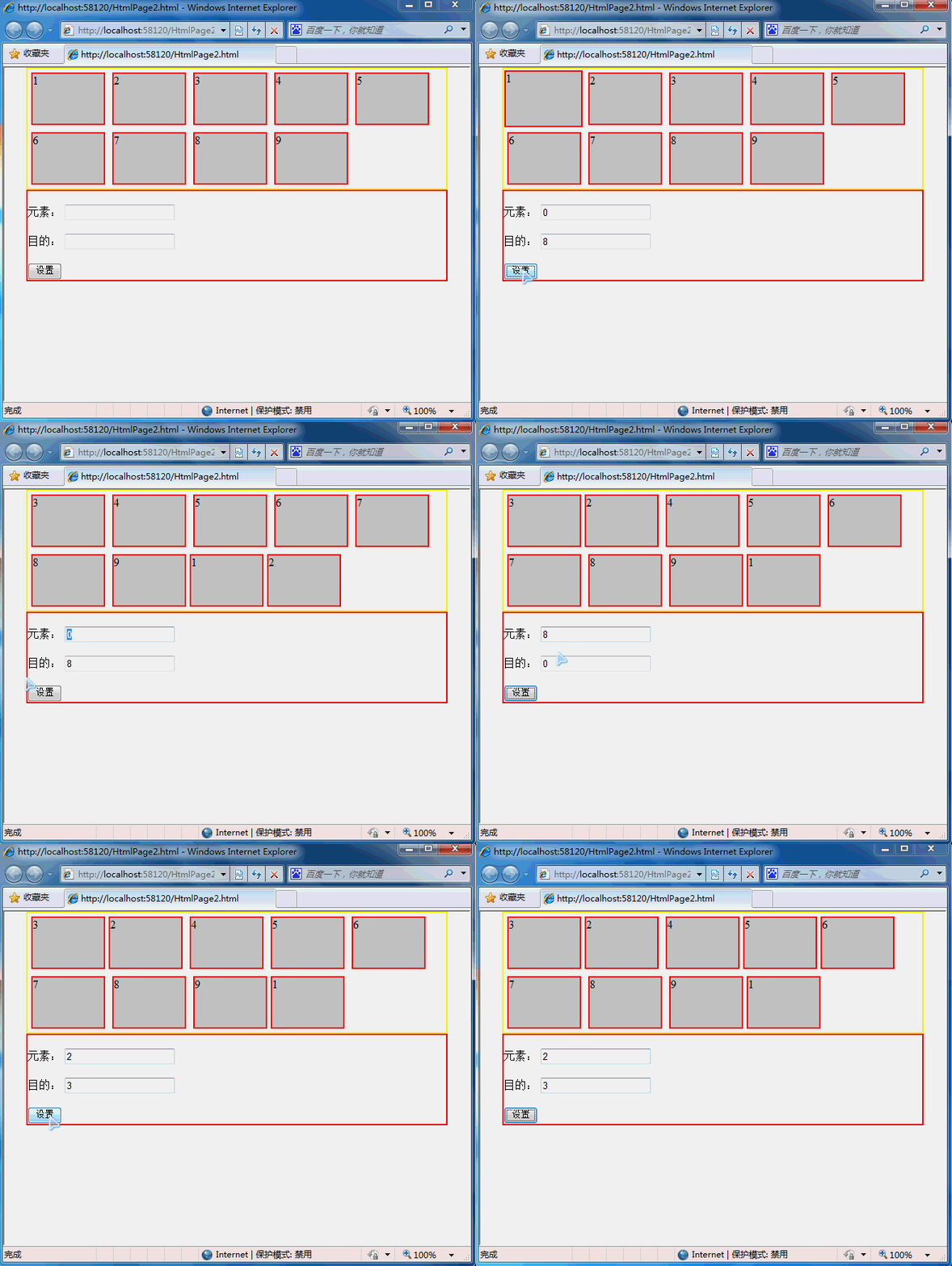
代码实现:
 <!DOCTYPE html>

 <html xmlns="http://www.w3.org/1999/xhtml">

 <head>

     <meta http-equiv="Content-Type" content="text/html; charset=utf-8" />

     <title></title>

     <style type="text/css">

         html, body, div, ul {margin: 0px;padding: 0px;}

         .clear {clear: both;}

         .content, .footer {margin: 0 auto;width: 90%;}

         .content {border: solid 2px yellow;}

         .footer {border: solid 2px red;}

         .content ul li {float: left;width: 100px;height: 70px;margin: 5px 5px;border: solid 2px red;list-style-type: none;background-color: #ccc;}

     </style>

     <script src="js/jquery.js"></script>

     <script type="text/javascript">

         $(function () {

             var m_nodeObj, t_nodeObj, tempWidth;

             $("#btnSet").click(function () {

                 m_nodeObj = $(".content li:eq(" + $("#itemNumb").val() + ")");

                 t_nodeObj = $(".content li:eq(" + $("#setNumb").val() + ")");

                 ////方案一 无动画

                 //m_nodeObj.insertAfter(t_nodeObj);

                 ////方案二

                 //$(m_nodeObj).animate({ "width": "toggle" }, function () {

                 //    $(this).insertAfter($(t_nodeObj)).animate({ "width": "toggle" })

                 //})

                 //方案三

                 $(m_nodeObj).clone(true).appendTo(".content ul")

                     .css({ "position": "absolute", "top": node.ordinate(m_nodeObj), "left": node.abscissa(m_nodeObj) })

                     .animate({ width: node.width(m_nodeObj) + 10, height: node.height(m_nodeObj) + 10, top: node.ordinate(m_nodeObj) - 5, left: node.abscissa(m_nodeObj) - 5 }, 200, function () {

                         tempWidth = node.width(m_nodeObj);

                         t_nodeObj.animate({ "margin-right": tempWidth });

                         m_nodeObj.animate({ "width": '0px' }, function () { $(this).remove() });

                     })

                     .animate({ width: node.width(m_nodeObj), height: node.height(m_nodeObj), top: node.ordinate(t_nodeObj), left: node.abscissa(t_nodeObj) }, 500, function () {

                         //  m_nodeObj.insertAfter(t_nodeObj).animate({ "width": tempWidth }); $(this).remove();

                         t_nodeObj.css({ "margin-right": "0px" });

                         m_nodeObj.css("width", tempWidth).insertAfter(t_nodeObj);

                         $(this).remove();

                     })

             })

         })

         node = {

             abscissa: function (obj) {

                 return obj.offset().left - parseInt(obj.css("margin-left").replace("px", ""));

             },

             ordinate: function (obj) {

                 return obj.offset().top - parseInt(obj.css("margin-top").replace("px", ""));

             },

             height: function (obj) {

                 return parseInt(obj.css("height").replace("px", ""));

             },

             width: function (obj) {

                 return parseInt(obj.css("width").replace("px", ""));

             }

         }     </script>

 </head>

 <body>

     <div class="content">

         <ul>

             <li>1</li>

             <li>2</li>

             <li>3</li>

             <li>4</li>

             <li>5</li>

             <li>6</li>

             <li>7</li>

             <li>8</li>

             <li>9</li>

         </ul>

         <div class="clear"></div>

     </div>

     <div class="footer">

         <br />

         元素:  <input type="text" id="itemNumb" />

         <br />

         <br />

         目的: <input type="text" id="setNumb" />

         <br />

         <br />

         <input type="button" value="设置" id="btnSet" />

     </div>

 </body>

 </html>
html元素li移动动态效果的更多相关文章
- 关于table的td和ul元素li隔行变色的功能实现
table元素的td和ul元素li隔行变色的功能实现 利用css控制二者的样式轻松实现隔行换色: 例如:table的css样式控制: table tr td{ background-color:颜 ...
- 横向子菜单栏ul根据其子元素li个数动态获取宽度,并与父li绝对垂直居中的jquery代码段
;(function(window){ $('.menuitem').hover(function(){ $('>a',this).css('background-color ...
- 关于li元素嵌套的事儿
今天阅读<锋利的jQuery>第二版2.6节案例研究部分的时候,遇到一个问题. <ul> <li class="a1"><a href=& ...
- ul或者ol中添加li元素
<!doctype html><html> <head> <meta charset="utf-8"> ...
- CCS设置第一个li的元素与其他li样式不同
<div class="ly-content-list"> <ul> <li> <div class="title"& ...
- AngularJS的基础元素应用
<!doctype html> <!-- 标记ng-app告诉AngularJS处理整个HTML页并引导应用 --> <html ng-app> <head& ...
- <<< Jquery查找元素、选择器使用方法总结
$("#myDiv"); //根据给定的ID匹配一个元素,用于搜索id 属性中给定的值,id属性必须是唯一的 $("div"); //根据给定的元素名匹配所有元 ...
- VB下对HTML元素的操作
<!DOCTYPE html> <html> <head> <title>test</title> </head> <bo ...
- 在js中怎么样选择互斥的相邻元素
在使用jquery中,我们通常会选择siblings()去选择相邻元素,使用eq()方法去匹配元素,使用index()获取对应元素的索引值,具体jquery代码如下: <style> *{ ...
随机推荐
- ZZTHX-线程锁
以前一直在做卡乐付,悲剧的是项目中的余额查询,超级转账和刷卡器相关的东西已经开发好了,我对这块还是比较好奇和感兴趣的,在项目空闲的时候我就开始尝试熟悉和了解这块的业务和代码.实践出真理,只有在实践中才 ...
- C#基础知识之方法重载总结
1.首先解释一下什么是方法重载? 方法重载是指在同一个类中方法同名,参数不同,调用时根据实参的形式,选择与他匹配的方法执行操作的一种技术. 这里所说的参数不同是指以下几种情况: ① 参数的类型 ...
- 【转】简明vim练级攻略
本文来自:http://coolshell.cn/articles/5426.html vim的学习曲线相当的大(参看各种文本编辑器的学习曲线),所以,如果你一开始看到的是一大堆VIM的命令分类,你一 ...
- 【39】明智而审慎第使用private继承
1.private继承意味着,根据某物实现出,继承父类的实现,关闭父类的接口,并不是Is-A的关系,不满足里氏代换,继承的内容访问权限都修改为private. 2.那么问题来了,复合也表达根据某物实现 ...
- 区域医疗移动医疗影像解决方案2--基于FLEX的PACS
基于Flex的PACS和基于HTML5的PACS,都不是基于DICOM的WADO的方式,即所有的图像操作,移动.缩放.旋转.测量.伪彩.窗宽窗位调整等都是在本地浏览器能够完成,不用和服务器进行频繁的交 ...
- Linux curl命令详解
用途说明 curl命令是一个功能强大的网络工具,它能够通过http.ftp等方式下载文件,也能够上传文件.其实curl远不止前面所说的那些功能,大家可以通过man curl阅读手册页获取更多的信息.类 ...
- 50个Android开发技巧(02 延迟载入和避免反复渲染视图)
当你在Application中创建复杂的布局时.页面的渲染过程也变得更加缓慢. 此时,我们须要利用 <include />标签(避免反复渲染)和 ViewStub类(延迟载入)来优化我们的 ...
- MySQL计划任务(事件调度器)(Event Scheduler)
http://www.cnblogs.com/c840136/articles/2388512.html https://dev.mysql.com/doc/refman/5.7/en/events- ...
- LayoutInflater
Android中LayoutInflater的使用 博客分类: Android Inflater英文意思是膨胀,在Android中应该是扩展的意思吧. LayoutInflater的作用类似于 f ...
- android的界面编程
主要是用View以及ViewGroup,同时ViewGroup又是View的子类,充当容器. 主要有两种方法控制view的行为: 1.在XML布局文件中通过XML属性进行控制 2.在Java代码中通过 ...