
html元素li移动动态效果
在日常工作当中遇到了一个问题,平铺型列表修改单个内容设置排序时列表排序应与之对应。一下是一个小小的例子;简单的解决了此类问题,以浮动的形式改变当前的数据的显示顺序。有不足之处欢迎指点,后期还会做一个更完善的版本。敬请期待!
效果预览:
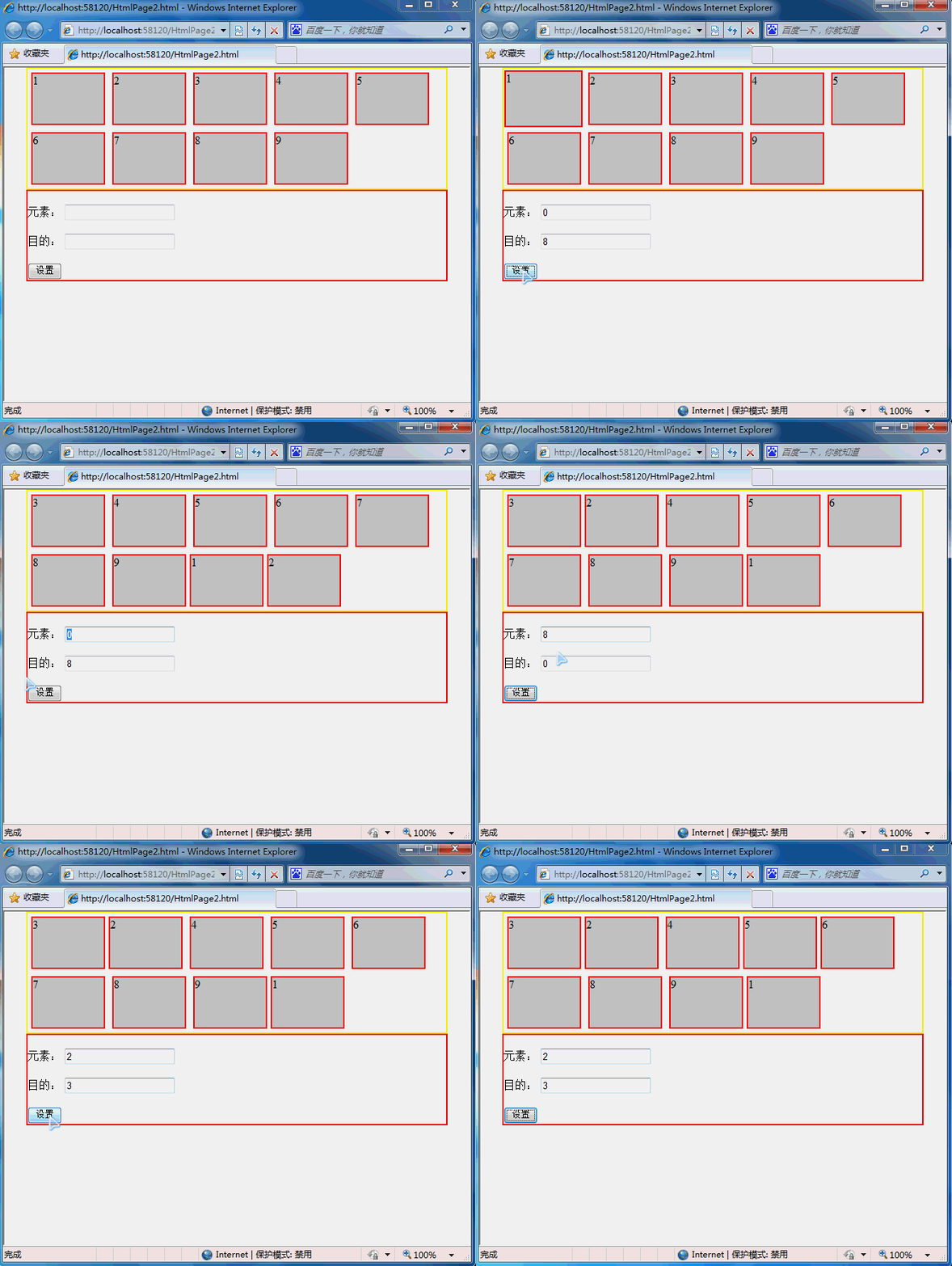
代码实现:
 <!DOCTYPE html>

 <html xmlns="http://www.w3.org/1999/xhtml">

 <head>

     <meta http-equiv="Content-Type" content="text/html; charset=utf-8" />

     <title></title>

     <style type="text/css">

         html, body, div, ul {margin: 0px;padding: 0px;}

         .clear {clear: both;}

         .content, .footer {margin: 0 auto;width: 90%;}

         .content {border: solid 2px yellow;}

         .footer {border: solid 2px red;}

         .content ul li {float: left;width: 100px;height: 70px;margin: 5px 5px;border: solid 2px red;list-style-type: none;background-color: #ccc;}

     </style>

     <script src="js/jquery.js"></script>

     <script type="text/javascript">

         $(function () {

             var m_nodeObj, t_nodeObj, tempWidth;

             $("#btnSet").click(function () {

                 m_nodeObj = $(".content li:eq(" + $("#itemNumb").val() + ")");

                 t_nodeObj = $(".content li:eq(" + $("#setNumb").val() + ")");

                 ////方案一 无动画

                 //m_nodeObj.insertAfter(t_nodeObj);

                 ////方案二

                 //$(m_nodeObj).animate({ "width": "toggle" }, function () {

                 //    $(this).insertAfter($(t_nodeObj)).animate({ "width": "toggle" })

                 //})

                 //方案三

                 $(m_nodeObj).clone(true).appendTo(".content ul")

                     .css({ "position": "absolute", "top": node.ordinate(m_nodeObj), "left": node.abscissa(m_nodeObj) })

                     .animate({ width: node.width(m_nodeObj) + 10, height: node.height(m_nodeObj) + 10, top: node.ordinate(m_nodeObj) - 5, left: node.abscissa(m_nodeObj) - 5 }, 200, function () {

                         tempWidth = node.width(m_nodeObj);

                         t_nodeObj.animate({ "margin-right": tempWidth });

                         m_nodeObj.animate({ "width": '0px' }, function () { $(this).remove() });

                     })

                     .animate({ width: node.width(m_nodeObj), height: node.height(m_nodeObj), top: node.ordinate(t_nodeObj), left: node.abscissa(t_nodeObj) }, 500, function () {

                         //  m_nodeObj.insertAfter(t_nodeObj).animate({ "width": tempWidth }); $(this).remove();

                         t_nodeObj.css({ "margin-right": "0px" });

                         m_nodeObj.css("width", tempWidth).insertAfter(t_nodeObj);

                         $(this).remove();

                     })

             })

         })

         node = {

             abscissa: function (obj) {

                 return obj.offset().left - parseInt(obj.css("margin-left").replace("px", ""));

             },

             ordinate: function (obj) {

                 return obj.offset().top - parseInt(obj.css("margin-top").replace("px", ""));

             },

             height: function (obj) {

                 return parseInt(obj.css("height").replace("px", ""));

             },

             width: function (obj) {

                 return parseInt(obj.css("width").replace("px", ""));

             }

         }     </script>

 </head>

 <body>

     <div class="content">

         <ul>

             <li>1</li>

             <li>2</li>

             <li>3</li>

             <li>4</li>

             <li>5</li>

             <li>6</li>

             <li>7</li>

             <li>8</li>

             <li>9</li>

         </ul>

         <div class="clear"></div>

     </div>

     <div class="footer">

         <br />

         元素:  <input type="text" id="itemNumb" />

         <br />

         <br />

         目的: <input type="text" id="setNumb" />

         <br />

         <br />

         <input type="button" value="设置" id="btnSet" />

     </div>

 </body>

 </html>
html元素li移动动态效果的更多相关文章
- 关于table的td和ul元素li隔行变色的功能实现
table元素的td和ul元素li隔行变色的功能实现 利用css控制二者的样式轻松实现隔行换色: 例如:table的css样式控制: table tr td{ background-color:颜 ...
- 横向子菜单栏ul根据其子元素li个数动态获取宽度,并与父li绝对垂直居中的jquery代码段
;(function(window){ $('.menuitem').hover(function(){ $('>a',this).css('background-color ...
- 关于li元素嵌套的事儿
今天阅读<锋利的jQuery>第二版2.6节案例研究部分的时候,遇到一个问题. <ul> <li class="a1"><a href=& ...
- ul或者ol中添加li元素
<!doctype html><html> <head> <meta charset="utf-8"> ...
- CCS设置第一个li的元素与其他li样式不同
<div class="ly-content-list"> <ul> <li> <div class="title"& ...
- AngularJS的基础元素应用
<!doctype html> <!-- 标记ng-app告诉AngularJS处理整个HTML页并引导应用 --> <html ng-app> <head& ...
- <<< Jquery查找元素、选择器使用方法总结
$("#myDiv"); //根据给定的ID匹配一个元素,用于搜索id 属性中给定的值,id属性必须是唯一的 $("div"); //根据给定的元素名匹配所有元 ...
- VB下对HTML元素的操作
<!DOCTYPE html> <html> <head> <title>test</title> </head> <bo ...
- 在js中怎么样选择互斥的相邻元素
在使用jquery中,我们通常会选择siblings()去选择相邻元素,使用eq()方法去匹配元素,使用index()获取对应元素的索引值,具体jquery代码如下: <style> *{ ...
随机推荐
- Icon specified in the Info.plist not found under the top level app wrapper: Icon.png
For some reason the (possibly when adding multiple icons and changing the file?) the item gets moved ...
- Cocos2d-x 3.0心得(01)-图片载入与混合模式
近期開始用cocos2dx 3.0做东西,略有心(cao)得(dian),略微作下记录吧. v3.0相对v2.2来说,最引人注意的,应该是对触摸层级的优化.和lambda回调函数的引入(嗯嗯.不枉我改 ...
- Sql Server问题集锦
Sql数据库默认实例和命名实例的区别: 1.服务中服务名称的区别: 默认实例:MSSQLSERVER; 命名实例:实列名为:benet,在服务中的名称是:MSSQL$BENET; 注:如果你有多个 ...
- Vim文本编辑器 指令簿(二)
常常处理文本以及常常须要写代码的人,都会有自己比較常常使用的编辑器,本人喜欢用Vim.理由就是Vim编辑器灵活,而且能够达到纯键盘操作,使用纯熟情况下,根本不须要鼠标操作.听起来是不是非常酷的?只是别 ...
- Chrome 扩展程序 CrxMouse 优化版 v3.0.1
说明 CrxMouse 原版更新至 v2.7.8,跟进升级优化版至 v3.0.1. 改动说明: 1. 去除可能存在的后台数据上传隐患: 2. 解决鼠标右键拖动时的轨迹漂移问题. 3. 加入部分默认设置 ...
- 实例源码--Android通讯录源码
下载源码 技术要点: 1.通讯录联 系人的管理 2.接听.打电话 3.发短信 4. 源码带详细的 中文注释 ...... 详细介绍: 1.通讯录联系人的管理 播放器具有播放本地音乐的功能 ...
- 显示/去掉CONSOLE窗口
众所周知,控制台应用程序一般都会显示一个控制台窗口(虚拟DOS窗口),但很多时候控制台程序的执行逻辑根本不需要与用户进行交互,所以显示这个难看的窗口纯属多余,那么如何将它屏蔽掉呢?下面我向大家介绍一种 ...
- linux 学习笔记 Linux内核的四大功能简介
一 内存管理 默认情况下,运行在Linux系统上的每个进程都有各自的内存页面:进程不能访问其他进程正在使用的内存页面. 内核维护着自己的内存区域 用户进程不能访问内核进程的内存 可以创建一些共享内存页 ...
- c数组和指针的理解
#include<stdio.h> int main(void) { ,,,,}; ); printf(,*(p-)); // ] = &a; √ // ] = a; × // ] ...
- 虚反矩阵指令pinv之应用
pinv指令 在多数解的例子中,有时并不是仅要将其中一变数设定为零之解.为使整个系统得到最佳化,亦可利用pinv指令求得最小模组之合理解.pinv(A)又称为虚反矩阵(pseudoinvers ...