
SSH2中memcached作为hibernate二级缓存
一、安装memcached服务端
1. 下载memcached的windows稳定版,解压放某个盘下面,比如在c:\memcached
2. 在CMD下输入 "c:\memcached\memcached.exe -d install" 安装.
3. 再输入:"c:\memcached\memcached.exe -d start" 启动,可以看到进程中多了memcached。
NOTE:1、 一定要开启memcached服务;2、以后memcached将作为windows的一个服务每次开机时自动启动。
二、导包
commons-codec-1.3.jar
hibernate-memcached-1.2.2.jar(很多文章中少了这个,导致失败!)
memcached-2.1.jar
spy-2.4.jar
slf4j-api-1.5.0.jar
三、修改配置文件
1、applicationContext.xml

 <property name="hibernateProperties">

           <!-- hibernate memcached 二级缓存 -->

          <value>

            hibernate.dialect=org.hibernate.dialect.MySQLInnoDBDialect

            hibernate.show_sql=true

            hibernate.format_sql=true

            hibernate.query.substitutions=true 1, false 0

            hibernate.jdbc.batch_size=20<!--默认的数据库-->

            <!--配置Hibernate使用cache提供类-->

               hibernate.cache.provider_class=com.googlecode.hibernate.memcached.MemcachedCacheProvider

            <!-- 开启Hibernate的二级缓存 -->

              hibernate.cache.use_second_level_cache=true

            <!--设置查询缓存开启-->

            hibernate.cache.use_query_cache=true

            <!-- 设置memcached缓存服务器的端口 -->

               hibernate.memcached.servers=localhost:11211

              <!-- 设置二级缓存的前缀名称 -->

               hibernate.cache.region_prefix=quality.cache.ehcache

               <!-- 否使用结构化的方式缓存对象  -->

               hibernate.cache.use_structured_entries=true

               <!-- 操作超时时间设置,单位ms -->

               hibernate.memcached.operationTimeout=300000

               <!-- 缓存失效时间,单位秒 -->

               hibernate.memcached.cacheTimeSeconds=300

           </value>

 </property>
更多详细的参数请参考http://code.google.com/p/hibernate-memcached/wiki/Configuration
此时启动tomcat服务器,console假如有如下的信息,
2013-07-20 18:29:42.426 INFO net.spy.memcached.MemcachedConnection: Added {QA sa=localhost/127.0.0.1:11211, #Rops=0, #Wops=0, #iq=0, topRop=null, topWop=null, toWrite=0, interested=0} to connect queue
2013-07-20 18:29:42.426 INFO net.spy.memcached.MemcachedConnection: Connection state changed for sun.nio.ch.SelectionKeyImpl@8c4549
那恭喜您,您已经成功配置memcached作为二级缓存了!但是此时还不能使用memcached。
2、修改数据表映射文件*.hbm.xml
只需在需要缓存的字段前加上<cache usage="read-write"/>,根据不同的需求,usage可改为read、write
<hibernate-mapping>

    <class name="hibernate.TbUserbasic" table="tb_userbasic" catalog="db_xydate">

        <cache usage="read-write"/>

        <id name="userId" type="java.lang.Integer">

            <column name="UserId" />

            <generator class="assigned" />

        </id>

        <property name="userName" type="java.lang.String">

            <column name="UserName" length="20" not-null="true" />

        </property>
...
3、查询语句前
加上query.setCacheable(true);//这样才能使查询的时候调用缓存!
 Session session=this.getHibernateTemplate().getSessionFactory().openSession();

 Query query=session.createQuery(sql);

 query.setCacheable(true);//这样才能使查询的时候调用缓存!

 query.setFirstResult(start);

 query.setMaxResults(size);

 List list=query.list();

 System.out.println(list.size());

 session.close();

 return list;
OK,此时应该是可以使用memcached作为强大的二级缓存了!
四、案例

第一次点击搜索按钮,console输出信息为
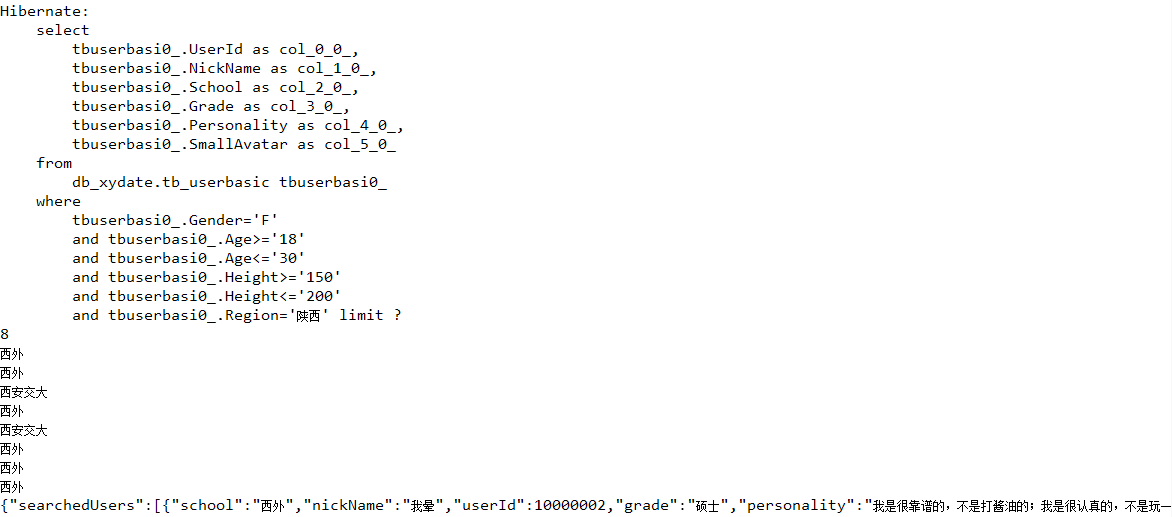
第二、三、四...次点击搜索按钮,console输出信息为:

Ok,第一次之后的查询在缓存生命周期内都不用到数据库去取数据了。
SSH2中memcached作为hibernate二级缓存的更多相关文章
- Hibernate 二级缓存 总结整理(转)
和<Hibernate 关系映射 收集.总结整理> 一样,本篇文章也是我很早之前收集.总结整理的,在此也发上来 希望对大家有用.因为是很早之前写的,不当之处请指正. 1.缓存:缓存是什么, ...
- Hibernate ——二级缓存
一.Hibernate 二级缓存 1.Hibernate 二级缓存是 SessionFactory 级别的缓存. 2.二级缓存分为两类: (1)Hibernate内置二级缓存 (2)外置缓存,可配置的 ...
- 配置Hibernate二级缓存步骤
配置Hibernate二级缓存步骤: 加入二级缓存的jar包及配置文件 jar包位置:hibernate-release-4.1.8.Final\lib\optional\ehcache下所有jar包 ...
- Hibernate(十六):Hibernate二级缓存
Hibernate缓存 缓存(Cache):计算机领域非常通用的概念.它介于应用程序和永久性数据存储源(如磁盘上的文件或者数据库)之间,起作用是降低应用程序直接读取永久性数据存储源的频率,从而提高应用 ...
- Hibernate二级缓存简述及基于Spring4,Hibernate5,Ehcache3的二级缓存配置
Hibernate L2缓存 缓存的分类 L2缓存工作原理 放入二级缓存的数据 Ehcache 依赖 ehcache.xml 常用的memoryStoreEvictionPolicy(缓存算法) eh ...
- hibernate二级缓存demo2
@Test public void hello3(){ Session session=sessionFactory.openSession(); List list = session.create ...
- hibernate二级缓存整合
<?xml version="1.0" encoding="UTF-8"?> <ehcache xmlns:xsi="http:// ...
- ssh整合hibernate 使用spring管理hibernate二级缓存,配置hibernate4.0以上二级缓存
ssh整合hibernate 使用spring管理hibernate二级缓存,配置hibernate4.0以上二级缓存 hibernate : Hibernate是一个持久层框架,经常访问物理数据库 ...
- spring boot集成ehcache 2.x 用于hibernate二级缓存
https://www.jianshu.com/p/87b2c309b776 本文将介绍如何在spring boot中集成ehcache作为hibernate的二级缓存.各个框架版本如下 spring ...
随机推荐
- try、catch、finally的使用分析---与 return 相关
看了一篇文章,讲解的是关于java中关于try.catch.finally中一些问题 下面看一个例子(例1),来讲解java里面中try.catch.finally的处理流程 1 2 3 4 5 ...
- DataGrid中取HyperLinkColumn列的值,处理DataGrid中绑定的特殊字符
DataGrid中取HyperLinkColumn列的值. /// <summary> /// 对datagrid中标签进行编码,处理特殊字符 /// </summary> / ...
- NBTSTAT命令详解
1. 具体功能 该命令用于显示本地计算机和远程计算机的基于 TCP/IP(NetBT) 协议的 NetBIOS 统计资料. NetBIOS 名称表和 NetBIOS 名称缓存. NBTSTAT ...
- @Entity设置OneToMany
Hibernate设置bean映射数据库的方式有配置模式与注解模式,下面通过注解模式配置OneToMany @Entity @Table(name="csdnbbs_sys_catalog& ...
- PAT-乙级-1035. 插入与归并(25)
1035. 插入与归并(25) 时间限制 200 ms 内存限制 65536 kB 代码长度限制 8000 B 判题程序 Standard 作者 CHEN, Yue 根据维基百科的定义: 插入排序是迭 ...
- 汇编Ring 3下实现 HOOK API
[文章标题]汇编ring3下实现HOOK API [文章作者]nohacks(非安全,hacker0058) [作者主页]hacker0058.ys168.com [文章出处]看雪论坛(bbs.ped ...
- 破解之API断点法
上回给大家做的破解教程,地址是http://www.52pojie.net/thread-52719-1-1.html,用的是“调用堆栈”方法.今天给新手提供另一种方法“API函数断点”,这种方法要求 ...
- OD之窗口界面
- NODE.JS的基本系统模块操作样例
就练练手, 嘿嘿,说不定,写服务器脚本也可以哟. console.log('Currently executing file is ' + __filename); console.log('It i ...
- hdu 4454 Stealing a Cake 三分法
很容易想到三分法求解,不过要分别在0-pi,pi-2pi进行三分. 另外也可以直接暴力枚举…… 代码如下: #include<iostream> #include<stdio.h&g ...