
React-Flux 介绍及实例演示
一、Flux架构
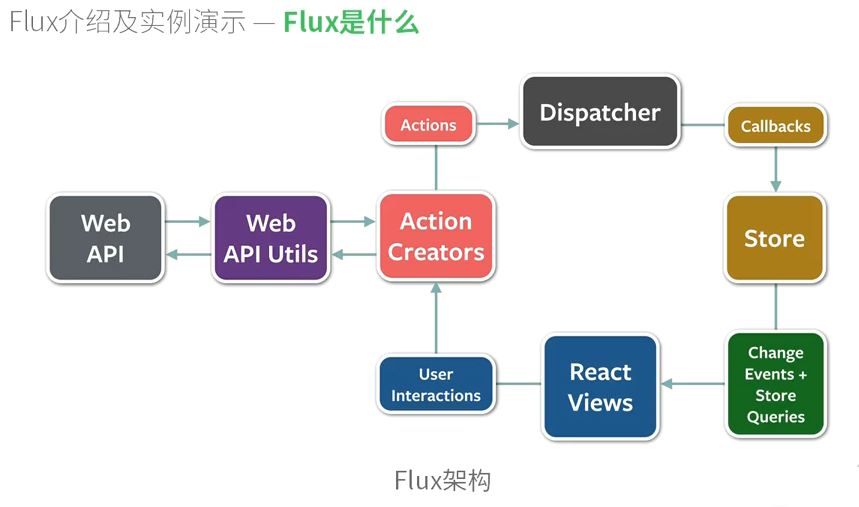
二、例子
1.TodoApp.react.js
 /**

  * Copyright (c) 2014-2015, Facebook, Inc.

  * All rights reserved.

  *

  * This source code is licensed under the BSD-style license found in the

  * LICENSE file in the root directory of this source tree. An additional grant

  * of patent rights can be found in the PATENTS file in the same directory.

  */

 /**

  * This component operates as a "Controller-View".  It listens for changes in

  * the TodoStore and passes the new data to its children.

  */

 var Footer = require('./Footer.react');

 var Header = require('./Header.react');

 var MainSection = require('./MainSection.react');

 var React = require('react');

 var TodoStore = require('../stores/TodoStore');

 /**

  * Retrieve the current TODO data from the TodoStore

  */

 function getTodoState() {

   return {

     allTodos: TodoStore.getAll(),

     areAllComplete: TodoStore.areAllComplete()

   };

 }

 var TodoApp = React.createClass({

   getInitialState: function() {

     return getTodoState();

   },

   componentDidMount: function() {

     TodoStore.addChangeListener(this._onChange);

   },

   componentWillUnmount: function() {

     TodoStore.removeChangeListener(this._onChange);

   },

   /**

    * @return {object}

    */

   render: function() {

     return (

       <div>

         <Header />

         <MainSection

           allTodos={this.state.allTodos}

           areAllComplete={this.state.areAllComplete}

         />

         <Footer allTodos={this.state.allTodos} />

       </div>

     );

   },

   /**

    * Event handler for 'change' events coming from the TodoStore

    */

   _onChange: function() {

     this.setState(getTodoState());

   }

 });

 module.exports = TodoApp;
2.TodoActions.js
 /*

  * Copyright (c) 2014-2015, Facebook, Inc.

  * All rights reserved.

  *

  * This source code is licensed under the BSD-style license found in the

  * LICENSE file in the root directory of this source tree. An additional grant

  * of patent rights can be found in the PATENTS file in the same directory.

  *

  * TodoActions

  */

 var AppDispatcher = require('../dispatcher/AppDispatcher');

 var TodoConstants = require('../constants/TodoConstants');

 var TodoActions = {

   /**

    * @param  {string} text

    */

   create: function(text) {

     AppDispatcher.dispatch({

       actionType: TodoConstants.TODO_CREATE,

       text: text

     });

   },

   /**

    * @param  {string} id The ID of the ToDo item

    * @param  {string} text

    */

   updateText: function(id, text) {

     AppDispatcher.dispatch({

       actionType: TodoConstants.TODO_UPDATE_TEXT,

       id: id,

       text: text

     });

   },

   /**

    * Toggle whether a single ToDo is complete

    * @param  {object} todo

    */

   toggleComplete: function(todo) {

     var id = todo.id;

     var actionType = todo.complete ?

         TodoConstants.TODO_UNDO_COMPLETE :

         TodoConstants.TODO_COMPLETE;

     AppDispatcher.dispatch({

       actionType: actionType,

       id: id

     });

   },

   /**

    * Mark all ToDos as complete

    */

   toggleCompleteAll: function() {

     AppDispatcher.dispatch({

       actionType: TodoConstants.TODO_TOGGLE_COMPLETE_ALL

     });

   },

   /**

    * @param  {string} id

    */

   destroy: function(id) {

     AppDispatcher.dispatch({

       actionType: TodoConstants.TODO_DESTROY,

       id: id

     });

   },

   /**

    * Delete all the completed ToDos

    */

   destroyCompleted: function() {

     AppDispatcher.dispatch({

       actionType: TodoConstants.TODO_DESTROY_COMPLETED

     });

   }

 };

 module.exports = TodoActions;
3.AppDispatcher.js
 /*

  * Copyright (c) 2014-2015, Facebook, Inc.

  * All rights reserved.

  *

  * This source code is licensed under the BSD-style license found in the

  * LICENSE file in the root directory of this source tree. An additional grant

  * of patent rights can be found in the PATENTS file in the same directory.

  *

  * AppDispatcher

  *

  * A singleton that operates as the central hub for application updates.

  */

 var Dispatcher = require('flux').Dispatcher;

 module.exports = new Dispatcher();
4.TodoStore.js
 /*

  * Copyright (c) 2014, Facebook, Inc.

  * All rights reserved.

  *

  * This source code is licensed under the BSD-style license found in the

  * LICENSE file in the root directory of this source tree. An additional grant

  * of patent rights can be found in the PATENTS file in the same directory.

  *

  * TodoStore

  */

 var AppDispatcher = require('../dispatcher/AppDispatcher');

 var EventEmitter = require('events').EventEmitter;

 var TodoConstants = require('../constants/TodoConstants');

 var assign = require('object-assign');

 var CHANGE_EVENT = 'change';

 var _todos = {};

 /**

  * Create a TODO item.

  * @param  {string} text The content of the TODO

  */

 function create(text) {

   // Hand waving here -- not showing how this interacts with XHR or persistent

   // server-side storage.

   // Using the current timestamp + random number in place of a real id.

   var id = (+new Date() + Math.floor(Math.random() * 999999)).toString(36);

   _todos[id] = {

     id: id,

     complete: false,

     text: text

   };

 }

 /**

  * Update a TODO item.

  * @param  {string} id

  * @param {object} updates An object literal containing only the data to be

  *     updated.

  */

 function update(id, updates) {

   _todos[id] = assign({}, _todos[id], updates);

 }

 /**

  * Update all of the TODO items with the same object.

  * @param  {object} updates An object literal containing only the data to be

  *     updated.

  */

 function updateAll(updates) {

   for (var id in _todos) {

     update(id, updates);

   }

 }

 /**

  * Delete a TODO item.

  * @param  {string} id

  */

 function destroy(id) {

   delete _todos[id];

 }

 /**

  * Delete all the completed TODO items.

  */

 function destroyCompleted() {

   for (var id in _todos) {

     if (_todos[id].complete) {

       destroy(id);

     }

   }

 }

 var TodoStore = assign({}, EventEmitter.prototype, {

   /**

    * Tests whether all the remaining TODO items are marked as completed.

    * @return {boolean}

    */

   areAllComplete: function() {

     for (var id in _todos) {

       if (!_todos[id].complete) {

         return false;

       }

     }

     return true;

   },

   /**

    * Get the entire collection of TODOs.

    * @return {object}

    */

   getAll: function() {

     return _todos;

   },

   emitChange: function() {

     this.emit(CHANGE_EVENT);

   },

   /**

    * @param {function} callback

    */

   addChangeListener: function(callback) {

     this.on(CHANGE_EVENT, callback);

   },

   /**

    * @param {function} callback

    */

   removeChangeListener: function(callback) {

     this.removeListener(CHANGE_EVENT, callback);

   }

 });

 // Register callback to handle all updates

 AppDispatcher.register(function(action) {

   var text;

   switch(action.actionType) {

     case TodoConstants.TODO_CREATE:

       text = action.text.trim();

       if (text !== '') {

         create(text);

         TodoStore.emitChange();

       }

       break;

     case TodoConstants.TODO_TOGGLE_COMPLETE_ALL:

       if (TodoStore.areAllComplete()) {

         updateAll({complete: false});

       } else {

         updateAll({complete: true});

       }

       TodoStore.emitChange();

       break;

     case TodoConstants.TODO_UNDO_COMPLETE:

       update(action.id, {complete: false});

       TodoStore.emitChange();

       break;

     case TodoConstants.TODO_COMPLETE:

       update(action.id, {complete: true});

       TodoStore.emitChange();

       break;

     case TodoConstants.TODO_UPDATE_TEXT:

       text = action.text.trim();

       if (text !== '') {

         update(action.id, {text: text});

         TodoStore.emitChange();

       }

       break;

     case TodoConstants.TODO_DESTROY:

       destroy(action.id);

       TodoStore.emitChange();

       break;

     case TodoConstants.TODO_DESTROY_COMPLETED:

       destroyCompleted();

       TodoStore.emitChange();

       break;

     default:

       // no op

   }

 });

 module.exports = TodoStore;
React-Flux 介绍及实例演示的更多相关文章
- javascript——touch事件介绍与实例演示
分类: javascript2014-02-12 16:42 1742人阅读 评论(0) 收藏 举报 touch事件touchmovetouchstarttouchend 前言 诸如智能手机和平板 ...
- 构建具有用户身份认证的 React + Flux 应用程序
原文:Build a React + Flux App with User Authentication 译者:nzbin 译者的话:这是一篇内容详实的 React + Flux 教程,文章主要介绍了 ...
- 36.React基础介绍——2019年12月24日
2019年12月24日16:47:12 2019年10月25日11:24:29 主要介绍react入门知识. 1.jsx语法介绍 1.1 介绍 jsx语法是一种类似于html标签的语法,它的作用相当于 ...
- 1.6 flux介绍
这一节将介绍 React 的核心应用架构模式 Flux,包括内容: Flux 介绍 MVC 架构之痛 Flux 的理解 Flux 相关库和工具介绍 Flux 与 React 实例 最后我们将会把之前的 ...
- SSO之CAS单点登录实例演示
本文目录: 一.概述 二.演示环境 三.JDK安装配置 四.安全证书配置 五.部署CAS-Server相关的Tomcat 六.部署CAS-Client相关的Tomcat 七. 测试验证SSO 一.概述 ...
- 实例演示使用RDIFramework.NET 框架的工作流组件进行业务流程的定义—请假申请流程-Web
实例演示使用RDIFramework.NET 框架的工作流组件 进行业务流程的定义—请假申请流程-Web 参考文章: RDIFramework.NET — 基于.NET的快速信息化系统开发框架 — 系 ...
- 审核流(3)低调奢华,简单不凡,实例演示-SNF.WorkFlow--SNF快速开发平台3.1
下面我们就从什么都没有,结合审核流进行演示实例.从无到有如何快速完美的实现,然而如此简单.低调而奢华,简单而不凡. 从只有数据表通过SNF.CodeGenerator代码生成器快速生成单据并与审核流进 ...
- React 简单介绍
React 简单介绍 作者 RK_CODER 关注 2014.12.10 17:37* 字数 2516 阅读 55715评论 6喜欢 70 why React? React是Facebook开发的一款 ...
- 初学者的React全家桶完整实例
概述 该项目还有些功能在开发过程中,如果您有什么需求,欢迎您与我联系.我希望能够通过这个项目对React初学者,或者Babel/webpack初学者都有一定的帮助.我在此再强调一下,在我写的这些文章末 ...
随机推荐
- Scrapy源码学习(一)
用Scrapy已经有一段时间了,觉得该是看一下源码的时候了.最开始用的时候还是0.16的版本,现在稳定版已经到了0.18.结合使用Scrapy的过程,先从Scrapy的命令行看起. 一.准备 下载源代 ...
- c#配置log4net步骤
1.引入添加log4net.dll引用 2.建立配置文件Log4Net.config(名字自定义).文件内容参考,输出的文件名称可更改 .运行是要放入到相应bin/debug(release) 目录 ...
- Ajax和JavaScript的区别
javascript是一种在浏览器端执行的脚本语言,Ajax是一种创建交互式网页应用的开发技术 ,它是利用了一系列相关的技术其中就包括javascript.Javascript是由网景公司开发的一种脚 ...
- PHP 网站保存快捷方式的实现代码
介绍下使用PHP实现网站快捷方式的保存方法. PHP怎么实现网站保存快捷方式呢?下面是一段PHP代码,下面这段代码,可以PHP实现网站保存快捷方式,以便用户随时浏览. <?php /** * ...
- Translation perface: <<Professional JavaScript for Web Developers, 3rd Edition>>
It is a huge pitty to breaking translating this book. Sincerly speaking, I am striken by this great ...
- Spark 大数据平台 Introduction part 2 coding
Basic Functions sc.parallelize(List(1,2,3,4,5,6)).map(_ * 2).filter(_ > 5).collect() *** res: Arr ...
- WPF学习01:初始XAML浅析
本文内容: 浅析WPF应用默认创建的XAML中元素.attributes. 新建WPF工程“HelloWPF”. 初始创建的主窗体XAML代码如下: <Window x:Class=" ...
- c语言知识点总结(摘自head first c)
gcc name.c -o name; ./name或者gcc name.c -o name && ./name;同时执行关键字:void sizeof(运算符,它能告诉你某样东 ...
- [css]兼容性
div +input 输入框 , 在微信中 有问题 块级元素 行内元素
- SOLVED: GATT callback fails to register
I finally figured this problem out. The device I am using is a Samsung Galaxy S4 and the actual prob ...