
【已解决】Android ADT中增大AVD内存后无法启动:emulator failed to allocate memory 8
【问题】
折腾:
【已解决】Android ADT中增大AVD内存后无法启动:emulator failed to allocate memory 8
过程中,增大对应AVD的内存为2G后,结果无法启动AVD了:
|
[2012-12-18 18:01:38 – Emulator] Failed to allocate memory: 8 |
【解决过程】
1.所以,重新改小为1G试试:
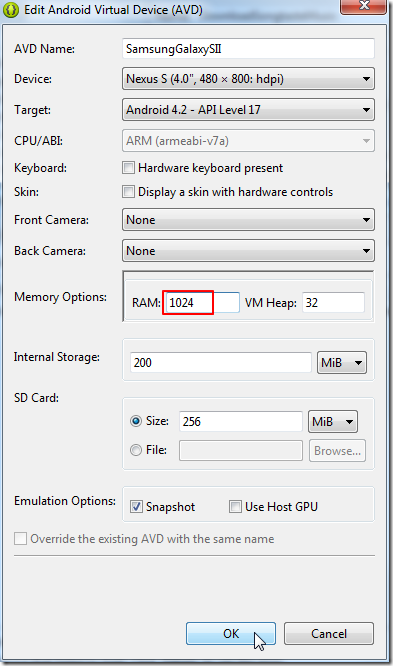
结果问题依旧。
2.参考:
Android Emulator: Failed to allocate memory: 8 even with 8MB RAM
说是,只能是256/512/1024
但是很明显,我上面改成1024也是不行的。
参考最后一个人的解释,去改为900MB,看到log为:
|
[2012-12-18 18:16:04 – SDK Manager] Snapshot image already present, was not changed. |
然后再去试试,结果错误依旧。
3.改回之前配置的512MB,是可以的。
但是不是我想要的,想要的就是,尽量让内存大点,以此希望能让AVD模拟器跑的快点,不要这么慢。
4.再去改为768MB,结果又显示和之前的snapshot不一致,所以还不给启动:
|
[2012-12-18 18:19:00 – DownloadSongtasteMusic] —————————— |
5.所以,先去把snapshot去掉,然后再启动,启动后,关闭掉,再次勾选上snapshot。
结果还是同样提示:
ERROR: Unable to load VM from snapshot. The snapshot has been saved for a different hardware configuration
所以,估计只能是删除掉,重新建一个,也许才可以的。
6.重新新建一个AVD:
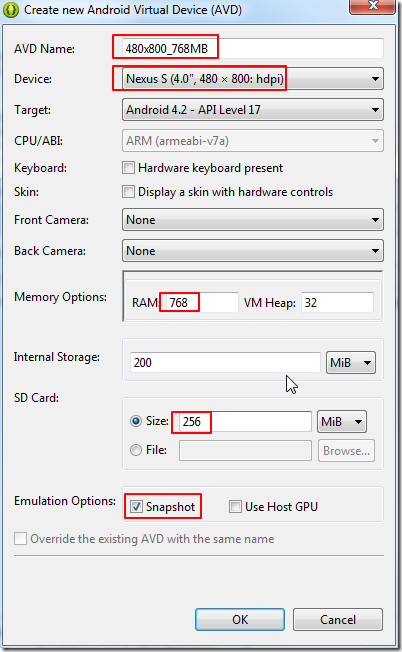
然后用这个AVD试试效果。
然后是可以启动的。
不过速度也还是很慢。
6.继续参考该贴,先去设置为1024MB,
然后再去把:
C:\Users\CLi\.android\avd\SamsungGalaxySII.avd\config.ini
中的:
hw.ramSize=1024
改为
hw.ramSize=1024MB
然后去运行试试,结果出现:
Emulator] emulator: ERROR: Unable to load VM from snapshot. The snapshot has been saved for a different hardware configuration.
再去取消掉snapshot,再运行,的确是可以运行的。
【总结】
结论是:
当前有个bug:
默认是通过
hw.ramSize=1024
来判断内存大小的,但是当是>=1024时,就无法正确识别了。
必须手动把对应的
C:\Users\CLi\.android\avd\SamsungGalaxySII.avd\config.ini
中的
hw.ramSize=1024
改为
hw.ramSize=1024MB
就可以了。
提示:
1. 手动改了后,结果会导致界面中无法正确显示:
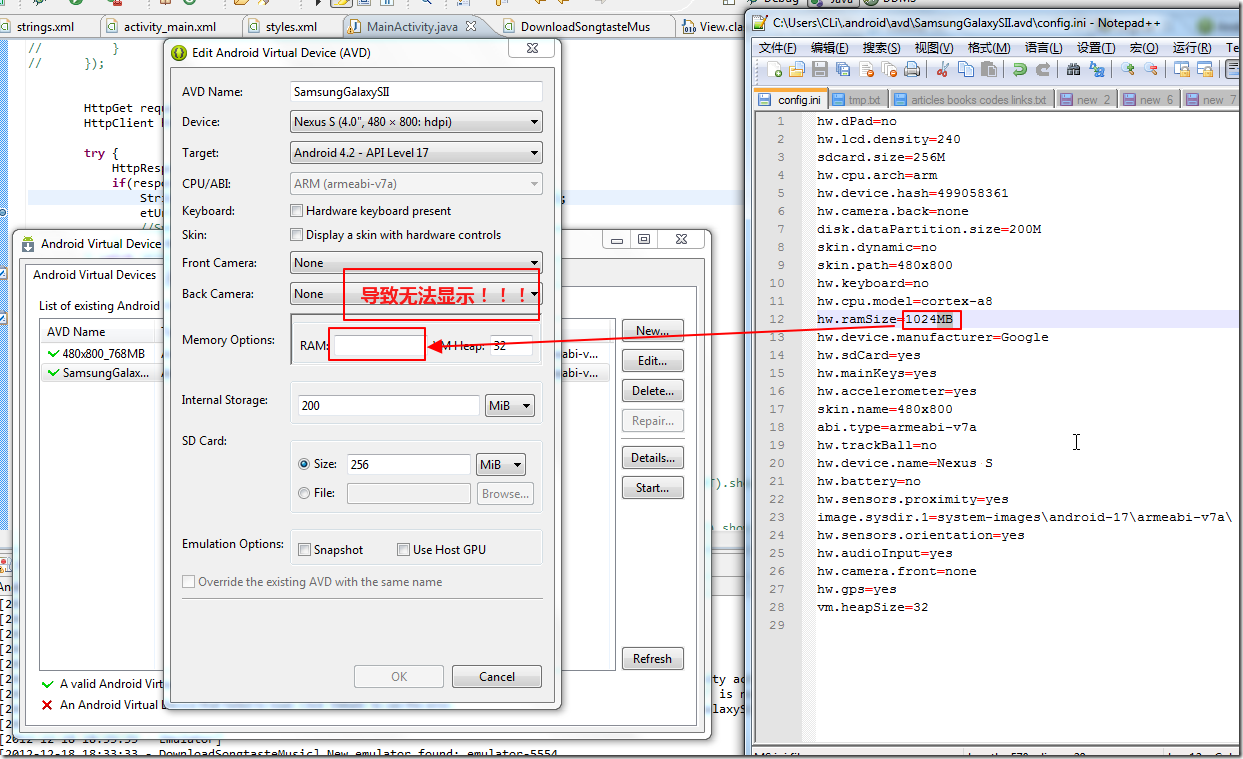
总之,还是很悲催,bug还是很大的说。
2.虽然改为1024MB,甚至2048MB,但是实际上运行AVD的时候,貌似还是原始的(我所选的那个设备Nexus的)343MB:
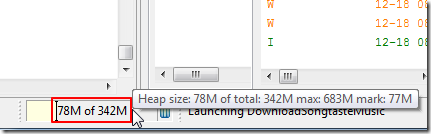
总之,更加坑爹。。。
【已解决】Android ADT中增大AVD内存后无法启动:emulator failed to allocate memory 8的更多相关文章
- 【已解决】Android ADT中增大AVD内存后无法启动:emulator failed to allocate memory
[已解决]Android ADT中增大AVD内存后无法启动:emulator failed to allocate memory 结论是: 当前有个bug: 默认是通过 hw.ramSize=1024 ...
- Android ADT中增大AVD内存后无法启动:emulator failed to allocate memory 8 (转)
Android ADT中增大AVD内存后无法启动:emulator failed to allocate memory 8http://www.crifan.com/android_emulator_ ...
- 解决webpack项目中打包时候内存溢出的bug JavaScript heap out of memory
vue 项目 npm run dev 的时候一直卡住不动:后来找到报错是 Ineffective mark-compacts near heap limit Allocation failed - J ...
- 将文件从已Root Android手机中copy出来的几个cmd窗口命令
将文件从已Root Android手机中copy出来的几个cmd窗口命令: 以shell身份登录adbadb shell进入adb后切换至root用户su更改文件的所属chown shell *更改文 ...
- Android 启动模拟器是出现“Failed to allocate memory: 8”错误提示的原因及解决办法
某天,Android 启动模拟器是出现“Failed to allocate memory: 8”错误,模拟器无法启动,如下图: 原因:设置了不正确AVD显示屏模式,4.0版默认的模式为WVGA800 ...
- 解决java web中safari浏览器下载后文件中文乱码问题
解决java web中safari浏览器下载后文件中文乱码问题 String fileName = "测试文件.doc"; String userAgent = request.g ...
- 解决Failed to allocate memory: 8转
解决Failed to allocate memory: 8 昨天换了x64的Win7,发现在Eclipse上启动模拟器的时候存在问题,当设置的模拟器分辨率大于400×800的时候会出现 Failed ...
- MySQL在windows系统中修改datadir路径后无法启动问题,报错1067
windows server2008下如何更改MySQL数据库的目录的帖子已经很多了,这里简单介绍一个步骤,如果不成功请先查看其它帖子. 更改默认的mysql数据库目录 将 C:\Documents ...
- 解决Zend OPcache huge_code_pages: mmap(HUGETLB) failed: Cannot allocate memory报错
前几日看到鸟哥介绍的 <让你的PHP7更快之Hugepage>, 于是想试试手给服务器加上,参照格式安装好扩展,调整好配置文件,然后重启php-fpm,结果启动一直报Zend OPcach ...
随机推荐
- zoj 3232 It's not Floyd Algorithm(强联通分量,缩点)
题目 /******************************************************************/ 以下题解来自互联网:Juny的博客 思路核心:给你的闭包 ...
- Filter高级开发
孤傲苍狼 只为成功找方法,不为失败找借口! javaweb学习总结(四十三)——Filter高级开发 在filter中可以得到代表用户请求和响应的request.response对象,因此在编程中可以 ...
- XE2编译出来的DLL的DLLMain的退出地方用到了halt0
DelphiXE2内存加模块升级版.支持32位和64位模块. 已转至新的博客 http://www.raysoftware.cn/?p=51 很多年以前写过内存加载DLL的一片技术. http://b ...
- [iOS]iPhone进行真机测试(基础版)
买完688个人开发者账号之后,如何进行真机测试呢??看下面 1.打开https://developer.apple.com 然后,输入我们买过688点那个App ID帐号和密码哦!!一定是要支付过的! ...
- [iOS]利用Appicon and Launchimage Maker生成并配置iOSApp的图标和启动页
一.先来研究下这个软件->Appicon and Launchimage Maker 首先打开你电脑上的AppStore,然后搜索:AppIcon 然后回车: 这里我们先使用免费版的点击下载.( ...
- Spring面向切面编程(AOP,Aspect Oriented Programming)
AOP为Aspect Oriented Programming的缩写,意为:面向切面编程(也叫面向方面),可以通过预编译方式和运行期动态代理实现在不修改源代码的情况下给程序动态统一添加功能的一种技术. ...
- 49. Anagrams
题目: Given an array of strings, return all groups of strings that are anagrams. Note: All inputs will ...
- 【问题】和NULL比较遇到的问题
1.问题描述: select FName from teacher where FId not in( select distinct FTeacherId from student ) 子查询返回的 ...
- makefile生成静态库和动态库
库是一种软件组件技术,库里面封装了数据和函数. 库的使用可以使程序模块化. Windows系统包括静态链接库(.lib文件)和动态链接库(.dll文件). Linux通常把库文件存放在/usr/lib ...
- class_create()
#define class_create(owner, name) \({ \ ...