
MySQL Foreign Key
ntroduction to MySQL foreign key
A foreign key is a field in a table that matches another field of another table. A foreign key places constraints on data in the related tables, which enables MySQL to maintain referential integrity.
Let’s take a look at the following database diagram in the sample database.
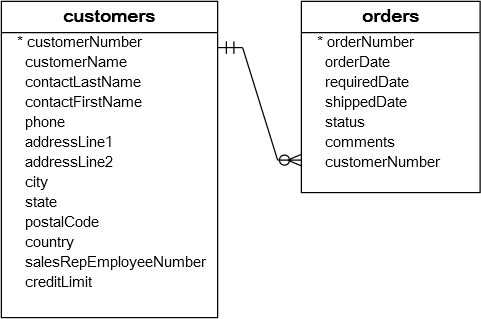
We have two tables: customers and orders. Each customer has zero or more orders and each order belongs to only one customer. The relationship between customers table and orders table is one-to-many, and it is established by a foreign key in the orders table specified by the customerNumber field. The customerNumber field in the orders table relates to the customerNumber primary key field in the customers table.
The customers table is called parent table or referenced table, and the orders table is known as child table or referencing table.
A foreign key can be a column or a set of columns. The columns in the child table often refer to the primary key columns in the parent table.
A table may have more than one foreign key, and each foreign key in the child table may refer to a different parent table.
A row in the child table must contain values that exist in the parent table e.g., each order record in the orders table must have a customerNumber that exists in the customers table. Multiple orders can refer to the same customer therefore, this relationship is called one (customer) to many (orders), or one-to-many.
Sometimes, the child and parent tables are the same. The foreign key refers back to the primary key of the table e.g., the following employees table:
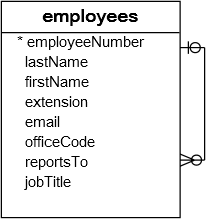
The reportTo column is a foreign key that refers to the employeeNumber column which is the primary key of the employees table to reflect the reporting structure between employees i.e., each employee reports to anther employee and an employee can have zero or more direct reports. We have a specific tutorial on the self-join to help you query data against this kind of table.
The reportTo foreign key is also known as recursive or self-referencing foreign key.
Foreign keys enforce referential integrity that helps you maintain the consistency and integrity of the data automatically. For example, you cannot create an order for a non-existent customer.
In addition, you can set up a cascade on delete action for the customerNumber foreign key so that when you delete a customer in the customers table, all the orders associated with the customer are also deleted. This saves you time and efforts of using multiple DELETE statementsor a DELETE JOIN statement.
The same as deletion, you can also define a cascade on update action for the customerNumber foreign key to perform the cross-table update without using multiple UPDATE statements or an UPDATE JOIN statement.
In MySQL, the InnoDB storage engine supports foreign keys so that you must create InnoDB tables in order to use foreign key constraints.
Creating foreign keys for tables
MySQL creating foreign key syntax
The following syntax illustrates how to define a foreign key in a child table in CREATE TABLE statement.
FOREIGN KEY foreign_key_name (columns)
REFERENCES parent_table(columns)
ON DELETE action
ON UPDATE action
|
1
2
3
4
5
|
CONSTRAINT constraint_name
FOREIGN KEY foreign_key_name (columns)
REFERENCES parent_table(columns)
ON DELETE action
ON UPDATE action
|
Let’s examine the syntax in greater detail:
- The
CONSTRAINTclause allows you to define constraint name for the foreign key constraint. If you omit it, MySQL will generate a name automatically. - The
FOREIGN KEYclause specifies the columns in the child table that refers to primary key columns in the parent table. You can put a foreign key name afterFOREIGN KEYclause or leave it to let MySQL create a name for you. Notice that MySQL automatically creates an index with theforeign_key_namename. - The
REFERENCESclause specifies the parent table and its columns to which the columns in the child table refer. The number of columns in the child table and parent table specified in theFOREIGN KEYandREFERENCESmust be the same. - The
ON DELETEclause allows you to define what happens to the records in the child table when the records in the parent table are deleted. If you omit theON DELETEclause and delete a record in the parent table that has records in the child table refer to, MySQL will reject the deletion. In addition, MySQL also provides you with actions so that you can have other options such as ON DELETE CASCADE that ask MySQL to delete records in the child table that refers to a record in the parent table when the record in the parent table is deleted. If you don’t want the related records in the child table to be deleted, you use theON DELETE SET NULLaction instead. MySQL will set the foreign key column values in the child table toNULLwhen the record in the parent table is deleted, with a condition that the foreign key column in the child table must acceptNULLvalues. Notice that if you useON DELETE NO ACTIONorON DELETE RESTRICTaction, MySQL will reject the deletion. - The
ON UPDATEclause enables you to specify what happens to the rows in the child table when rows in the parent table are updated. You can omit theON UPDATEclause to let MySQL reject any updates to the rows in the child table when the rows in the parent table are updated. TheON UPDATE CASCADEaction allows you to perform a cross-table update, and theON UPDATE SET NULLaction resets the values in the rows in the child table toNULLvalues when the rows in the parent table are updated. TheON UPDATE NO ACTIONorUPDATE RESTRICTactions reject any updates.
MySQL creating table foreign key example
The following example creates a dbdemo database and two tables: categories and products. Each category has one or more products and each product belongs to only one category. The cat_id field in the products table is defined as a foreign key with UPDATE ON CASCADE and DELETE ON RESTRICT actions.
USE dbdemo;
CREATE TABLE categories(
cat_id int not null auto_increment primary key,
cat_name varchar(255) not null,
cat_description text
) ENGINE=InnoDB;
CREATE TABLE products(
prd_id int not null auto_increment primary key,
prd_name varchar(355) not null,
prd_price decimal,
cat_id int not null,
FOREIGN KEY fk_cat(cat_id)
REFERENCES categories(cat_id)
ON UPDATE CASCADE
ON DELETE RESTRICT
)ENGINE=InnoDB;
|
1
2
3
4
5
6
7
8
9
10
11
12
13
14
15
16
17
18
19
20
|
CREATE DATABASE IF NOT EXISTS dbdemo;
USE dbdemo;
CREATE TABLE categories(
cat_id int not null auto_increment primary key,
cat_name varchar(255) not null,
cat_description text
) ENGINE=InnoDB;
CREATE TABLE products(
prd_id int not null auto_increment primary key,
prd_name varchar(355) not null,
prd_price decimal,
cat_id int not null,
FOREIGN KEY fk_cat(cat_id)
REFERENCES categories(cat_id)
ON UPDATE CASCADE
ON DELETE RESTRICT
)ENGINE=InnoDB;
|
Adding a foreign key to a table
MySQL adding foreign key syntax
To add a foreign key to an existing table, you use the ALTER TABLE statement with the foreign key definition syntax above:
ADD CONSTRAINT constraint_name
FOREIGN KEY foreign_key_name(columns)
REFERENCES parent_table(columns)
ON DELETE action
ON UPDATE action;
|
1
2
3
4
5
6
|
ALTER table_name
ADD CONSTRAINT constraint_name
FOREIGN KEY foreign_key_name(columns)
REFERENCES parent_table(columns)
ON DELETE action
ON UPDATE action;
|
MySQL adding foreign key example
Now, let’s add a new table named vendors and change the products table to include the vendor id field:
CREATE TABLE vendors(
vdr_id int not null auto_increment primary key,
vdr_name varchar(255)
)ENGINE=InnoDB;
ALTER TABLE products
ADD COLUMN vdr_id int not null AFTER cat_id;
|
1
2
3
4
5
6
7
8
9
|
USE dbdemo;
CREATE TABLE vendors(
vdr_id int not null auto_increment primary key,
vdr_name varchar(255)
)ENGINE=InnoDB;
ALTER TABLE products
ADD COLUMN vdr_id int not null AFTER cat_id;
|
To add a foreign key to the products table, you use the following statement:
ADD FOREIGN KEY fk_vendor(vdr_id)
REFERENCES vendors(vdr_id)
ON DELETE NO ACTION
ON UPDATE CASCADE;
|
1
2
3
4
5
|
ALTER TABLE products
ADD FOREIGN KEY fk_vendor(vdr_id)
REFERENCES vendors(vdr_id)
ON DELETE NO ACTION
ON UPDATE CASCADE;
|
Now, the products table has two foreign keys, one refers to the categories table and another refers to the vendors table.
Dropping MySQL foreign key
You also use the ALTER TABLE statement to drop foreign key as the following statement:
DROP FOREIGN KEY constraint_name;
|
1
2
|
ALTER TABLE table_name
DROP FOREIGN KEY constraint_name;
|
In the statement above:
- First, you specify the table name from which you want to remove the foreign key.
- Second, you put the constraint name after the
DROP FOREIGN KEYclause.
Notice that constraint_name is the name of the constraint specified when you created or added the foreign key to the table. If you omit it, MySQL generates a constraint name for you.
To obtain the generated constraint name of a table, you use the SHOW CREATE TABLE statement as follows:
|
1
|
SHOW CREATE TABLE table_name;
|
For example, to see the foreign keys of the products table, you use the following statement:
|
1
|
SHOW CREATE TABLE products;
|
The following is the output of the statement:
prd_id int(11) NOT NULL AUTO_INCREMENT,
prd_name varchar(355) NOT NULL,
prd_price decimal(10,0) DEFAULT NULL,
cat_id int(11) NOT NULL,
vdr_id int(11) NOT NULL,
PRIMARY KEY (prd_id),
KEY fk_cat (cat_id),
KEY fk_vendor(vdr_id),
CONSTRAINT products_ibfk_2
FOREIGN KEY (vdr_id)
REFERENCES vendors (vdr_id)
ON DELETE NO ACTION
ON UPDATE CASCADE,
CONSTRAINT products_ibfk_1
FOREIGN KEY (cat_id)
REFERENCES categories (cat_id)
ON UPDATE CASCADE
) ENGINE=InnoDB;
|
1
2
3
4
5
6
7
8
9
10
11
12
13
14
15
16
17
18
19
20
21
|
CREATE TABLE products (
prd_id int(11) NOT NULL AUTO_INCREMENT,
prd_name varchar(355) NOT NULL,
prd_price decimal(10,0) DEFAULT NULL,
cat_id int(11) NOT NULL,
vdr_id int(11) NOT NULL,
PRIMARY KEY (prd_id),
KEY fk_cat (cat_id),
KEY fk_vendor(vdr_id),
CONSTRAINT products_ibfk_2
FOREIGN KEY (vdr_id)
REFERENCES vendors (vdr_id)
ON DELETE NO ACTION
ON UPDATE CASCADE,
CONSTRAINT products_ibfk_1
FOREIGN KEY (cat_id)
REFERENCES categories (cat_id)
ON UPDATE CASCADE
) ENGINE=InnoDB;
|
The products table has two foreign key constraints: products_ibfk_1 and products_ibfk_2
You can drop the foreign keys of the products table by using the following statement:
DROP FOREIGN KEY products_ibfk_1;
ALTER TABLE products
DROP FOREIGN KEY products_ibfk_2;
|
1
2
3
4
5
|
ALTER TABLE products
DROP FOREIGN KEY products_ibfk_1;
ALTER TABLE products
DROP FOREIGN KEY products_ibfk_2;
|
MySQL disabling foreign key checks
Sometimes, it is very useful to disable foreign key checks e.g., when you import data from a CSV file into a table. If you don’t disable foreign key checks, you have to load data into a proper order i.e., you have to load data into parent tables first and then child tables, which can be tedious. However, if you disable the foreign key checks, you can load data in any orders.
Another example is that, unless you disable the foreign key checks, you cannot drop a table that is referenced by a foreign key constraint. When you drop a table, any constraints that you defined for the table are also removed.
To disable foreign key checks, you use the following statement:
|
1
|
SET foreign_key_checks = 0;
|
And of course, you can enable it using the statement below:
|
1
|
SET foreign_key_checks = 1;
|
In this tutorial, we have covered a lot about MySQL foreign key. We also introduced you to some very handy statements that allow you to manage foreign keys effectively in MySQL.
http://www.mysqltutorial.org/mysql-foreign-key/
MySQL Foreign Key的更多相关文章
- mysql FOREIGN KEY约束 语法
mysql FOREIGN KEY约束 语法 作用:一个表中的 FOREIGN KEY 指向另一个表中的 PRIMARY KEY. DD马达 说明:FOREIGN KEY 约束用于预防破坏表之间连接的 ...
- MySQL—FOREIGN KEY
作用:保持数据一致性,完整性.实现一对一或一对多关系.(学习的过程中,老师说,实际的生产中,一般不使用物理上的外键约束的,都是使用逻辑上的外键约束) 要求: 父表与子表的存储引擎必须相等,而且只能是I ...
- mysql foreign key(外键) 说明与实例
一,什么是foreign key,及其完整性 个人觉得,foreign key就是表与表之间的某种约定的关系,由于这种关系的存在,我们能够让表与表之间的数据,更加的完整,关连性更强.关于完整性,关连性 ...
- mysql foreign key 外键
ALTER TABLE `fd_rel_customer_doctor` ADD CONSTRAINT `FK_fd_rel_customer_doctor_1` FOREIGN KEY (`CUST ...
- 更改具有Foreign key约束的表
1.Foreign key 说明: foreign key(外键) 建立起了表与表之间的约束关系,让表与表之间的数据更具有完整性和关联性.设想,有两张表A.B,A表中保存了许多电脑制造商的信息,比如联 ...
- MySQL主从复制中断,报“Error on master: message (format)='Cannot delete or update a parent row: a foreign key constraint fails' error code=1217” 错误
前几天,发现从库挂了,具体报错信息如下: 分析思路 1. 因为我采用的是选择性复制,只针对以下几个库进行复制: card,upay,deal,monitor,collect.所以,不太可能出现对于sa ...
- MYSQL外键(Foreign Key)的使用
在MySQL 3.23.44版本后,InnoDB引擎类型的表支持了外键约束.外键的使用条件:1.两个表必须是InnoDB表,MyISAM表暂时不支持外键(据说以后的版本有可能支持,但至少目前不支持): ...
- mysql 外键(FOREIGN KEY)
最近有开始做一个实验室管理系统,因为分了几个表进行存储·所以要维护表间的关联··研究了一下MySQL的外键. (1)只有InnoDB类型的表才可以使用外键,mysql默认是MyISAM,这种类型不支持 ...
- MySQL添加外键时报错 ERROR 1215 (HY000): Cannot add foreign key constraint
1.数据类型 2.数据表的引擎 数据表 mysql> show tables; +------------------+ | Tables_in_market | +--------- ...
随机推荐
- C#DataTable学习心得[转]
一.DataSet.DataTable.DataRow.DataColumn 1] 在DataSet中添加DataTable DataSet.Tables.Add(DataTable) 实例: Dat ...
- CentOS 6.5上安装GlassFish4.0 过程笔记
CentOS 6.5上安装GlassFish4.0 过程笔记 1.安装JDK, 注意操作系统的位数, 64 or 32: [root@linuxidc ~]# mkdir /usr/java [ro ...
- Rsync 12种故障排查及思路
Rsync 故障排查整理 Rsync服务常见问题汇总讲解: ====================================================================== ...
- sed练习第一节
ed语法和基本命令 employee.txt文件内容如下: 101,John Doe,CEO 102,Jason Smith,IT Manager 103,Raj Reddy,Sysadmin 104 ...
- Solr中的group与facet的区别 [转]
Solr中的group与facet的区别 facet 自己理解就是分组聚合用的, 如下说明 http://blog.csdn.net/a925907195/article/details/472572 ...
- android中使用图文并茂的按钮
代码: <LinearLayout android:orientation="horizontal" android:layout_width="match_par ...
- 认识MySQL Replication
MySQL Replication 是 MySQL 非常有特色的一个功能,他能够将一个 MySQL Server 的 Instance 中的数据完整的复制到另外一个 MySQL Server 的 In ...
- 类的封装,property特性,类与对象的绑定方法和非绑定方法,
类的封装 就是把数据或者方法封装起来 为什么要封装 封装数据的主要原因是:保护隐私 封装方法的主要原因是:隔离复杂度(快门就是傻瓜相机为傻瓜们提供的方法,该方法将内部复杂的照相功能都隐藏起来了,比如你 ...
- CAD参数绘制实心圆弧填充(com接口)
C#中实现代码说明: private void DrawPathToHatch1() { //把路径的开始位置移动指定的点 //参数一为点的X坐标 ,参数二为点的Y坐标,参数三为该点处开始宽度,对Po ...
- 哈尔滨工程大学ACM预热赛 补题
链接:https://ac.nowcoder.com/acm/contest/554/A来源:牛客网 小虎刚刚上了幼儿园,老师让他做一个家庭作业:首先画3个格子,第二行有2个格子,第三行有1个格子. ...