
Android(java)学习笔记155:中文乱码的问题处理(qq登录案例)
1. 我们在之前的笔记中LoginServlet.java中,我们Tomcat服务器回复给客户端的数据是英文的"Login Success","Login Failed".
现在我们改成如下的汉字:
 package com.himi.web;

 import java.io.IOException;

 import javax.servlet.ServletException;

 import javax.servlet.annotation.WebServlet;

 import javax.servlet.http.HttpServlet;

 import javax.servlet.http.HttpServletRequest;

 import javax.servlet.http.HttpServletResponse;

 /**

  * Servlet implementation class LoginServlet

  */

 @WebServlet("/LoginServlet")

 public class LoginServlet extends HttpServlet {

     private static final long serialVersionUID = 1L;

     /**

      * @see HttpServlet#doGet(HttpServletRequest request, HttpServletResponse response)

      */

     protected void doGet(HttpServletRequest request, HttpServletResponse response) throws ServletException, IOException {

          String qq = request.getParameter("qq");

          String password = request.getParameter("password");

          System.out.println("qq:"+qq);

          System.out.println("password:"+password);

          //模拟服务器操作,查询数据库,看qq和密码是否正确. response.getOutputStream()获得一个输出流,向浏览器写入数据(提示数据)

          if("10086".equals(qq) && "123456".equals(password)) {

              response.getOutputStream().write("登录成功".getBytes());

          }else {

              response.getOutputStream().write("登录失败".getBytes());

          }

     }

 }
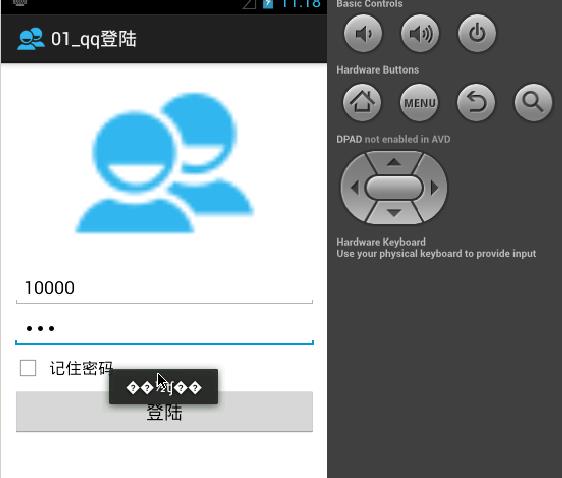
这时候,我们布署之前的Android手机端http程序到模拟器上,运行产生如下效果:
2.常见的乱码处理
(1)菱形里面有问号 : gbk的中文数据用utf-8表示的
Tomcat默认的编码是iso-8859-1的码表,没有中文,如果遇到了不认识的字符串就使用本地默认编码gbk;
当我们把这些gbk编码数据通过http协议传递给手机Android客户端的时候,Android客户端的默认编码是utf-8.所以会出现这样的问题。
这个乱码解决问题的方式:在客户端或者服务器端任意一端(不能同时修改两端).比如服务器端把回复数据编码改成utf-8,要么就是客户端把接收到数据指定以gb2312。
(2)中文用户名输入出现乱码
• 手机客户端
还是之前的qq登录的案例,这里输入中文:
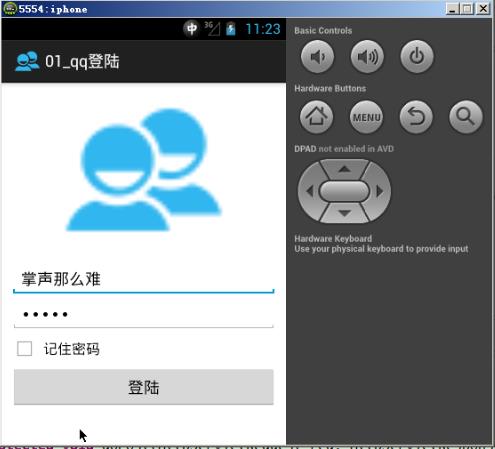
点击登录之后,服务器端接收到数据,显示乱码,效果如下:出现?乱码

• PC端浏览器
这里也是输入中文用户名,如下:
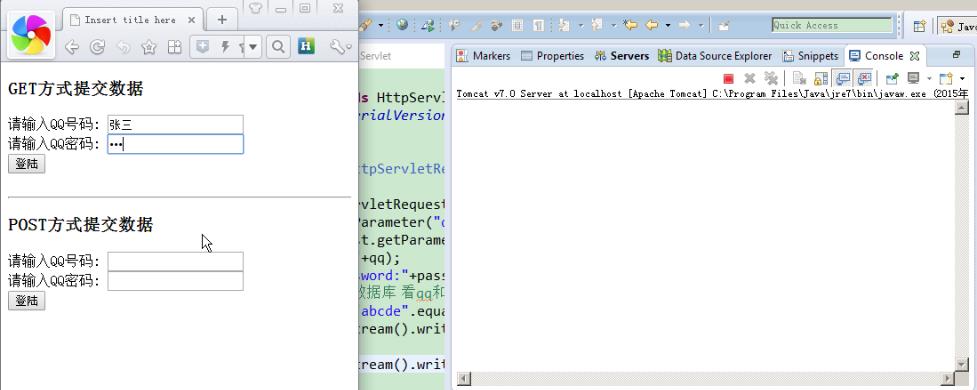
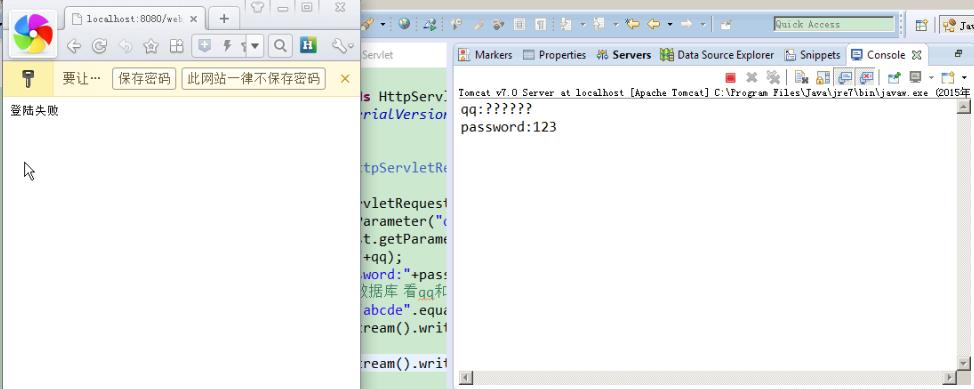
结果出现乱码如下:出现的?乱码
(3)PC端到服务器端的乱码问题解决:
PC端到服务器端的乱码是由于之前客户端是以utf-8流的方式把中文用户名,传递给服务器端,服务端默认编码是ios-8859-1,它是不能识别中文的。
所以服务器端以ios-8859-1的方式显示数据,就会上面的问号乱码。
解决办法:修改服务器端代码,如下:
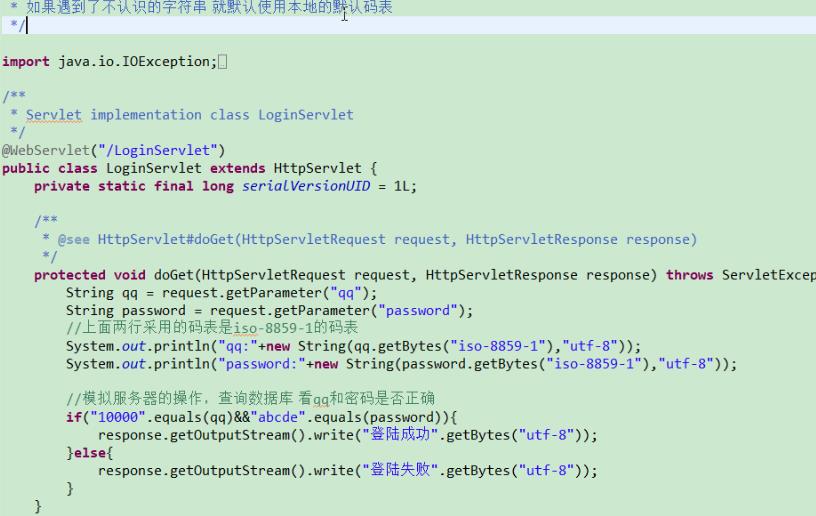
qq.getBytes("iso-8859-1"),这里必须指定iso-8859-1的方式,不然会默认是系统本地编码gb2312;
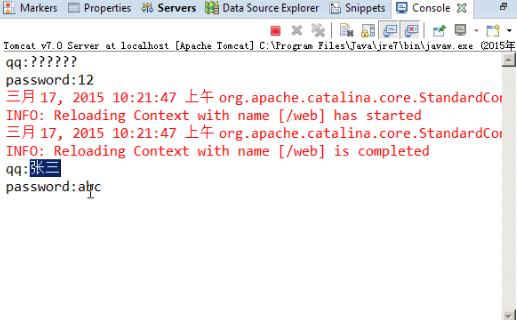
此时再次在浏览器提交数据,服务器端就不会出现乱码,如下:
(4)GET客户端到服务器端的乱码问题解决:
上面只是解决PC端到服务器端的乱码出现的问题,但是客户端到服务器端的乱码还是没有解决,如下:

这里我们知道get方式是组拼url路径的,提交的数据包含在这个路径下,提交的数据要是包含中文或者其他不合法字符就会转化,就如下:
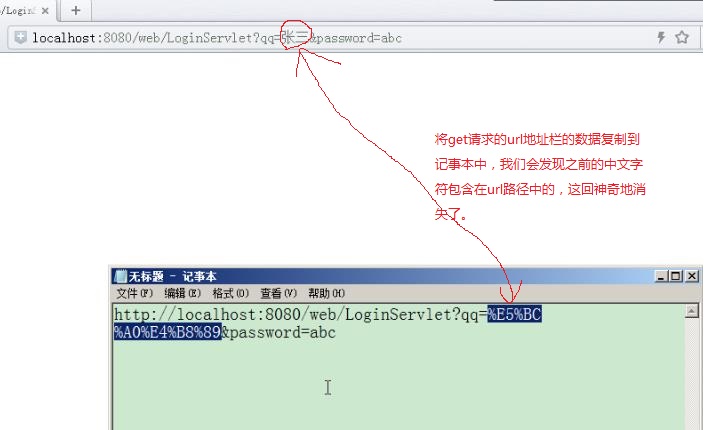
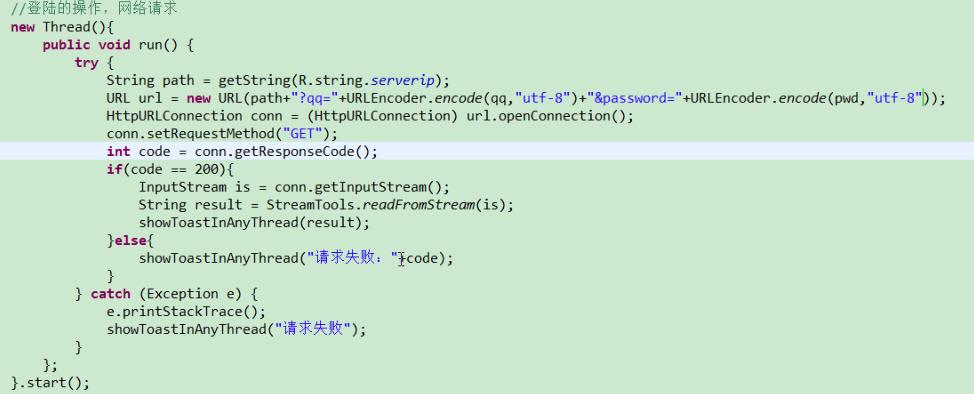
解决方法:拼接url的路径时候,对中文进行转化:
(5)POST客户端到服务器端的乱码问题解决:
之前POST方式编写的QQ登录案例,直接布署程序到模拟器上会出现如下错误:

解决办法:
 package com.himi.post;

 import java.io.BufferedReader;

 import java.io.File;

 import java.io.FileInputStream;

 import java.io.FileOutputStream;

 import java.io.InputStream;

 import java.io.InputStreamReader;

 import java.net.HttpURLConnection;

 import java.net.MalformedURLException;

 import java.net.URL;

 import android.app.Activity;

 import android.os.Bundle;

 import android.text.TextUtils;

 import android.util.Log;

 import android.view.View;

 import android.widget.CheckBox;

 import android.widget.EditText;

 import android.widget.Toast;

 public class MainActivity extends Activity {

     private static final String Tag = "MainActivity";

     private EditText et_qq;

     private EditText et_pwd;

     private CheckBox cb_remember;

     @Override

     protected void onCreate(Bundle savedInstanceState) {

         super.onCreate(savedInstanceState);

         setContentView(R.layout.activity_main);

         //查询关心的控件

         et_qq = (EditText) findViewById(R.id.et_qq);

         et_pwd = (EditText) findViewById(R.id.et_pwd);

         cb_remember = (CheckBox) findViewById(R.id.cb_remember);

         Log.i(Tag,"oncreate 被调用");

         //完成数据的回显。

         readSavedData();

     }

     //读取保存的数据

     private void readSavedData() {

         // getFilesDir() == /data/data/包名/files/  获取文件的路径 一般系统是不会清理的。 用户手工清理,系统会有提示。

         // getCacheDir()==  /data/data/包名/cache/ 缓存文件的路径 当系统内存严重不足的时候 系统会自动的清除缓存 用户手工清理系统没有提示

         File file = new File(getFilesDir(),"info.txt");

         if(file.exists()&&file.length()>0){

             try {

                 //FileInputStream fis = new FileInputStream(file);

                 FileInputStream fis =this.openFileInput("info.txt");

                 BufferedReader br = new BufferedReader(new InputStreamReader(fis));

                 //214342###abcdef

                 String info = br.readLine();

                 String qq = info.split("###")[0];

                 String pwd = info.split("###")[1];

                 et_qq.setText(qq);

                 et_pwd.setText(pwd);

                 fis.close();

             } catch (Exception e) {

                 e.printStackTrace();

             }

         }

     }

     /**

      * 登陆按钮的点击事件,在点击事件里面获取数据

      * @param view

      */

     public void login(View view){

         final String qq = et_qq.getText().toString().trim();

         final String pwd = et_pwd.getText().toString().trim();

         if(TextUtils.isEmpty(qq)||TextUtils.isEmpty(pwd)){

             Toast.makeText(this, "qq号码或者密码不能为空", 0).show();

             return;

         }

         //判断用户是否勾选记住密码。

         if(cb_remember.isChecked()){

             //保存密码

             Log.i(Tag,"保存密码");

             try {

 //                File file = new File(getFilesDir(),"info.txt");

 //                FileOutputStream fos = new FileOutputStream(file);

                 FileOutputStream fos = this.openFileOutput("info.txt", 0);

                 //214342###abcdef

                 fos.write((qq+"###"+pwd).getBytes());

                 fos.close();

                 Toast.makeText(this, "保存成功", 0).show();

             } catch (Exception e) {

                 e.printStackTrace();

                 Toast.makeText(this, "保存失败", 0).show();

             }

         }else{

             //无需保存密码

             Log.i(Tag,"无需保存密码");

         }

         //登录的操作,网络的请求

         new Thread() {

             public void run() {

                 //post请求提交数据

                 //String path = "http://localhost:8080/web/LoginServlet";这里不能写成localhost

                 try {

                     String path = getString(R.string.serverip);

                     URL url = new URL(path);

                     HttpURLConnection conn = (HttpURLConnection) url.openConnection();

                     //重要,记得设置请求方式post

                     conn.setRequestMethod("POST");

                     //重要,记得设置数据的类型

                     conn.setRequestProperty("Content-Type","application/x-www-form-urlencoded");

                     String data = "qq="+URLEncoder.encode(qq,"utf-8")+"&password="+URLEncoder.encode(pwd,"utf-8");

                     //重要,记得设置数据的长度

                     conn.setRequestProperty("Content-Length", String.valueOf(data.length()));

                     //重要,记得给服务器写数据

                     conn.setDoOutput(true);//声明要给服务器写数据

                     //重要,把数据写给服务器

                     conn.getOutputStream().write(data.getBytes());

                     int code = conn.getResponseCode();

                     if(code == 200) {

                         InputStream is = conn.getInputStream();

                         String result = StreamTools.readStream(is);

                         showToastInAnyThread(result);

                     }else {

                         showToastInAnyThread("请求失败");

                     }

                 } catch (Exception e) {

                     e.printStackTrace();

                     showToastInAnyThread("请求失败");

                 }

             };

         }.start();

     }

     /**

      * 显示土司 在主线程更新UI

      * @param text

      */

     public void showToastInAnyThread(final String text) {

         runOnUiThread(new Runnable() {

             public void run() {

                 Toast.makeText(MainActivity.this, text, 0).show();

             }

         });

     }

 }
这时候我们输入提交数据给服务器就不会出现乱码,如下:

(6)HttpClient-Get客户端到服务器端的乱码问题解决:
  1 package com.himi.post;

  2 import java.io.BufferedReader;

  3 import java.io.File;

  4 import java.io.FileInputStream;

  5 import java.io.FileOutputStream;

  6 import java.io.InputStream;

  7 import java.io.InputStreamReader;

  8 import org.apache.http.HttpResponse;

  9 import org.apache.http.client.HttpClient;

 10 import org.apache.http.client.methods.HttpGet;

 11 import org.apache.http.impl.client.DefaultHttpClient;

 12 import android.app.Activity;

 13 import android.os.Bundle;

 14 import android.text.TextUtils;

 15 import android.util.Log;

 16 import android.view.View;

 17 import android.widget.CheckBox;

 18 import android.widget.EditText;

 19 import android.widget.Toast;

 20 public class MainActivity extends Activity {

 21     private static final String Tag = "MainActivity";

 22     private EditText et_qq;

 23     private EditText et_pwd;

 24     private CheckBox cb_remember;

 25     @Override

 26     protected void onCreate(Bundle savedInstanceState) {

 27         super.onCreate(savedInstanceState);

 28         setContentView(R.layout.activity_main);

 29         //查询关心的控件

 30         et_qq = (EditText) findViewById(R.id.et_qq);

 31         et_pwd = (EditText) findViewById(R.id.et_pwd);

 32         cb_remember = (CheckBox) findViewById(R.id.cb_remember);

 33         Log.i(Tag,"oncreate 被调用");

 34         //完成数据的回显。

 35         readSavedData();

 36     }

 37     //读取保存的数据

 38     private void readSavedData() {

 39         // getFilesDir() == /data/data/包名/files/  获取文件的路径 一般系统是不会清理的。 用户手工清理,系统会有提示。

 40         // getCacheDir()==  /data/data/包名/cache/ 缓存文件的路径 当系统内存严重不足的时候 系统会自动的清除缓存 用户手工清理系统没有提示

 41         File file = new File(getFilesDir(),"info.txt");

 42         if(file.exists()&&file.length()>0){

 43             try {

 44                 //FileInputStream fis = new FileInputStream(file);

 45                 FileInputStream fis =this.openFileInput("info.txt");

 46                 BufferedReader br = new BufferedReader(new InputStreamReader(fis));

 47                 //214342###abcdef

 48                 String info = br.readLine();

 49                 String qq = info.split("###")[0];

 50                 String pwd = info.split("###")[1];

 51                 et_qq.setText(qq);

 52                 et_pwd.setText(pwd);

 53                 fis.close();

 54             } catch (Exception e) {

 55                 e.printStackTrace();

 56             }

 57         }

 58     }

 59     /**

 60      * 登陆按钮的点击事件,在点击事件里面获取数据

 61      * @param view

 62      */

 63     public void login(View view){

 64         final String qq = et_qq.getText().toString().trim();

 65         final String pwd = et_pwd.getText().toString().trim();

 66         if(TextUtils.isEmpty(qq)||TextUtils.isEmpty(pwd)){

 67             Toast.makeText(this, "qq号码或者密码不能为空", 0).show();

 68             return;

 69         }

 70         //判断用户是否勾选记住密码。

 71         if(cb_remember.isChecked()){

 72             //保存密码

 73             Log.i(Tag,"保存密码");

 74             try {

 75 //                File file = new File(getFilesDir(),"info.txt");

 76 //                FileOutputStream fos = new FileOutputStream(file);

 77                 FileOutputStream fos = this.openFileOutput("info.txt", 0);

 78                 //214342###abcdef

 79                 fos.write((qq+"###"+pwd).getBytes());

 80                 fos.close();

 81                 Toast.makeText(this, "保存成功", 0).show();

 82             } catch (Exception e) {

 83                 e.printStackTrace();

 84                 Toast.makeText(this, "保存失败", 0).show();

 85             }

 86         }else{

 87             //无需保存密码

 88             Log.i(Tag,"无需保存密码");

 89         }

 90

 91         //登录的操作,网络的请求

 92         new Thread() {

 93             public void run() {

 94                 //String path = "http://localhost:8080/web/LoginServlet";这里不能写成localhost

 95                 try {

 96                     //httpclient get请求提交数据

 97                     String path = getString(R.string.serverip)+"?qq="+URLEncoder.encode(qq)+"&password="+URLEncoder.encoder(pwd);

 98                     //1.打开浏览器

 99                     HttpClient client = new DefaultHttpClient();

100                     //2.输入地址

101                     HttpGet httpGet = new HttpGet(path);

102                     //3.敲回车

103                     HttpResponse response = client.execute(httpGet);

104                     int code = response.getStatusLine().getStatusCode();

105                     if(code == 200) {

106                         InputStream is = response.getEntity().getContent();

107                         String result = StreamTools.readStream(is);

108                         showToastInAnyThread(result);

109                     }else {

110                         showToastInAnyThread("请求失败,返回码是:"+code);

111                     }

112

113

114                 } catch (Exception e) {

115                     e.printStackTrace();

116                     showToastInAnyThread("请求失败");

117                 }

118             };

119         }.start();

120

121     }

122

123     /**

124      * 显示土司 在主线程更新UI

125      * @param text

126      */

127     public void showToastInAnyThread(final String text) {

128         runOnUiThread(new Runnable() {

129

130             public void run() {

131                 Toast.makeText(MainActivity.this, text, 0).show();

132

133             }

134         });

135     }

136 }
(7)HttpClient-Post客户端到服务器端的乱码问题解决:
  1 package com.himi.post;

  2 import java.io.BufferedReader;

  3 import java.io.File;

  4 import java.io.FileInputStream;

  5 import java.io.FileOutputStream;

  6 import java.io.InputStream;

  7 import java.io.InputStreamReader;

  8 import java.util.ArrayList;

  9 import java.util.List;

 10 import org.apache.http.HttpResponse;

 11 import org.apache.http.NameValuePair;

 12 import org.apache.http.client.HttpClient;

 13 import org.apache.http.client.entity.UrlEncodedFormEntity;

 14 import org.apache.http.client.methods.HttpPost;

 15 import org.apache.http.impl.client.DefaultHttpClient;

 16 import org.apache.http.message.BasicNameValuePair;

 17 import android.app.Activity;

 18 import android.os.Bundle;

 19 import android.text.TextUtils;

 20 import android.util.Log;

 21 import android.view.View;

 22 import android.widget.CheckBox;

 23 import android.widget.EditText;

 24 import android.widget.Toast;

 25 public class MainActivity extends Activity {

 26     private static final String Tag = "MainActivity";

 27     private EditText et_qq;

 28     private EditText et_pwd;

 29     private CheckBox cb_remember;

 30     @Override

 31     protected void onCreate(Bundle savedInstanceState) {

 32         super.onCreate(savedInstanceState);

 33         setContentView(R.layout.activity_main);

 34         //查询关心的控件

 35         et_qq = (EditText) findViewById(R.id.et_qq);

 36         et_pwd = (EditText) findViewById(R.id.et_pwd);

 37         cb_remember = (CheckBox) findViewById(R.id.cb_remember);

 38         Log.i(Tag,"oncreate 被调用");

 39         //完成数据的回显。

 40         readSavedData();

 41     }

 42     //读取保存的数据

 43     private void readSavedData() {

 44         // getFilesDir() == /data/data/包名/files/  获取文件的路径 一般系统是不会清理的。 用户手工清理,系统会有提示。

 45         // getCacheDir()==  /data/data/包名/cache/ 缓存文件的路径 当系统内存严重不足的时候 系统会自动的清除缓存 用户手工清理系统没有提示

 46         File file = new File(getFilesDir(),"info.txt");

 47         if(file.exists()&&file.length()>0){

 48             try {

 49                 //FileInputStream fis = new FileInputStream(file);

 50                 FileInputStream fis =this.openFileInput("info.txt");

 51                 BufferedReader br = new BufferedReader(new InputStreamReader(fis));

 52                 //214342###abcdef

 53                 String info = br.readLine();

 54                 String qq = info.split("###")[0];

 55                 String pwd = info.split("###")[1];

 56                 et_qq.setText(qq);

 57                 et_pwd.setText(pwd);

 58                 fis.close();

 59             } catch (Exception e) {

 60                 e.printStackTrace();

 61             }

 62         }

 63     }

 64     /**

 65      * 登陆按钮的点击事件,在点击事件里面获取数据

 66      * @param view

 67      */

 68     public void login(View view){

 69         final String qq = et_qq.getText().toString().trim();

 70         final String pwd = et_pwd.getText().toString().trim();

 71         if(TextUtils.isEmpty(qq)||TextUtils.isEmpty(pwd)){

 72             Toast.makeText(this, "qq号码或者密码不能为空", 0).show();

 73             return;

 74         }

 75         //判断用户是否勾选记住密码。

 76         if(cb_remember.isChecked()){

 77             //保存密码

 78             Log.i(Tag,"保存密码");

 79             try {

 80 //                File file = new File(getFilesDir(),"info.txt");

 81 //                FileOutputStream fos = new FileOutputStream(file);

 82                 FileOutputStream fos = this.openFileOutput("info.txt", 0);

 83                 //214342###abcdef

 84                 fos.write((qq+"###"+pwd).getBytes());

 85                 fos.close();

 86                 Toast.makeText(this, "保存成功", 0).show();

 87             } catch (Exception e) {

 88                 e.printStackTrace();

 89                 Toast.makeText(this, "保存失败", 0).show();

 90             }

 91         }else{

 92             //无需保存密码

 93             Log.i(Tag,"无需保存密码");

 94         }

 95

 96         //登录的操作,网络的请求

 97         new Thread() {

 98             public void run() {

 99                 //post请求提交数据

100                 //String path = "http://localhost:8080/web/LoginServlet";这里不能写成localhost

101                 try {

102                     String path = getString(R.string.serverip);

103                     //1.打开浏览器

104                     HttpClient client = new DefaultHttpClient();

105                     //2.输入地址

106                     HttpPost httpPost = new HttpPost(path);

107                     //设置一个url的表单的数据

108                     List<NameValuePair> paramters = new ArrayList<NameValuePair>();

109                     paramters.add(new BasicNameValuePair("qq", qq));

110                     paramters.add(new BasicNameValuePair("password", pwd));

111                     httpPost.setEntity(new UrlEncodedFormEntity(paramters,"utf-8"));

112                     //3.敲回车

113                     HttpResponse response = client.execute(httpPost);

114                     int code = response.getStatusLine().getStatusCode();

115                     if(code == 200) {

116                         InputStream is = response.getEntity().getContent();

117                         String result = StreamTools.readStream(is);

118                         showToastInAnyThread(result);

119                     }else {

120                         showToastInAnyThread("请求失败,返回码是:"+code);

121                     }

122

123                 } catch (Exception e) {

124                     e.printStackTrace();

125                     showToastInAnyThread("请求失败");

126                 }

127             };

128         }.start();

129

130     }

131

132     /**

133      * 显示土司 在主线程更新UI

134      * @param text

135      */

136     public void showToastInAnyThread(final String text) {

137         runOnUiThread(new Runnable() {

138

139             public void run() {

140                 Toast.makeText(MainActivity.this, text, 0).show();

141

142             }

143         });

144     }

145 }
Android(java)学习笔记155:中文乱码的问题处理(qq登录案例)的更多相关文章
- Android(java)学习笔记212:中文乱码的问题处理(qq登录案例)
1.我们在之前的笔记中LoginServlet.java中,我们Tomcat服务器回复给客户端的数据是英文的"Login Success","Login Failed&q ...
- Android(java)学习笔记213:开源框架post和get方式提交数据(qq登录案例)
1.前面提到Http的get/post方式 . HttpClient方式,实际工作的时候不常用到,因为这些方式编写代码是很麻烦的 2.Android应用会经常使用http协议进行传输,网上会有很完善 ...
- Android(java)学习笔记156:开源框架post和get方式提交数据(qq登录案例)
1. 前面提到Http的get/post方式 . HttpClient方式,实际工作的时候不常用到,因为这些方式编写代码是很麻烦的 2. Android应用会经常使用http协议进行传输,网上会有很 ...
- 《Java学习笔记(第8版)》学习指导
<Java学习笔记(第8版)>学习指导 目录 图书简况 学习指导 第一章 Java平台概论 第二章 从JDK到IDE 第三章 基础语法 第四章 认识对象 第五章 对象封装 第六章 继承与多 ...
- java学习笔记12--国际化
java学习笔记12--国际化 国际化的操作就是指一个程序可以同时适应多门语言,即:如果现在程序者是中国人,则会以中文为显示文字,如果现在程序的使用者是英国人,则会以英语为显示的文字,也就是说可以通过 ...
- 0028 Java学习笔记-面向对象-Lambda表达式
匿名内部类与Lambda表达式示例 下面代码来源于:0027 Java学习笔记-面向对象-(非静态.静态.局部.匿名)内部类 package testpack; public class Test1{ ...
- Android自动化学习笔记之MonkeyRunner:官方介绍和简单实例
---------------------------------------------------------------------------------------------------- ...
- Android动画学习笔记-Android Animation
Android动画学习笔记-Android Animation 3.0以前,android支持两种动画模式,tween animation,frame animation,在android3.0中 ...
- Java学习笔记:语言基础
Java学习笔记:语言基础 2014-1-31 最近开始学习Java,目的倒不在于想深入的掌握Java开发,而是想了解Java的基本语法,可以阅读Java源代码,从而拓展一些知识面.同时为学习An ...
随机推荐
- HihoCoder1705: 座位问题(STL)
描述 HIHO银行等待区有一排N个座位,从左到右依次编号1~N.现在有M位顾客坐在座位上,其中第i位坐在编号Ai的座位上. 之后又陆续来了K位顾客,(K + M ≤ N) 他们都会选择坐在最" ...
- node --save可以省略掉手动修改package.json的步骤
当你为你的模块安装一个依赖模块时,正常情况下你得先安装他们(在模块根目录下npm install module-name),然后连同版本号手动将他们添加到模块配置文件package.json中的依赖里 ...
- linux设备驱动第三篇:如何实现一个简单的字符设备驱动
在linux设备驱动第一篇:设备驱动程序简介中简单介绍了字符驱动,本篇简单介绍如何写一个简单的字符设备驱动.本篇借鉴LDD中的源码,实现一个与硬件设备无关的字符设备驱动,仅仅操作从内核中分配的一些内存 ...
- Django中的Ajax详解
AJAX(Asynchronous Javascript And XML)翻译成中文就是“异步Javascript和XML”.即使用Javascript语言与服务器进行异步交互,传输的数据为XML(当 ...
- lightoj1231【背包】
题意: 有n种货币,已知每种货币的价值和数量. 给出一个k,问最多能组成k的方法.这个数量很大,需要mod 1e8+7. 思路: 额....这一题和上一篇的差不多,直接传送门: (此题很棒) 这里的话 ...
- BFS+PRIM
转载请注明出处:優YoU http://user.qzone.qq.com/289065406/blog/1299324104 在一个y行 x列的迷宫中,有可行走的通路空格' ',不可行走的墙'#', ...
- poj 1733 Parity game【hash+带权并查集】
hash一下然后用带权并查集做模2下的前缀和 #include<iostream> #include<cstdio> #include<map> #include& ...
- socket通信模块
1 原理 1.1 模型 应用层协议需要必须传输数据,需要把数据封装为TCP/UDP包来传输,这个对TCP/UDP的封装就是socket通信.在socket里,包括send和receive. 一个服务器 ...
- magento package
Magento Local module file is relative to app/code/local/ Magento Community module file is relative t ...
- PopupWindow(3)back,home 键无法关闭popupwindow的解决方案
private PopupWindow mPopupWindow; //popup window 一般popuowindow 要都个显示view,本例子中view模拟菜单. private View ...