
R语言学习 - 线图绘制
profile="Pos;H3K27ac

-5000;8.7

-4000;8.4

-3000;8.3

-2000;7.2

-1000;3.6

0;3.6

1000;7.1

2000;8.2

3000;8.4

4000;8.5

5000;8.5"
profile_text <- read.table(text=profile, header=T, row.names=1, quote="",sep=";")

# 在melt时保留位置信息

# melt格式是ggplot2画图最喜欢的格式

# 好好体会下这个格式,虽然多占用了不少空间,但是确实很方便

# 这里可以用 `xvariable`,也可以是其它字符串,但需要保证后面与这里的一致

# 因为这一列是要在X轴显示,所以起名为`xvariable`。

profile_text$xvariable = rownames(profile_text)

library(ggplot2)

library(reshape2)

data_m <- melt(profile_text, id.vars=c("xvariable"))

data_m

   xvariable variable value

1      -5000  H3K27ac   8.7

2      -4000  H3K27ac   8.4

3      -3000  H3K27ac   8.3

4      -2000  H3K27ac   7.2

5      -1000  H3K27ac   3.6

6          0  H3K27ac   3.6

7       1000  H3K27ac   7.1

8       2000  H3K27ac   8.2

9       3000  H3K27ac   8.4

10      4000  H3K27ac   8.5

11      5000  H3K27ac   8.5
# variable和value为矩阵melt后的两列的名字,内部变量, variable代表了点线的属性,value代表对应的值。

p <- ggplot(data_m, aes(x=xvariable, y=value), color=variable) + geom_line()

# 图会存储在当前目录的Rplots.pdf文件中,如果用Rstudio,可以不运行dev.off()

dev.off()
geom_path: Each group consists of only one observation.Do you need to adjust the group aesthetic?
p <- ggplot(data_m, aes(x=xvariable, y=value, color=variable, group=variable)) + geom_line() + theme(legend.position=c(0.1,0.9))

p
summary(data_m)

  xvariable      variable

 Length:11       H3K27ac:11

 Class :character

 Mode  :character
data_m$xvariable <- as.numeric(data_m$xvariable)

#再检验下

is.numeric(data_m$xvariable)

[1] TRUE
# 注意断行时,加号在行尾,不能放在行首

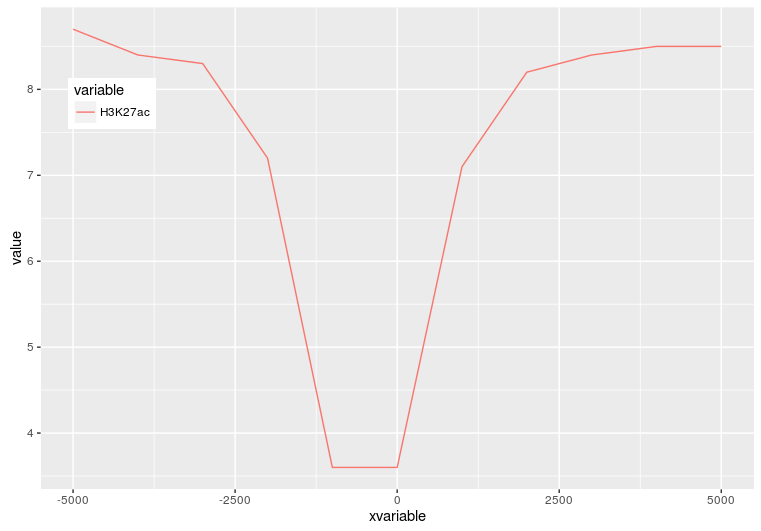
p <- ggplot(data_m, aes(x=xvariable, y=value,color=variable,group=variable)) +

     geom_line() + theme(legend.position=c(0.1,0.8))

p
p <- ggplot(data_m, aes(x=xvariable, y=value,color=variable,group=variable)) +

     geom_line() + stat_smooth(method="auto", se=FALSE) +

     theme(legend.position=c(0.1,0.8))

p
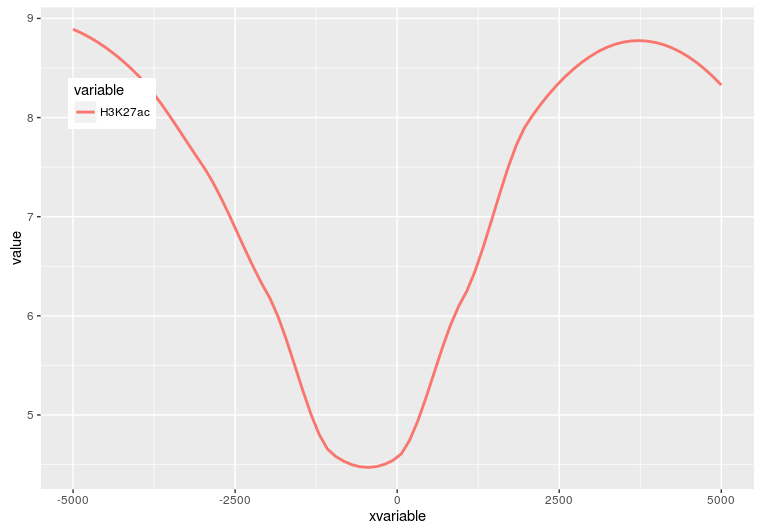
p <- ggplot(data_m, aes(x=xvariable, y=value,color=variable,group=variable)) +

     stat_smooth(method="auto", se=FALSE) + theme(legend.position=c(0.1,0.8))

p
profile = "Pos;h3k27ac;ctcf;enhancer;h3k4me3;polII

-5000;8.7;10.7;11.7;10;8.3

-4000;8.4;10.8;11.8;9.8;7.8

-3000;8.3;10.5;12.2;9.4;7

-2000;7.2;10.9;12.7;8.4;4.8

-1000;3.6;8.5;12.8;4.8;1.3

0;3.6;8.5;13.4;5.2;1.5

1000;7.1;10.9;12.4;8.1;4.9

2000;8.2;10.7;12.4;9.5;7.7

3000;8.4;10.4;12;9.8;7.9

4000;8.5;10.6;11.7;9.7;8.2

5000;8.5;10.6;11.7;10;8.2"

profile_text <- read.table(text=profile, header=T, row.names=1, quote="",sep=";")

profile_text$xvariable = rownames(profile_text)

data_m <- melt(profile_text, id.vars=c("xvariable"))

data_m$xvariable <- as.numeric(data_m$xvariable)

# 这里group=variable,而不是group=1 (如果上面你用的是1的话)

# variable和value为矩阵melt后的两列的名字,内部变量, variable代表了点线的属性,value代表对应的值。

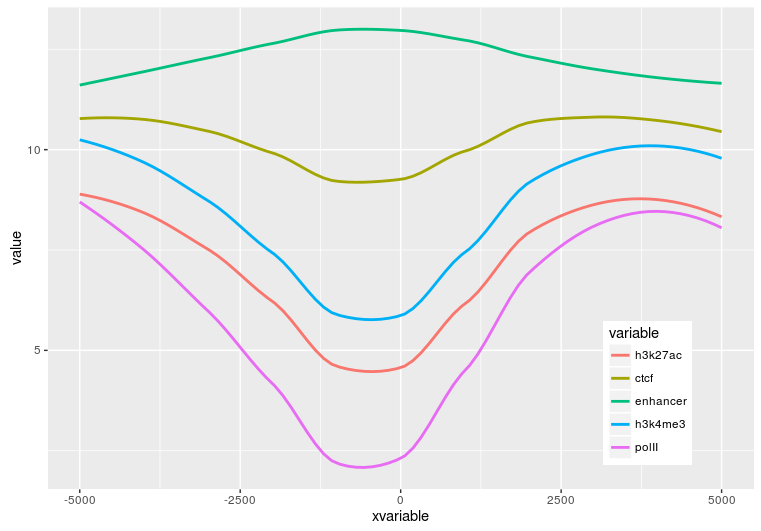
p <- ggplot(data_m, aes(x=xvariable, y=value,color=variable,group=variable)) + stat_smooth(method="auto", se=FALSE) + theme(legend.position=c(0.85,0.2))

p
profile = "Pos;h3k27ac;ctcf;enhancer;h3k4me3;polII

-5000;8.7;10.7;11.7;10;8.3

-4000;8.4;10.8;11.8;9.8;7.8

-3000;8.3;10.5;12.2;9.4;7

-2000;7.2;10.9;12.7;8.4;4.8

-1000;3.6;8.5;12.8;4.8;1.3

0;3.6;8.5;13.4;5.2;1.5

1000;7.1;10.9;12.4;8.1;4.9

2000;8.2;10.7;12.4;9.5;7.7

3000;8.4;10.4;12;9.8;7.9

4000;8.5;10.6;11.7;9.7;8.2

5000;8.5;10.6;11.7;10;8.2"

profile_text <- read.table(text=profile, header=T, row.names=1, quote="",sep=";")

profile_text_rownames <- row.names(profile_text)

profile_text$xvariable = rownames(profile_text)

data_m <- melt(profile_text, id.vars=c("xvariable"))

# 就是这一句,会经常用到

data_m$xvariable <- factor(data_m$xvariable, levels=profile_text_rownames, ordered=T)

# geom_line设置线的粗细和透明度

p <- ggplot(data_m, aes(x=xvariable, y=value,color=variable,group=variable)) + geom_line(size=1, alpha=0.9) + theme(legend.position=c(0.85,0.2)) + theme(axis.text.x=element_text(angle=45,hjust=1, vjust=1))

# stat_smooth

#p <- ggplot(data_m, aes(x=xvariable, y=value,color=variable,group=variable)) + stat_smooth(method="auto", se=FALSE) + theme(legend.position=c(0.85,0.2)) + theme(axis.text.x=element_text(angle=45,hjust=1, vjust=1))

p
到此完成了线图的基本绘制,虽然还可以,但还有不少需要提高的地方,比如在线图上加一条或几条垂线、加个水平线、修改X轴的标记(比如0换为TSS)、设置每条线的颜色等。
R语言学习 - 线图绘制的更多相关文章
- R语言学习 - 线图一步法
首先把测试数据存储到文件中方便调用.数据矩阵存储在line_data.xls和line_data_melt.xls文件中 (直接拷贝到文件中也可以,这里这么操作只是为了随文章提供个测试文件,方便使用. ...
- R语言学习 - 热图绘制heatmap
生成测试数据 绘图首先需要数据.通过生成一堆的向量,转换为矩阵,得到想要的数据. data <- c(1:6, 6:1, 6:1, 1:6, (6:1)/10, (1:6)/10, (1:6)/ ...
- R语言-画线图
R语言分高水平作图函数和低水平作图函数 高水平作图函数:可以独立绘图,例如plot() 低水平作图函数:必须先运行高水平作图函数绘图,然后再加画在已有的图上面 第一种方法:plot()函数 > ...
- R语言学习 - 热图简化
绘制热图除了使用ggplot2,还可以有其它的包或函数,比如pheatmap::pheatmap (pheatmap包中的pheatmap函数).gplots::heatmap.2等. 相比于gg ...
- R语言学习笔记:绘制地图
在R中画地图先从简单的maps包开始. library("maps") 在这个maps包中有一些数据集,用命令data(package=”maps”),可以看到如下数据: cana ...
- R语言学习 - 热图美化
实际应用中,异常值的出现会毁掉一张热图.这通常不是我们想要的.为了更好的可视化效果,需要对数据做些预处理,主要有对数转换,Z-score转换,抹去异常值,非线性颜色等方式. 对数转换 为了方便描述,假 ...
- R语言学习 - 箱线图(小提琴图、抖动图、区域散点图)
箱线图 箱线图是能同时反映数据统计量和整体分布,又很漂亮的展示图.在2014年的Nature Method上有2篇Correspondence论述了使用箱线图的好处和一个在线绘制箱线图的工具.就这样都 ...
- R语言学习 第四篇:函数和流程控制
变量用于临时存储数据,而函数用于操作数据,实现代码的重复使用.在R中,函数只是另一种数据类型的变量,可以被分配,操作,甚至把函数作为参数传递给其他函数.分支控制和循环控制,和通用编程语言的风格很相似, ...
- R语言学习笔记:基础知识
1.数据分析金字塔 2.[文件]-[改变工作目录] 3.[程序包]-[设定CRAN镜像] [程序包]-[安装程序包] 4.向量 c() 例:x=c(2,5,8,3,5,9) 例:x=c(1:100) ...
随机推荐
- 看opengl写代码(7) 使用混合数组(glInterLeavedArrays)
glInterLeavedArrays 函数 有 三个 參数 : mode ,stride,pointer. mode :指示 开启 哪些 顶点数组,以及 顶点数组 使用的 数据类型. 其余的 顶点 ...
- You don't have permission to access ××× on this server.
之前开发项目一直在linux上用的xampp集成环境,前几天突然想移到window上面去. 開始在window上安装了一个集成环境(名字大概是 Uniform Service),把项目文件已过去, o ...
- 使用heartbeat+monit实现主备双热备份系统
一.使用背景 项目须要实现主备双热自己主动切换的功能,保证系统7*24小时不间断执行.现已有两台双网卡的IBM的server,为了不再添加成本採购独立外部存储设备和双机热备软件.採用了linux下开源 ...
- Python的lambda函数与排序
Python的lambda函数与排序 2010-03-02 15:02 2809人阅读 评论(0) 收藏 举报 lambdapythonlistlispclass工作 目录(?)[+] 前几天 ...
- POJ3254 状压dp
Corn ...
- mongodb配置主从模式
Mongodb的replication主要有两种:主从和副本集(replica set).主从的原理和mysql类似,主节点记录在其上的所有操作oplog,从节点定期轮询主节点获取这些操作,然后对自己 ...
- [noip模拟赛]bird
https://www.zybuluo.com/ysner/note/1295414 题面 \(R\)是一个猎人,他准备打猎,他站在平面直角坐标系的\((0,0)\)位置. 天上有\(n\)只小鸟从右 ...
- vue watcher
观察 Watchers 虽然计算属性在大多数情况下更合适,但有时也需要一个自定义的 watcher .这是为什么 Vue 提供一个更通用的方法通过watch 选项,来响应数据的变化.当你想要在数据变化 ...
- 昆石VOS3000_2.1.2.0完整安装包及安装脚本
安装包下载地址 http://www.51voip.org/post/57.html 安装教程: 上传安装包 ·给整个目录授权 chmod 777 /root/vosintsall 1.安装前准备 首 ...
- source命令用法(转载)
转自:http://zhidao.baidu.com/link?url=mNfsPHSjTEm7llgyMYx0UVNwkJmD_cxLeHtZnHcM6Ms8LDXofVHka_EzHi6GltbR ...