
WinForm ListBox 控件用法
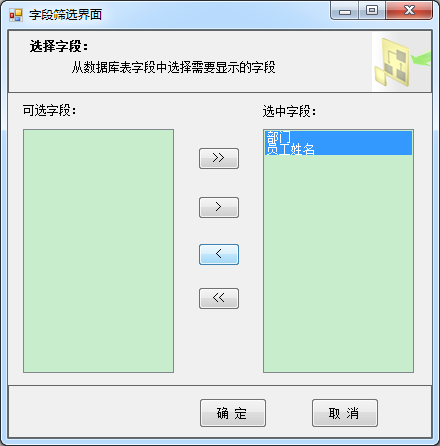
下面演示如何利用列表控件 ListBox 实现多选与移动选项:
using IMS.WinFormClient.UserControls;

using System;

using System.Collections.Generic;

using System.Windows.Forms;

namespace IMS.WinFormClient

{

    public partial class ListBoxForm : Form

    {

        UCReport _uCReport = null; // parentForm

        public ListBoxForm(UCReport uCReport, List<KeyValuePair<string, string>> selectedPairs, List<KeyValuePair<string, string>> unselectedPairs)

        {

            InitializeComponent();

            _uCReport = uCReport;

            if (selectedPairs != null)

            {

                foreach (var field in selectedPairs)

                {

                    this.listBox2.Items.Add(field.Key);

                }

            }

            if (unselectedPairs != null)

            {

                foreach (var field in unselectedPairs)

                {

                    this.listBox1.Items.Add(field.Key);

                }

            }

        }

        //全部移动:左->右

        private void button1_Click(object sender, EventArgs e)

        {

            foreach (object o in listBox1.Items)

            {

                listBox2.Items.Add(o);

            }

            listBox1.Items.Clear();

        }

        //只移动选中项:左->右

        private void button2_Click(object sender, EventArgs e)

        {

            if (this.listBox1.SelectedItems.Count > )

            {

                object[] items = new object[this.listBox1.SelectedItems.Count];

                this.listBox1.SelectedItems.CopyTo(items, );

                foreach (var item in items)

                {

                    string selectedItem = item.ToString();

                    //判断是否添加到listbox1

                    if (!this.listBox2.Items.Contains(selectedItem))

                    {

                        //添加人员到listbox2中

                        this.listBox2.Items.Add(selectedItem);

                        //移除listbox1中

                        this.listBox1.Items.Remove(selectedItem);

                    }

                }

            }

        }

        //只移动选中项:右->左

        private void button3_Click(object sender, EventArgs e)

        {

            if (this.listBox2.SelectedItems.Count > )

            {

                object[] items = new object[this.listBox2.SelectedItems.Count];

                this.listBox2.SelectedItems.CopyTo(items, );

                foreach (var item in items)

                {

                    string selectedItem = item.ToString();

                    //判断是否添加到listbox1

                    if (!this.listBox1.Items.Contains(selectedItem))

                    {

                        //添加人员到listbox1中

                        this.listBox1.Items.Add(selectedItem);

                        //移除listbox2中

                        this.listBox2.Items.Remove(selectedItem);

                    }

                }

            }

        }

        //全部移动:右->左

        private void button4_Click(object sender, EventArgs e)

        {

            foreach (object o in listBox2.Items)

            {

                listBox1.Items.Add(o);

            }

            listBox2.Items.Clear();

        }

        private void btnCancel_Click(object sender, EventArgs e)

        {

            this.Close();

        }

        private void btnOk_Click(object sender, EventArgs e)

        {

            List<string> selectedFieldsList = new List<string>();

            if (this.listBox2.Items.Count > )

            {

                foreach (var item in this.listBox2.Items)

                {

                    selectedFieldsList.Add(item.ToString());

                }

            }

            else

            {

                MessageBox.Show("请至少选择一项");

                return;

            }

            List<string> unselectedFieldsList = new List<string>();

            if (this.listBox1.Items.Count > )

            {

                foreach (var item in this.listBox1.Items)

                {

                    unselectedFieldsList.Add(item.ToString());

                }

            }

            // 通知父窗体更新需要显示的字段

            _uCReport.CustomFeildsEvent(selectedFieldsList, unselectedFieldsList);

            this.Close();

        }

    }

}
运行结果:
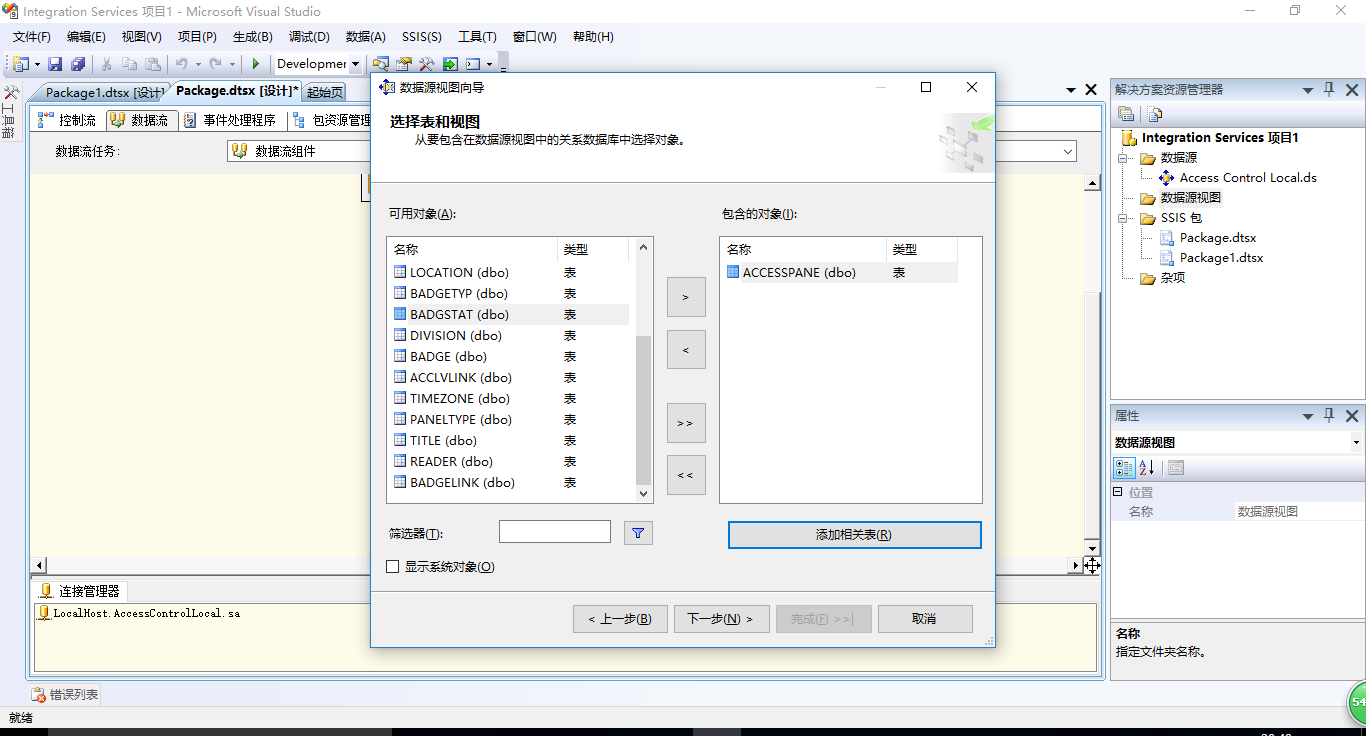
更全面的功能可以参考微软的 SQL Server Business Inteligence 的 Integration Services 项目下的选择界面:
(打开vs->新建Integration Services项目->添加数据源视图->选择3个下一个即可看到以下界面)
WinForm ListBox 控件用法的更多相关文章
- asp.net Listbox控件用法
2008-02-18 19:56 来源: 作者: ListBox(列表框)控件可以显示一组项目的列表,用户可以根据需要从中选择一个或多个选项.列表框可以为用户提供所有选项的列表.虽然也可设置列表框为多 ...
- C# LIstbox 解决WinForm下ListBox控件“设置DataSource属性后无法修改项集合”的问题
解决WinForm下ListBox控件“设置DataSource属性后无法修改项集合”的问题 分类: winform2008-05-24 02:33 2592人阅读 评论(11) 收藏 举报 winf ...
- 解决WinForm下ListBox控件“设置DataSource属性后无法修改项集合”
解决WinForm下ListBox控件“设置DataSource属性后无法修改项集合” 最近更新: 2013-2-15 587 很少写WinForm程序第一次使用ListBox控件就遇到了比 ...
- WinForm将一个窗体的值传到另一个窗体的listbox控件,C#
做arcgisengine二次开发,读取当前图层文件的字段值,别名,类型. 读取文件是在有地图图层的窗体(假设为Form1),由于窗体有限,所以想把读取的数据在另一个窗体(假设为Form2)显示出来 ...
- winform窗体控件(全)
回顾跟补充下除了昨天那常用6个其他的winform窗体控件作用 1:Button:按钮 (1)AutoSize:如果是True的情况下,内容将会撑开:False的话会另起一行 (2)Enabled: ...
- WinForm 公共控件
一.窗体属性: 1.AcceptButton - 窗体的“接受”按钮.如果设置该属性,每次用户按“Enter”键都相当于“单击”了该按钮. 需要设置哪个键,就在后面选择. 2.CancelButton ...
- listbox控件使用
1. 属性列表: SelectionMode 组件中条目的选择类型,即多选(Multiple).单选(Single) Rows 列表框中显示总共多少行 Sel ...
- winform基础控件总结
转自:http://www.cnblogs.com/top5/archive/2010/04/29/1724039.html 基础 - 常用控件 C# WinForm开发系列 - CheckBox/B ...
- ComboxBox控件、checklistbox控件和listbox控件的组合开发
第一步:先创建一个WinForm窗体应用程序,按照下图所示的进行布局. 第二步:为ComboxBox控件.checklistbox控件和listbox控件和button控件设置属性 第三步:在代码中的 ...
随机推荐
- hosts.allow和hosts.deny文件
之前想通过外部主机访问自己主机上的VMWare虚拟机,使用了VMWare的NAT端口映射,经过一番尝试,算是成功了,总结一下. VMWare NAT端口映射就可以将虚拟机上的服务映射成自己主机上的端口 ...
- webview的设置
设置支持js: webView.getSettings().setJavaScriptEnabled(true); 设置无图模式: webView.getSettings().setBlockNetw ...
- [React] Use Prop Collections with Render Props
Sometimes you have common use cases that require common props to be applied to certain elements. You ...
- python爬虫实践--求职Top10城市
前言 从智联招聘爬取相关信息后,我们关心的是如何对内容进行分析,获取用用的信息.本次以上篇文章“5分钟掌握智联招聘网站爬取并保存到MongoDB数据库”中爬取的数据为基础,分析关键词为“python” ...
- C#中的函数式编程:递归与纯函数(二) 学习ASP.NET Core Razor 编程系列四——Asp.Net Core Razor列表模板页面
C#中的函数式编程:递归与纯函数(二) 在序言中,我们提到函数式编程的两大特征:无副作用.函数是第一公民.现在,我们先来深入第一个特征:无副作用. 无副作用是通过引用透明(Referential ...
- Eclipse离线安装Emmet插件
Eclipse离线安装Emmet插件 近期发现了一个写前端代码很好的一个东西,一个叫做Emmet的工具,这个工具使用仿CSS选择器的语法来生成代码,大大提高了HTML/CSS代码编写的速度,前身就是大 ...
- [办公应用]word 2007:全屏快捷键,让复制图片保持原样大小(office 全屏快捷键)
最近同事咨询这两个问题: 1.word 2007内是否有全屏显示的快捷键,这样投影时,就可以快速切换到全屏. 2.从ppt或者excel复制一张较大的图片,word 2007 会默认让复制的图片缩小, ...
- 视频生成 量产 win 转 linux ffmpeg linux 安装 对批量视频的尽可能短时间生成
环境准备 Welcome to aliyun Elastic Compute Service! [root@mytest ~]# pip install baidu-aip Looking in in ...
- 万一的Delphi消息教程
http://www.cnblogs.com/del/category/134064.html
- ionic2 在执行ionic serve后报 build dev failed: Cannot set property 'fileSystem' of null
ionic2 真是烦人,因为环境依赖的问题还有网络的问题,不知砸的,项目放一段事件不运行就会出问题. 我一开始是 用 cnpm install安装的依赖,其中也报了错, 然后执行 ionic serv ...