
JDBC示例(增删查改)
前提:
1、项目中引入MySQL的JAR包,POM参考如下配置:
        <!-- mysql-connector-java -->

        <!-- http://mvnrepository.com/artifact/mysql/mysql-connector-java -->

        <dependency>

            <groupId>mysql</groupId>

            <artifactId>mysql-connector-java</artifactId>

            <version>5.1.38</version>

        </dependency>
示例:
一、创建数据库
//STEP 1. Import required packages

import java.sql.*;

public class JDBCExample {

    // JDBC driver name and database URL

    static final String JDBC_DRIVER = "com.mysql.jdbc.Driver";

    static final String DB_URL = "jdbc:mysql://localhost/";

    // Database credentials

    static final String USER = "root";

    static final String PASS = "root";

    public static void main(String[] args) {

        Connection conn = null;

        Statement stmt = null;

        try {

            // STEP 2: Register JDBC driver

            Class.forName("com.mysql.jdbc.Driver");

            // STEP 3: Open a connection

            System.out.println("Connecting to database...");

            conn = DriverManager.getConnection(DB_URL, USER, PASS);

            // STEP 4: Execute a query

            System.out.println("Creating database...");

            stmt = conn.createStatement();

            String sql = "CREATE DATABASE STUDENTS";

            stmt.executeUpdate(sql);

            System.out.println("Database created successfully...");

        } catch (SQLException se) {

            // Handle errors for JDBC

            se.printStackTrace();

        } catch (Exception e) {

            // Handle errors for Class.forName

            e.printStackTrace();

        } finally {

            // finally block used to close resources

            try {

                if (stmt != null)

                    stmt.close();

            } catch (SQLException se2) {

            } // nothing we can do

            try {

                if (conn != null)

                    conn.close();

            } catch (SQLException se) {

                se.printStackTrace();

            } // end finally try

        } // end try

        System.out.println("Goodbye!");

    }// end main

}// end JDBCExample
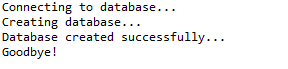
这将产生如下所示结果:
二、选择数据库
//STEP 1. Import required packages

import java.sql.*;

public class JDBCExample2 {

    // JDBC driver name and database URL

    static final String JDBC_DRIVER = "com.mysql.jdbc.Driver";

    static final String DB_URL = "jdbc:mysql://localhost/STUDENTS?serverTimezone=UTC";

    // Database credentials

    static final String USER = "root";

    static final String PASS = "root";

    public static void main(String[] args) {

        Connection conn = null;

        try {

            // STEP 2: Register JDBC driver

            Class.forName("com.mysql.jdbc.Driver");

            // STEP 3: Open a connection

            System.out.println("Connecting to a selected database...");

            conn = DriverManager.getConnection(DB_URL, USER, PASS);

            System.out.println("Connected database successfully...");

        } catch (SQLException se) {

            // Handle errors for JDBC

            se.printStackTrace();

        } catch (Exception e) {

            // Handle errors for Class.forName

            e.printStackTrace();

        } finally {

            // finally block used to close resources

            try {

                if (conn != null)

                    conn.close();

            } catch (SQLException se) {

                se.printStackTrace();

            } // end finally try

        } // end try

        System.out.println("Goodbye!");

    }// end main

}// end JDBCExample
这将产生如下所示结果:

三、删除数据库
//STEP 1. Import required packages

import java.sql.*;

public class JDBCExample3 {

    // JDBC driver name and database URL

    static final String JDBC_DRIVER = "com.mysql.jdbc.Driver";

    static final String DB_URL = "jdbc:mysql://localhost/";

    // Database credentials

    static final String USER = "root";

    static final String PASS = "root";

    public static void main(String[] args) {

        Connection conn = null;

        Statement stmt = null;

        try {

            // STEP 2: Register JDBC driver

            Class.forName("com.mysql.jdbc.Driver");

            // STEP 3: Open a connection

            System.out.println("Connecting to a selected database...");

            conn = DriverManager.getConnection(DB_URL, USER, PASS);

            System.out.println("Connected database successfully...");

            // STEP 4: Execute a query

            System.out.println("Deleting database...");

            stmt = conn.createStatement();

            String sql = "DROP DATABASE STUDENTS";

            stmt.executeUpdate(sql);

            System.out.println("Database deleted successfully...");

        } catch (SQLException se) {

            // Handle errors for JDBC

            se.printStackTrace();

        } catch (Exception e) {

            // Handle errors for Class.forName

            e.printStackTrace();

        } finally {

            // finally block used to close resources

            try {

                if (stmt != null)

                    conn.close();

            } catch (SQLException se) {

            } // do nothing

            try {

                if (conn != null)

                    conn.close();

            } catch (SQLException se) {

                se.printStackTrace();

            } // end finally try

        } // end try

        System.out.println("Goodbye!");

    }// end main

}// end JDBCExample
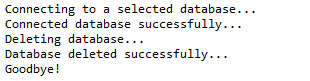
这将产生如下所示结果:
四、创建表
//STEP 1. Import required packages

import java.sql.*;

public class JDBCExample4 {

    // JDBC driver name and database URL

    static final String JDBC_DRIVER = "com.mysql.jdbc.Driver";

    static final String DB_URL = "jdbc:mysql://localhost/STUDENTS?serverTimezone=UTC";

    // Database credentials

    static final String USER = "root";

    static final String PASS = "root";

    public static void main(String[] args) {

        Connection conn = null;

        Statement stmt = null;

        try {

            // STEP 2: Register JDBC driver

            Class.forName("com.mysql.jdbc.Driver");

            // STEP 3: Open a connection

            System.out.println("Connecting to a selected database...");

            conn = DriverManager.getConnection(DB_URL, USER, PASS);

            System.out.println("Connected database successfully...");

            // STEP 4: Execute a query

            System.out.println("Creating table in given database...");

            stmt = conn.createStatement();

            String sql = "CREATE TABLE REGISTRATION " + "(id INTEGER not NULL, " + " first VARCHAR(255), "

                    + " last VARCHAR(255), " + " age INTEGER, " + " PRIMARY KEY ( id ))";

            stmt.executeUpdate(sql);

            System.out.println("Created table in given database...");

        } catch (SQLException se) {

            // Handle errors for JDBC

            se.printStackTrace();

        } catch (Exception e) {

            // Handle errors for Class.forName

            e.printStackTrace();

        } finally {

            // finally block used to close resources

            try {

                if (stmt != null)

                    conn.close();

            } catch (SQLException se) {

            } // do nothing

            try {

                if (conn != null)

                    conn.close();

            } catch (SQLException se) {

                se.printStackTrace();

            } // end finally try

        } // end try

        System.out.println("Goodbye!");

    }// end main

}// end JDBCExample
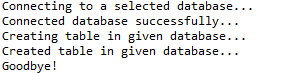
这将产生如下所示结果:
五、删除表
//STEP 1. Import required packages

import java.sql.*;

public class JDBCExample5 {

    // JDBC driver name and database URL

    static final String JDBC_DRIVER = "com.mysql.jdbc.Driver";

    static final String DB_URL = "jdbc:mysql://localhost/STUDENTS?serverTimezone=UTC";

    // Database credentials

    static final String USER = "root";

    static final String PASS = "root";

    public static void main(String[] args) {

        Connection conn = null;

        Statement stmt = null;

        try {

            // STEP 2: Register JDBC driver

            Class.forName("com.mysql.jdbc.Driver");

            // STEP 3: Open a connection

            System.out.println("Connecting to a selected database...");

            conn = DriverManager.getConnection(DB_URL, USER, PASS);

            System.out.println("Connected database successfully...");

            // STEP 4: Execute a query

            System.out.println("Deleting table in given database...");

            stmt = conn.createStatement();

            String sql = "DROP TABLE REGISTRATION ";

            stmt.executeUpdate(sql);

            System.out.println("Table  deleted in given database...");

        } catch (SQLException se) {

            // Handle errors for JDBC

            se.printStackTrace();

        } catch (Exception e) {

            // Handle errors for Class.forName

            e.printStackTrace();

        } finally {

            // finally block used to close resources

            try {

                if (stmt != null)

                    conn.close();

            } catch (SQLException se) {

            } // do nothing

            try {

                if (conn != null)

                    conn.close();

            } catch (SQLException se) {

                se.printStackTrace();

            } // end finally try

        } // end try

        System.out.println("Goodbye!");

    }// end main

}// end JDBCExample
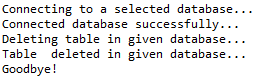
这将产生如下所示结果:
六、插入记录
//STEP 1. Import required packages

import java.sql.*;

public class JDBCExample6 {

    // JDBC driver name and database URL

    static final String JDBC_DRIVER = "com.mysql.jdbc.Driver";

    static final String DB_URL = "jdbc:mysql://localhost/STUDENTS?serverTimezone=UTC";

    // Database credentials

    static final String USER = "root";

    static final String PASS = "root";

    public static void main(String[] args) {

        Connection conn = null;

        Statement stmt = null;

        try {

            // STEP 2: Register JDBC driver

            Class.forName("com.mysql.jdbc.Driver");

            // STEP 3: Open a connection

            System.out.println("Connecting to a selected database...");

            conn = DriverManager.getConnection(DB_URL, USER, PASS);

            System.out.println("Connected database successfully...");

            // STEP 4: Execute a query

            System.out.println("Inserting records into the table...");

            stmt = conn.createStatement();

            String sql = "INSERT INTO Registration " + "VALUES (100, 'Zara', 'Ali', 18)";

            stmt.executeUpdate(sql);

            sql = "INSERT INTO Registration " + "VALUES (101, 'Mahnaz', 'Fatma', 25)";

            stmt.executeUpdate(sql);

            sql = "INSERT INTO Registration " + "VALUES (102, 'Zaid', 'Khan', 30)";

            stmt.executeUpdate(sql);

            sql = "INSERT INTO Registration " + "VALUES(103, 'Sumit', 'Mittal', 28)";

            stmt.executeUpdate(sql);

            System.out.println("Inserted records into the table...");

        } catch (SQLException se) {

            // Handle errors for JDBC

            se.printStackTrace();

        } catch (Exception e) {

            // Handle errors for Class.forName

            e.printStackTrace();

        } finally {

            // finally block used to close resources

            try {

                if (stmt != null)

                    conn.close();

            } catch (SQLException se) {

            } // do nothing

            try {

                if (conn != null)

                    conn.close();

            } catch (SQLException se) {

                se.printStackTrace();

            } // end finally try

        } // end try

        System.out.println("Goodbye!");

    }// end main

}// end JDBCExample
这将产生如下所示结果:
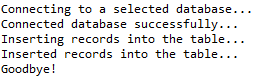
七、查询表记录
//STEP 1. Import required packages

import java.sql.*;

public class JDBCExample7 {

    // JDBC driver name and database URL

    static final String JDBC_DRIVER = "com.mysql.jdbc.Driver";

    static final String DB_URL = "jdbc:mysql://localhost/STUDENTS?serverTimezone=UTC";

    // Database credentials

    static final String USER = "root";

    static final String PASS = "root";

    public static void main(String[] args) {

        Connection conn = null;

        Statement stmt = null;

        try {

            // STEP 2: Register JDBC driver

            Class.forName("com.mysql.jdbc.Driver");

            // STEP 3: Open a connection

            System.out.println("Connecting to a selected database...");

            conn = DriverManager.getConnection(DB_URL, USER, PASS);

            System.out.println("Connected database successfully...");

            // STEP 4: Execute a query

            System.out.println("Creating statement...");

            stmt = conn.createStatement();

            String sql = "SELECT id, first, last, age FROM Registration";

            ResultSet rs = stmt.executeQuery(sql);

            // STEP 5: Extract data from result set

            while (rs.next()) {

                // Retrieve by column name

                int id = rs.getInt("id");

                int age = rs.getInt("age");

                String first = rs.getString("first");

                String last = rs.getString("last");

                // Display values

                System.out.print("ID: " + id);

                System.out.print(", Age: " + age);

                System.out.print(", First: " + first);

                System.out.println(", Last: " + last);

            }

            rs.close();

        } catch (SQLException se) {

            // Handle errors for JDBC

            se.printStackTrace();

        } catch (Exception e) {

            // Handle errors for Class.forName

            e.printStackTrace();

        } finally {

            // finally block used to close resources

            try {

                if (stmt != null)

                    conn.close();

            } catch (SQLException se) {

            } // do nothing

            try {

                if (conn != null)

                    conn.close();

            } catch (SQLException se) {

                se.printStackTrace();

            } // end finally try

        } // end try

        System.out.println("Goodbye!");

    }// end main

}// end JDBCExample
这将产生如下所示结果:
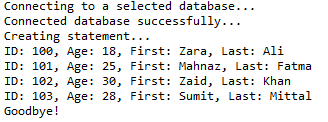
八、更新表记录
//STEP 1. Import required packages

import java.sql.*;

public class JDBCExample8 {

    // JDBC driver name and database URL

    static final String JDBC_DRIVER = "com.mysql.jdbc.Driver";

    static final String DB_URL = "jdbc:mysql://localhost/STUDENTS?serverTimezone=UTC";

    // Database credentials

    static final String USER = "root";

    static final String PASS = "root";

    public static void main(String[] args) {

        Connection conn = null;

        Statement stmt = null;

        try {

            // STEP 2: Register JDBC driver

            Class.forName("com.mysql.jdbc.Driver");

            // STEP 3: Open a connection

            System.out.println("Connecting to a selected database...");

            conn = DriverManager.getConnection(DB_URL, USER, PASS);

            System.out.println("Connected database successfully...");

            // STEP 4: Execute a query

            System.out.println("Creating statement...");

            stmt = conn.createStatement();

            String sql = "UPDATE Registration " + "SET age = 30 WHERE id in (100, 101)";

            stmt.executeUpdate(sql);

            // Now you can extract all the records

            // to see the updated records

            sql = "SELECT id, first, last, age FROM Registration";

            ResultSet rs = stmt.executeQuery(sql);

            while (rs.next()) {

                // Retrieve by column name

                int id = rs.getInt("id");

                int age = rs.getInt("age");

                String first = rs.getString("first");

                String last = rs.getString("last");

                // Display values

                System.out.print("ID: " + id);

                System.out.print(", Age: " + age);

                System.out.print(", First: " + first);

                System.out.println(", Last: " + last);

            }

            rs.close();

        } catch (SQLException se) {

            // Handle errors for JDBC

            se.printStackTrace();

        } catch (Exception e) {

            // Handle errors for Class.forName

            e.printStackTrace();

        } finally {

            // finally block used to close resources

            try {

                if (stmt != null)

                    conn.close();

            } catch (SQLException se) {

            } // do nothing

            try {

                if (conn != null)

                    conn.close();

            } catch (SQLException se) {

                se.printStackTrace();

            } // end finally try

        } // end try

        System.out.println("Goodbye!");

    }// end main

}// end JDBCExample
这将产生如下所示结果:
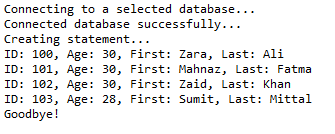
九、删除记录
//STEP 1. Import required packages

import java.sql.*;

public class JDBCExample9 {

    // JDBC driver name and database URL

    static final String JDBC_DRIVER = "com.mysql.jdbc.Driver";

    static final String DB_URL = "jdbc:mysql://localhost/STUDENTS?serverTimezone=UTC";

    // Database credentials

    static final String USER = "root";

    static final String PASS = "root";

    public static void main(String[] args) {

        Connection conn = null;

        Statement stmt = null;

        try {

            // STEP 2: Register JDBC driver

            Class.forName("com.mysql.jdbc.Driver");

            // STEP 3: Open a connection

            System.out.println("Connecting to a selected database...");

            conn = DriverManager.getConnection(DB_URL, USER, PASS);

            System.out.println("Connected database successfully...");

            // STEP 4: Execute a query

            System.out.println("Creating statement...");

            stmt = conn.createStatement();

            String sql = "DELETE FROM Registration " + "WHERE id = 101";

            stmt.executeUpdate(sql);

            // Now you can extract all the records

            // to see the remaining records

            sql = "SELECT id, first, last, age FROM Registration";

            ResultSet rs = stmt.executeQuery(sql);

            while (rs.next()) {

                // Retrieve by column name

                int id = rs.getInt("id");

                int age = rs.getInt("age");

                String first = rs.getString("first");

                String last = rs.getString("last");

                // Display values

                System.out.print("ID: " + id);

                System.out.print(", Age: " + age);

                System.out.print(", First: " + first);

                System.out.println(", Last: " + last);

            }

            rs.close();

        } catch (SQLException se) {

            // Handle errors for JDBC

            se.printStackTrace();

        } catch (Exception e) {

            // Handle errors for Class.forName

            e.printStackTrace();

        } finally {

            // finally block used to close resources

            try {

                if (stmt != null)

                    conn.close();

            } catch (SQLException se) {

            } // do nothing

            try {

                if (conn != null)

                    conn.close();

            } catch (SQLException se) {

                se.printStackTrace();

            } // end finally try

        } // end try

        System.out.println("Goodbye!");

    }// end main

}// end JDBCExample
这将产生如下所示结果:
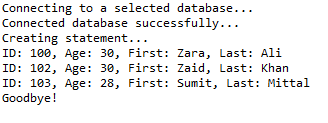
十、Where子句
//STEP 1. Import required packages

import java.sql.*;

public class JDBCExample10 {

    // JDBC driver name and database URL

    static final String JDBC_DRIVER = "com.mysql.jdbc.Driver";

    static final String DB_URL = "jdbc:mysql://localhost/STUDENTS?serverTimezone=UTC";

    // Database credentials

    static final String USER = "root";

    static final String PASS = "root";

    public static void main(String[] args) {

        Connection conn = null;

        Statement stmt = null;

        try {

            // STEP 2: Register JDBC driver

            Class.forName("com.mysql.jdbc.Driver");

            // STEP 3: Open a connection

            System.out.println("Connecting to a selected database...");

            conn = DriverManager.getConnection(DB_URL, USER, PASS);

            System.out.println("Connected database successfully...");

            // STEP 4: Execute a query

            System.out.println("Creating statement...");

            stmt = conn.createStatement();

            // Extract records without any condition.

            System.out.println("Fetching records without condition...");

            String sql = "SELECT id, first, last, age FROM Registration";

            ResultSet rs = stmt.executeQuery(sql);

            while (rs.next()) {

                // Retrieve by column name

                int id = rs.getInt("id");

                int age = rs.getInt("age");

                String first = rs.getString("first");

                String last = rs.getString("last");

                // Display values

                System.out.print("ID: " + id);

                System.out.print(", Age: " + age);

                System.out.print(", First: " + first);

                System.out.println(", Last: " + last);

            }

            // Select all records having ID equal or greater than 101

            System.out.println("Fetching records with condition...");

            sql = "SELECT id, first, last, age FROM Registration" + " WHERE id >= 101 ";

            rs = stmt.executeQuery(sql);

            while (rs.next()) {

                // Retrieve by column name

                int id = rs.getInt("id");

                int age = rs.getInt("age");

                String first = rs.getString("first");

                String last = rs.getString("last");

                // Display values

                System.out.print("ID: " + id);

                System.out.print(", Age: " + age);

                System.out.print(", First: " + first);

                System.out.println(", Last: " + last);

            }

            rs.close();

        } catch (SQLException se) {

            // Handle errors for JDBC

            se.printStackTrace();

        } catch (Exception e) {

            // Handle errors for Class.forName

            e.printStackTrace();

        } finally {

            // finally block used to close resources

            try {

                if (stmt != null)

                    conn.close();

            } catch (SQLException se) {

            } // do nothing

            try {

                if (conn != null)

                    conn.close();

            } catch (SQLException se) {

                se.printStackTrace();

            } // end finally try

        } // end try

        System.out.println("Goodbye!");

    }// end main

}// end JDBCExample
这将产生如下所示结果:
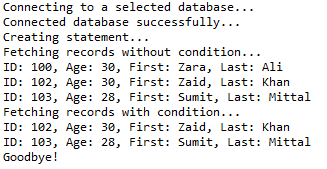
十一、Like子句
//STEP 1. Import required packages

import java.sql.*;

public class JDBCExample11 {

    // JDBC driver name and database URL

    static final String JDBC_DRIVER = "com.mysql.jdbc.Driver";

    static final String DB_URL = "jdbc:mysql://localhost/STUDENTS?serverTimezone=UTC";

    // Database credentials

    static final String USER = "root";

    static final String PASS = "root";

    public static void main(String[] args) {

        Connection conn = null;

        Statement stmt = null;

        try {

            // STEP 2: Register JDBC driver

            Class.forName("com.mysql.jdbc.Driver");

            // STEP 3: Open a connection

            System.out.println("Connecting to a selected database...");

            conn = DriverManager.getConnection(DB_URL, USER, PASS);

            System.out.println("Connected database successfully...");

            // STEP 4: Execute a query

            System.out.println("Creating statement...");

            stmt = conn.createStatement();

            // Extract records without any condition.

            System.out.println("Fetching records without condition...");

            String sql = "SELECT id, first, last, age FROM Registration";

            ResultSet rs = stmt.executeQuery(sql);

            while (rs.next()) {

                // Retrieve by column name

                int id = rs.getInt("id");

                int age = rs.getInt("age");

                String first = rs.getString("first");

                String last = rs.getString("last");

                // Display values

                System.out.print("ID: " + id);

                System.out.print(", Age: " + age);

                System.out.print(", First: " + first);

                System.out.println(", Last: " + last);

            }

            // Select all records having ID equal or greater than 101

            System.out.println("Fetching records with condition...");

            sql = "SELECT id, first, last, age FROM Registration" + " WHERE first LIKE '%za%' ";

            rs = stmt.executeQuery(sql);

            while (rs.next()) {

                // Retrieve by column name

                int id = rs.getInt("id");

                int age = rs.getInt("age");

                String first = rs.getString("first");

                String last = rs.getString("last");

                // Display values

                System.out.print("ID: " + id);

                System.out.print(", Age: " + age);

                System.out.print(", First: " + first);

                System.out.println(", Last: " + last);

            }

            rs.close();

        } catch (SQLException se) {

            // Handle errors for JDBC

            se.printStackTrace();

        } catch (Exception e) {

            // Handle errors for Class.forName

            e.printStackTrace();

        } finally {

            // finally block used to close resources

            try {

                if (stmt != null)

                    conn.close();

            } catch (SQLException se) {

            } // do nothing

            try {

                if (conn != null)

                    conn.close();

            } catch (SQLException se) {

                se.printStackTrace();

            } // end finally try

        } // end try

        System.out.println("Goodbye!");

    }// end main

}// end JDBCExample
这将产生如下所示结果:
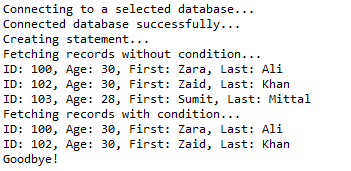
十二、排序
//STEP 1. Import required packages

import java.sql.*;

public class JDBCExample12 {

    // JDBC driver name and database URL

    static final String JDBC_DRIVER = "com.mysql.jdbc.Driver";

    static final String DB_URL = "jdbc:mysql://localhost/STUDENTS?serverTimezone=UTC";

    // Database credentials

    static final String USER = "root";

    static final String PASS = "root";

    public static void main(String[] args) {

        Connection conn = null;

        Statement stmt = null;

        try {

            // STEP 2: Register JDBC driver

            Class.forName("com.mysql.jdbc.Driver");

            // STEP 3: Open a connection

            System.out.println("Connecting to a selected database...");

            conn = DriverManager.getConnection(DB_URL, USER, PASS);

            System.out.println("Connected database successfully...");

            // STEP 4: Execute a query

            System.out.println("Creating statement...");

            stmt = conn.createStatement();

            // Extract records in ascending order by first name.

            System.out.println("Fetching records in ascending order...");

            String sql = "SELECT id, first, last, age FROM Registration" + " ORDER BY first ASC";

            ResultSet rs = stmt.executeQuery(sql);

            while (rs.next()) {

                // Retrieve by column name

                int id = rs.getInt("id");

                int age = rs.getInt("age");

                String first = rs.getString("first");

                String last = rs.getString("last");

                // Display values

                System.out.print("ID: " + id);

                System.out.print(", Age: " + age);

                System.out.print(", First: " + first);

                System.out.println(", Last: " + last);

            }

            // Extract records in descending order by first name.

            System.out.println("Fetching records in descending order...");

            sql = "SELECT id, first, last, age FROM Registration" + " ORDER BY first DESC";

            rs = stmt.executeQuery(sql);

            while (rs.next()) {

                // Retrieve by column name

                int id = rs.getInt("id");

                int age = rs.getInt("age");

                String first = rs.getString("first");

                String last = rs.getString("last");

                // Display values

                System.out.print("ID: " + id);

                System.out.print(", Age: " + age);

                System.out.print(", First: " + first);

                System.out.println(", Last: " + last);

            }

            rs.close();

        } catch (SQLException se) {

            // Handle errors for JDBC

            se.printStackTrace();

        } catch (Exception e) {

            // Handle errors for Class.forName

            e.printStackTrace();

        } finally {

            // finally block used to close resources

            try {

                if (stmt != null)

                    conn.close();

            } catch (SQLException se) {

            } // do nothing

            try {

                if (conn != null)

                    conn.close();

            } catch (SQLException se) {

                se.printStackTrace();

            } // end finally try

        } // end try

        System.out.println("Goodbye!");

    }// end main

}// end JDBCExample
这将产生如下所示结果:
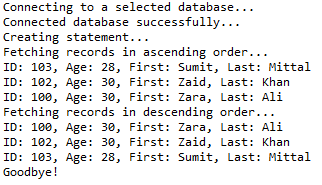
测试工程:https://github.com/easonjim/5_java_example/tree/master/jdbcbasics/test10/
JDBC示例(增删查改)的更多相关文章
- SSH框架的多表查询和增删查改 (方法一)上
原创作品,允许转载,转载时请务必标明作者信息和声明本文章==> http://www.cnblogs.com/zhu520/p/7772823.html 因为最近在做Android 练习的 ...
- jdbc的实例应用:增删查改实现
//在jdbc中进行增删查改 //查看所有 public static void findAll() { String url = "jdbc:mysql://localhost:3306/ ...
- 2015.8.2 jdbc实现商品类的增删查改
在惠普济宁基地进行了两周sql和java的学习,学到很多东西 刚才实现了用jdbc访问数据库对数据库进行操作,是用eclipse写的,过几天移植到NetBeans上,个人还是比较习惯看图形化界面 前几 ...
- JDBC+Servlet+jsp(增删查改)
先在mysql新增数据库和表先,把下面的几句代码复制去到mysql运行就可以创建成功了! 创建数据库 create database jdbc01 character set utf8 collat ...
- JDBC终章- 使用 DBUtils实现增删查改- C3P0Utils数据源/QueryRunner runner连接数据源并执行sql
JDBC终章- 使用 DBUtils实现增删查改 1.数据库结构 Create Table CREATE TABLE `user` ( `id` ) NOT NULL AUTO_INCREMENT, ...
- [课本]JDBC课程6--使用JDBC的DAO模块化--完成数据库的增删查改_工具类JDBCTools四个(Preparedstatement)功能模块的敲定版
(课本P273-任务九) /**DAO: Data Access Object * 为什么用: 实现功能的模块化,更有利于代码的维护和升级 * 是什么: 访问数据信息的类,包含对数据的CRUD(cre ...
- 在Eclipse上实现简单的JDBC增删查改操作
在Javaweb的学习里,学到了如何完成简单的增删查改操作,在这里撰写一篇文章以便自己整理回忆. 首先要建立一些包和导入一些文件.建一些类.具体框架如图 编写Product类 public clas ...
- hibernate基础增删查改简单实例
hibernate 基础理论知识网上很多,可以百度和google.这里不做多的介绍,以一个User表来开展例子 建一个web-project 我这里用了junit单元测试环境来进行增删查改的测试,别的 ...
- 利用dbutils工具实现数据的增删查改操作(dbutis入门)
一.前期准备 1.安装数据库(如:mysql5.5) 2.安装Eclipse(如:3.4) 3.下载数据库驱动包 4.下载dbutis工具包 5.在Eclipse创建名为 dbutils 的工程并在工 ...
- 极极极极极简的的增删查改(CRUD)解决方案
去年这个时候写过一篇全自动数据表格的文章http://www.cnblogs.com/liuyh/p/5747331.html.文章对自己写的一个js组件做了个概述,很多人把它当作了一款功能相似的纯前 ...
随机推荐
- 460在全志r16平台tinav3.0系统下使用i2c-tools
460在全志r16平台tinav3.0系统下使用i2c-tools 2018/9/6 19:05 版本:V1.0 开发板:SC3817R SDK:tina v3.0 1.01原始编译全志r16平台ti ...
- 轻松搞定Spring+quartz的定时任务
1.spring 的定时任务写法有两种:一种是继承工作类,一种是普通的Bean,定时写法有两种写法:一种是以时间间隔启动任务SimpleTriggerBean,一种是以时刻启动任务CronTrigge ...
- HTML5——动画延迟的另外一种方式
https://www.cnblogs.com/hhhhhh/p/5758167.html
- cron on Centos
1. crond.service 2. configuration 2.0 format # Example of job definition: # .---------------- minute ...
- 谈谈JVM内存区域的划分
我们知道,计算机CPU和内存的交互是最频繁的,内存是我们的高速缓存区,用户磁盘和CPU的交互,而CPU运转速度越来越快,磁盘远远跟不上CPU的读写速度,才设计了内存,用户缓冲用户IO等待导致CPU的等 ...
- vue工程化之项目引入jquery
既然写项目,那么少不了用jq,那我们就引入进来吧 1.因为已经安装了vue脚手架,所以需要在webpack中全局引入jquery 打开package.json文件,在里面加入这行代码,jquery后面 ...
- 03C#数据类型
C#数据类型 值类型和引用类型区别 在C#语言中,值类型变量存储的是指定数据类型的数据,值类型变量的值(或实例)存储在栈(Stack)中,赋值语句是传递变量的值.引用类型(例如类就是引用类型)的实例, ...
- Syslinux编译环境配置简要步骤
由于毕业设计要做一个加密U盘的LINUX,需要修改一sysylinux引导程序,在网上很少有关于syslinux编译环境配置的文章,在此简要总结一下,发出来共享. 需要的软件: 1. vmware ...
- Nginx出现403 forbidden (13: Permission denied)报错的四种原因
一.由于php-fpm启动用户和nginx工作用户不一致所致 php-fpm启动用户配置位置 nginx工作用户配置位置 二.不存在在文件,可能是文件路径有误,可以查看nginx错误日志来判断 三.缺 ...
- Linux系统下设置vi编辑器,tab键为4
1.cd ~ 2.vi .exrc 3.set tabstop=4(保存并退出)即可