
GoAhead4.1.0 开发总结一(移植)
环境
官方文档:https://www.embedthis.com/goahead/doc/
源码下载: goahead-4.1.0-src.tgz
系统平台:Ubuntu 12.04.4
gcc version 4.6.3
移植步骤
1.解压与编译
前提:交叉编译工具 arm-none-linux-gnueabi-gcc 已经安装并配置了环境变量;
tar -zxvf goahead-4.1.-src.tgz

cd goahead-4.1.0
// 交叉编译
make CC=arm-none-linux-gnueabi-gcc ARCH=arm
编译之后在 goahead-4.1.0/build 目录下生成了 linux-arm-default 文件夹
里面包含我们需要的 goahead 可执行文件和 库
2.开始测试
新建一个 goahead 文件夹,可nfs挂载,我们使用nfs挂载调试
将 goahead-4.1.0/build/linux-arm-default/bin 里面的 goahead libgo.so 拷贝到 goahead 文件夹
目标arm板开启 mount 挂载
cd /mnt/goahead
// 运行测试
./goahead -v ./web/ 192.168.10.111:80

这里出现不能获取本地IP地址
解决方案一:
修改源码 goahead-4.1.0/src/http.c
#else

{

#if 0

    struct hostent  *hp;

    if ((hp = gethostbyname(host)) == NULL) {

        error("Cannot get host address for host %s: errno %d", host, errno);

        return -;

    }

    memcpy((char*) &intaddr, (char *) hp->h_addr_list[], (size_t) hp->h_length);

    ipaddr = inet_ntoa(intaddr);

#else     // wangh 2019-6-4 换种方式获取ip地址 (ipv4)

    int sockfd;

    struct sockaddr_in sin;

    struct ifreq ifr;

    sockfd = socket(AF_INET, SOCK_DGRAM, );

    if (sockfd == -)

    {

        return -;

    }

    strncpy(ifr.ifr_name, "eth0", IFNAMSIZ);    //网卡多的得修改下

    ifr.ifr_name[IFNAMSIZ - ] = ;

    if (ioctl(sockfd, SIOCGIFADDR, &ifr) < )

    {

        return -;

    }

    memcpy(&sin, &ifr.ifr_addr, sizeof(sin));

    ipaddr=inet_ntoa(sin.sin_addr);

#endif

    websSetIpAddr(ipaddr);

    websSetHost(ipaddr);

}

#endif

    return ;

}
修改源码后需重新编译,并重新将 goahead-4.1.0/build/linux-arm-default/bin 里面的 goahead libgo.so 拷贝到 goahead 文件夹
再测试

拷贝 build/linux-arm-default/bin/self.crt self.key 到 goahead

测试发现 不能打开 route.txt
拷贝 goahead-4.1.0/src/route.txt 到 goahead

拷贝 goahead-4.1.0/src/auth.txt 到 goahead
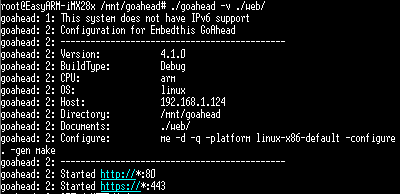
这里说明移植运行成功
再浏览器输入 目标板主机地址 192.168.1.124
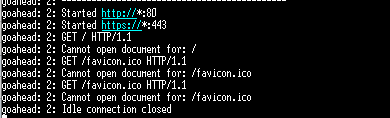
这是因为网页的内容还没有添加
3 web内容添加
再 goahead 文件夹下 新建 web 文件夹

编写 测试 首页
<html>
<!- Copyright (C) HTGD Co.,Ltd. 2019 All Rights Reserved. ->
<head> <!- 文档包含的元数据 ->
<title>M283 Web Application</title> <!- 文档标题 ->
<meta charset="UTF-8"> <!- 中文编码 ->
<link rel="stylesheet" href="style/normal_ws.css" type="text/css">
</head>
<body> <!- 元素包含了可见的页面内容 ->
<h1>M283 Web Application</h1> <!- 一级标题 ->
<h2>The Simplified I/O Device Control</h2> <!- 二级标题 ->
<form id="gpio-2-4" action="/goform/gpio_p24" method="post">
<input type="hidden" name="lab_gpio_p2.4" value="gpio-p2.4" />
<table border="0">
<tr>
<td width=100><b>DeviceName </b></td>
<td width=100><b>Direction </b></td>
<td width=100><b>Value </b></td>
<td width=100><b>Setting</b></td>
</tr>
<tr>
<td width=100> Gpio P2.4 </td>
<td width=100>
<input type="checkbox" name="dir24" title="out" />out</td>
<td width=100>
<input type="checkbox" name="val24" /></td>
<td width=100><input type="submit" value="set" /></td>
</tr>
</table>
</form>
<form id="gpio-2-5" action="/goform/gpio_p25" method="post">
<input type="hidden" name="lab_gpio_p2.5" value="gpio-p2.5" />
<table>
<tr>
<td width=100>
Gpio P2.5</td>
<td width=100>
<input type="checkbox" name="dir25" title="out" />out</td>
<td width=100>
<input type="checkbox" name="val25" /></td>
<td width=100><input type="submit" value="set" /></td>
</tr>
</table>
</form>
<form id="gpio-2-6" action="/goform/gpio_p26" method="post">
<input type="hidden" name="lab_gpio_p2.6" value="gpio-p2.6" />
<table>
<tr>
<td width=100>
Gpio P2.6</td>
<td width=100>
<input type="checkbox" name="dir26" title="out" />out</td>
<td width=100>
<input type="checkbox" name="val26" /></td>
<td width=100><input type="submit" value="set" /></td>
</tr>
</table>
</form>
<form id="gpio-2-7" action="/goform/gpio_p27" method="post">
<input type="hidden" name="lab_gpio_p2.7" value="gpio-p2.7" />
<table>
<tr>
<td width=100>
Gpio P2.7</td>
<td width=100>
<input type="checkbox" name="dir27" title="out" />out</td>
<td width=100>
<input type="checkbox" name="val27" /></td>
<td width=100><input type="submit" value="set" /></td>
</tr>
</table>
</form>
<form id="gpio-led" action="/goform/led" method="post">
<input type="hidden" name="lab_led" value="led-err" />
<table>
<tr>
<td width=100>
LED-ERR</td>
<td width=100>
<input type="checkbox" name="dir_led" checked disabled title="out" />out</td>
<td width=100>
<input type="checkbox" name="val_led" /></td>
<td width=100><input type="submit" value="set" /></td>
</tr>
</table>
</form>
<form id="gpio-buzzer" action="/goform/buzzer" method="post">
<input type="hidden" name="lab_buzzer" value="buzzer" />
<table>
<tr>
<td width=100>
BUZZER</td>
<td width=100>
<input type="checkbox" name="dir_buz" checked disabled title="out" />out</td>
<td width=100>
<input type="checkbox" name="val_buz" /></td>
<td width=100><input type="submit" value="set" /></td>
</tr>
</table>
</form> <p> <!- 元素定义一个段落 ->
About the GPIO P2.4(,5,6,7), we assume the pin(s) are exported previously<br />
and they can work as GPIO.<br /><br />
The buzzer must connect JP1(BZ) on the board, else it does not buzze<br />
when the control signal is valid.
</p>
<h2>
System LCD Backlight Control</h2>
<form id="lcdbkl" action="/goform/lcdbkl" method="post">
<input type="hidden" name="lab_bkl" value="lab_bkl" />
<table>
<tr>
<td><b>backlight(0-100): </b></td>
<td><input type="text" name="bkl_val" value="80" size="3" maxlength="3" />%</td>
<td><input type="submit" name="lcd_bk" value="set"/></td>
</tr>
</table>
<hr/>
<p align="center"><b> © 2019 HTGD Co.,Ltd.</b> <a href="http://www.htgd.com.cn">公司主页</a></p>
</body>
</html>
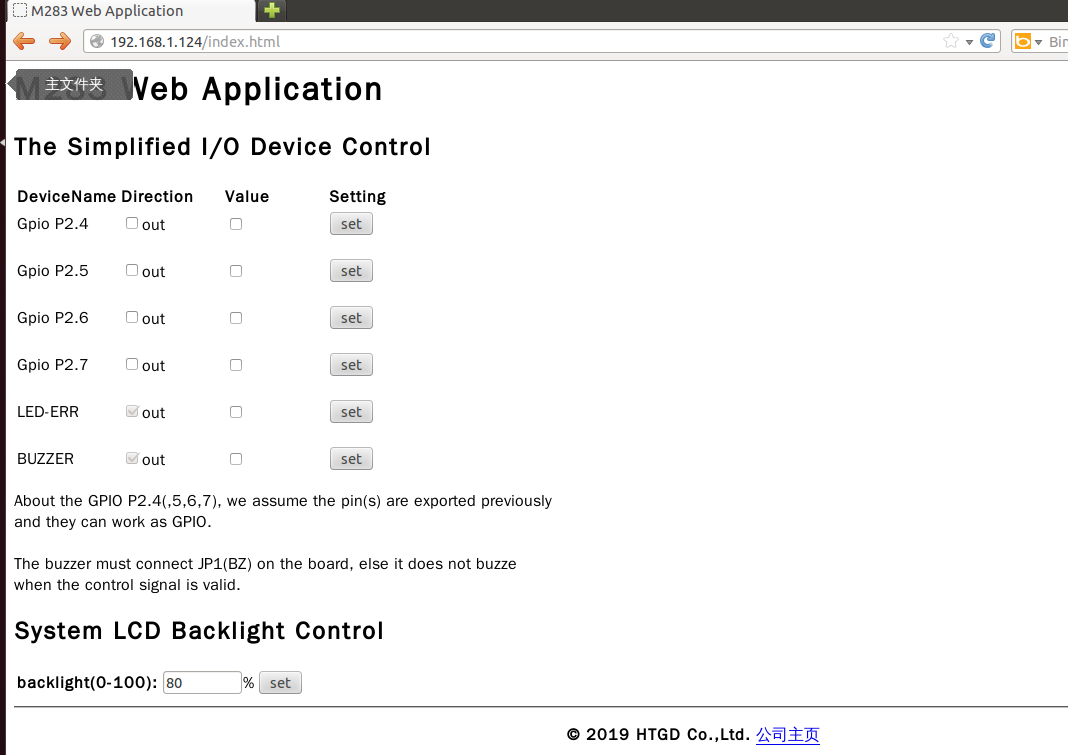
然后执行 ./goahead -v ./web/
默认打开 index.html 其他页面直接写名称
GoAhead4.1.0 开发总结一(移植)的更多相关文章
- GoAhead4.1.0 开发总结二(自定义使用)
环境 官方文档:https://www.embedthis.com/goahead/doc/ 源码下载: goahead-4.1.0-src.tgz 系统平台:Ubuntu 12.04.4 gcc v ...
- GoAhead4.1.0 开发总结三(GoAction+Ajax实现局部数据交互)
环境 官方文档:https://www.embedthis.com/goahead/doc/ 源码下载: goahead-4.1.0-src.tgz 系统平台:Ubuntu 12.04.4 gcc v ...
- 【转】Vsftpd-3.0.2服务器arm-linux移植—mini2440开发板
Vsftpd-3.0.2服务器arm-linux移植—mini2440开发板 开发板:mini2440(2011.04.21)环境:ubuntu9.10 为方便的将文件上传到开发板,采用vsftpd, ...
- EJB3.0开发环境的搭建
EJB Container的介绍SUN公司正式推出了EJB的规范之后,在众多的公司和开发者中引起了非常大的反响.标志着用Java开发企业级应用系统将变的非常easy.很多公司都已经推出了或正打算EJB ...
- 【分享】iTOP4412开发板-Bluetooth移植文档
[分享]iTOP4412开发板-Bluetooth移植文档 最近须要把Bluetooth移植到iTOP-4412 开发平台.查阅了相关资料,经过一段时间的研究.调试,最终成功的将蓝牙功能移植到了开发板 ...
- (转)规划从 OpenGL ES 2.0 到 Direct3D 的移植
如果你移植 iOS 或 Android 平台中的游戏,那么你可能需要在 OpenGL ES 2.0 方面进行大量投资.如果你准备将你的图形管道代码库移动到 Direct3D 11 和 Windows ...
- 【VS开发】如何移植对话框?
[VS开发]如何移植对话框? 标签:[VS开发] 问题描述:当开发好一个可视化界面的时候,想将其移植到另外的工程中,这个时候希望能够导出对话框资源,好直接在另一个工程中进行编辑,而不用再次编辑对话框上 ...
- IMX6开发板Qtopia2.2.0开发环境搭建以及编译镜像
搭建 Qtopia2.2.0 开发环境,需要先搭建 Android 的编译环境,然后在 Android 编译环境的基础上,再搭建 Qtopia2.2.0 编译环境.以下内容基于迅为-iMX6开发板.Q ...
- ASP.NET Core 1.0 开发记录
官方资料: https://github.com/dotnet/core https://docs.microsoft.com/en-us/aspnet/core https://docs.micro ...
随机推荐
- 【spring boot 系列】spring data jpa 全面解析(实践 + 源码分析)
前言 本文将从示例.原理.应用3个方面介绍spring data jpa. 以下分析基于spring boot 2.0 + spring 5.0.4版本源码 概述 JPA是什么? JPA (Java ...
- 斯特林(Stirling)公式 求大数阶乘的位数
我们知道整数n的位数的计算方法为:log10(n)+1n!=10^m故n!的位数为 m = log10(n!)+1 lgN!=lg1+lg2+lg3+lg4+lg5+................. ...
- zoj2479 Cover the Rectangular Ground
肯定是dfs搜一下的,但是呢存在一个很大的剪枝,也就是面积必定要是相等的,那么如何去操作呢,可以想到的是二进制枚举选取的方法,然后把方法中选取的矩形面积求和并判断一下即可,然后dfs搜索,要注意的是, ...
- Android GIS开发系列计划
本系列博客的整理与写作计划如下,计划3个月(至2018.2)完成. 第一部分, 入门季 第二部分, Android基础季 第三部分, Data Flow 季 第四部分, 可视化季 第五部分, GIS常 ...
- SD卡 驱动层测速
init_timer(&timer1); timer1.function = test_time; timer1.data = ; timer1.expires = jiffies + mse ...
- Java之旅(1)—Class类
看到Class的时候,我们是不是会一下子想到我们敲代码中的class呢?此Class非彼class,这里讲的Class类实际上就是java类的统称,我们能够将其称之为抽象的类不是详细的一个类的名字. ...
- 旧瓶新酒之ngx_lua & fail2ban实现主动诱捕
服务器承担着业务运行及数据存储的重要作用,因此极易成为攻击者的首要目标.如何对业务服务器的安全进行防护,及时找出针对系统的攻击,并阻断攻击,最大程度地降低主机系统安全的风险程度,是企业安全从业人员面临 ...
- C++虚函数表剖析
关键词:虚函数.虚表,虚表指针,动态绑定,多态 一.概述 为了实现C++的多态,C++使用了一种动态绑定的技术. 这个技术的核心是虚函数表(下文简称虚表).本文介绍虚函数表是怎样实现动态绑定的. 二. ...
- Kinect驱动的人脸实时动画
近期几年.realtime的人脸动画開始风声水起.不少图形图像的研究者開始在这个领域不断的在顶级会议siggraph和期刊tog上面发文章. 随着kinect等便宜的三维数据採集设备的运用.以及其功能 ...
- spring中编程式事务控制
step1:配置xml文件 <!-- 事务管理bean --> <bean id="transactionManager" class="org.spr ...