
Tomcat server.xml配置文件
server.xml配置文件:
<?xml version="1.0" encoding="UTF-8"?>
<!--
Licensed to the Apache Software Foundation (ASF) under one or more
contributor license agreements. See the NOTICE file distributed with
this work for additional information regarding copyright ownership.
The ASF licenses this file to You under the Apache License, Version 2.0
(the "License"); you may not use this file except in compliance with
the License. You may obtain a copy of the License at http://www.apache.org/licenses/LICENSE-2.0 Unless required by applicable law or agreed to in writing, software
distributed under the License is distributed on an "AS IS" BASIS,
WITHOUT WARRANTIES OR CONDITIONS OF ANY KIND, either express or implied.
See the License for the specific language governing permissions and
limitations under the License.
-->
<!-- Note: A "Server" is not itself a "Container", so you may not
define subcomponents such as "Valves" at this level.
Documentation at /docs/config/server.html
-->
<Server port="" shutdown="SHUTDOWN">
<Listener className="org.apache.catalina.startup.VersionLoggerListener" />
<!-- Security listener. Documentation at /docs/config/listeners.html
<Listener className="org.apache.catalina.security.SecurityListener" />
-->
<!--APR library loader. Documentation at /docs/apr.html -->
<Listener className="org.apache.catalina.core.AprLifecycleListener" SSLEngine="on" />
<!-- Prevent memory leaks due to use of particular java/javax APIs-->
<Listener className="org.apache.catalina.core.JreMemoryLeakPreventionListener" />
<Listener className="org.apache.catalina.mbeans.GlobalResourcesLifecycleListener" />
<Listener className="org.apache.catalina.core.ThreadLocalLeakPreventionListener" /> <!-- Global JNDI resources
Documentation at /docs/jndi-resources-howto.html
-->
<GlobalNamingResources>
<!-- Editable user database that can also be used by
UserDatabaseRealm to authenticate users
-->
<Resource name="UserDatabase" auth="Container"
type="org.apache.catalina.UserDatabase"
description="User database that can be updated and saved"
factory="org.apache.catalina.users.MemoryUserDatabaseFactory"
pathname="conf/tomcat-users.xml" />
</GlobalNamingResources> <!-- A "Service" is a collection of one or more "Connectors" that share
a single "Container" Note: A "Service" is not itself a "Container",
so you may not define subcomponents such as "Valves" at this level.
Documentation at /docs/config/service.html
-->
<Service name="Catalina"> <!--The connectors can use a shared executor, you can define one or more named thread pools-->
<!--
<Executor name="tomcatThreadPool" namePrefix="catalina-exec-"
maxThreads="" minSpareThreads=""/>
--> <!-- A "Connector" represents an endpoint by which requests are received
and responses are returned. Documentation at :
Java HTTP Connector: /docs/config/http.html
Java AJP Connector: /docs/config/ajp.html
APR (HTTP/AJP) Connector: /docs/apr.html
Define a non-SSL/TLS HTTP/1.1 Connector on port
-->
<Connector port="" protocol="HTTP/1.1"

               connectionTimeout=""

               redirectPort="" />
<!--1、 同一个应用配置8080 8081两个端口-->
<Connector port="" protocol="HTTP/1.1"
connectionTimeout=""
redirectPort="" />
<!-- A "Connector" using the shared thread pool-->
<!--
<Connector executor="tomcatThreadPool"
port="" protocol="HTTP/1.1"
connectionTimeout=""
redirectPort="" />
-->
<!-- Define a SSL/TLS HTTP/1.1 Connector on port
This connector uses the NIO implementation. The default
SSLImplementation will depend on the presence of the APR/native
library and the useOpenSSL attribute of the
AprLifecycleListener.
Either JSSE or OpenSSL style configuration may be used regardless of
the SSLImplementation selected. JSSE style configuration is used below.
-->
<!--
<Connector port="" protocol="org.apache.coyote.http11.Http11NioProtocol"
maxThreads="" SSLEnabled="true">
<SSLHostConfig>
<Certificate certificateKeystoreFile="conf/localhost-rsa.jks"
type="RSA" />
</SSLHostConfig>
</Connector>
-->
<!-- Define a SSL/TLS HTTP/1.1 Connector on port with HTTP/
This connector uses the APR/native implementation which always uses
OpenSSL for TLS.
Either JSSE or OpenSSL style configuration may be used. OpenSSL style
configuration is used below.
-->
<!--
<Connector port="" protocol="org.apache.coyote.http11.Http11AprProtocol"
maxThreads="" SSLEnabled="true" >
<UpgradeProtocol className="org.apache.coyote.http2.Http2Protocol" />
<SSLHostConfig>
<Certificate certificateKeyFile="conf/localhost-rsa-key.pem"
certificateFile="conf/localhost-rsa-cert.pem"
certificateChainFile="conf/localhost-rsa-chain.pem"
type="RSA" />
</SSLHostConfig>
</Connector>
--> <!-- Define an AJP 1.3 Connector on port -->
<Connector port="" protocol="AJP/1.3" redirectPort="" /> <!-- An Engine represents the entry point (within Catalina) that processes
every request. The Engine implementation for Tomcat stand alone
analyzes the HTTP headers included with the request, and passes them
on to the appropriate Host (virtual host).
Documentation at /docs/config/engine.html --> <!-- You should set jvmRoute to support load-balancing via AJP ie :
<Engine name="Catalina" defaultHost="localhost" jvmRoute="jvm1">
-->
<Engine name="Catalina" defaultHost="localhost"> <!--For clustering, please take a look at documentation at:
/docs/cluster-howto.html (simple how to)
/docs/config/cluster.html (reference documentation) -->
<!--
<Cluster className="org.apache.catalina.ha.tcp.SimpleTcpCluster"/>
--> <!-- Use the LockOutRealm to prevent attempts to guess user passwords
via a brute-force attack -->
<Realm className="org.apache.catalina.realm.LockOutRealm">
<!-- This Realm uses the UserDatabase configured in the global JNDI
resources under the key "UserDatabase". Any edits
that are performed against this UserDatabase are immediately
available for use by the Realm. -->
<Realm className="org.apache.catalina.realm.UserDatabaseRealm"
resourceName="UserDatabase"/>
</Realm> <Host name="localhost" appBase="webapps"
unpackWARs="true" autoDeploy="true">
<!--2、 此处加入context标签,可以直接使用localhost:8080访问到wlsweb项目-->
<Context path="" docBase="/wlsweb" />
<!-- SingleSignOn valve, share authentication between web applications
Documentation at: /docs/config/valve.html -->
<!--
<Valve className="org.apache.catalina.authenticator.SingleSignOn" />
--> <!-- Access log processes all example.
Documentation at: /docs/config/valve.html
Note: The pattern used is equivalent to using pattern="common" -->
<Valve className="org.apache.catalina.valves.AccessLogValve" directory="logs"
prefix="localhost_access_log" suffix=".txt"
pattern="%h %l %u %t "%r" %s %b" /> </Host>
</Engine>
</Service>
</Server>
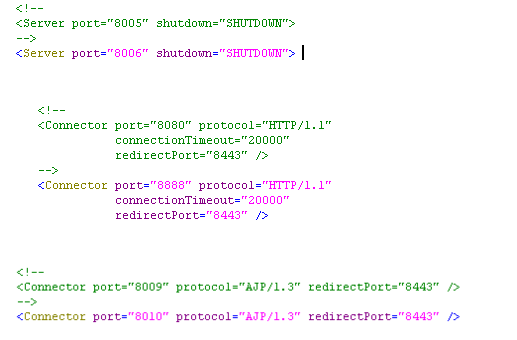
1)server.xml配置文件中第一个红色标记处加入如下内容:可以实现不同的端口访问同一个应用,如果想配置多个端口,继续在后面追加;
<Connector port="" protocol="HTTP/1.1"
connectionTimeout=""
redirectPort="" />
2)server.xml 配置文件第二个红色标记处加入如下内容:可以实现直接使用localhost+端口号访问项目,比如在webapps下放了一个wlsweb项目。想直接通过访问localhost:8080访问,可以直接在<host>里面加入如下内容:
<Context path="" docBase="/wlsweb" />
这样直接访问到了welweb不能再访问到ROOT。
3)一个电脑上配置两个或多个tomcat只需要复制一个副本,修改配置文件三处即可。否则会启动异常。
Tomcat server.xml配置文件的更多相关文章
- tomcat server.xml配置文件 解析
把服务拆分出来了. 前几天我也进行了拆分.可是当时服务起不来所以我想会不会有什么设置,使得这个服务在主机中只能启一个.然后我又找了一台服务器,也把代码放了进去.结果仿佛是我料想到的样子, ...
- tomcat设置默认欢迎页、server.xml配置文件中的标签理解
一:要求:输入网址,不加文件名便可以访问默认页面 (1)项目中只有静态文件 方法:更改tomcat下的conf目录下的web.xml文件,如下图: <welcom-file-list>元素 ...
- web服务器专题:tomcat(二)模块组件与server.xml 配置文件
web服务器专题:tomcat(二)模块组件与server.xml 配置文件 回顾: Web服务器专题:tomcat(一) 基础模块 一个Server.xml的实例 <?xml version= ...
- tomcat server.xml docbase workdir
在tomcat安装好后,只要把你的web项目copy到%TOMCAT_HOME%webapp下面就可以是使用啦!!其实还有种方法就是设定虚拟目录,即把项目的目录映射到tomcat中.这样做即可以不用重 ...
- tomcat——Server.xml
本机tomcat位置:D:\tomcat7\apache-tomcat-7.0.61 server.xml 位置:D:\tomcat7\apache-tomcat-7.0.61\conf 注意:ser ...
- Tomcat server.xml UTF-8配置
Tomcat server.xml UTF-8配置 <Connector port="8080" maxThreads="150" minSpareThr ...
- tomcat 的 server.xml配置文件
tomcat的配置文件在其安装后生成的conf目录下,其中主配置文件便是conf下的server.xml文件. server.xml文件由server->service->engine-& ...
- Tomcat下的Server.xml配置文件详解
自15年毕业到现在已经入行两年多了,一直以来没有深入的了解过tomcat的详细配置,只懂修改一下端口号.在网上找了些相关资料来支撑这篇文章,深入了解server.xml文件各配置的作用 <?xm ...
- 原 tomcat的server.xml配置文件中三个端口的作用
以Tomcat7.0为例, 在安装目录下. conf/server.xml 中可以配置三个端口号, 如果使用多个tomcat 是需要配置这三个. 该Connector 用于监听请求. protocol ...
随机推荐
- 360安全中心:WannaCry勒索软件威胁形势分析
猫宁!!! 参考链接:http://zt.360.cn/1101061855.php?dtid=1101062360&did=210646167 这不是全文,而是重点摘要部分. 2017年5月 ...
- LuoguP2700逐个击破【并查集/生成树/正难则反】By cellur925
题目传送门 题目大意:给你一棵树,求把其中k个点相互隔离(不连通)所需要的边权代价. 这题我开始是想要求出把k个点联通的最小代价的,但后来发现还是实现起来比较困难,题解里貌似也没有这种做法,于是就鸽了 ...
- Ubuntu 18.04 LTS 常见问题解决 2
1 每次重启后都有system program problem detected sudo gedit /etc/default/apport 然后将打开的文件中的enabled=1改为0,原因暂时不 ...
- iOS NavigationBar 导航栏自定义
1. 设置导航栏NavigationBar的背景颜色: a) setBarTintColor : 设置NagivationBar的颜色 也可以用 : [[UINavigationBar appear ...
- SAE部署Python-让云端自动运行Python代码
之前写过模拟登录新浪微博的帖子,然而我并没有去爬过微博的数据,觉得有点浪费,于是就想写一个代码来发微博.写完之后觉得如果能自动发微博就好了,但是我又不可能24小时开始(晚上12点后还会断网),也没有v ...
- css3 background-size属性--ie兼容
css3 background-size属性--ie兼容 safari浏览器对background-size 属性显示原始大小 background-size: cover not working o ...
- linux实现多台服务器文件同步
inotify-tools+rsync实时同步文件安装和配置 Linux+Nginx+PHP+MySQL+MemCached+eaccelerator安装优化记录(见 http://www.linux ...
- AIDL(1):简介
Android 接口定义语言 (AIDL) 1.AIDL是什么 AIDL(Android 接口定义语言)与您可能使用过的其他 IDL 类似. 您可以利用它定义客户端与服务使用进程间通信 (IPC) 进 ...
- bash 变量传递方法
###1.sh ##(该sh 目的是 将变量env传入env.sh, 同时让env.sh在当前事物生效,最后执行env.sh 定义的变量envs) export ENV=prepareecho ...
- 动手实现 Redux(六):Redux 总结
不知不觉地,到这里大家不仅仅已经掌握了 Redux,而且还自己动手写了一个 Redux.我们从一个非常原始的代码开始,不停地在发现问题.解决问题.优化代码的过程中进行推演,最后把 Redux 模式自己 ...