
Android开发-之认识palette
Android开发中,Google工程师已经给我们封装好了很多的按钮,使得我们在开发中非常的方便和便捷。
那么今天就来认识一下常用的按钮,那么在之前的课程中我已经详细讲过了Button按钮,那么这里就不再重复了
Android开发-之监听button点击事件:http://www.cnblogs.com/xiao-chuan/p/6074075.html
一、常用按钮
1、按钮公共属性
按钮的公共属性包括:1)常用的样式属性
a、background
b、margin
c、……
2)宽高
a、width
b、height
3)大小
a、size
b、max(min)
c、……
4)文本显示内容
a、text
b、hint
5)唯一键ID
a、id
6)点击事件
2、TextView:
TextView:文本框
autoLink:文本的默认路径
<TextView

        android:layout_width="match_parent"

        android:layout_height="50sp"

        android:text="中国移动:10086"

        android:textSize="20sp"

        android:autoLink="phone"

        />

    <TextView

        android:layout_width="match_parent"

        android:layout_height="50sp"

        android:text="站长邮箱:10086@qq.com"

        android:textSize="20sp"

        android:autoLink="email"

        />

    <TextView

        android:layout_width="match_parent"

        android:layout_height="50sp"

        android:text="有事找百度:http://www.baidu.com"

        android:textSize="20sp"

        android:autoLink="web"

        />
那么在这里呢,如果点击第一个 TextView默认效果就是电话啦,那么第二个第三个呢~~一下是实现的效果图,这里大家可以看到我并没有指定文本颜色,这里注意的是autoLink有默认的颜色啦!

3、EditText
EditText输入框
inputType:输入框输入的文本格式
<EditText

        android:id="@+id/userName"

        android:layout_width="match_parent"

        android:layout_height="wrap_content"

        android:hint="请输入用户名"

        android:textColor="@android:color/holo_red_light"

        android:textSize="20sp"

        android:inputType="text"

        android:maxLength="12"

        />

    <EditText

        android:id="@+id/userAge"

        android:layout_width="match_parent"

        android:layout_height="wrap_content"

        android:hint="请输入年龄"

        android:maxLength="3"

        android:numeric="integer"

        android:inputType="number"

        />

    <EditText

        android:id="@+id/userPwd"

        android:layout_width="match_parent"

        android:layout_height="wrap_content"

        android:hint="请输入密码"

        android:maxLength="12"

        android:password="true"

        android:inputType="textPassword"

        />

    <EditText

        android:id="@+id/userAddress"

        android:layout_width="match_parent"

        android:layout_height="wrap_content"

        android:hint="请输入详细地址"

        android:maxLength="500"

        android:lines="3"

        android:inputType="textMultiLine"

        />
inputType:
text:文本格式
textPassword:密码格式
number:数字格式
textMultiLink:地址栏格式
……
注:那么你输入的时候呢输入法也会自动切换输入的方式,以密码格式输入那么输入的内容是不可见的。
4、Bar
这里分为:
1)SeekBar:调度,就比如我们的音量,亮度等
2)RatingBar:选择,常见到的就是在电商网站上面的评论等
3)ProgressBar:加载、下载,加载图片,下载文件等
<TextView

        android:id="@+id/showText"

        android:layout_width="match_parent"

        android:layout_height="wrap_content"

        android:text="我是一个TextView"

        android:textSize="20sp"

        />

    <SeekBar

        android:id="@+id/seekBar"

        android:layout_width="match_parent"

        android:layout_height="wrap_content"

        android:max="50"

        android:progress="20"

        />

    <RatingBar

        android:id="@+id/ratingBar"

        android:layout_width="wrap_content"

        android:layout_height="wrap_content"

        android:numStars="5"

        android:rating="1"

        android:stepSize="1"

        />

    <ProgressBar

        android:id="@+id/progressBar"

        android:layout_width="match_parent"

        android:layout_height="wrap_content"

        android:max="100"

        android:progress="10"

        />

    <ProgressBar

        android:id="@+id/progressBar2"

        android:layout_width="match_parent"

        android:layout_height="wrap_content"

        android:max="100"

        android:progress="10"

        style="?android:attr/progressBarStyleLarge"

        />

    <ProgressBar

        android:id="@+id/progressBar3"

        android:layout_width="match_parent"

        android:layout_height="wrap_content"

        android:max="100"

        android:progress="10"

        style="?android:attr/progressBarStyleHorizontal"

        />

    <LinearLayout android:layout_width="match_parent"

        android:layout_height="wrap_content" android:orientation="horizontal">

        <Button

            android:layout_width="0dp"

            android:layout_weight="1"

            android:layout_height="wrap_content"

            android:text="开始"

            android:onClick="doStart"

            />

        <Button

            android:layout_width="0dp"

            android:layout_weight="1"

            android:layout_height="wrap_content"

            android:text="结束"

            android:onClick="doStop"

            />

    </LinearLayout>
页面效果:
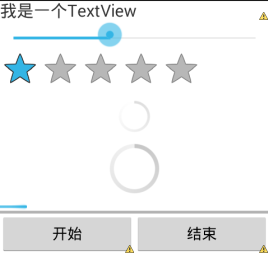
以下是为了让大家更加清楚它们的效果和区别:
private SeekBar sb;

    private TextView showText;

    private RatingBar rb;

    private ProgressBar pb3;

    @Override

    protected void onCreate(Bundle savedInstanceState) {

        super.onCreate(savedInstanceState);

        setContentView(R.layout.activity_seek_bars);

        showText=(TextView)findViewById(R.id.showText);

        sb=(SeekBar)findViewById(R.id.seekBar);

        rb=(RatingBar)findViewById(R.id.ratingBar);

        pb3=(ProgressBar)findViewById(R.id.progressBar3);

        //为seekBar绑定事件

        sb.setOnSeekBarChangeListener(new OnSeekBarChangeListener() {

            @Override

            public void onStopTrackingTouch(SeekBar seekBar) {

            }

            @Override

            public void onStartTrackingTouch(SeekBar seekBar) {

            }

            @Override

            public void onProgressChanged(SeekBar seekBar, int progress,

                    boolean fromUser) {

                //改变showText字体大小

                showText.setTextSize(progress);

            }

        });

        rb.setOnRatingBarChangeListener(new OnRatingBarChangeListener() {

            @Override

            public void onRatingChanged(RatingBar ratingBar, float rating,

                    boolean fromUser) {

                Toast.makeText(SeekBarsActivity.this, "你选择了"+rating+"星", 3000).show();

            }

        });

    }

    //开始下载[注意:除了ProgressBar外,所有的UI都必须在UI主线程中操作]

    boolean isRun=true;

    public void doStart(View view) throws Exception{

        isRun=true;

        //构建一个执行进度条变化的子线程

        new Thread(new Runnable() {

            @Override

            public void run() {

                //耗时操作不能放在主线程中执行

                while(isRun){

                    if(pb3.getProgress()<100){

                        pb3.setProgress(pb3.getProgress()+1);

                        try {

                            Thread.sleep(50);

                        } catch (InterruptedException e) {

                            e.printStackTrace();

                        }

                    }else{

                        isRun=false;

                        //最简单方法实现在多线程更新UI

                        runOnUiThread(new Runnable() {

                            public void run() {

                                Toast.makeText(SeekBarsActivity.this, "下载完毕",3000).show();

                            }

                        });

                    }

                }

            }

        }).start();

    }

    //结束下载

    public void doStop(View view){

        isRun=false;

    }
注意:
  1)除了ProgressBar外,所有的UI都必须在UI主线程中操作,否则会报错
  2)耗时操作不能放在主线程中执行,否则会报错

  3)Google工程师让Android4.0以后的版本都不支持以上两点了,那么有人就要纠结了,那位了维护低版本,要怎么办~~自己想,很简单的问题!
5、Image与单选多选框
1)imageButton:图片按钮
2)imageView:图片视图
imageView与HTML5对比:
imageView:运行更流畅,在没有网络的情况下也可以使用。。
HTML5:运行时不够流畅,没有网就废了……但是优点在于页面更加美观,数据传输更加便捷。。
3)RadioButton:单选框,各元素是互斥的,只能选择一个,比如性别
4)CheckBox:多选按钮,可以选择多个,比如爱好
5)ToggleButton:单个提示按钮,比如开关
<RadioGroup android:id="@+id/rgsex"

        android:layout_width="match_parent"

        android:layout_height="wrap_content"

        android:orientation="horizontal">

        <RadioButton

            android:id="@+id/sexOne"

            android:layout_width="wrap_content"

            android:layout_height="wrap_content"

            android:text="男"

            android:checked="true"

            />

        <RadioButton

            android:id="@+id/sexTwo"

            android:layout_width="wrap_content"

            android:layout_height="wrap_content"

            android:text="女"

            />

    </RadioGroup>

    <LinearLayout android:layout_width="match_parent"

        android:layout_height="wrap_content"

        android:orientation="horizontal">

        <CheckBox

            android:id="@+id/cb1"

            android:layout_width="wrap_content"

            android:layout_height="wrap_content"

            android:text="篮球"

            />

        <CheckBox

            android:id="@+id/cb2"

            android:layout_width="wrap_content"

            android:layout_height="wrap_content"

            android:text="足球"

            />

        <CheckBox

            android:id="@+id/cb3"

            android:layout_width="wrap_content"

            android:layout_height="wrap_content"

            android:text="羽毛球"

            />

    </LinearLayout>

    <ToggleButton

        android:id="@+id/stateButton"

        android:layout_width="wrap_content"

        android:layout_height="wrap_content"

        android:textOn="开灯"

        android:textOff="关灯"

        android:checked="true"

        />

    <ImageButton

        android:layout_width="wrap_content"

        android:layout_height="wrap_content"

        android:src="@drawable/image001"

        android:scaleType="fitXY"

        android:maxWidth="120dp"

        android:maxHeight="60dp"

        android:adjustViewBounds="true"

        android:onClick="getValues"

        />
效果如下:
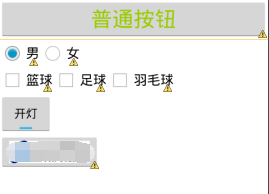
ps:图片打码了是因为实在找不到合适的图片然后又不想给人家打广告又不得钱……
以下同样为了更加清楚它们的效果和区别:
private RadioGroup rg;

    private CheckBox cb1,cb2,cb3;

    @Override

    protected void onCreate(Bundle savedInstanceState) {

        super.onCreate(savedInstanceState);

        setContentView(R.layout.activity_buttons);

        cb1=(CheckBox)findViewById(R.id.cb1);

        cb2=(CheckBox)findViewById(R.id.cb2);

        cb3=(CheckBox)findViewById(R.id.cb3);

        rg=(RadioGroup)findViewById(R.id.rgsex);

        //监听单选按钮组事件

        rg.setOnCheckedChangeListener(new OnCheckedChangeListener() {

            @Override

            public void onCheckedChanged(RadioGroup group, int checkedId) {

                RadioButton rb=(RadioButton)findViewById(checkedId);

                Toast.makeText(ButtonsActivity.this, "你选择了:"+rb.getText().toString(), 3000).show();

            }

        });

    }

    //取值[单选按钮|复选框]

    public void getValues(View view){

        //单选按钮

        RadioButton rb=(RadioButton)findViewById(rg.getCheckedRadioButtonId());

        StringBuffer sb=new StringBuffer();

        sb.append("性别:"+rb.getText().toString()+"\n");

        //复选框

        sb.append("爱好:");

        if(cb1.isChecked())

            sb.append(cb1.getText().toString()+",");

        if(cb2.isChecked())

            sb.append(cb2.getText().toString()+",");

        if(cb3.isChecked())

            sb.append(cb3.getText().toString()+",");

        Toast.makeText(this, sb.toString(), 5000).show();

    }
PS:Google工程师都给我们封装好了,我们可以直接使用。我们也可以自己写一个底层的框架去实现这些按钮,相信大家在学习Java的时候这些按钮的实现都已经自己有写过了,其实Google工程师所封装的底层代码也是那样子实现的。只是说~谁那么无聊啊现成的不用!但是如果大家以后做Android框架开发的时候……就需要自己写了~在基础知识更新完了以后呢……就会涉及到比较高级的内容了哈哈哈哈……完全还没有准备!
二、总结
1、其实还有很多常用的以及一些不常用的,不管怎样都希望大家能够养成自学的习惯……到了公司更是如此!
2、Android框架的开发单纯的就是Java知识,所以跟Android开发没什么关系,但是又要对Android有很高的认知!
3、可以在Android页面中嵌套,但是要区分HTML5与Android palette之间的区别!
4、TextView和EditView的区别,其实很大……
5、palette要与相应的事件和业务逻辑一起使用才会真正的有意义,比如数据的传输~~在以后的课程中我会详细的讲解到。
Android开发-之认识palette的更多相关文章
- android 开发 对图片编码,并生成gif图片
demo场景: 将2张静态的png格式图片组合生成一个gif图片,间隔500毫秒,关键类:AnimatedGifEncoder 如需要解析gif获取每帧的图片,可参考上一篇博客:<android ...
- android 开发从入门到精通
Android-Tips This is an awesome list of tips for android. If you are a beginner, this list will be t ...
- 【转】Android开发笔记(序)写在前面的目录
原文:http://blog.csdn.net/aqi00/article/details/50012511 知识点分类 一方面写写自己走过的弯路掉进去的坑,避免以后再犯:另一方面希望通过分享自己的经 ...
- 2015年Android开发新技术盘点
又到年末. 利用中午的时间,汇总盘点一下今年Android开发方面的新技术.感觉如今Android开发没有曾经那么纯粹了,出现了非常多新的开发模式. 2015年影响比較普遍的新技术应该就是Materi ...
- 50、转自知乎上android开发相见恨晚的接口
原文链接:http://www.zhihu.com/question/33636939 程序员软件开发Android 开发JavaAndroid修改 Android开发中,有哪些让你觉得相 ...
- Android开发常用开源框架:图片处理
https://blog.csdn.net/SGQ_CSDN/article/details/79910709 Android开发常用开源框架:图片处理 框架名称 功能描述 Android Unive ...
- Android学习探索之Java 8 在Android 开发中的应用
前言: Java 8推出已经将近2年多了,引入很多革命性变化,加入了函数式编程的特征,使基于行为的编程成为可能,同时减化了各种设计模式的实现方式,是Java有史以来最重要的更新.但是Android上, ...
- Android 开发一定要看的15个实战项目
前言: 虽说网上有太多的Android课程,但是大多都是视频,有Android在线开发环境的几乎没有,但是对于学习Android的人来说拥有在线的Android开发环境是非常好的,可以随时动手操作学习 ...
- Android开发学习之路-关于Exception
Exception在Java中是表示异常的一个类.它是Throwable的子类. 而Exception的子类RuntimeException是一个特殊的异常类,在代码中不需要对此类进行throw,而是 ...
随机推荐
- IE浏览器下一些图片无法显示的(在其他非ie浏览器能够显示)解决办法
因为要完成本学期老师布置得网页作业,做完的时候进行网页的兼容性测试,chrome和360都没有问题. ie下却有两个图片无法显示. 一般这种情况代码是没有什么问题的,一般是图片本身的问题, 当我用Ps ...
- linux菜鸟日记(5)
iptables详细语法及配置: SNAT:源地址转换DNAT:目标地址转换PNAT:端口地址转换 ----------------------------------iptables规则链 路由以后 ...
- bzoj1001最小割
听说最大流过不去??? dinic果然神了,1000,000的点都能过(主要是比较稀疏) #include <cstdio> #define INF 9223372036854775807 ...
- Ejabberd导入到eclipse
ejabberd 在eclipse(erlide)中的配置.调试.运行 最近在折腾ejabberd,将ejabberd项目配置到eclipse中进行编译.调试等,现在将过程记下来,希望能帮助到需要 ...
- SQLServer触发器创建、删除、修改、查看
一: 触发器是一种特殊的存储过程﹐它不能被显式地调用﹐而是在往表中插入记录﹑更新记录或者删除记录时被自动地激活.所以触发器可以用来实现对表实施复杂的完整性约束. 二: SQL Server为每个触发器 ...
- jquery中focus()失效怎么解决
又学到一个新的知识! 今天在写表单验证的时候遇到一个关于获取焦点的focus()问题. 场景说明:在验证密码输入格式不对之后,弹出alert()提示框,提示密码不对,请重新输入.同时清空密码框并获得焦 ...
- android studio/Intellij idea之proguard实践
默认情况下,build->Gene Signed APK 反编译后发现,没有混淆... 多次爬stackoverflow才搞定这个问题: 首先 build variants这里由debug设置为 ...
- liunx常用的命令
计算机网络的主要优点是能够实现资源和信息的共享,并且用户可以远程访问信息.Linux提供了一组强有力的网络命令来为用户服务,这些工具能够帮助用户登录到远程计算机上.传输文件和执行远程命令等. 本章介绍 ...
- 深入理解css BFC 模型
如果要深入理解css布局的各种原理,要在重构页面做得心应手的话,那么你就必须先理解这玩意 "BFC" , BlockFormatting Context(块级格式化上下文): 这里 ...
- 验证mongodb主从复制过程~记录操作
接 mongodb的安装:http://www.cnblogs.com/myrunning/p/4319367.html 1.1创建数据目录 在这里我们将不使用mongodb的配置文件启动mongod ...