
Android自动连接指定的wifi,免密码或指定密码
一、运行时的状态
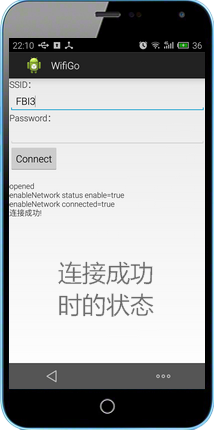
遇到一个这样的要求:“不进行扫描操作,怎么对指定的免密码WIFI进行连接(之前没有连接过)”,于是动手写了一个Demo,如图所示未连接成功时的状态,第一个编辑框让用户输入SSID,第二个编辑框输入密码,密码可以根据实例情况输入,也可以不输入密码,因为有些Wifi免密码。这里的免密码不是指可以破解wifi密码。注意图片中手机顶部的wifi图标,是没有的,说明此时并没有打开手机的wifi。在手机上运行状态如下所示:

输入SSID,点击连接后的状态,当手机的wifi没有打开时,程序将自动打开wifi,打开后再连接指定的wifi。
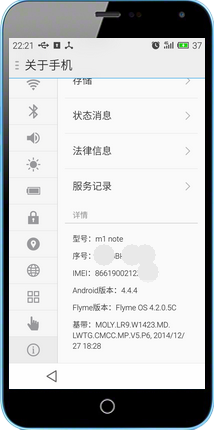
测试的手机信息如下:
二、功能实现
2.1、项目结构如下所示:

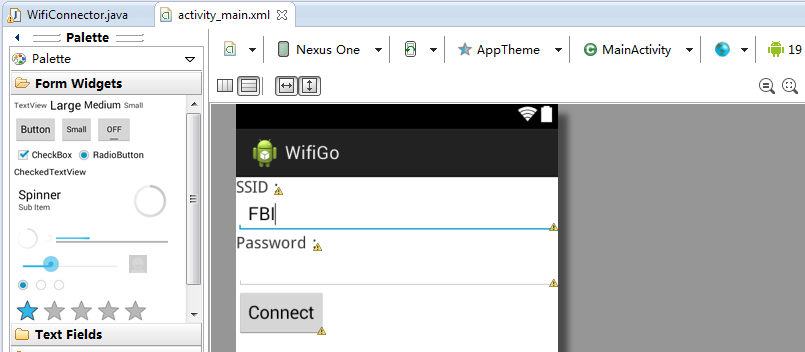
2.2、页面布局activity_main.xml文件如下所示:
<LinearLayout xmlns:android="http://schemas.android.com/apk/res/android"

    android:layout_width="fill_parent"

    android:layout_height="fill_parent"

    android:orientation="vertical" >

    <TextView

        android:id="@+id/txtSSID"

        android:layout_width="wrap_content"

        android:layout_height="wrap_content"

        android:text="SSID:"

        android:textSize="@dimen/activity_horizontal_margin" />

    <EditText

        android:id="@+id/editSSID"

        android:layout_width="match_parent"

        android:layout_height="wrap_content"

        android:ems="10"

        android:text="FBI" >

        <requestFocus />

    </EditText>

    <TextView

        android:id="@+id/TextView01"

        android:layout_width="wrap_content"

        android:layout_height="wrap_content"

        android:text="Password:"

        android:textSize="@dimen/activity_horizontal_margin" />

    <EditText

        android:id="@+id/editPwd"

        android:layout_width="match_parent"

        android:layout_height="wrap_content"

        android:ems="10"

        android:text="" />

    <Button

        android:id="@+id/btnConnect"

        android:layout_width="wrap_content"

        android:layout_height="wrap_content"

        android:text="Connect" />

    <TextView

        android:id="@+id/txtMessage"

        android:layout_width="wrap_content"

        android:layout_height="wrap_content"

        android:text="" />

</LinearLayout>
2.3、清单文件AndroidManifest.xml内容如下,中间添加了对wifi访问的用户权限部分非常重要
<?xml version="1.0" encoding="utf-8"?>

<manifest xmlns:android="http://schemas.android.com/apk/res/android"

    package="com.example.wifigo"

    android:versionCode="1"

    android:versionName="1.0" >

    <uses-sdk

        android:minSdkVersion="14"

        android:targetSdkVersion="19" />

    <uses-permission android:name="android.permission.CHANGE_NETWORK_STATE" >

    </uses-permission>

    <uses-permission android:name="android.permission.CHANGE_WIFI_STATE" >

    </uses-permission>

    <uses-permission android:name="android.permission.ACCESS_NETWORK_STATE" >

    </uses-permission>

    <uses-permission android:name="android.permission.ACCESS_WIFI_STATE" >

    </uses-permission>

    <application

        android:allowBackup="true"

        android:icon="@drawable/ic_launcher"

        android:label="@string/app_name"

        android:theme="@style/AppTheme" >

        <activity

            android:name=".MainActivity"

            android:label="@string/app_name" >

            <intent-filter>

                <action android:name="android.intent.action.MAIN" />

                <category android:name="android.intent.category.LAUNCHER" />

            </intent-filter>

        </activity>

    </application>

</manifest>
2.4、Wifi连接管理类WifiConnector.java,有不少是参考热心网友的博客,谢谢了!
package com.example.wifigo;

import java.util.List;

import android.net.wifi.*;

import android.net.wifi.WifiConfiguration.AuthAlgorithm;

import android.net.wifi.WifiConfiguration.KeyMgmt;

import android.os.Handler;

import android.os.Message;

import android.text.TextUtils;

import android.util.Log;

public class WifiConnector {

    Handler mHandler;

    WifiManager wifiManager;

    /**

     * 向UI发送消息

     * @param info 消息

     */

    public void sendMsg(String info) {

        if (mHandler != null) {

            Message msg = new Message();

            msg.obj = info;

            mHandler.sendMessage(msg);// 向Handler发送消息

        } else {

            Log.e("wifi", info);

        }

    }

    //WIFICIPHER_WEP是WEP ,WIFICIPHER_WPA是WPA,WIFICIPHER_NOPASS没有密码

    public enum WifiCipherType {

        WIFICIPHER_WEP, WIFICIPHER_WPA, WIFICIPHER_NOPASS, WIFICIPHER_INVALID

    }

    // 构造函数

    public WifiConnector(WifiManager wifiManager) {

        this.wifiManager = wifiManager;

    }

    // 提供一个外部接口,传入要连接的无线网

    public void connect(String ssid, String password, WifiCipherType type) {

        Thread thread = new Thread(new ConnectRunnable(ssid, password, type));

        thread.start();

    }

    // 查看以前是否也配置过这个网络

    private WifiConfiguration isExsits(String SSID) {

        List<WifiConfiguration> existingConfigs = wifiManager

                .getConfiguredNetworks();

        for (WifiConfiguration existingConfig : existingConfigs) {

            if (existingConfig.SSID.equals("\"" + SSID + "\"")) {

                return existingConfig;

            }

        }

        return null;

    }

    private WifiConfiguration createWifiInfo(String SSID, String Password,

            WifiCipherType Type) {

        WifiConfiguration config = new WifiConfiguration();

        config.allowedAuthAlgorithms.clear();

        config.allowedGroupCiphers.clear();

        config.allowedKeyManagement.clear();

        config.allowedPairwiseCiphers.clear();

        config.allowedProtocols.clear();

        config.SSID = "\"" + SSID + "\"";

        // nopass

        if (Type == WifiCipherType.WIFICIPHER_NOPASS) {

            config.allowedKeyManagement.set(WifiConfiguration.KeyMgmt.NONE);

        }

        // wep

        if (Type == WifiCipherType.WIFICIPHER_WEP) {

            if (!TextUtils.isEmpty(Password)) {

                if (isHexWepKey(Password)) {

                    config.wepKeys[0] = Password;

                } else {

                    config.wepKeys[0] = "\"" + Password + "\"";

                }

            }

            config.allowedAuthAlgorithms.set(AuthAlgorithm.OPEN);

            config.allowedAuthAlgorithms.set(AuthAlgorithm.SHARED);

            config.allowedKeyManagement.set(KeyMgmt.NONE);

            config.wepTxKeyIndex = 0;

        }

        // wpa

        if (Type == WifiCipherType.WIFICIPHER_WPA) {

            config.preSharedKey = "\"" + Password + "\"";

            config.hiddenSSID = true;

            config.allowedAuthAlgorithms

                    .set(WifiConfiguration.AuthAlgorithm.OPEN);

            config.allowedGroupCiphers.set(WifiConfiguration.GroupCipher.TKIP);

            config.allowedKeyManagement.set(WifiConfiguration.KeyMgmt.WPA_PSK);

            config.allowedPairwiseCiphers

                    .set(WifiConfiguration.PairwiseCipher.TKIP);

            // 此处需要修改否则不能自动重联

            // config.allowedProtocols.set(WifiConfiguration.Protocol.WPA);

            config.allowedGroupCiphers.set(WifiConfiguration.GroupCipher.CCMP);

            config.allowedPairwiseCiphers

                    .set(WifiConfiguration.PairwiseCipher.CCMP);

            config.status = WifiConfiguration.Status.ENABLED;

        }

        return config;

    }

    // 打开wifi功能

    private boolean openWifi() {

        boolean bRet = true;

        if (!wifiManager.isWifiEnabled()) {

            bRet = wifiManager.setWifiEnabled(true);

        }

        return bRet;

    }

    class ConnectRunnable implements Runnable {

        private String ssid;

        private String password;

        private WifiCipherType type;

        public ConnectRunnable(String ssid, String password, WifiCipherType type) {

            this.ssid = ssid;

            this.password = password;

            this.type = type;

        }

        @Override

        public void run() {

            try {

                // 打开wifi

                openWifi();

                sendMsg("opened");

                Thread.sleep(200);

                // 开启wifi功能需要一段时间(我在手机上测试一般需要1-3秒左右),所以要等到wifi

                // 状态变成WIFI_STATE_ENABLED的时候才能执行下面的语句

                while (wifiManager.getWifiState() == WifiManager.WIFI_STATE_ENABLING) {

                    try {

                        // 为了避免程序一直while循环,让它睡个100毫秒检测……

                        Thread.sleep(100);

                    } catch (InterruptedException ie) {

                    }

                }

                WifiConfiguration wifiConfig = createWifiInfo(ssid, password,

                        type);

                //

                if (wifiConfig == null) {

                    sendMsg("wifiConfig is null!");

                    return;

                }

                WifiConfiguration tempConfig = isExsits(ssid);

                if (tempConfig != null) {

                    wifiManager.removeNetwork(tempConfig.networkId);

                }

                int netID = wifiManager.addNetwork(wifiConfig);

                boolean enabled = wifiManager.enableNetwork(netID, true);

                sendMsg("enableNetwork status enable=" + enabled);

                boolean connected = wifiManager.reconnect();

                sendMsg("enableNetwork connected=" + connected);

                sendMsg("连接成功!");

            } catch (Exception e) {

                // TODO: handle exception

                sendMsg(e.getMessage());

                e.printStackTrace();

            }

        }

    }

    private static boolean isHexWepKey(String wepKey) {

        final int len = wepKey.length();

        // WEP-40, WEP-104, and some vendors using 256-bit WEP (WEP-232?)

        if (len != 10 && len != 26 && len != 58) {

            return false;

        }

        return isHex(wepKey);

    }

    private static boolean isHex(String key) {

        for (int i = key.length() - 1; i >= 0; i--) {

            final char c = key.charAt(i);

            if (!(c >= '0' && c <= '9' || c >= 'A' && c <= 'F' || c >= 'a'

                    && c <= 'f')) {

                return false;

            }

        }

        return true;

    }

}
2.5、MainActivity.java代码,完成接收用户的输入与调用wifi连接功能,如下所示:
package com.example.wifigo;

import com.example.wifigo.WifiConnector.WifiCipherType;

import android.app.Activity;

import android.content.Context;

import android.net.wifi.WifiManager;

import android.os.Bundle;

import android.os.Handler;

import android.os.Message;

import android.view.Menu;

import android.view.MenuItem;

import android.view.View;

import android.widget.Button;

import android.widget.EditText;

import android.widget.TextView;

import android.widget.Toast;

public class MainActivity extends Activity {

    Button btnConnect;

    WifiManager wifiManager;

    WifiConnector wac;

    TextView textView1;

    EditText editPwd;

    EditText editSSID;

    @Override

    protected void onCreate(Bundle savedInstanceState) {

        super.onCreate(savedInstanceState);

        setContentView(R.layout.activity_main);

        btnConnect = (Button) findViewById(R.id.btnConnect);

        textView1 = (TextView) findViewById(R.id.txtMessage);

        wifiManager = (WifiManager) getSystemService(Context.WIFI_SERVICE);

        wac = new WifiConnector(wifiManager);

         editPwd=(EditText) findViewById(R.id.editPwd);

         editSSID=(EditText) findViewById(R.id.editSSID);

        wac.mHandler = new Handler() {

            @Override

            public void handleMessage(Message msg) {

                // 操作界面

                textView1.setText(textView1.getText()+"\n"+msg.obj+"");

                super.handleMessage(msg);

            }

        };

        btnConnect.setOnClickListener(new Button.OnClickListener() {

            @Override

            public void onClick(View v) {

                try {

                    wac.connect(editSSID.getText().toString(), editPwd.getText().toString(),

                            editPwd.getText().toString().equals("")?WifiCipherType.WIFICIPHER_NOPASS:WifiCipherType.WIFICIPHER_WPA);

                } catch (Exception e) {

                    textView1.setText(e.getMessage());

                }

            }

        });

    }

    @Override

    public boolean onCreateOptionsMenu(Menu menu) {

        // Inflate the menu; this adds items to the action bar if it is present.

        getMenuInflater().inflate(R.menu.main, menu);

        return true;

    }

    @Override

    public boolean onOptionsItemSelected(MenuItem item) {

        // Handle action bar item clicks here. The action bar will

        // automatically handle clicks on the Home/Up button, so long

        // as you specify a parent activity in AndroidManifest.xml.

        int id = item.getItemId();

        if (id == R.id.action_settings) {

            return true;

        }

        return super.onOptionsItemSelected(item);

    }

}
2.6、小结
时间比较紧,代码比较粗糙,这毕竟只是一个demo,如果您需要使用在商业项目中这可能只具有抛砖引玉的作用了;另外测试时发现如果手机的wifi没有打开,依靠程序打开时程序会崩溃,后面发现有可能是打开wifi时需要一段时间,所以代码中增加了一些人为的延时操作,尽量用更加优雅的办法替代;我使用一台Android 4.x.x的meizu note 1手机和一个DLink DIR-600N的老路由器测试没有问题,使用自己的笔记本电脑作热点,带密码连接没有问题,这不代表在其它环境下就正常了。
2.7、参考示例:
Android自动连接指定的wifi,免密码或指定密码的更多相关文章
- android自动连接指定wifi
public class WifiAutoConnectManager { private static final String TAG = WifiAutoConnectManager.class ...
- ESP8266 HTTP 项目(2)HTTP网页修改WIFI连接,上电自动连接上次的WIFI。
网页 <!DOCTYPE html> <html lang="zh-CN"> <head> <meta charset="utf ...
- Android 6.0 中的 Wifi 连接
Android 6.0 中的 Wifi 连接 这几天在写一个软件,结果被其中的 wifi 连接问题困扰了 3 天. 先描述下需求: usb 接口接了一根 usb2serial,通过这个接口接收命令 当 ...
- 转-Android中自动连接到指定SSID的Wi-Fi
最近在做一个项目,其中涉及到一块“自动连接已存在的wifi热点”的功能,在网上查阅了大量资料,五花八门,但其中一些说的很简单,即不能实现傻瓜式的拿来就用,有些说的很详细,但其中不乏些许错误造成功能无法 ...
- 【转】Android中自动连接到指定SSID的Wi-Fi
最近在做一个项目,其中涉及到一块“自动连接已存在的wifi热点”的功能,在网上查阅了大量资料,五花八门,但其中一些说的很简单,即不能实现傻瓜式的拿来就用,有些说的很详细,但其中不乏些许错误造成功能无法 ...
- 使用cmd查看电脑连接过的wifi密码并将密码发送至指定邮箱(三)
之前,我写了使用cmd查看电脑连接过的wifi密码(二)和使用cmd查看电脑连接过的wifi密码(一)但其中的功能不完善,在本次的更新中新增了更多的功能,其实2018/10/24 就更新完成了,一直拖 ...
- Android 8.0/9.0 wifi 自动连接评分机制
前言 Android N wifi auto connect流程分析 Android N selectQualifiedNetwork分析 Wifi自动连接时的评分机制 今天了解了一下Wifi自动连接 ...
- Python实现Telnet自动连接检测密码
最近在学习Python网络相关编程,这个代码实现了Telnet自动连接检测root用户密码,密码取自密码本,一个一个检测密码是否匹配,直到匹配成功,屏幕输出停止. Python内置了telnetlib ...
- Linux系列:Ubuntu/fedora实用小技巧—禁止自动锁屏、设置免密码自动登录、免密码执行sudo操作
首先声明:该文虽以Ubuntu 13.04为例,同样适用于Fedora 17(已测试),但在较低版本的Ubuntu下可能有所差异,具体看后面的注意事项. 技巧目录: 解决Ubuntu下每隔几分钟自动锁 ...
随机推荐
- jsp页面缓存清理
jsp页面开发过程中,页面修改了,但是显示的还是以前的页面,没有显示刚修改的内容,清理缓存方法,加上头信息: <meta http-equiv="pragma" conten ...
- 使用Axure来仿真Vogue网站
用户体验包括三部分:用户研究.视觉设计和交互设计.按顺序进行,在用户研究和视觉设计之后,开始交互设计,Axure是最好的交互设计的软件. Vogue是著名的奢侈品品牌,网站设计“高大上”,用Axure ...
- java 中 finally里面写了return 会发生什么?
boolean test() throws Exception { boolean ret = true; try { int b = 12; int c; for (int i = 1; i > ...
- spark on centos6.5 安装
第一步在centos 6.5上安装java 运行环境 http://www.oracle.com/technetwork/java/javase/downloads/jdk7-downloads-18 ...
- Android横竖屏切换
ps:虽然现在的app一般都是固定一个屏幕方向,但是还是有必要了解下屏幕切换的方法和注意. 一 固定横竖屏 androidmainfest.xml中设置activoty属性:android:scree ...
- 单一职责原则(Single Responsibility Principle)
单一职责原则(SRP:The Single Responsibility Principle) 一个类应该有且只有一个变化的原因. There should never be more than on ...
- 返本求源——DOM元素的特性与属性
抛砖引玉 很多前端类库(比如dojo与JQuery)在涉及dom操作时都会见到两个模块:attr.prop.某天代码复查时,见到一段为某节点设置文本的代码: attr.set(node, 'inner ...
- FTP文件管理
因为网站有下载文件需要和网站分离,使用到了FTP管理文件,这里做一个简单的整理. 1.安装FTP 和安装iis一样.全部勾选. 设置站点名称和路径. 设置ip. 身份授权选择所有用户,可以读写. 完成 ...
- Programming Entity Framework CodeFirst -- 约定和属性配置
以下是EF中Data Annotation和 Fluenlt API的不同属性约定的对照. Length Data Annotation MinLength(nn) MaxLength(nn) ...
- js模版引擎handlebars.js实用教程——each-循环中使用this
返回目录 <!DOCTYPE html> <html> <head> <META http-equiv=Content-Type content=" ...