
Oracle SQL explain/execution Plan
From http://blog.csdn.net/wujiandao/article/details/6621073
1. Four ways to get execution plan(anytime you want, for specified sql)
• Execute the SQL statement EXPLAIN PLAN, and then query the table where the output was written.
• Query a dynamic performance view showing the execution plans cached in the library cache.
• Query an Automatic Workload Repository or Statspack table, showing the execution plans stored in the repository.
• Activate a tracing facility providing execution plans.
1.1 Explain plan: ( take sql statements as input, generate the sql execution plan into plan_table, use dbms_xplan.display to query the plan_table)

Syntax of the SQL statement EXPLAIN PLAN
Prior to oracle 10g, use utlxplan.sql under path $ORACLE_HOME/rdbms/admin to create the plan_table.
As of Oracle Database 10g, by default, a plan table and a public synonym named plan_table that exposes it to all users are available under the schema SYS.
It is interesting to notice that the default plan table created as of Oracle Database 10g is a global temporary table that stores data up to the end of the session.1 In this way, several concurrent users working with it do not interfere with each other.
How to query the plan_table?
As of Oracle9i Release 2, however, there is an easier and much better way to do it—by using the function display in the package dbms_xplan.
SELECT * FROM table(dbms_xplan.display);
Notes: if bind variable used, the explain plan result is not correct sometimes.
1.2 Dynamic Performance Views( usually for sql statements in SGA)
Four dynamic performance views show information about the cursors present in the library cache:
• v$sql_plan provides basically the same information as the plan table. In other words, it provides execution plans and other related information provided by the query optimizer. The only notable differences between this view and the plan table are due to some columns identifying the cursor related to the execution plan in the library cache.
• v$sql_plan_statistics provides execution statistics, such as the elapsed time and the number of produced rows, for each operation (the row source operation) in the view v$sql_plan. Essentially, it provides the runtime behavior of an execution plan. This is an important piece of information because the view v$sql_plan shows the estimations and decisions taken by the query optimizer only at parse time. Since the collection of execution statistics causes a non-negligible overhead, by default they are not collected. To activate the collection, either the initialization parameter statistics_level must be set to all or the hint gather_plan_statistics must be specified in the SQL statement.
• v$sql_workarea provides information about the memory work areas needed to execute a cursor. It gives runtime memory utilization as well as estimations about the amount of memory needed to efficiently execute operations.
• v$sql_plan_statistics_all shows in a single view all the information provided by the views v$sql_plan, v$sql_plan_statistics, and v$sql_workarea. By using it, you simply avoid manually joining several views.
Notes: The cursors in the library cache (and therefore in these views) are identified by three columns: address, hash_value, and child_number. With the columns address and hash_value, you identify the parent cursors. With all three columns, you identify the child cursors. In addition, as of Oracle Database 10g, it is also possible, and more common as well, to use the column sql_id instead of the columns address and hash_value to identify cursors. The advantage of using the
column sql_id is that its value depends only on the SQL statement itself. In other words, it never changes for a given SQL statement. On the other hand, the column address is a pointer to the handle of the SQL statement in memory and can change over time. To identify a cursor, basically you are confronted with two search methods. Either you know the session executing a SQL statement or you know the text of the SQL statement. In both cases, once the cursor is identified, you can display information about it.
Identifying Child Cursors
- ) For known session:
SELECT status, sql_id, sql_child_number FROM v$session
B ) For sql statements known:
SELECT sql_id, child_number, sql_text
FROM v$sql
WHERE sql_text LIKE '%online discount%' AND sql_text NOT LIKE '%v$sql%';
1.3 Querying Dynamic Performance Views
To obtain the execution plan, you can run queries directly against the dynamic performance views v$sql_plan and v$sql_plan_statistics_all(not recommended, in this case, we need to query the plan from library cache and insert into plan table and query plan table using dbms_xplan.display) . As of Oracle Database 10g, however, there is an easier and much better way to do it—you can use the function display_cursor in the package dbms_xplan.
SELECT * FROM table(dbms_xplan.display_cursor('1hqjydsjbvmwq',0));
AWR: As of Oracle Database 10g, the AWR repository intended to store performance-related information is automatically installed. During normal operation, the database engine is responsible not only for maintaining its content but also for leveraging it for self-tuning purposes. Its purpose is to keep a history of the database workload over the last few weeks.The execution plans stored in AWR are available through the view dba_hist_sql_plan. To query them, the package dbms_xplan provides the function display_awr.
SELECT * FROM table(dbms_xplan.display_awr('1hqjydsjbvmwq'));
Statspack: The predecessor of AWR, called Statspack, is neither automatically installed nor maintained. It is just an add-on that a DBA can install in the database. In any case, its purpose is similar to AWR.
Statspack stores execution plans in the stats$sql_plan repository table when a level equal to or greater than 6 is used for taking the snapshots. Unfortunately, no feature is provided by the package dbms_xplan to query it. I suggest copying the execution plan in a plan table and
displaying it with the function display in the package dbms_xplan.
In addition, for both AWR and Statspack, Oracle provides useful reports for highlighting execution plan changes and resource consumption variation during a period of time for a specific SQL statement. Their names are awrsqrpt.sql and sprepsql.sql, respectively. You will find them under the directory $ORACLE_HOME/rdbms/admin. Note that the script for AWR is available only as of Oracle Database 10g Release 2.
1.4 TracingFacilities
Several tracing facilities provide information about executionplans. Unfortunately, except for SQL trace, all of them are not officially supported.
1.4.1 TracingDatabase Calls
SQL trace, it is able to provide detailed trace files containing not only a list of executedSQL statements but also indepth performance figures about their processing.

SQL trace:
The aim of SQL trace is twofold: first, to provide information inorder to break up the responsetime between service time and wait time, and second, to give detailedinformation about the usedresources and synchronization points. All this information regarding each interaction between the SQL engine and theother components is written in a trace file.
Internally,SQL trace is based on debugging event 10046.
Levels of the Debugging Event 10046
Level Description
0 The debugging event is disabled.
1 The debugging event is enabled. For each processed database call,the following information isgiven: SQL statement, response time, service time, number of
processed rows, number of logical reads, number of physical readsand writes, execution plan, andlittle additional information.
4 As in level 1, with additional information about bind variables.Mainly, the data type, itsprecision, and the value used for each execution.
8 As in level 1, plus detailed information about wait time. For eachwait experienced during theprocessing, the following information is given: the name of the
wait event, the duration, and a few additionalparameters identifying the resource that has been waited for.
12 Simultaneously level 4 and level 8.
Notes: DEBUGGING EVENTS
A debugging event, which is identified by anumeric value, is the means used to set a type of flag in a running database engine process. The aim is tochange its behavior, for example, by enabling or disabling a feature, by testing or simulating a corruption orcrash, or by collecting trace or debug information. Some debugging events are not simple flags and can beenabled at several levels. Each level has its own behavior. In some situations, the level is an address of a block ormemory structure.
1.4.1.1 Enabling SQL Trace: The Legacy Way
Up to Oracle9i, the documentation describes three methods for enabling SQL trace: the initializationparameter sql_trace, theprocedure set_sql_trace in the package dbms_session, and the procedure set_sql_trace_in_session in the packagedbms_system. The important thing to notice about these three methods is that all of them are able to enable SQL traceonly at level 1.
To enable and disable SQL trace at any level, there are two mainmethods. Either you set theparameter events by executing the SQL statement ALTER SESSION or you call theprocedure set_ev in the packagedbms_system. While the former can obviously enable SQL trace only for the session that executes it, the latter isable to enable SQL trace in any session by identifying it with a session ID and serial number.
A) The first method to enablesql trace in any level
The
following SQL statement enables SQL trace at level 12 for thesession
executing it. Noticehow the event number and the level are specified.
ALTER SESSION SET events '10046 trace name contextforever, level 12'
The
following SQL statement disables SQL trace for the sessionexecuting it.
Notice that thisis not achieved by specifying level 0.
ALTER SESSION SET events '10046 trace name contextoff'
Also we can use alter system set eventsto enable sql trace at instance level.
B)The Second method to enable sql trace in anylevel
The
following PL/SQL call enables SQL trace at level 12 for thesession
identified by ID 127 andserial number 29. No parameter has a default
value. The last parameter then,even if it is not relevant inthis case,
must be specified.
dbms_system.set_ev( si=> 127, -- session id
se => 29, -- serial number
ev => 10046, -- event number
le => 12, -- level
nm => NULL)
The
following PL/SQL call disables SQL trace for the sessionidentified by
ID 127 and serial number 29. Notice that compared to the previous case,
only the valueof the parameter specifying thelevel has changed.
dbms_system.set_ev( si=> 127, -- session id
se => 29, -- serial number
ev => 10046, -- event number
le => 0, -- level
nm => NULL)
You can list the session ID and serial number for every userconnected to an instance by executingthe following query:
SELECT sid, serial#, username, machine
FROM v$session
WHERE type != 'BACKGROUND'
1.4.1.2 Enabling SQL Trace: The Contemporary Way
As
of Oracle Database 10g, for enabling and disabling SQL trace,
thepackage dbms_monitor is provided. Withthis package, not only do you
have an official way at last of taking fulladvantage of SQL trace,
butmore important, you can enable and disable SQL trace based on the
session attributes : client identifier, service name, module name, and
action name. This means that if theapplication is correctly
instrumented, you can enable and disable SQL trace independently of
thesession used to execute the database calls. Nowadays, this is
particularly useful because in many situations connectionpooling is
used, so users are nottied to a specific session.
Session Level
To
enable and disable SQL trace for a session, the package dbms_monitor
provides theprocedures session_trace_enable and
session_trace_disable,respectively.
The following PL/SQL call
enables SQL trace at level 8 for thesession identified by ID 127
andserial number 29. All parameters have default values. If the two
parametersidentifying the session are notspecified, SQL trace is enabled
for the session executing the PL/SQL call. The parameter waits defaults
to TRUE, and theparameter binds defaults to FALSE.
dbms_monitor.session_trace_enable( session_id => 127,
serial_num => 29,
waits => TRUE,
binds => FALSE)
The
following PL/SQL call disables SQL trace for the sessionidentified by
ID 127 and serial number 29. Be aware that both parameters have default
values. Ifthey are not specified, SQL traceis disabled for the session
executing the PL/SQL call.
dbms_monitor.session_trace_disable( session_id => 127,
serial_num => 29)
Client Level
To
enable and disable SQL trace for a client, the package dbms_monitor
provides the procedures client_id_trace_enable and
client_id_trace_disable,respectively. Naturally, these procedures can be
used only if the session attribute client identifier is set.
dbms_monitor.client_id_trace_enable( client_id=> 'helicon.antognini.ch',
waits => TRUE,
binds => FALSE)
dbms_monitor.client_id_trace_disable(client_id=> 'helicon.antognini.ch')
Component Level
To
enable and disable SQL trace for a component specified through aservice
name, module name, andaction name, the package dbms_monitor provides
the procedures
serv_mod_act_trace_enable and
serv_mod_act_trace_disable, respectively. To take full advantage of
these procedures, you have to set the session attributes, modulename,
and action name.
dbms_monitor.serv_mod_act_trace_enable( service_name=> 'DBM10203.antognini.ch',
module_name => 'mymodule',
action_name => 'myaction',
waits => TRUE,
binds => FALSE,
instance_name => NULL)
dbms_monitor.serv_mod_act_trace_disable( service_name=> 'DBM10203.antognini.ch',
module_name => 'mymodule',
action_name => 'myaction',
instance_name => NULL)
Database Level
As
of Oracle Database 10g Release 2, for enabling and disabling SQLtrace
for all sessions that connectto a database (except those created by
background processes), the package dbms_monitor provides the procedures
database_trace_enable and database_trace_disable, respectively.
The
following PL/SQL call enables SQL trace at level 12 for adatabase. All
parameters have defaultvalues. The parameter waits defaults to TRUE, and
the parameter binds defaultsto FALSE. In the case of RealApplication
Clusters, by using the parameter instance_name, it is possible to
restrict the tracing to a single instance.If the parameter instance_name
is set to NULL, which isalso the default value, SQL trace is enabled
for allinstances. Again, note that the parameter instance_name is case
sensitive.
dbms_monitor.database_trace_enable( waits=> TRUE,
binds => TRUE,
instance_name => NULL)
The
following PL/SQL call disables SQL trace for a database. If
theparameter instance_name is setto NULL, which is also the default
value, SQL trace is disabled for allinstances.
1.4.1.3 Triggering SQL Trace
Timing Information in Trace Files
The
dynamic initialization parameter timed_statistics, which can beset to
either TRUE or FALSE,controls the availability of timing information
such as the elapsed time andCPU time in the trace files. Ifit is set to
TRUE, timing information is added to the trace files. If it is setto
FALSE, they should bemissing; however, depending on the port you are
working on, they could be partially available as well. The defaultvalue
oftimed_statistics depends on another initialization parameter:
statistics_level.If statistics_level is set to basic, timed_statistics
defaults to FALSE. Otherwise, timed_statistics defaults to TRUE.
before enabling SQL trace,make sure that the parameter ( timed_statistics ) is set to TRUE.
Notes:
Some initialization parameters are static,and others are dynamic. When
they are dynamic, it means they can be changed without bouncing the
instance. Among the dynamicinitialization parameters, some of them can
be changed only atthe session level, some only at the system level, and
others at the session andsystem levels. To change an
initializationparameter at the session and system levels, you use the
SQL statements ALTER SESSION and ALTER SYSTEM, respectively.
Initializationparameters changed at the instance level take
effectimmediately or only for sessions created after the modification.
The viewv$parameter, or more precisely the columns isses_modifiable
andissys_modifiable, provide information about which situation an
initialization parameter can be changed in.
If initialization parameters arestatic, we must restart instance to make it take effect.
Limiting the Size of Trace Files
it
is possible to set at the session or system level the
dynamicinitialization parameter max_dump_file_size tomake maximumtrace
file size. ALTER SESSION SET max_dump_file_size = unlimited /[nk|MB]
Finding Trace Files
• Dedicated server processes create trace files in the directoryconfigured through the initializationparameteruser_dump_dest.
• Background processes create trace files in the directoryconfigured through the initialization parameterbackground_dump_dest.
Note
that the following are considered background processes:processes listed
in v$bgprocess,dispatcher processes (Dnnn), shared server processes
(Snnn), parallel slave
processes (Pnnn), job queue processes
(Jnnn), advanced queuingprocesses (Qnnn), MMON slaveprocesses (Mnnn),
and ASM-related processes (Onnn). The process type isavailable in the
column type ofthe view v$session.
As of Oracle Database
11g, with the introduction of the AutomaticDiagnostic Repository,
theinitialization parameters user_dump_dest and background_dump_dest
aredeprecated in favor of theinitialization parameter diagnostic_dest.
Since the new initializationparameter sets the basedirectory only, you
can use the view v$diag_info to get the exact location ofthe trace
files. The followingqueries show the difference between the value of the
initialization parameter and the location of the tracefiles:
SQL> SELECT value FROM v$parameterWHERE name = 'diagnostic_dest';
VALUE
------------------------------------------------------------------
/u00/app/oracle
SQL> SELECT value FROM v$diag_infoWHERE name = 'Diag Trace';
VALUE
------------------------------------------------------------------
/u00/app/oracle/diag/rdbms/dbm11106/DBM11106/trace
Structure of the Trace Files
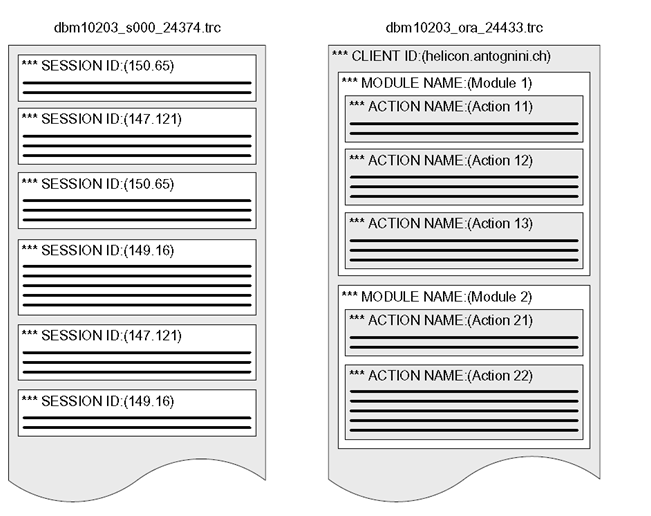
Using TRCSESS
You
can use the command-line tool TRCSESS, which is available as ofOracle
Database 10g, to extractpart of the information contained in one or more
trace files, based on thelogical sections describedearlier. To get a
complete list of its arguments, run it without arguments.
trcsess [output=<output file name >][session=<session ID>(session id.serial#)] [clientid=<clientid>]
[service=<service name>] [action=<action name>][module=<module name>]
<trace file names>
trcsessoutput=action12.trc
action="Action 12" dbm10203_ora_24433.trc (Notes: Howto identify the
24433 process? Here is the solution :select addr,pid,spid fromv$process
where addr in (select paddr as addr from v$session where sid=xxx) );
Rememberthat the arguments clientid, service, action, and module are case sensitive.
Profilers
Once
you have identified the correct trace files, or possibly cutoff part of
some of them with TRCSESS,it is time to analyze the content. For this
purpose, you use a profiler. Itsaim is to generate a formattedoutput
based on the content of raw trace files. Oracle distributes with both
the database and client binaries sucha profiler. Its name is TKPROF
(which stands forTraceKernel PROfiler).
Using TKPROF
TKPROF
is a command-line tool. Its main purpose is to take a rawtrace file as
input and generatea formatted text file as output. In addition, it is
also able to generate a SQLscript to load the data in adatabase,
although this feature is hardly ever used.
tkprof DBM11106_ora_6334.trcDBM11106_ora_6334.txt
Usage: tkprof tracefile outputfile [explain= ] [table= ] [print= ] [insert= ] [sys= ] [sort= ][…….]
From http://blog.csdn.net/wujiandao/article/details/6621073
1.4.2 Event 10053
ALTERSESSION SET events '10053 trace name context forever'
ALTERSESSION SET events '10053 trace name context off'
1.4.3 Event 10132
•Enable and disable the event for the current session.
ALTERSESSION SET events '10132 trace name context forever'
ALTERSESSION SET events '10132 trace name context off'
•
Enable and disable the event for the whole database. Warning:
thissetting does not take effectimmediately but only for sessions
created after the modification.
ALTERSYSTEM SET events '10132 trace name context forever'
ALTERSYSTEM SET events '10132 trace name context off'
Oracle SQL explain/execution Plan的更多相关文章
- oracle用EXPLAIN PLAN 分析SQL语句
EXPLAIN PLAN 是一个很好的分析SQL语句的工具,它甚至可以在不执行SQL的情况下分析语句. 通过分析,我们就可以知道ORACLE是怎么样连接表,使用什么方式扫描表(索引扫描或全表扫描)以及 ...
- sql server 执行计划(execution plan)介绍
大纲:目的介绍sql server 中执行计划的大致使用,当遇到查询性能瓶颈时,可以发挥用处,而且带有比较详细的学习文档和计划,阅读者可以按照我计划进行,从而达到对执行计划一个比较系统的学习. 什么是 ...
- oracle sql 执行计划分析
转自http://itindex.net/detail/45962-oracle-sql-%E8%AE%A1%E5%88%92 一.首先创建表 SQL> show user USER is &q ...
- Oracle SQL CPU占用高
Oracle数据库经常会遇到CPU利用率很高的情况,这种时候大都是数据库中存在着严重性能低下的SQL语句,这种SQL语句大大的消耗了CPU资源,导致整个系统性能低下.当然,引起严重性能低下的SQL语句 ...
- Oracle SQL优化[转]
Oracle SQL优化 1. 选用适合的ORACLE优化器 ORACLE的优化器共有3种: a. RULE (基于规则) b. COST (基于成本) c. CHOOSE (选择性) 设置缺省的优化 ...
- Oracle SQL性能优化总结
1. SQL语句执行步骤 语法分析> 语义分析> 视图转换 >表达式转换> 选择优化器 >选择连接方式 >选择连接顺序 >选择数据的搜索路径 >运行“执 ...
- Oracle SQL性能优化的40条军规
1. SQL语句执行步骤 语法分析> 语义分析> 视图转换 >表达式转换> 选择优化器 >选择连接方式 >选择连接顺序 >选择数据的搜索路径 >运行“执 ...
- Oracle SQL优化规则详解
1. 选用适合的Oracle优化器 Oracle的优化器共有3种: a. RULE (基于规则) b. COST (基于成本) c. CHOOSE (选择性) 设置缺省的优化器,可以通过对init.o ...
- Oracle SQL Tuning Advisor 测试
如果面对一个需要优化的SQL语句,没有很好的想法,可以先试试Oracle的SQL Tuning Advisor. SQL> select * from v$version; BANNER --- ...
随机推荐
- Eclipse安装svn插件的几种方式
Eclipse安装svn插件的几种方式 1.在线安装: (1).点击 Help --> Install New Software... (2).在弹出的窗口中点击add按钮,输入Name(任意) ...
- Uml学习-用例建模简介
用例建模简介 用例建模是UML建模的一部分,它也是UML里最基础的部分.用例建模的最主要功能就是用来表达系统的功能性需求或行为.用例图重点描述用户需求. 它描述需求.用户和主要组件之间的关系. 它不 ...
- git config 配置
1. git config简介 我们知道config是配置的意思,那么git config命令就是对git进行一些配置.而配置一般都是写在配置文件里面,那么git的配置文件在哪里呢?互动一下,先问下大 ...
- c#的逻辑运算符重载(二)
重载==以后,则==失去原有意义,这时可以使用object.equals(对象A,对象B)的方式进行判断,同样可以达到==的效果
- JVM基础知识
JVM简介 JVM是Java Virtual Machine(Java虚拟机)的缩写,JVM是一种用于计算设备的规范,它是一个虚构出来的计算机,是通过在实际的计算机上仿真模拟各种计算机功能来实现的.J ...
- 5. 网络配置与FTP服务笔记
IP地址: Ipv4 2*32 Ipv6 tcp 网络通讯协议 udp 用户数据报协议 常见网络端口: 20 21 ftp服务 文件共享 22 ...
- cmd 下切换目录
隔了段时间没用cmd 工作台,发现不会切换目录了,感觉特sb,为避免再次出现sb情况,记下来在说 1.切换磁盘(磁盘字母) d: 2.切换到指定目录 cd d:\www 在cmd下执行php文件 c: ...
- 【转】Hibernate 常见异常
转载地址:http://smartan.iteye.com/blog/1542137 Hibernate 常见异常net.sf.hibernate.MappingException 当出 ...
- android 悬浮覆盖状态栏的相关建议
WindowManager.LayoutParams.TYPE_SYSTEM_ERROR 显示在所有的应用之上包括显示在状态栏上,相对于TYPE_SYSTEM_OVERLAY不能获取焦点更为理想. 另 ...
- 测试机安装fd-server问题记录
今天在239测试机上安装了fd-server来代替apache,汇总下遇到的问题和解决方法. 1. 安装git时使用yum安装,命令 yum install git 2. 启动fd-server之前要 ...