
【代码笔记】iOS-scrollerView里多个tableView加搜索框
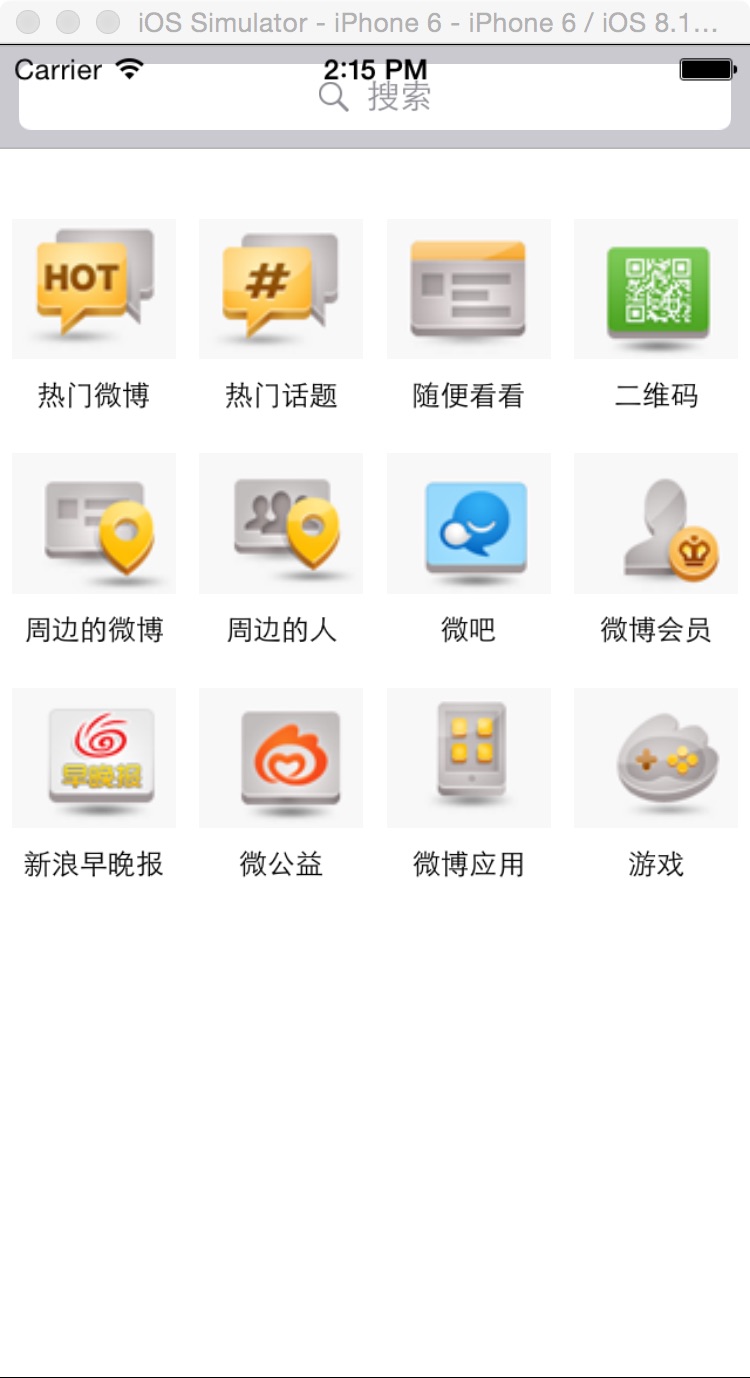
一,效果图。
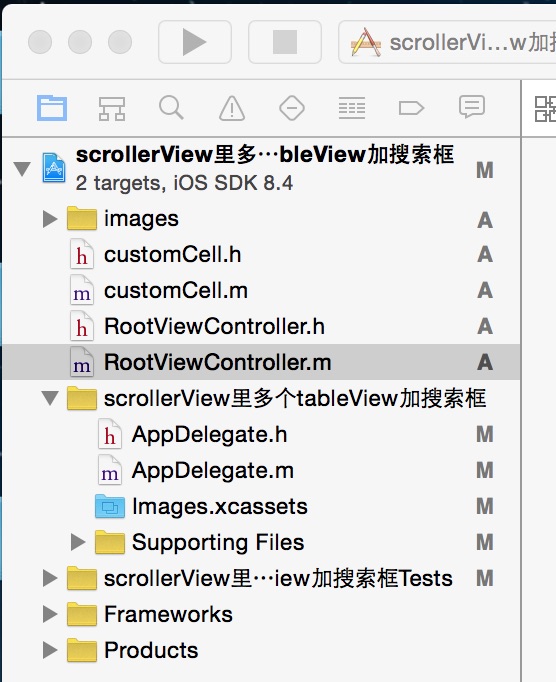
二,工程图。
三,代码。
RootViewController.h

#import <UIKit/UIKit.h>

#import "customCell.h"

@interface RootViewController : UIViewController

<UISearchBarDelegate,UITableViewDelegate,UITableViewDataSource,UIScrollViewDelegate,UISearchDisplayDelegate>

{

    customCell * cell;

    NSMutableArray * dataArray;

    NSMutableArray * imageArray;

    UIScrollView * scrollerView;

    UITableView * tableOneView;

    UITableView * tableTowView;

    UITableView * tableThreeView;

    UITableView * tableFourView;

    UISearchDisplayController * scrollerControl;

}

@end
RootViewController.m
#import "RootViewController.h"

#import "customCell.h"

@interface RootViewController ()

@end

@implementation RootViewController

- (id)initWithNibName:(NSString *)nibNameOrNil bundle:(NSBundle *)nibBundleOrNil

{

    self = [super initWithNibName:nibNameOrNil bundle:nibBundleOrNil];

    if (self) {

        // Custom initialization

    }

    return self;

}

- (void)viewDidLoad

{

    [super viewDidLoad];

    // Do any additional setup after loading the view.

    //初始化背景图

    [self initBackgroundView];

}

-(void)initBackgroundView

{

    self.navigationController.navigationBarHidden=YES;

    dataArray = [[NSMutableArray alloc]initWithObjects:@"热门微博",@"热门话题",@"随便看看",@"二维码",

                 @"周边的微博",@"周边的人",@"微吧",@"微博会员",

                 @"新浪早晚报",@"微公益",@"微博应用",@"游戏",

                 @"微刊",@"手机微博",@"微群",@"微相册",

                 @"名人堂",@"人气草根",@"微博精选",@"猜你喜欢",

                 @"手机新浪网",@"掌中新浪",@"天气通",@"微漫画",

                 @"聊天",@"看点",@"微盘",@"微收藏",

                 @"图钉",@"限免换享",@"淘身边",@"微美食",

                 @"新浪拍客",@"博客",@"充话费",@"MOMO岛",

                 @"网址导航",@"新浪视野",@"微数据",@"新浪彩票",nil];

    imageArray = [[NSMutableArray alloc] initWithObjects:@"0.png",@"1.png",@"2.png",@"3.png",@"4.png",@"5.png",@"6.png",@"7.png",@"8.png",@"9.png",@"10.png",@"11.png",@"12.png",@"13.png",@"14.png",@"15.png",@"16.png",@"17.png",@"18.png",@"19.png",@"20.png",@"21.png",@"22.png",@"23.png",@"24.png",@"25.png",@"26.png",@"27.png",@"28.png",@"29.png",@"30.png",@"31.png",@"32.png",@"33.png",@"34.png",@"35.png",@"36.png",@"37.png",@"38.png",@"39.png", nil];

    //scrollerView

    scrollerView = [[UIScrollView alloc] initWithFrame:CGRectMake(0, 0, 320, 460-44-44)];

    scrollerView.contentSize = CGSizeMake(320*4, 460-44-44);

    scrollerView.bounces = YES;

    scrollerView.tag = 101;

    scrollerView.showsHorizontalScrollIndicator = NO;

    scrollerView.pagingEnabled = YES;

    scrollerView.delegate = self;

    [self.view addSubview:scrollerView];

    //tableOne

    tableOneView = [[UITableView alloc] initWithFrame:CGRectMake(0, 44, 320, 460-44-44-44) style:UITableViewStylePlain];

    tableOneView.delegate = self;

    tableOneView.dataSource = self;

    tableOneView.bounces=NO;

    [tableOneView setSeparatorColor:[UIColor clearColor]];

    //tableTwo

    tableTowView = [[UITableView alloc] initWithFrame:CGRectMake(320, 44, 320, 460-44-44-44) style:UITableViewStylePlain];

    tableTowView.delegate = self;

    tableTowView.dataSource = self;

    tableTowView.bounces=NO;

    [tableTowView setSeparatorColor:[UIColor clearColor]];

    //tableThree

    tableThreeView = [[UITableView alloc]initWithFrame:CGRectMake(320*2, 44, 320, 460-44-44-44) style:UITableViewStylePlain];

    tableThreeView.delegate = self;

    tableThreeView.dataSource = self;

    tableThreeView.bounces=NO;

    [tableThreeView setSeparatorColor:[UIColor clearColor]];

    //tableFour

    tableFourView = [[UITableView alloc] initWithFrame:CGRectMake(320*3, 44, 320, 460-44-44-44) style:UITableViewStylePlain];

    tableFourView.delegate = self;

    tableFourView.dataSource = self;

    tableFourView.bounces=NO;

    [tableFourView setSeparatorColor:[UIColor clearColor]];

    [scrollerView addSubview:tableFourView];

    [scrollerView addSubview:tableThreeView];

    [scrollerView addSubview:tableTowView];

    [scrollerView addSubview:tableOneView];

    //searchbar

    UISearchBar * searchBar = [[UISearchBar alloc]initWithFrame:CGRectMake(0, 0, 320, 44)];

    searchBar.placeholder = @"搜索";

    searchBar.delegate = self;

    searchBar.showsCancelButton = YES;

    [self.view addSubview:searchBar];

    //searchcontroller

    scrollerControl = [[UISearchDisplayController alloc]initWithSearchBar:searchBar contentsController:self];

    scrollerControl.delegate = self;

    scrollerControl.searchResultsDataSource = self;

    scrollerControl.searchResultsDelegate = self;

}

#pragma -mark -UITableViewDelegate

-(NSInteger)tableView:(UITableView *)tableView numberOfRowsInSection:(NSInteger)section

{

    return 3;

}

-(CGFloat)tableView:(UITableView *)tableView heightForRowAtIndexPath:(NSIndexPath *)indexPath

{

    return 100;

}

-(UITableViewCell *)tableView:(UITableView *)tableView cellForRowAtIndexPath:(NSIndexPath *)indexPath

{

    static int i = 0;

    static int j = 0;

    NSString * strID = @"ID";

    cell = [tableView dequeueReusableCellWithIdentifier:strID];

    if (cell == nil) {

        cell = [[customCell alloc] initWithStyle:UITableViewCellStyleValue1 reuseIdentifier:strID];

        cell.selectionStyle = UITableViewCellSelectionStyleNone;

        cell.button1.tag = i++;

        cell.button2.tag = i++;

        cell.button3.tag = i++;

        cell.button4.tag = i++;

        cell.label1.tag = j++;

        cell.label2.tag = j++;

        cell.label3.tag = j++;

        cell.label4.tag = j++;

        if (cell.label1.tag >= 40 || cell.button1.tag >= 40) {

            return cell;

        }

    }

    [cell.label1 setText:[NSString stringWithFormat:@"%@",[dataArray objectAtIndex:cell.label1.tag]]];

    [cell.label2 setText:[NSString stringWithFormat:@"%@",[dataArray  objectAtIndex:cell.label2.tag]]];

    [cell.label3 setText:[NSString stringWithFormat:@"%@",[dataArray objectAtIndex:cell.label3.tag]]];

    [cell.label4 setText:[NSString stringWithFormat:@"%@",[dataArray objectAtIndex:cell.label4.tag]]];

    [cell.button1 setImage:[UIImage imageNamed:[imageArray objectAtIndex:cell.button1.tag]] forState:UIControlStateNormal];

    [cell.button2 setImage:[UIImage imageNamed:[imageArray objectAtIndex:cell.button2.tag]] forState:UIControlStateNormal];

    [cell.button3 setImage:[UIImage imageNamed:[imageArray objectAtIndex:cell.button3.tag]] forState:UIControlStateNormal];

    [cell.button4 setImage:[UIImage imageNamed:[imageArray objectAtIndex:cell.button4.tag]] forState:UIControlStateNormal];

    [cell.button1 addTarget:self action:@selector(doClickButtonAction:) forControlEvents:UIControlEventTouchUpInside];

    [cell.button2 addTarget:self action:@selector(doClickButtonAction:) forControlEvents:UIControlEventTouchUpInside];

    [cell.button3 addTarget:self action:@selector(doClickButtonAction:) forControlEvents:UIControlEventTouchUpInside];

    [cell.button4 addTarget:self action:@selector(doClickButtonAction:) forControlEvents:UIControlEventTouchUpInside];

    return cell;

}

-(void)doClickButtonAction:(UIButton *)btn

{

    NSLog(@"--btn.tag--%i",btn.tag);

}

- (void)didReceiveMemoryWarning

{

    [super didReceiveMemoryWarning];

    // Dispose of any resources that can be recreated.

}
customCell.h
#import <UIKit/UIKit.h>

@interface customCell : UITableViewCell

{

    UIButton * button1;

    UIButton * button2;

    UIButton * button3;

    UIButton * button4;

    UILabel * label1;

    UILabel * label2;

    UILabel * label3;

    UILabel * label4;

}

@property (nonatomic,retain)UIButton * button1;

@property (nonatomic,retain)UIButton * button2;

@property (nonatomic,retain)UIButton * button3;

@property (nonatomic,retain)UIButton * button4;

@property (nonatomic,retain)UILabel * label1;

@property (nonatomic,retain)UILabel * label2;

@property (nonatomic,retain)UILabel * label3;

@property (nonatomic,retain)UILabel * label4;

@end
customCell.m
#import "customCell.h"

@implementation customCell

@synthesize button1;

@synthesize button2;

@synthesize button3;

@synthesize button4;

@synthesize label1;

@synthesize label2;

@synthesize label3;

@synthesize label4;

- (id)initWithStyle:(UITableViewCellStyle)style reuseIdentifier:(NSString *)reuseIdentifier

{

    self = [super initWithStyle:style reuseIdentifier:reuseIdentifier];

    if (self) {

        // Initialization code

        button1 = [UIButton buttonWithType:UIButtonTypeCustom];

        button1.frame = CGRectMake(5, 10, 70, 60);

        button2 = [UIButton buttonWithType:UIButtonTypeCustom];

        button2.frame = CGRectMake(85, 10, 70, 60);

        button3 = [UIButton buttonWithType:UIButtonTypeCustom];

        button3.frame = CGRectMake(165, 10, 70, 60);

        button4 = [UIButton buttonWithType:UIButtonTypeCustom];

        button4.frame = CGRectMake(245, 10, 70, 60);

        [self addSubview:button1];

        [self addSubview:button2];

        [self addSubview:button3];

        [self addSubview:button4];

        label1 = [[UILabel alloc] initWithFrame:CGRectMake(5, 75, 70, 20)];

        label1.font = [UIFont systemFontOfSize:12];

        label1.textAlignment = NSTextAlignmentCenter;

        label2 = [[UILabel alloc] initWithFrame:CGRectMake(85, 75, 70, 20)];

        label2.font = [UIFont systemFontOfSize:12];

        label2.textAlignment = NSTextAlignmentCenter;

        label3 = [[UILabel alloc] initWithFrame:CGRectMake(165, 75, 70, 20)];

        label3.font = [UIFont systemFontOfSize:12];

        label3.textAlignment = NSTextAlignmentCenter;

        label4 = [[UILabel alloc] initWithFrame:CGRectMake(245, 75, 70, 20)];

        label4.font = [UIFont systemFontOfSize:12];

        label4.textAlignment = NSTextAlignmentCenter;

        [self addSubview:label1];

        [self addSubview:label2];

        [self addSubview:label3];

        [self addSubview:label4];

    }

    return self;

}

- (void)awakeFromNib

{

    // Initialization code

}

- (void)setSelected:(BOOL)selected animated:(BOOL)animated

{

    [super setSelected:selected animated:animated];

    // Configure the view for the selected state

}

@end
【代码笔记】iOS-scrollerView里多个tableView加搜索框的更多相关文章
- [iOS微博项目 - 1.2] - 导航栏搜索框
A.导航栏搜索框 1.需求 在“发现”页面,在顶部导航栏NavigationBar上添加一个搜索框 左端带有“放大镜”图标 github: https://github.com/hellovoidwo ...
- 【代码笔记】iOS-UIScrollerView里有两个tableView
一,效果图. 二,工程图. 三,代码. RootViewController.h #import <UIKit/UIKit.h> @interface RootViewController ...
- 【代码笔记】iOS-实现网络图片的异步加载和缓存
代码: - (void)viewDidLoad { [super viewDidLoad]; // Do any additional setup after loading the view. se ...
- ios项目里扒出来的json文件
p.p1 { margin: 0.0px 0.0px 0.0px 0.0px; font: 13.0px Menlo; color: #000000 } p.p2 { margin: 0.0px 0. ...
- IOS开发笔记 IOS如何访问通讯录
IOS开发笔记 IOS如何访问通讯录 其实我是反对这类的需求,你说你读我的隐私,我肯定不愿意的. 幸好ios6.0 以后给了个权限控制.当打开app的时候你可以选择拒绝. 实现方法: [plain] ...
- WWDC 2014 Session笔记 - iOS界面开发的大一统
本文是我的 WWDC 2014 笔记 中的一篇,涉及的 Session 有 What's New in Cocoa Touch Building Adaptive Apps with UIKit Wh ...
- 【hadoop代码笔记】hadoop作业提交之汇总
一.概述 在本篇博文中,试图通过代码了解hadoop job执行的整个流程.即用户提交的mapreduce的jar文件.输入提交到hadoop的集群,并在集群中运行.重点在代码的角度描述整个流程,有些 ...
- 笔记-iOS 视图控制器转场详解(上)
这是一篇长文,详细讲解了视图控制器转场的方方面面,配有详细的示意图和代码,为了使得文章在微信公众号中易于阅读,seedante 辛苦将大量长篇代码用截图的方式呈现,另外作者也在 Github 上附上了 ...
- <Python Text Processing with NLTK 2.0 Cookbook>代码笔记
如下是<Python Text Processing with NLTK 2.0 Cookbook>一书部分章节的代码笔记. Tokenizing text into sentences ...
随机推荐
- HT for Web的HTML5树组件延迟加载技术实现
HT for Web的HTML5树组件有延迟加载的功能,这个功能对于那些需要从服务器读取具有层级依赖关系数据时非常有用,需要获取数据的时候再向服务器发起请求,这样可减轻服务器压力,同时也减少了浏览器的 ...
- spring 数据校验之Hibernate validation
1.需要的jar包 2.springsevlet-config.xml配置 在spring3之后,任何支持JSR303的validator(如Hibernate Validator)都可以通过简单配置 ...
- [AngularJS] AngularJS系列(2) 中级篇之路由
目录 原理 angular-route ui-router 事件 深度路由 原理 ng的route本质是监听hashchange事件. 在angular-route中 $rootScope.$on(' ...
- MVC知识进阶01
下面是在项目中有关于MVC的知识总结,有些地方若不对,请指出. 一:MVC的基本知识 1 名词解释 *惯例优先原则<约定大于配置>:是一种开发设计模式,说是在项目里面使用事先规定的命 ...
- ASP.NET MVC系列:添加模型的验证规则
首先,在模型类中引用 System.ComponentModel.DataAnnotations 命名空间;System.ComponentModel.DataAnnotations 命名空间提供定义 ...
- C#骏鹏自动售货机接口
MachineJP类: 第1部分:串口初始化,串口数据读写 using System; using System.Collections.Generic; using System.IO.Ports; ...
- SQL Server存储过程多角度介绍
什么是存储过程: 存储过程(Procedure)类似于C#语言中的方法,它是SQL语句和控制流语句的预编译集合.存储过程存储在数据库内,可由应用程序通过一个调用执行,而且允许用户声明变量.逻辑控制语句 ...
- Firemonkey ListView 点击事件
Firemonkey ListView 的点击事件一直让人摸不着头绪(各平台触发规则不太相同),因为它提供了点击相关的事件就有如下: OnChange:改变项目触发. OnClick:点击触发. On ...
- Scalaz(38)- Free :Coproduct-Monadic语句组合
很多函数式编程爱好者都把FP称为Monadic Programming,意思是用Monad进行编程.我想FP作为一种比较成熟的编程模式,应该有一套比较规范的操作模式吧.因为Free能把任何F[A]升格 ...
- 在腾讯云上面搭建WordPress博客网站
一.准备工作 我们使用腾讯云服务器来运行WordPress,腾讯云会给新用户七天的产品体验时间还有一些代金券,做为新手尝试成本是比较小的. 腾讯云长期举办 "云+校园" 活动,学生 ...