
React-Native实战项目-导航器篇(一)
前言:官方文档已经看了一遍,但印象不是很深,于是在mooc上找了个实战学习项目做一做。
本篇目录:
基础导航练习√
1.ReactNavigation之createStackNavigator导航器案例练习
相关资料:
练习链接:http://www.devio.org/2018/12/24/createStackNavigator/
React Navigationan官网:https://reactnavigation.org/docs/zh-Hans/getting-started.html
1. 初始化react native项目
react-native init react_navigation_demo
2. 在项目目录下安装reactnavigation这个包
yarn add react-navigation
3. 安装依赖
yarn add react-native-reanimated react-native-gesture-handler react-native-screens
4. 版本更新后,此步骤忽略。
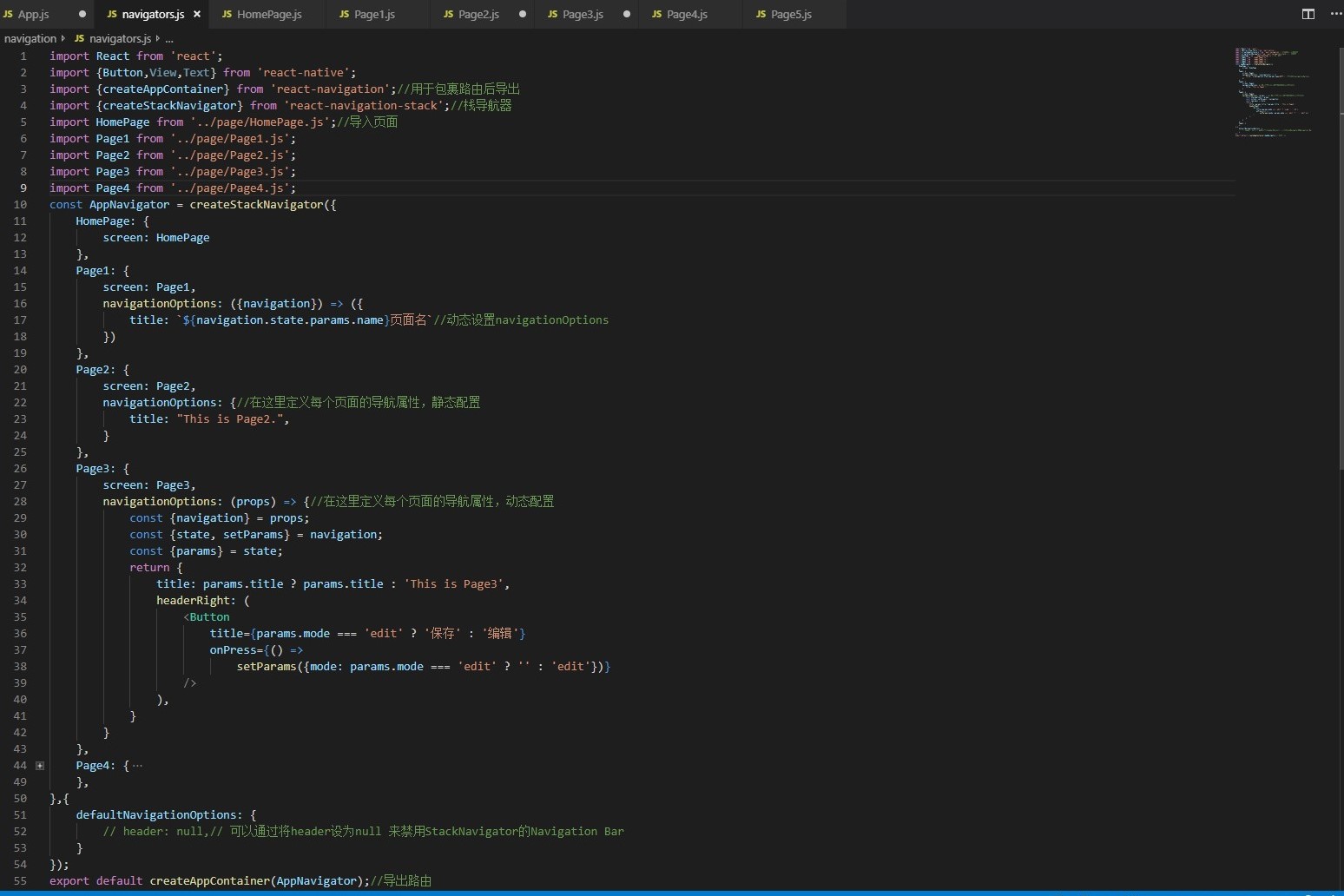
5. 新建并配置路由文件navigator/navigators.js
6. 新建页面文件夹Page,构建HomePage.js,Page1.js,Page2.js,Page3.js,Page4.js,Page5.js等页面
HomePage.js
import React,{Component} from 'react';

import {Button ,View,Text,StyleSheet} from 'react-native';

export default class HomePage extends Component{

    render(){

        const {navigation}=this.props; //获取navigation

        return(

            <View style={styles.container}>

                <Text style={styles.welcome}>Welcome To HomePage</Text>

                <Button title={'Go to Page1'} onPress={()=>{

                    navigation.navigate('Page1',{name:'动态的'});//跳转页面,并且允许传递参数

                }} />

                <Button title={'Go to Page2'} onPress={()=>{

                    navigation.navigate('Page2');

                }} />

                <Button title={'Go to Page3'} onPress={()=>{

                    navigation.navigate('Page3',{name:'动态的'});

                }} />

            </View>

        )

    }

}

const styles=StyleSheet.create({

    container:{

        flex:1,

    },

    welcome:{

        fontSize:20,

        textAlign:'center',

        margin:10,

    }

});
Page1.js
import React from 'react';

import {Button,View,Text,StyleSheet} from 'react-native';

export default class Page1 extends React.Component{

    render(){

        const {navigation}=this.props;

        return(

            <View style={styles.container}>

                <Text style={styles.welcome}>Welcome To Page1</Text>

                <Button

                    title={'Go Back'}

                    onPress={()=>{

                        navigation.goBack();

                    }}

                />

                <Button

                    title={'Go TO Page4'}

                    onPress={()=>{

                        navigation.navigate('Page4');

                    }}

                />

            </View>

        )

    }

}

const styles=StyleSheet.create({

    container:{

        flex:1,

    },

    welcome:{

        fontSize:20,

        textAlign:'center',

        margin:10,

    }

});
Page2.js
import React from 'react';

import {View,Text,StyleSheet} from 'react-native';

export default class Page2 extends React.Component{

    render(){

        const {navigation}=this.props;

        return(

            <View style={styles.container}>

                <Text style={styles.welcome}>Welcome To Page2</Text>

            </View>

        )

    }

}

const styles=StyleSheet.create({

    container:{

        flex:1,

    },

    welcome:{

        fontSize:20,

        textAlign:'center',

        margin:10,

    }

});
7. 修改根目录下的APP.js,将路由导入
import React from 'react';

import AppContainer from './navigation/navigators.js'//导入路由文件

export default class App extends React.Component {

  render() {

    return <AppContainer />;

  }

}
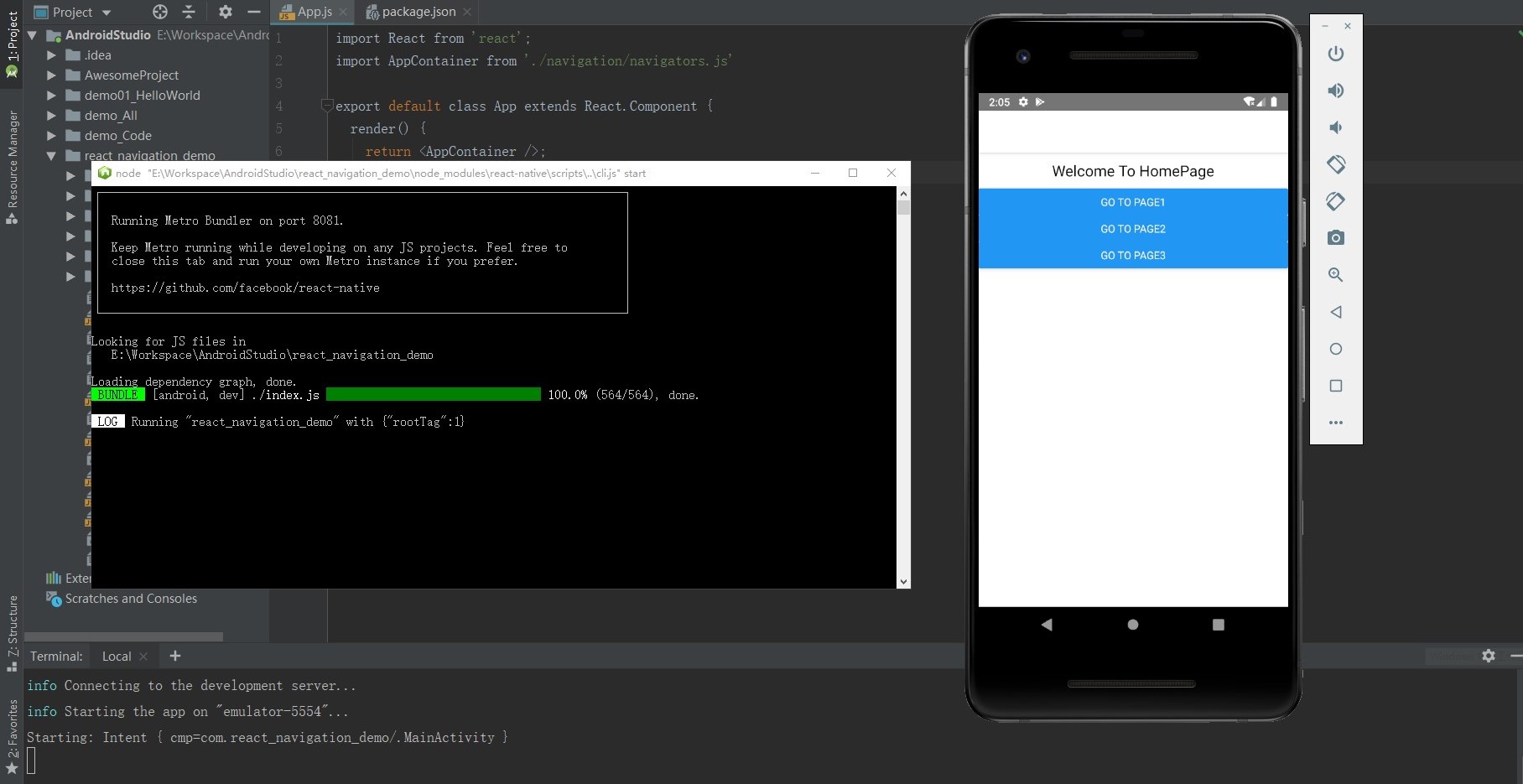
8. 启动连接虚拟手机,用react-native run-android编译运行代码
2.ReactNavigation之createBottomTabNavigator和createMaterialTopTabNavigator导航器案例练习
·导入createBottomTabNavigator和createMaterialTopTabNavigator导航器及矢量图标库
import {createBottomTabNavigator,createMaterialTopTabNavigator} from 'react-navigation-tabs';//底部导航及头部导航器

import Ionicons from 'react-native-vector-icons/Ionicons';//矢量图标库

import MaterialIcons from 'react-native-vector-icons/MaterialIcons';//矢量图标库

·编写代码
const AppBottomNavigator =createBottomTabNavigator({

    Page1:{

        screen:Page1,

        navigationOptions:{

            tabBarLabel:'最热',

            tabBarIcon:({tinColor,focused})=>(

                <Ionicons

                    name={"ios-home"}

                    size={26}

                    style={{color:tinColor}}

                />

            )

        }

    },

    Page2:{

        screen:Page2,

        navigationOptions:{

            tabBarLabel:'趋势',

            tabBarIcon:({tinColor,focused})=>(

                <Ionicons

                    name={"ios-people"}

                    size={26}

                    style={{color:tinColor}}

                />

            )

        }

    },

    Page3:{

        screen:Page3,

        navigationOptions:{

            tabBarLabel:'收藏',

            tabBarIcon:({tinColor,focused})=>(

                <Ionicons

                    name={"ios-chatboxes"}

                    size={26}

                    style={{color:tinColor}}

                />

            )

        }

    },

    Page4:{

        screen:Page4,

        navigationOptions:{

            tabBarLabel:'我的',

            tabBarIcon:({tinColor,focused})=>(

                <Ionicons

                    name={"ios-car"}

                    size={26}

                    style={{color:tinColor}}

                />

            )

        }

    },

},{

    tabBarOptions:{

       activeTintColor:Platform.OS==='ios'?'#e91e63':'fff',

    }

});

const AppTopNavigator =createMaterialTopTabNavigator({

    Page1:{

        screen:Page1,

        navigationOptions:{

            tabBarLabel:'ALL'//顶部导航项

        }

    },

    Page2:{

        screen:Page2,

        navigationOptions:{

            tabBarLabel:'IOS'//顶部导航项

        }

    },

    Page3:{

        screen:Page3,

        navigationOptions:{

            tabBarLabel:'React'//顶部导航项

        }

    },

    Page4:{

        screen:Page4,

        navigationOptions:{

            tabBarLabel:'React Native'//顶部导航项

        }

    },

    Page5:{

        screen:Page5,

        navigationOptions:{

            tabBarLabel:'TI实验室'//顶部导航项

        }

    },

},{

    tabBarOptions:{

        tabStyle:{minWidth:50,},//顶部导航项的最小宽

        upperCaseLabel:false,//是否使标签大写,默认为true

        scrollEnabled:true,//允许滑动切换标签

        style:{

            backgroundColor:"#678" //TabBar的背景色

        },

        indicatorStyle:{

            height:2,

            backgroundColor:"white",

        },//标签指示器样式

        labelStyle:{

            fontSize:13,

            marginTop:6,

            marginBottom:6,

        },//文字样式

    }

});
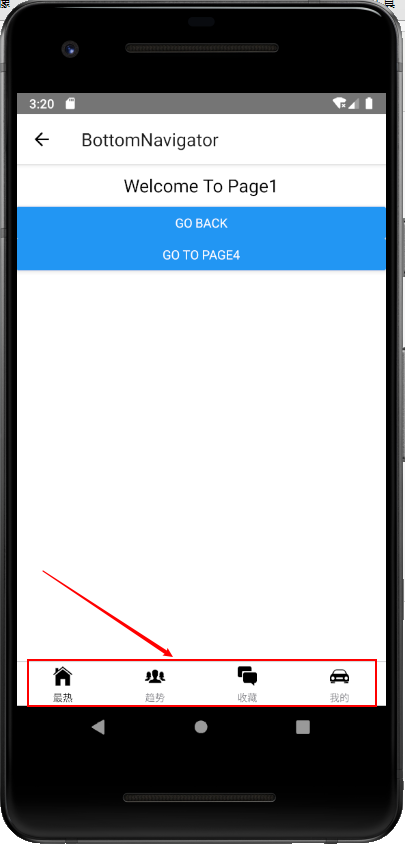
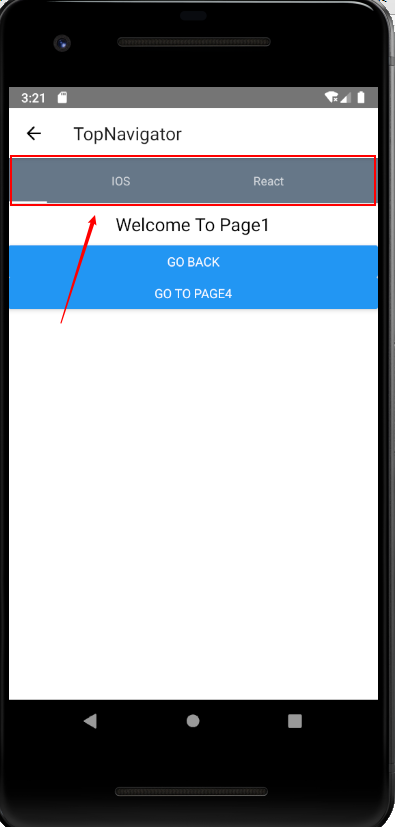
演示效果:
3.ReactNavigation之createDrawerNavigator导航器案例练习(!存在bug)
·导入createDrawerNavigator导航器

编写代码
const AppDrawerNavigator=createDrawerNavigator({

    Page4:{

        screen:Page4,

        navigationOptions:{

            drawerLabel:"Page4",

            drawerIcon:({tintColor})=>(

                <MaterialIcons

                    name={'drafts'}

                    size={24}

                    style={tintColor}

                />

            )

        }

    },

    Page5:{

        screen:Page5,

        navigationOptions:{

            drawerLabel:"Page5",

            drawerIcon:({tintColor})=>(

                <MaterialIcons

                    name={'move-to-inbox'}

                    size={24}

                    style={tintColor}

                />

            )

        }

    },

},{

    initialRouteName:'Page4',

    contentOptions:{

        activeTintColor:'#e91e63'

    },

    contentComponent:(props)=>(

        <ScrollView

            style={{backgroundColor:'#789',flex:1}}

        >

            <SafeAreaView

                forceInset={{top:'always',horizontal:'never'}}

            >

                <DrawerItems {...props}/>

            </SafeAreaView>

        </ScrollView>

    )

});//存在问题,需要后期调整
4.ReactNavigation之createSwitchNavigator导航器案例练习
·该导航器主要与登录验证有关,在后面的章节会具体介绍。
React-Native实战项目-导航器篇(一)的更多相关文章
- 0、手把手教React Native实战之开山篇
##作者简介 东方耀 Android开发 RN技术 facebook github android ios 原生开发 react reactjs nodejs 前端 ...
- 手把手教你React Native 实战之开山篇《一》
先说一下我为什么学习RN 18年3月29号,随着自己内心的欲望和冲动,任务交接了一下,正式离开一家医疗公司.第二天就入职了这之前已经找好的公司,由于自己对代码浓厚的热情,自己终于也不再带团队.正好有充 ...
- React Native实战系列教程之自定义原生UI组件和VideoView视频播放器开发
React Native实战系列教程之自定义原生UI组件和VideoView视频播放器开发 2016/09/23 | React Native技术文章 | Sky丶清| 4 条评论 | 1 ...
- RN 实战 & React Native 实战
RN 实战 & React Native 实战 https://abc.xgqfrms.xyz/react-native-docs/ 0.59 https://github.com/xgqfr ...
- React Native开源项目案例
(六).React Native开源项目: 1.Pober Wong_17童鞋为gank.io做的纯React Native项目,开源地址:https://github.com/Bob1993/Rea ...
- React Native 开源项目汇总
最近闲来无事,学习了React Native开发Android APP,自我感觉RN APP的效果和Native APP比还是蛮不错,以下是找到的一些优秀源码,仅供学习参考... React Nati ...
- React Native 之 项目实战(一)
前言 本文有配套视频,可以酌情观看. 文中内容因各人理解不同,可能会有所偏差,欢迎朋友们联系我. 文中所有内容仅供学习交流之用,不可用于商业用途,如因此引起的相关法律法规责任,与我无关. 如文中内容对 ...
- React Native之使用导航器跳转页面(react-navigation)
react-navigation是一个导航库,要使用react-navigation来实现跳转页面,首先得在项目中安装此库,由于Yarn是Facebook提供的替代npm的工具,可以加速node模块的 ...
- 【React Native 实战】商品分类
1.前言 商品分类是各种app常见的一种操作,一般都是左右两栏构成,左边栏是商品的分类,右边栏是商品的展示,同时左右两栏都可以滑动.今天我们就用React Native来实现这种效果. 实现内容:1) ...
随机推荐
- Linux学习笔记4-CentOS7中redis3.2.9安装教程
redis下载地址:http://www.redis.cn/download.html 1.将下载过来的redis-3.2.9.tar.gz文件复制到/usr/local文件夹下 2.tar xzf ...
- VMware 设置桥接方式 本机使用WLAN
最近使用开始VMware,以前一直用vritual box ,回归正题. 问题: VMware网络连接使用桥接方式如何做? 环境: 系统:centOS6.7 主机:win10 虚拟机:VMware10 ...
- Sass函数:Opacity函数-opacify()、fade-in()函数
这两个函数是用来对已有颜色的透明度做一个加法运算,会让颜色更加不透明.其接受两个参数,第一个参数是原始颜色,第二个参数是你需要增加的透明度值,其取值范围主要是在 0~1 之间.当透明度值增加到大于 1 ...
- 【串线篇】Mybatis缓存之整合第三方缓存
为什么要用第三方缓存?因为mybatis的缓存机制说白了就是一个map,不够强大.但幸好mybatis有自知之明将其Cache做成了一个接口开放出来,我们可以实现这个接口用第三方专业的缓存框架去自定义 ...
- Kettle5.4.0 java.lang.OutOfMemoryError
CPU: Intel i3 3.40GHz Memory : 8G Kettle默认配置 将MySQL上的一张29W条数据的表,通过Kettle增量抽取到Vertica数据库中,结果在排序这一步报内存 ...
- freertos优秀博客收藏
https://blog.csdn.net/zhzht19861011 朱工的专栏 专注/深入/分享 https://blog.csdn.net/xukai871105 xukai871105 专注于 ...
- postgre存储过程或者视图中"::"双冒号是什么意思
双冒号是类型转换的意思. 比如: '2019-09-10'::date
- python自动刷新抢火车票
#!/usr/bin/env python #-*- coding: utf-8 -*- """ 火车票 可以自动填充账号密码,同时,在登录时,也可以修改账号密码 然后手 ...
- HTTP请求流程基础知识
HTTP协议解析: HTTP即超文本传输协议,是一种详细规定了浏览器和万维网服务器之间互相通信的规则,它是万维网交换信息的基础,它允许将HTML文档从WEB服务器传输到WEB浏览器. URL(统一资源 ...
- hdu 1007 Quoit Design (经典分治 求最近点对)
Problem Description Have you ever played quoit in a playground? Quoit is a game in which flat rings ...