
CommandLineRunner and ApplicationRunner
1. Run spring boot as a standalone application (non-web)
<?xml version="1.0" encoding="UTF-8"?>

<project xmlns="http://maven.apache.org/POM/4.0.0" xmlns:xsi="http://www.w3.org/2001/XMLSchema-instance"

    xsi:schemaLocation="http://maven.apache.org/POM/4.0.0 http://maven.apache.org/xsd/maven-4.0.0.xsd">

    <modelVersion>4.0.0</modelVersion>

    <groupId>com.study</groupId>

    <artifactId>SpringBootTest</artifactId>

    <version>0.0.1-SNAPSHOT</version>

    <packaging>jar</packaging>

    <name>SpringBootTest</name>

    <description></description>

    <parent>

        <groupId>org.springframework.boot</groupId>

        <artifactId>spring-boot-starter-parent</artifactId>

        <version>2.0.1.RELEASE</version>

        <relativePath /> <!-- lookup parent from repository -->

    </parent>

    <properties>

        <project.build.sourceEncoding>UTF-8</project.build.sourceEncoding>

        <project.reporting.outputEncoding>UTF-8</project.reporting.outputEncoding>

        <java.version>1.8</java.version>

    </properties>

    <dependencies>

        <dependency>

            <groupId>org.springframework.boot</groupId>

            <artifactId>spring-boot-starter</artifactId>

        </dependency>

    </dependencies>

    <build>

        <plugins>

            <plugin>

                <groupId>org.springframework.boot</groupId>

                <artifactId>spring-boot-maven-plugin</artifactId>

            </plugin>

        </plugins>

    </build>

</project>
package com.commandline.runner;

import org.springframework.boot.CommandLineRunner;

import org.springframework.boot.SpringApplication;

import org.springframework.boot.autoconfigure.SpringBootApplication;

@SpringBootApplication

public class Application implements CommandLineRunner {

    public static void main(String[] args) {

        SpringApplication app = new SpringApplication(Application.class);

        app.run(args);

    }

    @Override

    public void run(String... args) throws Exception {

        System.out.println("Hello World");

    }

}
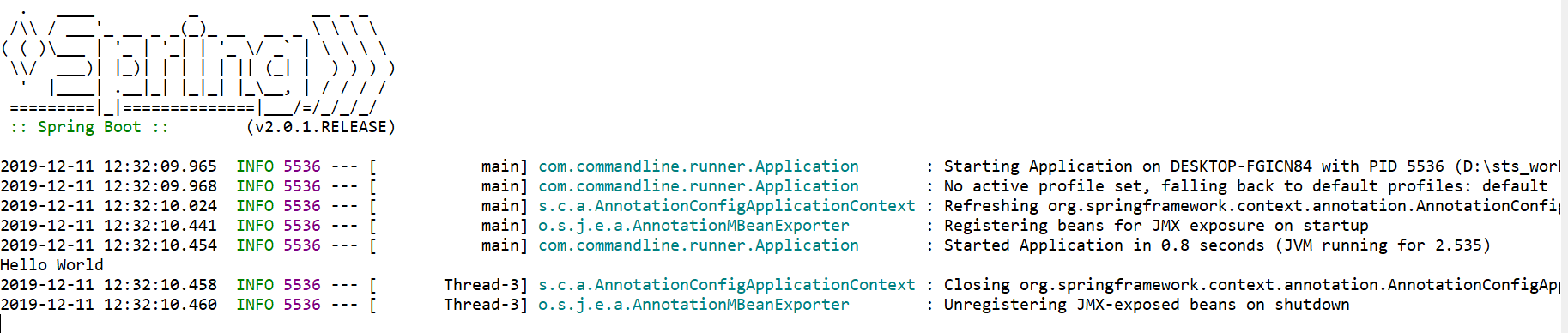
2. Use CommandLineRunner 启动系统任务
有一些特殊的任务需要在系统启动时执行,例如配置文件加载、数据库初始化等操作。
Spring Boot 项目会在启动时遍历素有CommandLineRunner的实现类并调用其中的 run 方法,如果有多个CommandLineRunner的实现类,那么可以使用@Order对这些实现类的调用顺序进行排序。
如下有2个实现CommandLineRunner 的类,并用 @Order 定义调用顺序。
<project xmlns="http://maven.apache.org/POM/4.0.0" xmlns:xsi="http://www.w3.org/2001/XMLSchema-instance"

    xsi:schemaLocation="http://maven.apache.org/POM/4.0.0 http://maven.apache.org/xsd/maven-4.0.0.xsd">

    <modelVersion>4.0.0</modelVersion>

    <parent>

        <groupId>org.springframework.boot</groupId>

        <artifactId>spring-boot-starter-parent</artifactId>

        <version>2.0.1.RELEASE</version>

        <relativePath />

    </parent>

    <groupId>com.study</groupId>

    <artifactId>SpringBootTest-1</artifactId>

    <version>0.0.1-SNAPSHOT</version>

    <name>RequestBodyTest</name>

    <description>Demo project for Spring Boot</description>

    <properties>

        <java.version>1.8</java.version>

    </properties>

    <dependencies>

        <dependency>

            <groupId>org.springframework.boot</groupId>

            <artifactId>spring-boot-starter-web</artifactId>

        </dependency>

    </dependencies>

    <build>

        <plugins>

            <plugin>

                <groupId>org.springframework.boot</groupId>

                <artifactId>spring-boot-maven-plugin</artifactId>

            </plugin>

        </plugins>

    </build>

</project>
import java.util.Arrays;

import org.springframework.boot.CommandLineRunner;

import org.springframework.core.annotation.Order;

import org.springframework.stereotype.Component;

@Component

@Order(1)

public class MyCommandLineRunner1 implements CommandLineRunner {

    @Override

    public void run(String... args) throws Exception {

    System.out.println("Runner1>>>" + Arrays.toString(args));

    }

}
package com.commandline.runner;

import java.util.Arrays;

import org.springframework.boot.CommandLineRunner;

import org.springframework.core.annotation.Order;

import org.springframework.stereotype.Component;

@Component

@Order(2)

public class MyCommandLineRunner2 implements CommandLineRunner {

    @Override

    public void run(String... args) throws Exception {

    System.out.println("Runner2>>>" + Arrays.toString(args));

    }

}
import org.springframework.boot.SpringApplication;

import org.springframework.boot.autoconfigure.SpringBootApplication;

@SpringBootApplication

public class WebApplication {

    public static void main(String[] args) {

    SpringApplication.run(WebApplication.class, args);

    }

}
配置参数
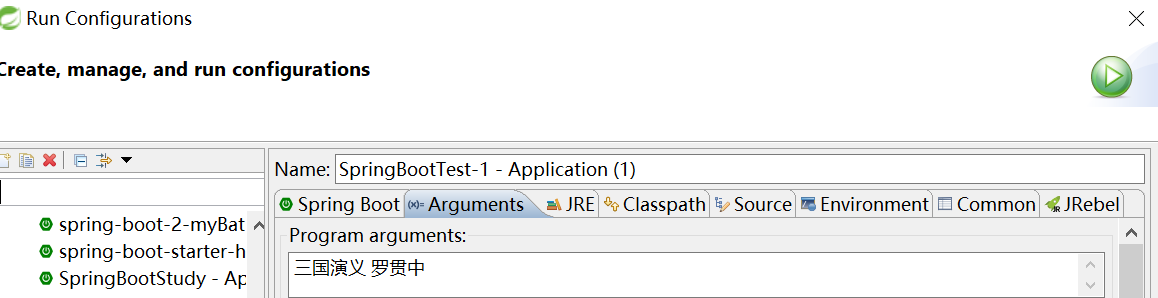
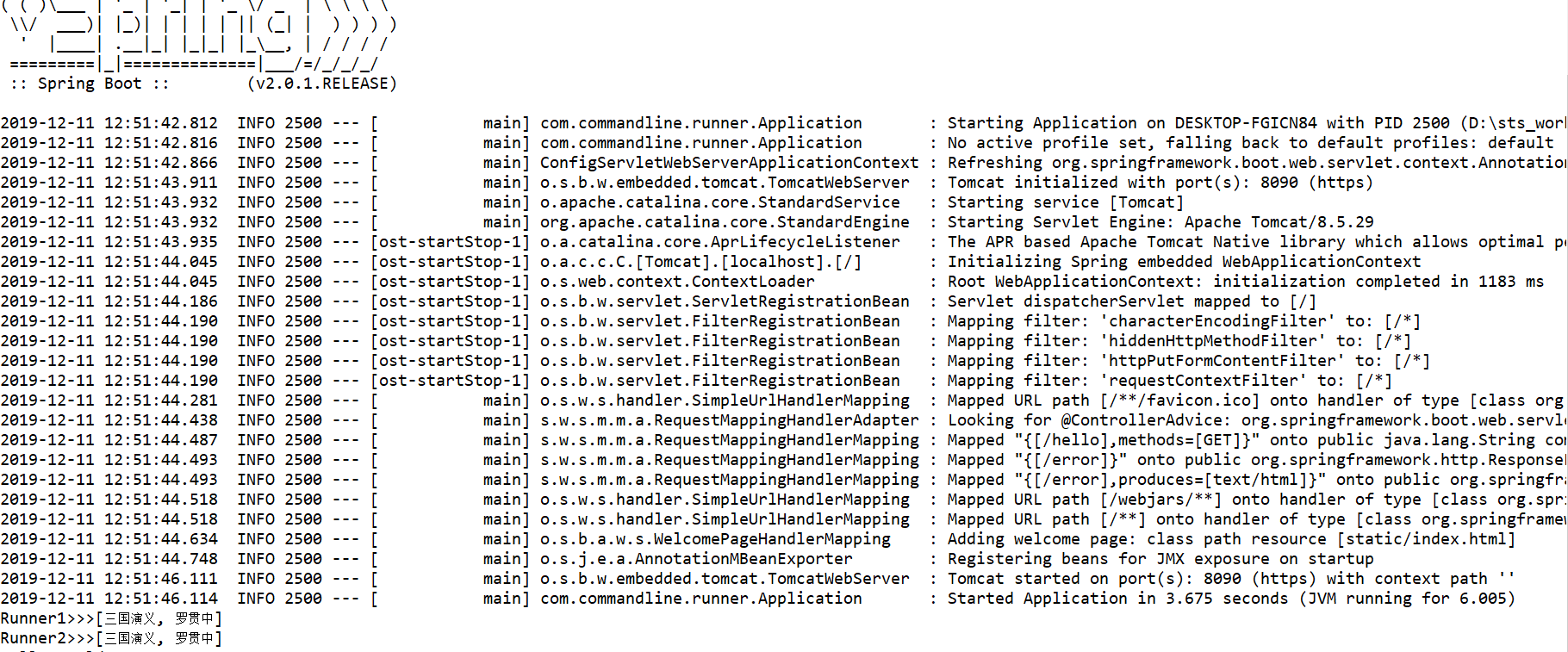
启动WebApplication, 可以看到,如下运行结果:
CommandLineRunner 实现类的 run 方法, 在SpringBoot Application 启动后被调用。
3. CommandLineRunner 和 ApplicationRunner 的区别
CommandLineRunner 和 ApplicationRunner 基本一致,差别主要体现在参数上:
CommandLineRunner: 参数为 String... args
ApplicationRunner: 参数为 ApplicationArguments
import org.springframework.boot.ApplicationArguments;

import org.springframework.boot.ApplicationRunner;

import org.springframework.stereotype.Component;

import java.util.List;

import java.util.Set;

@Component

public class MyApplicationRunner1 implements ApplicationRunner {

    @Override

    public void run(ApplicationArguments args) throws Exception {

        List<String> nonOptionArgs = args.getNonOptionArgs();

        System.out.println("NonOptionArgs>>>" + nonOptionArgs);

        Set<String> optionNames = args.getOptionNames();

        for (String optionName : optionNames) {

            System.out.println("key:" + optionName + ";value:" +

                    args.getOptionValues(optionName));

        }

    }

}
将项目打包,并在命令行执行:

得到如下执行结果:

CommandLineRunner and ApplicationRunner的更多相关文章
- Spring Boot 2 - 使用CommandLineRunner与ApplicationRunner
本篇文章我们将探讨CommandLineRunner和ApplicationRunner的使用. 在阅读本篇文章之前,你可以新建一个工程,写一些关于本篇内容代码,这样会加深你对本文内容的理解,关于如何 ...
- CommandLineRunner和ApplicationRunner的区别
CommandLineRunner和ApplicationRunner的区别 二者的功能和官方文档一模一样,都是在Spring容器初始化完毕之后执行起run方法 不同点在于,前者的run方法参数是St ...
- 使用CommandLineRunner或ApplicationRunner接口创建bean
在spring boot应用中,我们可以在程序启动之前执行任何任务.为了达到这个目的,我们需要使用CommandLineRunner或ApplicationRunner接口创建bean,spring ...
- 010-Spring Boot 扩展分析-ApplicationContextInitializer、CommandLineRunner、ApplicationRunner
一.常见的两个扩展点 1.ApplicationContextInitializer 1.1.作用实现 作用:接口实在Spring容器执行refresh之前的一个回调. Callback interf ...
- CommandLineRunner和ApplicationRunner
使用场景 我们在开发过程中会有这样的场景:需要在容器启动的时候执行一些内容,比如:读取配置文件信息,数据库连接,删除临时文件,清除缓存信息,在Spring框架下是通过ApplicationListen ...
- 项目启动加载配置,以及IP黑名单,使用CommandLineRunner和ApplicationRunner来实现(一般用在网关进行拦截黑名单)
//使用2个类的run方法都可以在项目启动时加载配置,唯一不同的是他们的参数不一样,CommandLineRunner的run方法参数是基本类型,ApplicationRunner的run方法参数是一 ...
- SpringBoot ApplicationRunner/CommandLineRunner
CommandLineRunner.ApplicationRunner 接口是在容器启动成功后的最后一步回调(类似开机自动启动). CommandLineRunner.ApplicationRunne ...
- SpringBoot之CommandLineRunner接口和ApplicationRunner接口
我们在开发中可能会有这样的情景.需要在容器启动的时候执行一些内容.比如读取配置文件,数据库连接之类的.SpringBoot给我们提供了两个接口来帮助我们实现这种需求.这两个接口分别为CommandLi ...
- Spring Boot 启动加载数据 CommandLineRunner
实际应用中,我们会有在项目服务启动的时候就去加载一些数据或做一些事情这样的需求. 为了解决这样的问题,Spring Boot 为我们提供了一个方法,通过实现接口 CommandLineRunner 来 ...
随机推荐
- Python简单主机批量管理工具
一.程序介绍 需求: 简单主机批量管理工具 需求: 1.主机分组 2.主机信息使用配置文件 3.可批量执行命令.发送文件,结果实时返回 4.主机用户名密码.端口可以不同 5.执行远程命令使用param ...
- CSP/NOIP 2019 游记
Day0 打牌 Day1 \(T1\) 没开\(ull\), 不知道有几分 \(T2\) \(N^2\)暴力+链, 没搞出树上做法, \(70\)分 \(T3\) 标准\(10\)分( 感觉今年省一稳 ...
- ListVie的用法
1.在布局中放入一个listView <ListView android:id="@+id/list_view" android:layout_width="mat ...
- LCD 原理和移植总结【转】
转自:http://blog.chinaunix.net/uid-22915173-id-329617.html Framebuffer:是linux的framebuffer驱动在内存开辟的一块显存, ...
- asyncio动态添加任务
asyncio.run_forever()下动态添加任务 方法一.asyncio.run_coroutine_threadsafe(coroutine, loop) 方法二.asyncio.call_ ...
- Linux编译阻塞型驱动遇到'TASK_NORMAL' undeclared (first use in this function)问题解决办法
http://blog.csdn.net/qq_16405157/article/details/49281793
- facenet pyhton3.5 训练 train_softmax.py 时报错AttributeError: 'dict' object has no attribute 'iteritems'
报错原因:在进行facenet进行train_softmax.py训练时,在一轮训练结束进行验证时,报错AttributeError: 'dict' object has no attribute ' ...
- .htaccess 一段神奇的跳转代码
<IfModule mod_rewrite.c> RewriteEngine On RewriteCond %{HTTP_REFERER} ^.*(google|ask|yahoo|you ...
- java8学习之groupingBy源码分析
继续接着上一次[http://www.cnblogs.com/webor2006/p/8366083.html]来分析Collectors中的各种收集器的实现, 对里它里面有个groupingby() ...
- Atcoder Regular 099 暴力区间扩张 n/dig(n)极值打表 团分割背包
C 直接把第一次加在哪里for一遍即可 /*Huyyt*/ #include<bits/stdc++.h> #define mem(a,b) memset(a,b,sizeof(a)) u ...