
CommandLineRunner and ApplicationRunner
1. Run spring boot as a standalone application (non-web)
<?xml version="1.0" encoding="UTF-8"?>

<project xmlns="http://maven.apache.org/POM/4.0.0" xmlns:xsi="http://www.w3.org/2001/XMLSchema-instance"

    xsi:schemaLocation="http://maven.apache.org/POM/4.0.0 http://maven.apache.org/xsd/maven-4.0.0.xsd">

    <modelVersion>4.0.0</modelVersion>

    <groupId>com.study</groupId>

    <artifactId>SpringBootTest</artifactId>

    <version>0.0.1-SNAPSHOT</version>

    <packaging>jar</packaging>

    <name>SpringBootTest</name>

    <description></description>

    <parent>

        <groupId>org.springframework.boot</groupId>

        <artifactId>spring-boot-starter-parent</artifactId>

        <version>2.0.1.RELEASE</version>

        <relativePath /> <!-- lookup parent from repository -->

    </parent>

    <properties>

        <project.build.sourceEncoding>UTF-8</project.build.sourceEncoding>

        <project.reporting.outputEncoding>UTF-8</project.reporting.outputEncoding>

        <java.version>1.8</java.version>

    </properties>

    <dependencies>

        <dependency>

            <groupId>org.springframework.boot</groupId>

            <artifactId>spring-boot-starter</artifactId>

        </dependency>

    </dependencies>

    <build>

        <plugins>

            <plugin>

                <groupId>org.springframework.boot</groupId>

                <artifactId>spring-boot-maven-plugin</artifactId>

            </plugin>

        </plugins>

    </build>

</project>
package com.commandline.runner;

import org.springframework.boot.CommandLineRunner;

import org.springframework.boot.SpringApplication;

import org.springframework.boot.autoconfigure.SpringBootApplication;

@SpringBootApplication

public class Application implements CommandLineRunner {

    public static void main(String[] args) {

        SpringApplication app = new SpringApplication(Application.class);

        app.run(args);

    }

    @Override

    public void run(String... args) throws Exception {

        System.out.println("Hello World");

    }

}
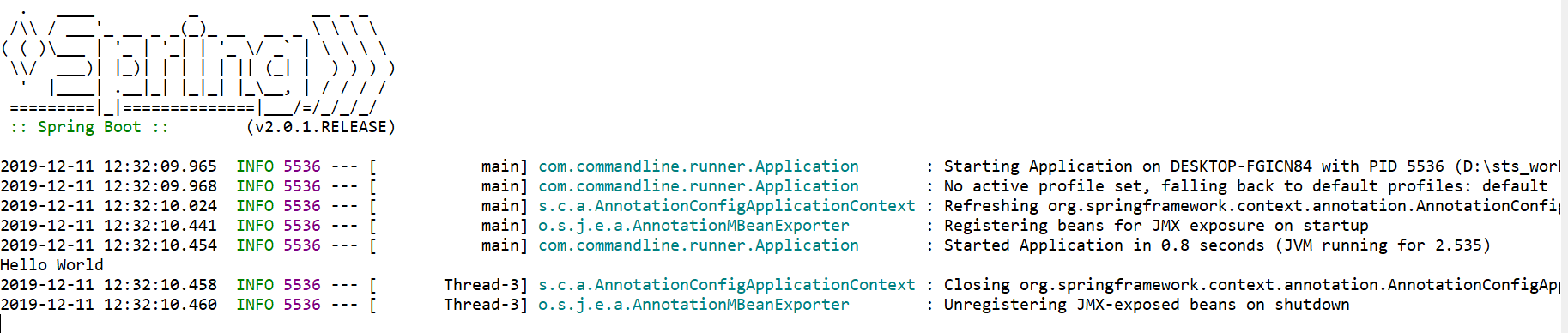
2. Use CommandLineRunner 启动系统任务
有一些特殊的任务需要在系统启动时执行,例如配置文件加载、数据库初始化等操作。
Spring Boot 项目会在启动时遍历素有CommandLineRunner的实现类并调用其中的 run 方法,如果有多个CommandLineRunner的实现类,那么可以使用@Order对这些实现类的调用顺序进行排序。
如下有2个实现CommandLineRunner 的类,并用 @Order 定义调用顺序。
<project xmlns="http://maven.apache.org/POM/4.0.0" xmlns:xsi="http://www.w3.org/2001/XMLSchema-instance"

    xsi:schemaLocation="http://maven.apache.org/POM/4.0.0 http://maven.apache.org/xsd/maven-4.0.0.xsd">

    <modelVersion>4.0.0</modelVersion>

    <parent>

        <groupId>org.springframework.boot</groupId>

        <artifactId>spring-boot-starter-parent</artifactId>

        <version>2.0.1.RELEASE</version>

        <relativePath />

    </parent>

    <groupId>com.study</groupId>

    <artifactId>SpringBootTest-1</artifactId>

    <version>0.0.1-SNAPSHOT</version>

    <name>RequestBodyTest</name>

    <description>Demo project for Spring Boot</description>

    <properties>

        <java.version>1.8</java.version>

    </properties>

    <dependencies>

        <dependency>

            <groupId>org.springframework.boot</groupId>

            <artifactId>spring-boot-starter-web</artifactId>

        </dependency>

    </dependencies>

    <build>

        <plugins>

            <plugin>

                <groupId>org.springframework.boot</groupId>

                <artifactId>spring-boot-maven-plugin</artifactId>

            </plugin>

        </plugins>

    </build>

</project>
import java.util.Arrays;

import org.springframework.boot.CommandLineRunner;

import org.springframework.core.annotation.Order;

import org.springframework.stereotype.Component;

@Component

@Order(1)

public class MyCommandLineRunner1 implements CommandLineRunner {

    @Override

    public void run(String... args) throws Exception {

    System.out.println("Runner1>>>" + Arrays.toString(args));

    }

}
package com.commandline.runner;

import java.util.Arrays;

import org.springframework.boot.CommandLineRunner;

import org.springframework.core.annotation.Order;

import org.springframework.stereotype.Component;

@Component

@Order(2)

public class MyCommandLineRunner2 implements CommandLineRunner {

    @Override

    public void run(String... args) throws Exception {

    System.out.println("Runner2>>>" + Arrays.toString(args));

    }

}
import org.springframework.boot.SpringApplication;

import org.springframework.boot.autoconfigure.SpringBootApplication;

@SpringBootApplication

public class WebApplication {

    public static void main(String[] args) {

    SpringApplication.run(WebApplication.class, args);

    }

}
配置参数
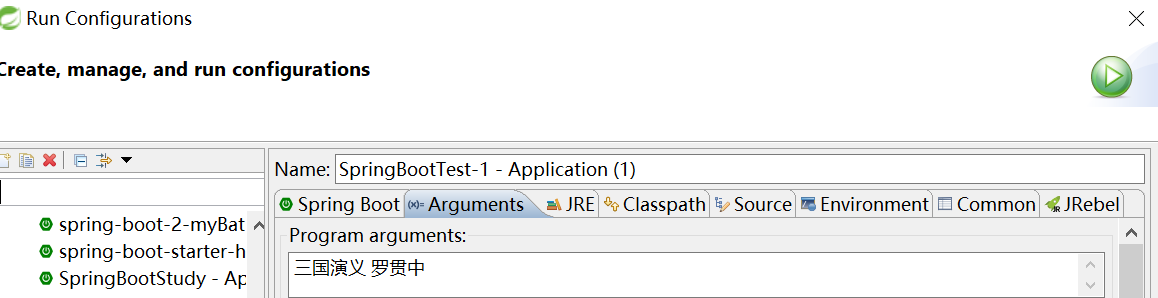
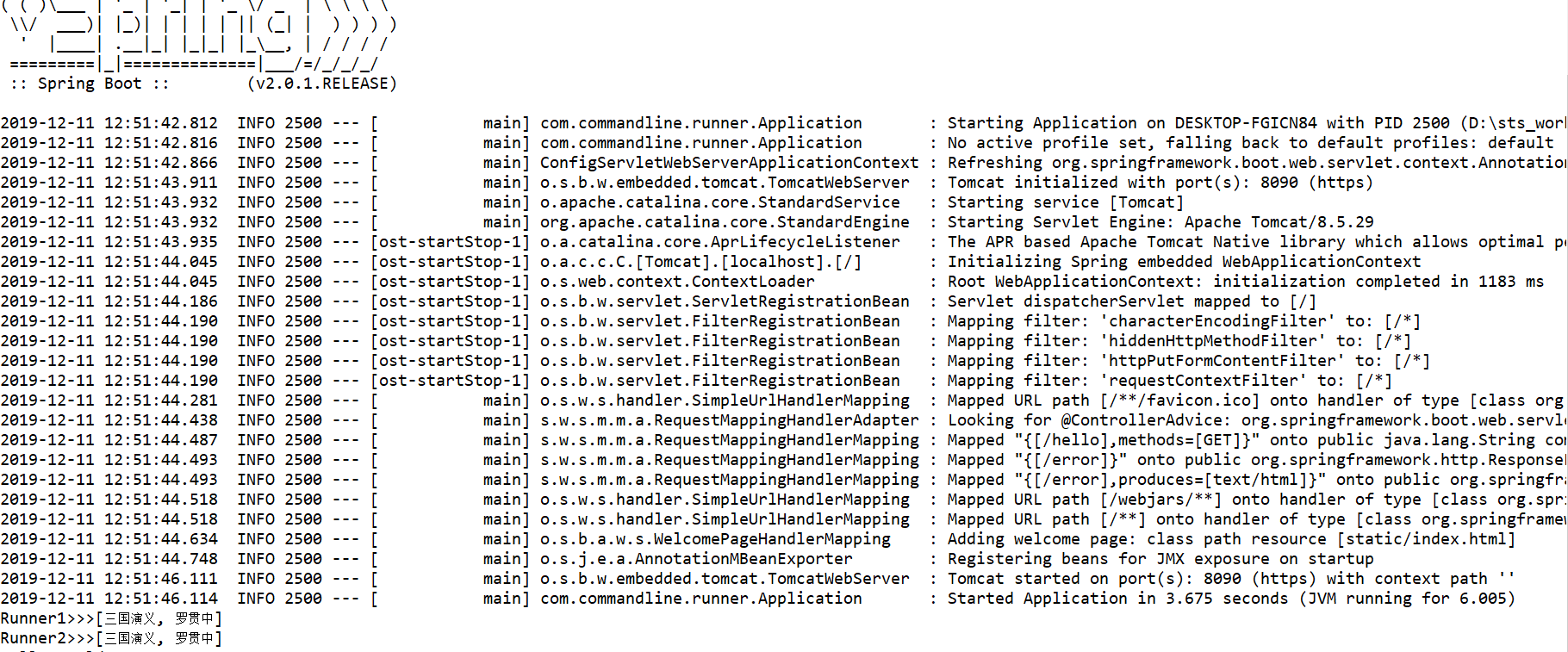
启动WebApplication, 可以看到,如下运行结果:
CommandLineRunner 实现类的 run 方法, 在SpringBoot Application 启动后被调用。
3. CommandLineRunner 和 ApplicationRunner 的区别
CommandLineRunner 和 ApplicationRunner 基本一致,差别主要体现在参数上:
CommandLineRunner: 参数为 String... args
ApplicationRunner: 参数为 ApplicationArguments
import org.springframework.boot.ApplicationArguments;

import org.springframework.boot.ApplicationRunner;

import org.springframework.stereotype.Component;

import java.util.List;

import java.util.Set;

@Component

public class MyApplicationRunner1 implements ApplicationRunner {

    @Override

    public void run(ApplicationArguments args) throws Exception {

        List<String> nonOptionArgs = args.getNonOptionArgs();

        System.out.println("NonOptionArgs>>>" + nonOptionArgs);

        Set<String> optionNames = args.getOptionNames();

        for (String optionName : optionNames) {

            System.out.println("key:" + optionName + ";value:" +

                    args.getOptionValues(optionName));

        }

    }

}
将项目打包,并在命令行执行:

得到如下执行结果:

CommandLineRunner and ApplicationRunner的更多相关文章
- Spring Boot 2 - 使用CommandLineRunner与ApplicationRunner
本篇文章我们将探讨CommandLineRunner和ApplicationRunner的使用. 在阅读本篇文章之前,你可以新建一个工程,写一些关于本篇内容代码,这样会加深你对本文内容的理解,关于如何 ...
- CommandLineRunner和ApplicationRunner的区别
CommandLineRunner和ApplicationRunner的区别 二者的功能和官方文档一模一样,都是在Spring容器初始化完毕之后执行起run方法 不同点在于,前者的run方法参数是St ...
- 使用CommandLineRunner或ApplicationRunner接口创建bean
在spring boot应用中,我们可以在程序启动之前执行任何任务.为了达到这个目的,我们需要使用CommandLineRunner或ApplicationRunner接口创建bean,spring ...
- 010-Spring Boot 扩展分析-ApplicationContextInitializer、CommandLineRunner、ApplicationRunner
一.常见的两个扩展点 1.ApplicationContextInitializer 1.1.作用实现 作用:接口实在Spring容器执行refresh之前的一个回调. Callback interf ...
- CommandLineRunner和ApplicationRunner
使用场景 我们在开发过程中会有这样的场景:需要在容器启动的时候执行一些内容,比如:读取配置文件信息,数据库连接,删除临时文件,清除缓存信息,在Spring框架下是通过ApplicationListen ...
- 项目启动加载配置,以及IP黑名单,使用CommandLineRunner和ApplicationRunner来实现(一般用在网关进行拦截黑名单)
//使用2个类的run方法都可以在项目启动时加载配置,唯一不同的是他们的参数不一样,CommandLineRunner的run方法参数是基本类型,ApplicationRunner的run方法参数是一 ...
- SpringBoot ApplicationRunner/CommandLineRunner
CommandLineRunner.ApplicationRunner 接口是在容器启动成功后的最后一步回调(类似开机自动启动). CommandLineRunner.ApplicationRunne ...
- SpringBoot之CommandLineRunner接口和ApplicationRunner接口
我们在开发中可能会有这样的情景.需要在容器启动的时候执行一些内容.比如读取配置文件,数据库连接之类的.SpringBoot给我们提供了两个接口来帮助我们实现这种需求.这两个接口分别为CommandLi ...
- Spring Boot 启动加载数据 CommandLineRunner
实际应用中,我们会有在项目服务启动的时候就去加载一些数据或做一些事情这样的需求. 为了解决这样的问题,Spring Boot 为我们提供了一个方法,通过实现接口 CommandLineRunner 来 ...
随机推荐
- centos7 安装vim
刚安装的centos7一般只有vi可以用,vim是没有安装的,如果我们想使用的话,需要我们自己去安装,可以使用如下命令进行安装: yum -y install vim 安装之后就可以正常使用
- mac下开启phpredis扩展
下载 官网下载php合适的版本:http://pecl.php.net/package/redis 这里我的php版本:7.1.23,下载的phpredis版本:5.0.0 配置安装 解包.重命名 s ...
- sql server update语句
update语句 --Update 语句用于修改表中的数据 语法:update 表名称 set 列名称 = 新值 where 列名称 = 某值 --更新某一行的若干列,set字句中用','隔开
- css动画之旋转翻牌效果
1.我们先设置两个盒子大小,颜色等等,然后定位重叠在一起,最后再进行动画设置 例子如下: <style> .box { height: 300px; width: 300px; posit ...
- 第一篇 HTML 认识HTML
认识HTML 学习一门语言,我们要先了解它,可以不用太资深,但要做到别人问,你能回答得出来! 注:推荐大家去网址:www.w3school.com.cn 前端学习手册(免费的) HTML(超文本标记语 ...
- appium 自动化测试框架详读(一)
appium框架使用的过程记录,开始使用markdown来语法来编写,不知道博客园是否会支持markdown语法 ***1. appium原理* appium启动时,创建一个http://127.0. ...
- python动态添加属性
class A: def __init__(self, info ={}): self.info = info def __getattr__(self, item): return self.inf ...
- ecshop新建增加独立页面的方法
ecshop是通过php文件来指向dwt文件的,比如index.php是程序文件,那么其模板文件就是index.dwt 那么如果新建一个php文件来单独做其他作用呢?其实很简单 第一步: 将index ...
- java8学习之Stream陷阱剖析
上一次[http://www.cnblogs.com/webor2006/p/8297603.html]在最后用stream.iterate()生成了6个奇数,接着基于它来实现如下需求:找出该流中大于 ...
- 安装tidb数据库
1.下载压缩包 安装tar包路径 命令:wget http://download.pingcap.org/tidb-latest-linux-amd64.tar.gz 命令:wget http://d ...