
EditPlus 好看的monaco主题
版本: editplus 4.3
效果图:
--------
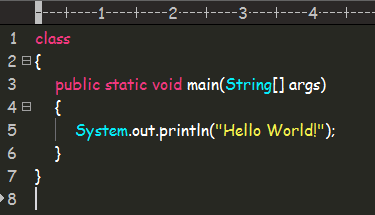
在editplus配置目录下,找到editplus_u.ini,替换为以下代码:
--------------------------------------------------------
[Options]

Placement=2C0000000200000003000000ABACFFFFABACFFFFFFFFFFFFFFFFFFFFBA0200000B000000A0050000A1030000FF

Window List=00000000000000000000000000000000FF

Marker List=00000000000000000000000000000000FF

Function List=00000000000000000000000000000000FF

Open Remote=00000000000000000000000000000000FF

Expand=00000000000000000000000000000000FF

Project Pos=00000000000000000000000000000000FF

Workspace Path=C:\Users\Jun\Desktop\鼠标移动到图片上图片等比例放大效果

Cliptext Window=145

Cliptext Window 2=559

Output=90

Output 2=169

Folding=1

FindX=663

FindY=289

Find=list_21

Tab Index=1

Cliptext=2

Custom colors=6D6D7200FFFFFF00FFFFFF00FFFFFF00FFFFFF00FFFFFF00FFFFFF00FFFFFF0031282700FFFFFF00FFFFFF00FFFFFF00FFFFFF00FFFFFF00FFFFFF00FFFFFF00FF

Matching Brace=1

Indent guide=1

Cliptext Edit=00000000000000000000000000000000FF

ReplaceX=439

ReplaceY=349

[Files]

Encoding=65001

Backup=0

Backup Remote=0

[Fonts]

Edit Window=F0FFFFFF00000000000000000000000090010000000000000302014243006F006D00690063002000530061006E00730020004D0053000000000000000000000000000000000000000000000000000000000000000000000000000000FF

Printer=F4FFFFFF00000000000000000000000090010000000000000000003143006F007500720069006500720020004E0065007700000000000000000000000000000000000000000000000000000000000000000000000000000000000000FF

Output Window=F4FFFFFF00000000000000000000000090010000000000000000003143006F007500720069006500720020004E0065007700000000000000000000000000000000000000000000000000000000000000000000000000000000000000FF

Hex Viewer=F4FFFFFF00000000000000000000000090010000000000010000003143006F007500720069006500720020004E0065007700000000000000000000000000000000000000000000000000000000000000000000000000000000000000FF

Custom 1=F4FFFFFF00000000000000000000000090010000000000000000002241007200690061006C000000720020004E0065007700000000000000000000000000000000000000000000000000000000000000000000000000000000000000FF

Custom 4=F5FFFFFF0000000000000000000000009001000000000000000000224D0053002000530061006E0073002000530065007200690066000000000000000000000000000000000000000000000000000000000000000000000000000000FF

[Tool Option]

Top Selector=1

[Colors\Text]

Background=2238503

Default=0

Foreground=16777215

[Colors\Keyword 1]

Foreground=8272368

Default=0

[Colors\Embedded script]

Foreground=16777215

Default=0

[Colors\Keyword 3]

Foreground=16777215

Default=0

[Colors\Keyword 6]

Foreground=8716287

Default=0

[Colors\Keyword 7]

Foreground=8716287

Default=0

[Colors\Keyword 8]

Foreground=8716287

Default=0

[Colors\Keyword 9]

Foreground=8454143

Default=0

[Colors\Keyword 10]

Foreground=8716287

Default=0

[Colors\Quotation]

Foreground=8454143

Default=0

[Colors\Quotation 2]

Foreground=5107956

Default=0

[Colors\Line comment]

Foreground=10789024

Default=0

[Colors\Line number]

Foreground=12632256

Background=2238503

Default=0

[Colors\Folding mark -]

Background=2238503

Default=0

[Colors\Matching words]

Default=0

Background=718314

[Colors\Keyword 2]

Foreground=16379142

Default=0

[Colors\Folding mark +]

Background=2238503

Default=0

[Colors\Text selection]

Background=7039851

Default=0

[Colors\Number]

Foreground=16524240

Default=0

[Colors\Block comment]

Foreground=8421504

Default=0

[Colors\Keyword 5]

Foreground=15574913

Default=0

[Colors\Ruler]

Foreground=12632256

Default=0

Background=2566187

[Colors\Cursor indicator]

Background=16777215

Default=0

[Colors\Indent Guide]

Foreground=7499117

Default=0
转载自: https://blog.csdn.net/encircles/article/details/68962192?locationNum=10&fps=1
EditPlus 好看的monaco主题的更多相关文章
- 为eclipse设置好看的代码主题
eclipse的默认代码背景是白色,上个文章简单说了字体设置,这边主要介绍代码高亮的主题设置,打造更酷的编程界面.网上有文章说可以在设置里面逐一设置,但是比较麻烦,可以去网上下载现成的主题包,网址为: ...
- 推荐一款好看的Hexo主题Ayer
介绍 Ayer 是一个干净且优雅的Hexo主题,自带响应式,加载速度很快,该有的功能都有,可配置项也很多,非常适合作为你的博客主题,主题内还附送了6张精美的高清壁纸.欢迎使用和Star支持,如果你在使 ...
- Hexo 官方主题 landscape-plus 优化
博主喜欢简洁大方的Hexo主题,看了不下100个主题之后,最终选择了 landscape-plus 主题(针对中国大陆地区,对Hexo官方主题landscape进行优化后的版本).更多Hexo主题资源 ...
- 【Hexo】Hexo+Github构建个人博客 (三):添加皮肤主题
一.选择主题 选择你自己喜欢的主题 参考: 1.Hexo官网主题 2.知乎:有哪些好看的 Hexo 主题? 二.配置主题 1.我选择了hexo-theme-yilia这个主题,简洁大方,功能齐全: 这 ...
- 【翻译】如何创建Ext JS暗黑主题之一
原文:How to Create a Dark Ext JS Theme– Part 1 概述 我是不是都要演示我的Spotifinder Ext JS应用程序.它是一个很酷的应用程序,可连接到Las ...
- Ubuntu 14.04安装Cinnamon桌面环境
2014年05月26日 薄荷开源网,mintos,网如其名,自然最关注的还是 Linux Mint 这个 DistroWatch 排名第一的 Linux 发行版.奈何此前的 Linux Mint 17 ...
- Set up Github Pages with Hexo, migrating from Jekyll
Set up Github Pages with Hexo, migrating from Jekyll. 本文介绍用Hexo建立github pages, 其中包含了从Jekyll迁移过来的过程. ...
- (转)EClipse插件推荐
http://www.importnew.com/4707.html 来自非营利性Eclipse基金会的Eclipse IDE以其插件生态系统著称.Eclipse市场拥有海量插件可供下载,你可以通过插 ...
- 使用hexo+github搭建免费个人博客详细教程
[TOC] 本文目录(注意无法点击): 前言 体验更加排版请访问原文链接:http://blog.liuxianan.com/build-blog-website-by-hexo-github.htm ...
随机推荐
- nginx负载均衡 之集群概念与负载均衡
集群介绍 为什么要用集群
- jpa repostiory
JpaRepository的查询 image.png image.png Spring Data JPA框架在进行方法名解析时,会先把方法名多余的前缀截取掉,比如 find.findBy.re ...
- JS Generator yield
function show() { console.log('a') console.log('b') } show() // 普通函数 function *show2() { console.log ...
- win2003 64位系统IIS配置方法
IIS7 很简单,在网站对应的应用程序池上右键高级设置,常规里的启用32位应用程序改为true就可以了,IIS6稍微复杂一些, 1,命令行里运行 cscript.exe %SYSTEMDRIVE%\i ...
- vim 配置 scala 语法高亮
第一步:执行下面这个命令: mkdir -p ~/.vim/{ftdetect,indent,syntax}for d in ftdetect indent syntax ; do curl -o ~ ...
- 批处理bat相关
时间 %date:~0,4%%date:~5,2%%date:~8,2%_%time:~0,2%%time:~3,2%%time:~6,2% 判断 if %date:~2,1%==/ (echo en ...
- zoopkeeper 的ACL操作
1.创建一个变量存放模式信息, private static final String MODE = "digest"; //ACL模式 2.在一个类的构造函数内放入初始化信息 ...
- layui文件上传中如何先判断后再弹出文件选择框
前言:layui中的上传,如何在点击上传按钮前阻止file的默认打开文件选择框呢?我想点击后先判断下,如果判断结果不符合,就直接弹出提示框,而不是文件选择框,判断符合才进行文件选择.但是在layui的 ...
- Iris Classification on Keras
Iris Classification on Keras Installation Python3 版本为 3.6.4 : : Anaconda conda install tensorflow==1 ...
- 六、Java中一个key存多个value的MultiValueMap,一键多值
一.MultiValueMap介绍,与map,HashMap相差不多 添加一个Key对应一个Value的:void add(K, V); 添加一个Key对应多个Value的:void add(K, L ...