
PyTestReport使用
PyTestReport详细介绍:
https://testerhome.com/opensource_projects/78
示例代码
#coding:utf-8

import os,unittest,time,HTMLTestRunner,smtplib

from email.mime.multipart import MIMEMultipart

from email.mime.text import MIMEText

from config import readConfig

from pytestreport import TestRunner

# import HTMLTestRunner_jpg

# 当前脚本所在文件真实路径

cur_path = os.path.dirname(os.path.realpath(__file__))

print(cur_path)

# print(type(cur_path))

# 第一步:用discover方法加载所有的测试用例

def add_case(caseName="case",rule="test*.py"):

    '''第一步:加载所有的测试用例'''

    case_path = os.path.join(cur_path,caseName) #用例文件夹

    # 如果不存在这个case文件夹,就自动创建一个

    if not os.path.exists(case_path):os.mkdir(case_path)

    print("\033[31mtest case path:\033[0m%s"%case_path)

    #定义discover方法的参数

    discover = unittest.defaultTestLoader.discover(case_path,

                                                   pattern=rule,

                                                   top_level_dir=None)

    print(discover)

    return discover

# 第二步:生成HTML报告

def run_case(all_case,reportName="report"):

    '''第二步:执行所有的用例,并把结果写入HTML测试报告'''

    now = time.strftime("%Y_%m_%d_%H_%M_%S")

    report_path = os.path.join(cur_path,reportName) # 测试报告文件夹

    # 如果不存在这个report文件夹,就自动创建一个

    if not os.path.exists(report_path):os.mkdir(report_path)

    # report_abspath = os.path.join(report_path,now+"result.html")

    # 配合jenkins生成的测试报告名称,固定为result.html

    report_abspath = os.path.join(report_path, "result.html")

    print("\033[31mreport path:\033[0m%s"%report_abspath)

    fp = open(report_abspath,"wb")

    # PyTestReport测试报告

    with open(report_abspath,'wb') as fp:

        runner = TestRunner(fp,

                            title='测试标题',

                            description='测试描述',

                            verbosity=2

                            )

        # 调用add函数返回值

        runner.run(all_case)

# 第三步:获取最新的测试报告

def get_report_file(report_path):

    '''第三步:获取最新的测试报告'''

    lists = os.listdir(report_path)

    lists.sort(key=lambda fn: os.path.getmtime(os.path.join(report_path,fn)))

    print(u'最新测试生成的报告:'+lists[-1])

    # 找到最新生成的测试报告文件

    report_file = os.path.join(report_path,lists[-1])

    return report_file

# 第四步:发送测试报告到邮箱

def send_mail(sender,psw,receiver,smtpserver,report_file,port):

    '''第四步:发送最新的测试报告内容'''

    with open(report_file,"rb") as f:

        mail_body = f.read()

    # 定义邮件内容

    msg = MIMEMultipart()

    body = MIMEText(mail_body,_subtype='html',_charset='utf-8')

    msg['Subject'] = '自动化测试报告'

    msg["from"] = sender

    msg["to"] = receiver

    msg.attach(body)

    # 添加附件

    att = MIMEText(open(report_file,"rb").read(),"base64","utf-8")

    att["Content-Type"] = "application/octet-stream"

    att["Content-Disposition"] = 'attachment; filename="report.html"'

    msg.attach(att)

    try:

        smtp = smtplib.SMTP_SSL(smtpserver,port)

    except:

        smtp = smtplib.SMTP()

        smtp.connect(smtpserver,port)

    # 用户名密码

    smtp.login(sender,psw)

    smtp.sendmail(sender,receiver,msg.as_string())

    smtp.quit()

    print('test report email has send out !')

if __name__ == "__main__":

    all_case = add_case()  # 1加载用例

    # 生成测试报告的路径

    run_case(all_case)  # 2执行用例

    # 获取最新的测试报告文件

    report_path = os.path.join(cur_path,"report")  # 用例文件夹

    report_file = get_report_file(report_path)   # 3获取最新的测试报告

    #邮箱配置

    sender = readConfig.sender

    psw = readConfig.psw

    smtp_server = readConfig.smtp_server

    port = readConfig.port

    receiver = readConfig.receiver

    # send_mail(sender,psw,receiver,smtp_server,report_file,port)  # 4最后一步发送报告
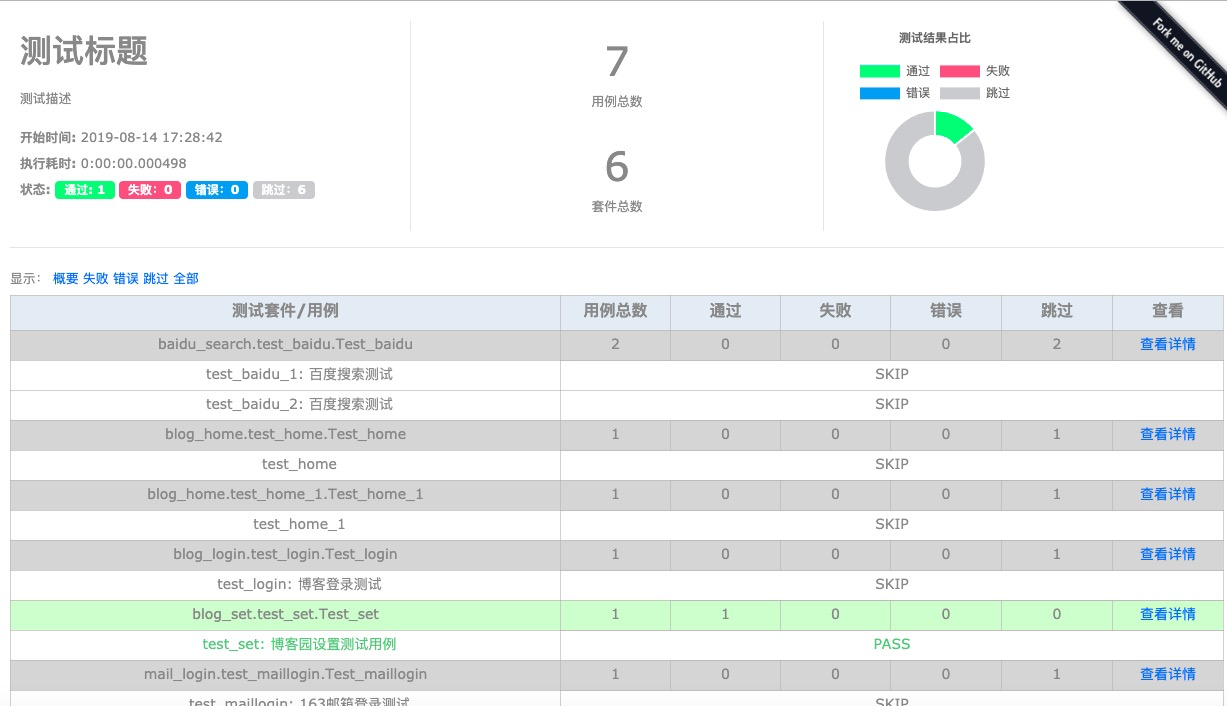
生成的测试报告
PyTestReport使用的更多相关文章
- PyTestReport 自动化报告
安装 pip install PyTestReport pytest框架执行命令 pytest.main(["-s", "test_login.py", &qu ...
- 纯python自研接口自动化脚本更新版本,让小白也能实现0到1万+的接口自动化用例
查看完整文章点击原文链接:纯python自研接口自动化脚本更新版本,让小白也能实现0到1万+的接口自动化用例 你是否还在用postman\jmeter做接口自动化吗?用python的开源框架[unit ...
- pytest文档43-元数据使用(pytest-metadata)
前言 什么是元数据?元数据是关于数据的描述,存储着关于数据的信息,为人们更方便地检索信息提供了帮助. pytest 框架里面的元数据可以使用 pytest-metadata 插件实现.文档地址http ...
随机推荐
- [Python3 练习] 006 汉诺塔2 非递归解法
题目:汉诺塔 II 接上一篇 [Python3 练习] 005 汉诺塔1 递归解法 这次不使用递归 不限定层数 (1) 解决方式 利用"二进制" (2) 具体说明 统一起见 我把左 ...
- this,static,执行程序的顺序等等留意点
self.static 和 $this 的区别为了更好地理解 self.static 和 $this 的区别,先来看一个示例. <?phpclass A { protected $name = ...
- jupyter notebook使用时路径问题和kernel error,安装opencv
修改路径: 在C:\Users\Administrator\ .jupyter 目录下面只有一个“migrated”文件. 打开命令窗口(运行->cmd),进入python的Script目录下输 ...
- java 线程池(线程的复用)
一. 线程池简介 1. 线程池的概念: 线程池就是首先创建一些线程,它们的集合称为线程池.使用线程池可以很好地提高性能,线程池在系统启动时即创建大量空闲的线程,程序将一个任务传给线程池,线程池就会启动 ...
- vue数据响应式的一些注意点
有关对象属性值不触发视图更新的情况: Vue 不能检测到对象属性的添加或删除,由于 Vue 会在初始化实例时对属性执行 getter/setter 转化过程,所以属性必须在 data 对象上存在才能让 ...
- vue中的scope
在vue文件中的style标签上,有一个特殊的属性:scoped. 当一个style标签拥有scoped属性时,它的CSS样式就只能作用于当前的组件,也就是说,该样式只能适用于当前组件元素. 通过该属 ...
- Jenkins构建触发器(定时构建项目)
如上图所示,Jenkins通常通过点击“立即构建”来进行手动构建项目,其实也可以使用配置中的 Poll SCM和Build periodically来进行定时自动构建项目: 在“配置”——>“构 ...
- Final修饰的字段是否可以通过反射设置值
案发现场 经常听说final修饰的字段是常量不能改变的他的值,但是以外发现 Integer.java源码中的字段“value”是final,但是可以通过反射改变他的值. public final cl ...
- POJ 2018 Best Cow Fences (二分答案构造新权值 or 斜率优化)
$ POJ~2018~Best~Cow~ Fences $(二分答案构造新权值) $ solution: $ 题目大意: 给定正整数数列 $ A $ ,求一个平均数最大的长度不小于 $ L $ 的子段 ...
- Mybatis(三)MyBatis 注解方式的基本 用法
在 MyBatis注解 SQL 中,最基本的就是@Select.@Insert.@Update 和@Delete 四种.