
spring boot 1.5.10.RELEASE ,spring boot admin 1.5.7 添加 security
生产环境的客户端actuator最好是加上security校验,不然配置信息不登录就能直接获取到
server端配置,参考官方 文档,https://codecentric.github.io/spring-boot-admin/1.5.7/#getting-started
代码参见,码云,https://gitee.com/xiongjinpeng/spring-boot-admin
pom.xml
<?xml version="1.0" encoding="UTF-8"?>

<project xmlns="http://maven.apache.org/POM/4.0.0" xmlns:xsi="http://www.w3.org/2001/XMLSchema-instance"

    xsi:schemaLocation="http://maven.apache.org/POM/4.0.0 http://maven.apache.org/xsd/maven-4.0.0.xsd">

    <modelVersion>4.0.0</modelVersion>

    <groupId>com.xx</groupId>

    <artifactId>spring-boot-admin</artifactId>

    <version>0.0.1</version>

    <packaging>jar</packaging>

    <name>spring-boot-admin</name>

    <parent>

        <groupId>org.springframework.boot</groupId>

        <artifactId>spring-boot-starter-parent</artifactId>

        <version>1.5.10.RELEASE</version>

        <relativePath/> <!-- lookup parent from repository -->

    </parent>

    <properties>

        <project.build.sourceEncoding>UTF-8</project.build.sourceEncoding>

        <project.reporting.outputEncoding>UTF-8</project.reporting.outputEncoding>

        <java.version>1.8</java.version>

        <spring-boot-admin.version>1.5.7</spring-boot-admin.version>

    </properties>

    <dependencies>

        <dependency>

            <groupId>de.codecentric</groupId>

            <artifactId>spring-boot-admin-starter-server</artifactId>

            <version>1.5.7</version>

        </dependency>

        <dependency>

            <groupId>org.springframework.boot</groupId>

            <artifactId>spring-boot-starter-web</artifactId>

        </dependency>

        <dependency>

            <groupId>org.springframework.boot</groupId>

            <artifactId>spring-boot-starter-security</artifactId>

        </dependency>

        <dependency>

            <groupId>de.codecentric</groupId>

            <artifactId>spring-boot-admin-server-ui-login</artifactId>

            <version>${spring-boot-admin.version}</version>

        </dependency>

    </dependencies>

    <build>

        <plugins>

            <plugin>

                <groupId>org.springframework.boot</groupId>

                <artifactId>spring-boot-maven-plugin</artifactId>

                <configuration>

                    <executable>true</executable>

                    <finalName>${project.name}</finalName>

                </configuration>

            </plugin>

        </plugins>

    </build>

</project>
SecurityConfig.java,官方的配置
import org.springframework.context.annotation.Configuration;

import org.springframework.security.config.annotation.web.builders.HttpSecurity;

import org.springframework.security.config.annotation.web.configuration.EnableWebSecurity;

import org.springframework.security.config.annotation.web.configuration.WebSecurityConfigurerAdapter;

/**

 * 基于安全认证的spring boot admin

 *

 * @author niugang

 *

 */

@Configuration

@EnableWebSecurity

public class SecurityConfig extends WebSecurityConfigurerAdapter {

    @Override

    protected void configure(HttpSecurity http) throws Exception {

        // Page with login form is served as /login.html and does a POST on /login

        http.formLogin().loginPage("/login.html").loginProcessingUrl("/login").permitAll();

        // The UI does a POST on /logout on logout

        http.logout().logoutUrl("/logout");

        // The ui currently doesn't support csrf

        http.csrf().disable();

        // Requests for the login page and the static assets are allowed

        //允许登录页面和静态资源的请求

        http.authorizeRequests()

                .antMatchers("/login.html", "/**/*.css", "/img/**", "/third-party/**")

                .permitAll();

        // ... and any other request needs to be authorized

        //这点重要:所有请求都需要认证

        http.authorizeRequests().antMatchers("/**").authenticated();

        // Enable so that the clients can authenticate via HTTP basic for registering

        http.httpBasic();

    }

}
application.properties
server.port=8011

#关闭原始的spring security 认证,不关闭的话,浏览器打开就会跳出弹出框

security.basic.enabled=false

#spring boot actuator某些端点的访问时需要权限的

management.security.enabled=false

#spring boot default user.name='user'

security.user.name=admin

#spring boot dafault user.password 在项目启动时打印在控制台中

security.user.password=123456
client端,客户端代码,
maven添加
<dependency>

            <groupId>de.codecentric</groupId>

            <artifactId>spring-boot-admin-starter-client</artifactId>

            <version>1.5.7</version>

        </dependency>

        <dependency>

            <groupId>org.springframework.boot</groupId>

            <artifactId>spring-boot-starter-security</artifactId>

        </dependency>
<parent>

        <groupId>org.springframework.boot</groupId>

        <artifactId>spring-boot-starter-parent</artifactId>

        <version>1.5.10.RELEASE</version>

        <relativePath/> <!-- lookup parent from repository -->

    </parent>
SecuritySecureConfig.java
import org.springframework.context.annotation.Configuration;

import org.springframework.security.config.annotation.web.builders.HttpSecurity;

import org.springframework.security.config.annotation.web.configuration.WebSecurityConfigurerAdapter;

@Configuration

public class SecuritySecureConfig extends WebSecurityConfigurerAdapter {

    @Override

    protected void configure(HttpSecurity http) throws Exception {

        http.csrf().disable().authorizeRequests()

                //拦截所有endpoint,拥有ACTUATOR_ADMIN角色可访问,否则需登录

//静态文件允许访问

                .antMatchers("/css/**", "/images/**","/js/**","/webjars/**","/**/favicon.ico").permitAll()

                //根路径允许访问

                .antMatchers("/").permitAll()

                //所有请求路径可以访问

                .antMatchers("/**").permitAll()

                .and().httpBasic();

    }

}
application.properties
spring.application.name=client

#要注册的Spring Boot Admin Server的URL

spring.boot.admin.url=http://localhost:8011

#从Spring Boot 1.5.x开始,默认情况下所有端点都是安全的。 为简洁起见,我们暂时禁用了安全性。 查看有关如何处理安全端点的安全性部分。

#management.security.enabled=false
#注册到server端用

spring.boot.admin.client.metadata.user.name=admin

spring.boot.admin.client.metadata.user.password=123456

#如果保护/api/applications端点,请不要忘记使用spring.boot.admin.username和spring.boot.admin.password在SBA客户端上配置用户名和密码【否则你的client端信息注册不到server端上】
#注册到server端用

spring.boot.admin.username=admin

spring.boot.admin.password=123456


#配置很重要,server端主动获取信息会用到

security.user.name=admin

security.user.password=123456
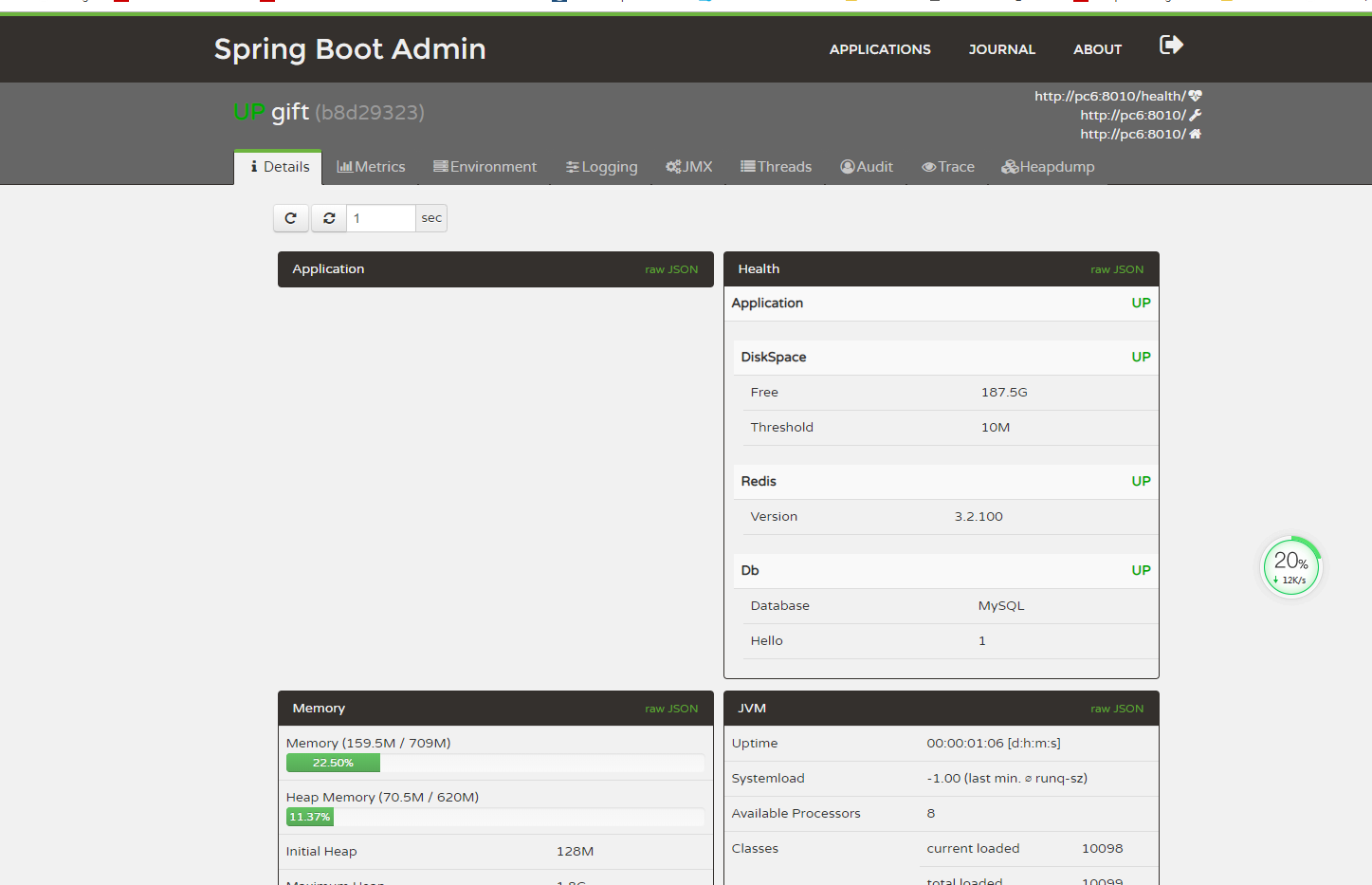
最新测试,还可以精简一下去掉代码
.antMatchers(

                        "/info",

                        "/info.json",

                        "/health",

                        "/health.json",

                        "/metrics",

                        "/metrics.json",

                        "/dump",

                        "/dump.json",

                        "/metrics/*",

                        "/beans",

                        "/beans.json",

                        "/configprops",

                        "/configprops.json",

                        "/auditevents",

                        "/auditevents.json",

                        "/heapdump",

                        "/heapdump.json",

                        "/trace",

                        "/trace.json",

                        "/env/*",

                        "/env",

                        "/env.json",

                        "/loggers/*",

                        "/loggers",

                        "/loggers.json",

                        "/mappings",

                        "/mappings.json",

                        "/jolokia/**"

                        ).hasRole("ACTUATOR_ADMIN")
和
management.security.roles=ACTUATOR_ADMIN
去掉这2个,也可以达到效果。
spring boot 1.5.10.RELEASE ,spring boot admin 1.5.7 添加 security的更多相关文章
- Spring框架学习(10)Spring中如何使用事务?
内容源自:Spring中如何使用事务? 一.为什么要使用事务? 如果我们一个业务逻辑只执行一次sql,是不需要使用事务的.但如果要执行多条sql语句才能完成一个业务逻辑的话,这个时候就要使用事务了. ...
- Spring学习总结(10)——Spring JMS---三种消息监听器
消息监听器MessageListener 在spring整合JMS的应用中我们在定义消息监听器的时候一共可以定义三种类型的消息监听器,分别是MessageListener.SessionAwareMe ...
- Spring 源码(10)Spring Bean 的创建过程(1)
Spring Bean的创建刚开始进行了一些准备工作,比如转换服务的初始化,占位符解析器的初始化,BeanDefinition元数据的冻结等操作,都是为了在创建Bean的过程中保证Bean的正确的创建 ...
- Spring Boot 1.5.10 发布:修复重要安全漏洞!!!
2018/01/31,Spring Boot团队发布了Spring Boot 1.5.10. Maven: <parent> <groupId>org.springframew ...
- 001-Spring Cloud Edgware.SR3 升级最新 Finchley.SR1,spring boot 1.5.9.RELEASE 升级2.0.4.RELEASE注意问题点
一.前提 升级前 => 升级后 Spring Boot 1.5.x => Spring Boot 2.0.4.RELEASE Spring Cloud Edgware SR3 => ...
- Spring学习总结(一)——Spring实现IoC的多种方式
控制反转IoC(Inversion of Control),是一种设计思想,DI(依赖注入)是实现IoC的一种方法,也有人认为DI只是IoC的另一种说法.没有IoC的程序中我们使用面向对象编程对象的创 ...
- Spring学习总结(三)——Spring实现AOP的多种方式
AOP(Aspect Oriented Programming)面向切面编程,通过预编译方式和运行期动态代理实现程序功能的横向多模块统一控制的一种技术.AOP是OOP的补充,是Spring框架中的一个 ...
- Spring学习总结(六)——Spring整合MyBatis完整示例
为了梳理前面学习的内容<Spring整合MyBatis(Maven+MySQL)一>与<Spring整合MyBatis(Maven+MySQL)二>,做一个完整的示例完成一个简 ...
- Spring学习总结(五)——Spring整合MyBatis(Maven+MySQL)一
MyBatis-Spring 会帮助你将 MyBatis 代码无缝地整合到 Spring 中. 使用这个类库中的类, Spring 将会加载必要的MyBatis工厂类和 session 类. 这个类库 ...
随机推荐
- wpf中文本框只能输入整数
private void txtBarCodeNum_KeyUp(object sender, KeyEventArgs e) { TxtInt(sender as TextBox); } priva ...
- ioncube扩展的安装详细图文教程,适合所有新手
有些程序在php环境下运行需要安装ionCube Loader的扩展支持,这里跳过介绍这些东西直接说一下怎么让你的主机环境支持这种扩展,顺利的让你的程序运行起来!这个教程适合用云服务器或者独立服务器的 ...
- Nginx服务项的基本配置
由于Nginx配置项较多,把他们按照用户使用时的预期功能分为以下4类: 1.调试,定位问题的配置项 2.正常运行必备配置项 3.优化性能配置项 4.事件类配置项 1. 用于调试进程,定位问题的配置项 ...
- 判断是否是iframe框架打开登录页, iframe框架着顶部页面刷新
if (window != top) top.location.href = location.href;
- 北京师范大学第十五届ACM决赛-重现赛D Disdain Chain (规律+组合数学)
链接:https://ac.nowcoder.com/acm/contest/3/D 来源:牛客网 Disdain Chain 时间限制:C/C++ 1秒,其他语言2秒 空间限制:C/C++ 2621 ...
- 一文了解kudu【转载】
原文地址:https://www.jianshu.com/p/83290cd817ac
- python基础练习题1
深深感知python基础是有多么重要,Ljh说一定要多练题,so,我现在开始要每天打卡练习python.加油! 01:求‘1-100’的偶数和 #第一种解法: sum=0 num=0 while nu ...
- IntelliTrace调试
当您进行调试时,IntelliTrace 将在后台收集有关托管应用程序的数据,其中包括来自许多框架组件(例如 ADO.NET.ASP.NET 和 System.XML)的信息.这些 IntelliTr ...
- QQ输入法用户评价
1.用户界面 用户界面简洁,并且可以随用户喜好自己更换,人性化,优化性比较大 2.记住用户选择 当输入一个字时,下一次输入这个拼音第一位的字就是上一次,或者使用次数最多的字.假如所使用的的字在后边,输 ...
- RouterOS基础安装配置
安装 光盘安装 载入光盘,按"A"全选按"I"进行安装,然后提示不否用旧的配置,按"N"全新安装,警告时按"Y"确定 安 ...