
微信小程序购物车功能
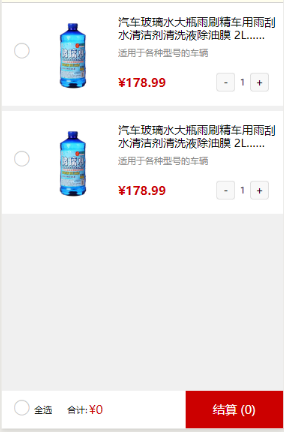
page{

background-color:#f0f0f0;

font-family: "微软雅黑";

}

.shop-mana{

width: 100%;

height: 70rpx;

background-color:#fffeee;

border-bottom: 1rpx solid #ccc;

}

.management{

float: left;

height: 70rpx;

line-height: 70rpx;

font-size: 26rpx;

margin-left: 40rpx;

}

.goto{

float: right;

height: 70rpx;

line-height: 70rpx;

font-size: 26rpx;

color: #c00;

margin-right: 30rpx;

cursor: pointer;

}

.carts{

width: 100%;

height: 520px;

overflow-y: scroll;

}

.goods{

width: 100%;

height: 275rpx;

background: #fff;

margin-bottom: 15rpx;

box-sizing: border-box;

padding:35rpx 17rpx;

}

.goods-check{

float: left;

width: 74rpx;

height: 205rpx;

line-height: 205rpx;

text-align: center;

/* */

}

.checkbox{

width: 36rpx;

height: 36rpx;

}

.goods-details{

float: left;

width: 642rpx;

height: 205rpx;

}

.goods-img{

float: left;

width: 200rpx;

height: 200rpx;

margin-top:5rpx;

margin-right: 20rpx;

}

.goods-img image{

width: 200rpx;

height: 200rpx;

}

.goods-title{

float: left;

width: 423rpx;

height: 205rpx;

}

.goods-name{

width:100%;

height: 70rpx;

margin-bottom: 15rpx;

font-size: 30rpx;

line-height: 35rpx;

overflow : hidden;

text-overflow: ellipsis;

display: -webkit-box;

-webkit-line-clamp: 2;

-webkit-box-orient: vertical;

}

.goods-apply{

font-size: 24rpx;

width: 100%;

color: #888888;

height: 30rpx;

line-height: 30rpx;

text-overflow: ellipsis;

overflow: hidden;

white-space: nowrap;

}

.goods-bot{

width: 100%;

height: 60rpx;

line-height: 60rpx;

margin-top:35rpx;

}

.goods-pri{

float: left;

height: 60rpx;

line-height: 60rpx;

font-size: 32rpx;

font-weight: 700;

color: #c00;

}

.goods-number{

margin-top:5rpx;

float: right;

width:160rpx;

height: 60rpx;

line-height: 60rpx;

}

.goods-minu{

float: left;

width:50rpx;

height: 50rpx;

line-height: 50rpx;

text-align: center;

font-size: 28rpx;

padding:0;

border-radius: 0;

}

.num{

  float: left;

  width:40rpx;

  height: 50rpx;

  line-height: 50rpx;

  text-align: center;

  font-size: 24rpx;

}

.goods-add{

  float: left;

  width:50rpx;

  height: 50rpx;

  line-height: 50rpx;

  text-align: center;

  font-size: 28rpx;

  padding:0;

  border-radius: 0;

}

.goods-num{

  float: right;

  margin-right: 15rpx;

  height: 35rpx;

  line-height: 35rpx;

  font-size: 26rpx;

  color: #888888;

}

.goods-footer{

  position: fixed;

  bottom: 0;

  left: 0;

  width: 100%;

  height: 100rpx;

  background-color:#fff;

  /*  */

}

.allSelect{

  float: left;

  width:150rpx;

  height: 100rpx;

  line-height: 100rpx;

  font-size: 24rpx;

  box-sizing: border-box;

  padding-left: 30rpx;

}

.allse{

  float: left;

  height: 100rpx;

  line-height: 100rpx;

  margin-top:18rpx;

}

.allSelect-text{

  float: left;

  margin-left:10rpx;

  font-size: 24rpx;

  height: 100rpx;

  line-height: 100rpx;

}

.sum{

  float: left;

  height: 100rpx;

  line-height: 100rpx;

  font-size: 24rpx;

  margin-left:25rpx;

}

.total-pri{

  float: left;

  height: 100rpx;

  line-height: 100rpx;

  font-size: 32rpx;

  color:#c00;

  margin-left: 5rpx;

}

.settlement{

  float: right;

  width: 260rpx;

  height: 100rpx;

  line-height: 100rpx;

  text-align: center;

  color: #fff;

  font-size: 32rpx;

  background-color:#c00;

  cursor: pointer;

}
const app = getApp()

Page({

data: {

staticImg: app.globalData.staticImg,

goods:[

{

code: "0001",

goodsName: '汽车玻璃水大瓶雨刷精车用雨刮水清洁剂清洗液除油膜 2L……',

goodsApply: '适用于各种型号的车辆',

goodsPrice: '178.99',

num: '1',

},

{

code: "0002",

goodsName: '汽车玻璃水大瓶雨刷精车用雨刮水清洁剂清洗液除油膜 2L……',

goodsApply: '适用于各种型号的车辆',

goodsPrice: '178.99',

num: '1',

},


],

totalPrice:'0.00',

num:'0',

},

// 单个选中

change: function (e) {

var that = this;

const index = e.currentTarget.dataset.index; // 获取data- 传进来的index

var goods = that.data.goods; // 获取购物车列表

var selectAllStatus = that.data.selectAllStatus; //获取全选状态

const selected = goods[index].selected; // 获取当前商品的选中状态

goods[index].selected = !selected; // 改变状态

goods[index]['selected'] = !selected;

//判断有一个没有选中,全选取消

var j = 0;

for (var i = 0; i < goods.length; i++) {

if (goods[i].selected == true) {

j++;

continue;

} else {

selectAllStatus = false;

}

}

if (j == goods.length) {

selectAllStatus = true;

}

//如果都选中,全选也选中实现

that.setData({

goods: goods,

selectAllStatus: selectAllStatus,

});

//调用计算数目方法

that.countNum()

//计算金额

that.count()

},

// 全选事件

selectAll: function(e) {

var that = this;

var selectAllStatus = that.data.selectAllStatus; // 是否全选状态

selectAllStatus = !selectAllStatus;

var goods = that.data.goods;

for (var i = 0; i < goods.length; i++) {

goods[i].selected = selectAllStatus;

goods[i]['selected'] = selectAllStatus; // 改变所有商品状态

}

that.setData({

selectAllStatus: selectAllStatus,

goods: goods

});

//调用计算数目方法

that.countNum()

//计算金额

that.count()

},

//加法

addtion: function (e) {

console.log(e)

var that = this

//得到下标

var index = e.currentTarget.dataset.index

//得到点击的值

var num = e.currentTarget.dataset.num

//默认99件最多

if (num < 100) {

num++

}

//把新的值给新的数组

var newList = that.data.goods

newList[index].num = num

    //把新的数组传给前台

    that.setData({

      goods: newList

    })

    //调用计算数目方法

    that.countNum()

    //计算金额

    that.count()

  },

  //减法

  subtraction: function (e) {

    var that = this

    //得到下标

    var index = e.currentTarget.dataset.index

    //得到点击的值

    var num = e.currentTarget.dataset.num

    //把新的值给新的数组

    var newList = that.data.goods

    //当1件时,点击移除

    if (num == 1) {

      num==1

    } else {

      num--

      newList[index].num = num

    }

    //把新的数组传给前台

    that.setData({

      goods: newList

    })

    //调用计算数目方法

    that.countNum()

    //计算金额

    that.count()

  },

  //计算数量

  countNum: function () {

    var that = this

    //遍历数组,把既选中的num加起来

    var newList = that.data.goods

    var allNum = 0

    for (var i = 0; i < newList.length; i++) {

      if (newList[i].selected) {

        allNum += parseInt(newList[i].num)

      }

    }

    that.setData({

      num: allNum

    })

  },

  //计算金额方法

  count: function () {

    var that = this

    //选中的订单,数量*价格加起来

    var goodsPrice = parseFloat(that.data.goods.goodsPrice)

    var newList = that.data.goods

    var newCount = 0.00

    for (var i = 0; i < newList.length; i++) {

      if (newList[i].selected) {

        newCount += newList[i].goodsPrice * newList[i].num

      }

    }

    that.setData({

      // newCount: newCount.toFixed(2),

      totalPrice: newCount,

    })

  },

})
微信小程序购物车功能的更多相关文章
- 微信小程序购物车产品计价
微信小程序购物车产品计价: 问题:当选中商品,价格累加时会出现无限循环小数 解答:在计算前先parseFloat(变量),再计算的最后使用(变量).toFixed(2)保留两位小数 例如: jiaCa ...
- [转] 扩展微信小程序框架功能
通过第三方 JavaScript 库,扩展微信小程序框架功能. 扩展微信小程序框架功能(1)——Promise ES6 对 Promise 有了原生的支持,但微信开发者工具更新版本(0.11.1122 ...
- 微信小程序的功能开发工具跟公众号的差别,小程序是一种减负思维对简单APP是巨大打击
微信小程序的功能开发工具跟公众号的差别,小程序是一种减负思维对简单APP是巨大打击 摘要: 小程序和公众号最大的区别有如下四点:1.小程序没有粉丝,开发者在后台能看到的只能是累计用户访问数以及实时统计 ...
- 微信小程序支付功能 C# .NET开发
微信小程序支付功能的开发的时候坑比较多,不过对于钱的事谨慎也是好事.网上关于小程序支付的实例很多,但是大多多少有些问题,C#开发的更少.此篇文档的目的是讲开发过程中遇到的问题做一个备注,也方便其他开发 ...
- 微信小程序 - 定位功能
(1) 查看微信小程序文档 大家可以从我截图中可以看到,API中的返回值有纬度和经度,所以我们接下来就是要用到纬度和经度逆地址解析出地址的一些信息. (2)注册腾讯地图开放平台 注册完之后选择WebS ...
- 微信小程序--分享功能
微信小程序--分享功能 微信小程序前段时间开放了小程序右上角的分享功能, 可以分享任意一个页面到好友或者群聊, 但是不能分享到朋友圈 这里有微信开发文档链接:点击跳转到微信分享功能API 入口方法: ...
- 微信小程序全选,微信小程序checkbox,微信小程序购物车
微信小程序,这里实现微信小程序checkbox,有需要此功能的朋友可以参考下. 摘要: 加减商品数量,汇总价格,全选与全不选 设计思路: 一.从网络上传入以下Json数据格式的数组 1.标题titl ...
- 支付宝小程序与微信小程序开发功能和语法糖不同
最近开始负责公司webapp数据打通支付宝小程序,之前已经打通了微信小程序,现在根据支付宝小程序的开发文档在之前的模板上面做修改. 在修改模板的过程中,总结一下双方功能和语法糖的不同之处. 框架: a ...
- 全栈项目|小书架|微信小程序-点赞功能实现
微信小程序端的点赞功能其实没什么好介绍的,无非就是调用接口改变点赞状态和点赞数量.需要注意的是取消点赞时的处理,我这里为了减少服务器接口的调用,直接本地存一个变量,修改这里的变量值即可. 由于源码都相 ...
随机推荐
- 禁止在DBGrid中按delete删除记录
procedure TForm1.DBGrid1KeyDown(Sender: TObject; var Key: Word; Shift: TShiftState);begin if (ssctr ...
- [转] javascript 正则表达式提取数字使用
简述: 测试了一下js的正则表达式函数match 用来从一个字符串里挑出非0开头的数字, 放入一个array里, 之后join(',')之后输出 知识点: 1. 用match函数, 提取一个字符串当中 ...
- Oracle 笔记(五)
1. Oracle的自定义函数 2. Oracle的触发器 3. Oracle的存储过程 知识点一:自定义函数 语法:cr ...
- yum 安装docker后 无法启动
一,yum安装docker yum -y install docker 启动docker service docker start 报错: journalctl -xe Error starting ...
- PHP操作redis部分命令
//连接本地的 Redis 服务 $redis = new Redis(); $redis->connect('127.0.0.1', 6379); $redis->auth('12345 ...
- UOJ#48最大矩形面积
题面 这是一道标准的单调栈的题目,但是由于题目的个例性,该题对于前后两数等于的情况并无额外处理,so也确实是让这题简单了一点 也没什么好说的直接上代码吧 #include<iostream> ...
- mysql8无法用navicat连接(mysql8加密方式的坑)
关键词:mysql8无法用navicat连接,navicat无法连接mysql8,mysql8,mysql8的加密方式 [1]mysql8 的坑 密码加密规则 在MySQL 8.0.以上版本中,cac ...
- Linux 查看文件内容(8)
我们知道在图形界面上查看文件内容只需要双击打开就好,那么在终端窗口里怎么查看文件内容呢?显然是需要能有一个命令能把文件内容显示在终端界面上. 查看文件内容主要有两个命令,分别是 cat 和 more, ...
- P4868 Preprefix sum
传送门 挺显然的一题?单点修改,前缀和数组前缀查询 树状数组就可以维护了 考虑每个位置对应询问的贡献,设询问的位置为 $x$,对于原数组 $a[i]$ 的某个位置 $i$,它会贡献 $(x-i+1)* ...
- 0-1-Tree CodeForces - 1156D (并查集)
大意: 给定树, 边权为黑或白, 求所有有向路径条数, 满足每走过一条黑边后不会走白边. 这题比赛的时候想了个假算法, 还没发现..... 显然所求的路径要么全黑, 要么全白, 要么先全白后全黑, 所 ...