
webpack配置--传统多页面项目
//依赖包--package.json文件

{

  "name": "webemeet",

  "version": "1.0.0",

  "description": "",

  "main": "index.js",

  "dependencies": {

    "cnpm": "^6.1.0",

    "expose-loader": "^0.7.5",

    "html-loader": "^0.5.5",

    "jquery": "^3.4.1"

  },

  "devDependencies": {

    "@babel/core": "^7.5.5",

    "@babel/preset-env": "^7.5.5",

    "autoprefixer": "^9.6.1",

    "babel": "^6.23.0",

    "babel-core": "^6.26.3",

    "babel-loader": "^7.1.5",

    "bootstrap": "^3.4.1",

    "clean-webpack-plugin": "^3.0.0",

    "css-loader": "^3.1.0",

    "extract-text-webpack-plugin": "^4.0.0-beta.0",

    "file-loader": "^4.1.0",

    "html-webpack-plugin": "^3.2.0",

    "less": "^3.9.0",

    "less-loader": "^5.0.0",

    "mini-css-extract-plugin": "^0.8.0",

    "postcss-loader": "^3.0.0",

    "raw-loader": "^3.1.0",

    "style-loader": "^0.23.1",

    "url-loader": "^2.1.0",

    "webpack": "^4.38.0",

    "webpack-cli": "^3.3.6",

    "webpack-dev-server": "^3.7.2"

  },

  "scripts": {

    "test": "echo \"Error: no test specified\" && exit 1",

    "build": "webpack --mode production",

    "serve": "webpack-dev-server --mode development"

  },

  "author": "",

  "license": "ISC"

}
webpack.config.js配置:(热加载,编译less.等常用功能都有)
const HtmlWebpackPlugin = require('html-webpack-plugin')

const MiniCssExtractPlugin = require('mini-css-extract-plugin')

const webpack = require("webpack");

const ExtractTextPlugin = require("extract-text-webpack-plugin");

const {

    CleanWebpackPlugin

} = require("clean-webpack-plugin")

var path = require('path');

module.exports = {

    // index2: './src/js/entry2.js'

    entry: {

        index: path.resolve(__dirname, './src/index/indexentry.js'),

        about: path.resolve(__dirname, './src/about/aboutentry.js'),

    },

    output: { //输出文件

        // filename: 'index.js', //输出文件名

        filename: './js/[name].js',

        path: path.resolve(__dirname, 'dist'),

        // publicPath: 'static', //输出解析文件的目录,url 相对于 HTML 页面

        // publicPath: __dirname + '/out',//添加静态资源, 否则会出现路径错误

    },

    module: {

        rules: [ // 提取html中直接引用的本地文件

            {

                test: /\.html$/,

                loader: 'html-loader'

            },

            {

                test: /.js$/,

                use: ['babel-loader']

            },

            // {

            //     test: /.css$/,

            //     use: ['style-loader', 'css-loader']

            // },

            // /*解析css, 并把css添加到html的style标签里*/

            // {

            //     test: /.less$/,

            //     use: ['style-loader', 'css-loader', 'less-loader']

            // },

            // /*解析less, 把less解析成浏览器可以识别的css语言*/

            {

                test: /\.css$/,

                // include: [path.resolve(__dirname, 'src')],

                use: [

                    MiniCssExtractPlugin.loader,

                    'css-loader',

                    {

                        loader: 'postcss-loader',

                        options: {

                            outputPath: './css/',

                            plugins: [require('autoprefixer')]

                        }

                    }

                ]

            },

            {

                test: /\.less$/,

                use: [

                    MiniCssExtractPlugin.loader,

                    'css-loader',

                    {

                        loader: 'postcss-loader',

                        options: {

                            outputPath: './css/',

                            plugins: [require('autoprefixer')] // 添加css中的浏览器前缀

                        }

                    },

                    'less-loader'

                ]

            },

            // {

            //     test: /.(jpg|png|gif|svg)$/,

            //     use: ['url-loader?limit=8192&name=./[name].[ext]']

            // },

            {

                test: /\.(png|jpg|gif)$/,

                use: [{

                    loader: 'url-loader',

                    options: {

                        outputPath: 'images/', //输出到images文件夹

                        limit: 500 //是把小于500B的文件打成Base64的格式,写入JS

                    }

                }]

            },

            /*解析图片*/

            {

                test: /\.(woff|woff2)(\?v=\d+\.\d+\.\d+)?$/,

                use: ['url-loader']

            },

            {

                test: /\.ttf(\?v=\d+\.\d+\.\d+)?$/,

                use: ['url-loader']

            },

            {

                test: /\.eot(\?v=\d+\.\d+\.\d+)?$/,

                use: ['url-loader']

            },

            {

                test: /\.svg(\?v=\d+\.\d+\.\d+)?$/,

                use: ['url-loader']

            }

        ]

    },

    plugins: [

        // 提取多个chunk之间的公共内容到一个公共chunk

        // new webpack.optimize.CommonsChunkPlugin({

        //     name: 'common',

        //     chunks: ['index', 'index2'],

        //     minChunks: 2,

        // }),

        /* 打包构建html文件 */

        new HtmlWebpackPlugin({

            filename: 'index.html', // 配置输出文件名和路径

            template: './src/index/index.html', // 配置要被编译的html文件

            chunks: ['index'],

            // chunks: ['index', "vendor", "common"],

            // favicon:'./src/img/apple-touch-icon.png

            // inject: 'head', // [js|css]注入到body部分

            /* 压缩html.................................................................................................................................................. */

            hash: true,

            // 压缩 => production 模式使用

            minify: {

                removeAttributeQuotes: true, //删除双引号

                collapseWhitespace: true //折叠 html 为一行

            },

            /*.................................................................................................................................................. */

        }),

        new HtmlWebpackPlugin({

            filename: 'about.html', // 配置输出文件名和路径

            template: './src/about/about.html', // 配置要被编译的html文件

            inject: 'head', // [js|css]注入到body部分

            chunks: ['about'],

            // chunks: ['index2', "vendor", "common"],

            /* 压缩html.................................................................................................................................................. */

            hash: true,

            // 压缩 => production 模式使用

            minify: {

                removeAttributeQuotes: true, //删除双引号

                collapseWhitespace: true //折叠 html 为一行

            },

            /*.................................................................................................................................................. */

        }),

        new MiniCssExtractPlugin({

            filename: '[name].css',

            chunkFilename: '[id].css'

        }),

        new CleanWebpackPlugin(),

        new webpack.ProvidePlugin({

            $: 'jquery',

            jQuery: 'jquery',

        }),

        new ExtractTextPlugin("css/[name].[contenthash].css"),

        new webpack.HotModuleReplacementPlugin() // 热更新插件

    ],

    mode: 'development', // 设置mode

    // optimization: {

    //     splitChunks: {

    //         cacheGroups: {

    //             commons: {

    //                 // 抽离自己写的公共代码

    //                 chunks: 'initial',

    //                 name: 'common', // 打包后的文件名,任意命名

    //                 minChunks: 2, //最小引用2次

    //                 minSize: 0 // 只要超出0字节就生成一个新包

    //             },

    //             styles: {

    //                 name: 'styles', // 抽离公用样式

    //                 test: /\.css$/,

    //                 chunks: 'all',

    //                 minChunks: 2,

    //                 enforce: true

    //             },

    //             vendor: {

    //                 // 抽离第三方插件

    //                 test: /node_modules/, // 指定是node_modules下的第三方包

    //                 chunks: 'initial',

    //                 name: 'vendor', // 打包后的文件名,任意命名

    //                 // 设置优先级,防止和自定义的公共代码提取时被覆盖,不进行打包

    //                 priority: 10

    //             },

    //         }

    //     }

    // },

    devServer: {

        before(app, server, compiler) {

            const watchFiles = ['.html', '.less'];

            compiler.hooks.done.tap('done', () => {

                const changedFiles = Object.keys(compiler.watchFileSystem.watcher.mtimes);

                if (

                    this.hot &&

                    changedFiles.some(filePath => watchFiles.includes(path.parse(filePath).ext))

                ) {

                    server.sockWrite(server.sockets, 'content-changed');

                }

            })

        },

        host: 'localhost', //服务器IP地址,可以是localhost

        compress: true, //服务端压缩是否开启

        open: true, // 自动打开浏览器

        hot: true, // 开启热更新

        port: 8888,

        hotOnly: true

    }

}
文件目录:
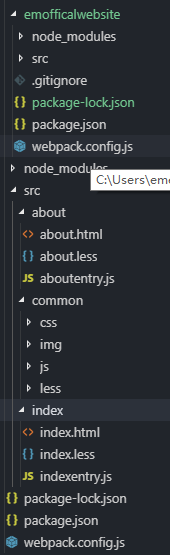
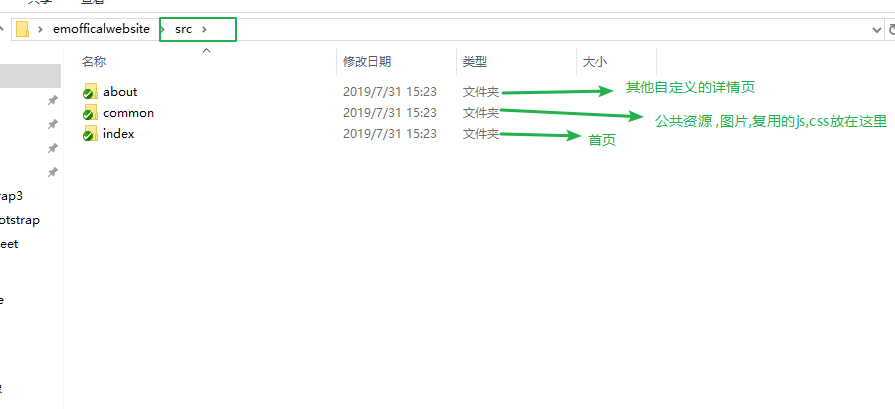
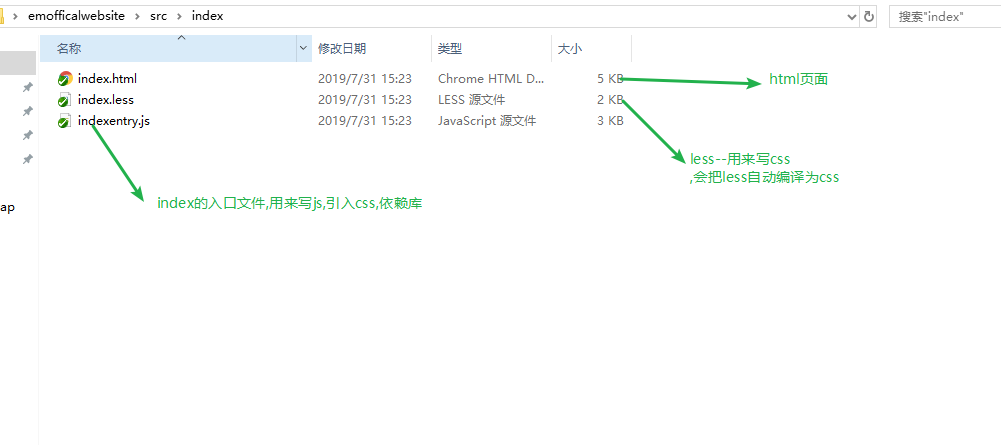
补充:
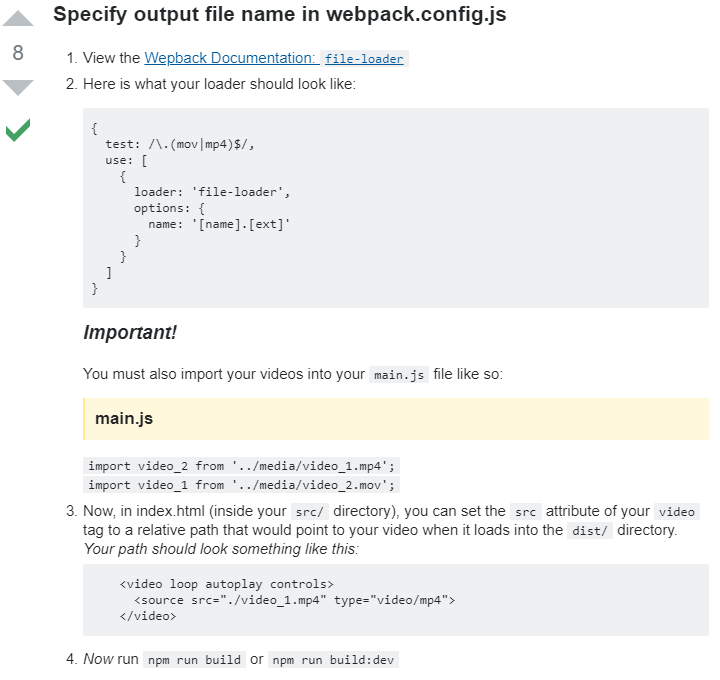
1.配置视频文件:https://stackoverflow.com/questions/45645675/webpack-3-locates-mp4-file-but-video-is-not-playable
2.压缩css:(需要安装cssnano包 npm install cssnano)https://my.oschina.net/itlangz/blog/2986976
 const MiniCssExtractPlugin = require('mini-css-extract-plugin')

 const OptimizeCSSAssetsPlugin = require('optimize-css-assets-webpack-plugin')

 plugins:[

         new OptimizeCSSAssetsPlugin({

         assetNameRegExp: /\.css$/g,

         cssProcessor: require('cssnano'),

         // cssProcessorOptions: cssnanoOptions,

         cssProcessorPluginOptions: {

             preset: ['default', {

                 discardComments: {

                     removeAll: true,

                 },

                 normalizeUnicode: false

             }]

         },

         canPrint: true

     })

 ]
webpack配置--传统多页面项目的更多相关文章
- Vue+webpack配置实现多页面应用开发
为什么要配置多页面开发? · 由于单页面应用不利于SEO,对于某些资讯类网站不够友好,而多页面则能够更优的解决此问题. · 传统的多页面开发模式(如java的jsp等) 前后端耦合性大,开发效率低,代 ...
- webpack配置相关的页面异常
原文:https://www.cnblogs.com/Hsong/p/9023341.html 前言 在团队协作开发中,为了统一代码风格,避免一些低级错误,应该设有团队成员统一遵守的编码规范.很多语言 ...
- webpack+react+antd 单页面应用实例
React框架已经火了好长一段时间了,再不学就out了! 对React还没有了解的同学可以看看我之前的一篇文章,可以快速简单的认识一下React.React入门最好的实例-TodoList 自己从开始 ...
- Vue 2.x + Webpack 3.x + Nodejs 多页面项目框架(上篇——纯前端多页面)
Vue 2.x + Webpack 3.x + Nodejs 多页面项目框架(上篇--纯前端多页面) @(HTML/JS) 一般来说,使用vue做成单页应用比较好,但特殊情况下,需要使用多页面也有另外 ...
- Vue 2.x + Webpack 3.x + Nodejs 多页面项目框架(下篇——多页面VueSSR+热更新Server)
Vue 2.x + Webpack 3.x + Nodejs 多页面项目框架(下篇--多页面VueSSR+热更新Server) @(HTML/JS) 这是Vue多页面框架系列文章的第二篇,上一篇(纯前 ...
- Webpack + Vue 多页面项目升级 Webpack 4 以及打包优化
0. 前言 早在 2016 年我就发布过一篇关于在多页面下使用 Webpack + Vue 的配置的文章,当时也是我在做自己一个个人项目时遇到的配置问题,想到别人也可能遇到跟我同样的问题,就把配置的思 ...
- VUE 多页面打包webpack配置
思路:多配置一个main的文件,用于webpack入口使用, 然后路由的导向也应该默认指向新组件,最后通过webpack构建出一个新的独立的html文件. 缺点:生成多个html会new出多个vu ...
- 关于自己配置有关webpack.config.js和vue项目搭建相关步骤
## Webpack的配置和使用 ### 安装 1. 全局安装 ``` npm install webpack -g ``` 2. 本地安装 ``` npm install webpack -D `` ...
- Element源码:项目初始化和webpack配置
0x00.项目初始化 由于整个过程像素级 copy element,所以将不使用vue-cli初始化项目. 创建项目 新建一个空的文件夹,使用npm init 来初始化项目,并安装vue模块. 修改目 ...
随机推荐
- sh_02_判断年龄改进版
sh_02_判断年龄改进版 # 输入用户年龄 age = int(input("请输入年龄:")) # 判断是否满 18 岁 (>=) if age >= 18: # ...
- [CF1093G]Multidimensional Queries:线段树
分析 非常有趣的一道题. 式子中的绝对值很难处理,但是我们发现: \[\sum_{i=1}^{k}|a_{x,i}-a_{y,i}|=\sum_{i=1}^{k}max(a_{x,i}-a_{y,i} ...
- 大数据笔记(三十一)——SparkStreaming详细介绍,开发spark程序
Spark Streaming: Spark用于处理流式数据的模块,类似Storm 核心:DStream(离散流),就是一个RDD=================================== ...
- python面向对象之设计模式
概念: 设计模式(Design Pattern)是一套被反复使用.多数人知晓的.经过分类的.代码设计经验的总结.使用设计模式的目的:为了代码可重用性.让代码更容易被他人理解.保证代码可靠性. 设计 ...
- 第五周学习总结&实验报告(三)
第五周学习总结&实验报告(三) 这一周又学习了新的知识点--继承. 一.继承的基本概念是: *定义一个类,在接下来所定义的类里面如果定义的属性与第一个类里面所拥有的属性一样,那么我们在此就不需 ...
- 当出现no changes added to commit时如何正确使用git提交命令
对于这个问题,最好的解决方法就是按如下步骤:1.到根目录下:git add . :("."是必须要的)2.git commit -m "some word"3 ...
- 大sd卡 裂开了,写保护掉了。重新装好后,被写保护的解决办:
大sd卡 裂开了,写保护掉了.重新装好后,被写保护的解决办: 1.用烙铁把写保护附近的塑料往外顶一点点,就ok 别太热,也别劲太大.容易过,不能破坏原来的部分. 解决问题. 总结: 写保护,就是检 ...
- virtualbox压缩虚拟机硬盘文件vhd
命令如下: VBoxManage modifyhd D:\pc1\pc1.vhd --compact 当提示以下内容时,将整个虚拟机文件夹拷贝盘符根目录下,将[D:\pc1\pc1.vhd]改为相应 ...
- vue--路由嵌套
路由嵌套的SPA实现的步骤: A(/a)组件需要嵌套B组件(/b)和C组件(/c) ①准备嵌套其它组价的父组件 指定一个容器在A组件指定一个容器<router-view></rout ...
- ubuntu 环境配置
安装包准备 下载 410以上显卡驱动 文件名: NVIDIA-Linux-x86_64-410.66.run 下载 cuda 10.0 选择 CUDA Toolkit 10.0 (Sept 2018) ...