
CentOS7集成Apache和SVN
本文主要介绍如何在CentOS7环境下集成Apache和SVN,完成后可以通过浏览器访问SVN仓库.
1.查看系统环境,关闭防火墙和SELinux.
 [root@Docker /]# systemctl status firewalld.service

 ● firewalld.service - firewalld - dynamic firewall daemon

    Loaded: loaded (/usr/lib/systemd/system/firewalld.service; disabled; vendor preset: enabled)

    Active: inactive (dead)

      Docs: man:firewalld()

 [root@Docker /]# getenforce

 Disabled

 [root@Docker /]# uname -a

 Linux Docker 3.10.-693.21..el7.x86_64 # SMP Wed Mar  :: UTC  x86_64 x86_64 x86_64 GNU/Linux

 [root@Docker /]# cat /etc/redhat-release

 CentOS Linux release 7.4. (Core)

 [root@Docker /]#
2.安装软件包和Apache SVN模块.
yum install httpd mod_dav_svn subversion
3. 验证安装结果.
 [root@Docker /]# httpd -version

 Server version: Apache/2.4. (CentOS)

 Server built:   Apr   ::

 [root@Docker /]# svnserve --version

 svnserve, version 1.7. (r1542130)

 compiled Apr  , ::
4.验证Apache SVN模块是否安装成功,需要检查mod_dav_svn.so和mod_authz_svn.so文件.
 [root@Docker modules]# pwd

 /etc/httpd/modules

 [root@Docker modules]# ll | egrep "mod_dav_svn.so|mod_authz_svn.so"

 -rwxr-xr-x  root root   Apr  : mod_authz_svn.so

 -rwxr-xr-x  root root  Apr  : mod_dav_svn.so
5.使用svnadmin命令创建SVN仓库repos.
 [root@Docker /]# mkdir /var/www/svn

 [root@Docker /]# cd /var/www/svn/

 [root@Docker svn]# svnadmin create repos

 [root@Docker svn]# tree -d repos/

 repos/

 ├── conf

 ├── db

 │   ├── revprops

 │   │   └──

 │   ├── revs

 │   │   └──

 │   ├── transactions

 │   └── txn-protorevs

 ├── hooks

 └── locks

  directories
6.修改repos目录属主和属组为apache.
 [root@Docker svn]# chown -R apache:apache repos/

 [root@Docker svn]# ll

 total

 drwxr-xr-x  apache apache  May  : repos
7.复制/var/www/svn/repos/conf 下的权限管理文件authz到 /var/www/svn下,并创建用户认证文件passwd,并且设置隐藏属性.
 [root@Docker svn]# cp /var/www/svn/repos/conf/authz /var/www/svn/

 [root@Docker svn]# cd /var/www/svn/repos

 [root@Docker repos]# touch .passwd
8.通过htpasswd命令建立SVN用户svnuser并将用户信息保存在passwd文件中.
 [root@Docker repos]# htpasswd ./.passwd svnuser

 New password:

 Re-type new password:

 Adding password for user svnuser

 [root@Docker repos]# cat .passwd

 svnuser:$apr1$ThE7aO2O$CQo.OIs.8TOqUFaFr7b3H0
9.修改authz文件并设置相应权限:
在[groups]下添加组
[/] 相当于/var/www/svn这个目录,赋予权限给用户组
[repos:/] 是指repos库
[repos:/desgin]是repos下的desgin目录
rw是指可读写权限
 [root@Docker svn]# vim authz

 [root@Docker svn]# grep -v "^#" authz

 [groups]

 admin_group=svnuser,svnuser2

 project_group=svnuser3,svnuser4

 project2_group=svnuser5,svnuser6

 [/]

 @admin_group=rw

 [repos:/]

 @project_group=rw

 [repos:/desgin]

 @project_group=rw

 [repos2:/]

 @project2_group=rw
10.关联Apache与SVN,创建subversion.conf文件.Locaion后的名字可以自定义,不需要与仓库名一致,这里我们定义为/documents,这样后面访问时直接输入http://x.x.x.x/documents即可打开仓库
[root@Docker /]# vim /etc/httpd/conf.d/subversion.conf

LoadModule dav_svn_module     modules/mod_dav_svn.so

LoadModule authz_svn_module   modules/mod_authz_svn.so

<Location /documents>

   DAV svn

   SVNParentPath /var/www/svn

   SVNListParentPath On

   AuthType Basic

   AuthName "Project SVN"

   AuthUserFile /var/www/svn/repos/.passwd

   Require valid-user

   AuthzSVNAccessFile /var/www/svn/authz

</Location>
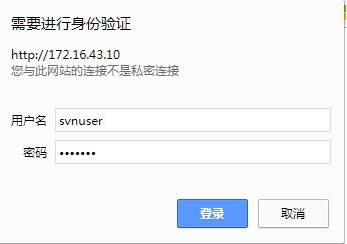
11.启动Apache,在浏览器中输入http://x.x.x.x/documents弹出认证窗口,输入用户认证信息即可看到SVN仓库repos.
[root@Docker /]# systemctl start httpd.service

CentOS7集成Apache和SVN的更多相关文章
- Apache Project SVN Download Sit
apache project svn download sit : http://svn.apache.org/repos/asf 如果想要研究相关项目的源码的话.或者想要成为某个项目的开发者, 就可 ...
- linux上nginx+apache 搭建 svn服务器
众所周知,nginx目前是不支持svn的,并且由于机房网络只开了80和22(ssh)端口,所以这时候就没法单独在服务器上搭建apache+svn .所以就产生了 nginx + apache + sv ...
- Apache 下SVN项目管理使用说明
Apache 下SVN项目管理使用说明 (1)Apaceh和SVN先要装好. (2)在apache的目录下找到httpd.conf文件,在最后一行增加如下配置 Include conf/svn.pro ...
- 基于腾讯Centos7云服务器搭建SVN版本控制库
基于腾讯Centos7云服务器搭建SVN版本控制库 最近在和小伙伴组队参加一个关于人工智能的比赛,无奈不知道怎么处理好每个人的代码托管问题,于是找到了晚上免费svn托管服务器的服务,但是所给的免费空间 ...
- Linux整合Apache和SVN
1.安装APR-1.2.7和APR-util-1.2.7 (下载地址:http://apr.apache.org/) #tar zxvf apr-1.2.7.tar.gz #cd apr-1. ...
- 在Linux(CentOS 6.6)服务器上安装并配置基于Apache的SVN服务器
#!/bin/bash # # 在Linux(CentOS 6.6)服务器上安装并配置基于Apache的SVN服务器: # # .安装服务 # .创建svn版本库 # .创建svn用户 # .配置sv ...
- CentOS7安装 Apache HTTP 服务器
CentOS7安装 Apache HTTP 服务器 时间:2015-05-02 00:45来源:linux.cn 作者:linux.cn 举报 点击:11457次 不管你因为什么原因使用服务器,大部分 ...
- centos7.3给搭建SVN服务器
centos7.3给搭建SVN服务器 1 安装svnserver yum install subversion 2 查看版本 svnserve --version 3 创建版本库 3.1 运行以下命令 ...
- centos7安装apache http server启动失败--Failed to start The Apache HTTP Server.
centos7安装apache http server启动失败 除了nginx可以开启http服务外,apche http server也可以开启http服务,安装过程如下:1. 首先,检测是 ...
随机推荐
- Populating Next Right Pointers in Each Node 设置二叉树的next节点
Given a binary tree struct TreeLinkNode { TreeLinkNode *left; TreeLinkNode *right; TreeLinkNode *nex ...
- centos7安装go语言环境
安装包下载地址为:https://golang.org/dl/. 各个系统对应的包名: 解压安装 1.下载源码包:go1.7rc3.linux-amd64.tar.gz 2.将下载的源码包解压至 /u ...
- 打印 1 到最大的 n 位数(C++ 和 Python 实现)
(说明:本博客中的题目.题目详细说明及参考代码均摘自 “何海涛<剑指Offer:名企面试官精讲典型编程题>2012年”) 题目 输入数字 n,按顺序打印出从 1 到最大的 n 位十进制数. ...
- C# Winform选项卡集成窗体
知识要点:利用反射动态的加载窗体到对应的TabPage的. using System; using System.Collections.Generic; using System.Component ...
- Azure 订阅和服务限制、配额和约束
最后更新时间:2016年10月24日 概述 本文档指定一些最常见的 Azure 限制.请注意,本文档目前未涵盖所有 Azure 服务.一段时间后,将展开并更新这些限制以包含多个平台. NOTE: 如果 ...
- 沉淀,再出发:PHP的简单使用
沉淀,再出发:PHP的简单使用 一.前言 关于PHP,笔者在本科的时候就听到了太多太多,可惜虽然看了很多的教材,听到了无数遍,也没有系统性的整理过和学习过这方面的知识,这点无论什么时候想起来都是一种遗 ...
- mysql 基础学习1
安装得方法有很多,这里就不详细介绍了. 进入 mysql 控制台 mysql -uroot -p 查看 有哪些库 show databases; 1.创建一个库 create database tes ...
- Kendo UI 的 k-template
官网上的例子: 1. <span id="output"></span><script>var template = kendo.templat ...
- css属性之flex属性
flex属性 规定了弹性元素如何伸长或缩短以适应flex容器中的可用空间.是一个简写属性,可以同时设置flex-grow, flex-shrink, flex-basis三个子属性. /* Basic ...
- Redux 源码解读 —— 从源码开始学 Redux
已经快一年没有碰过 React 全家桶了,最近换了个项目组要用到 React 技术栈,所以最近又复习了一下:捡起旧知识的同时又有了一些新的收获,在这里作文以记之. 在阅读文章之前,最好已经知道如何使用 ...