
springboot: mybatis的使用
第一步:引入mybatis依赖
            <dependency>

            <groupId>org.mybatis.spring.boot</groupId>

            <artifactId>mybatis-spring-boot-starter</artifactId>

            <version>1.3.0</version>

        </dependency>
第二步:类目表实体类
package com.payease.dataobject;

import lombok.Data;

import org.hibernate.annotations.DynamicUpdate;

import javax.persistence.Entity;

import javax.persistence.GeneratedValue;

import javax.persistence.Id;

/**

 * 类目

 * Created by liuxiaoming

 * 2017-11-09

 */

@Entity

@DynamicUpdate   //动态时间修改

@Data            // get set toString 登方法

public class ProductCategory {

    /** 类目id. */

    @Id

    @GeneratedValue

    private Integer categoryId;

    /** 类目名字. */

    private String categoryName;

    /** 类目编号. */

    private Integer categoryType;

//    private Date createTime;

//

//    private Date updateTime;

    public ProductCategory() {

    }

    public ProductCategory(String categoryName, Integer categoryType) {

        this.categoryName = categoryName;

        this.categoryType = categoryType;

    }

}
第三步:编写相应的mapper文件
package com.payease.dataobject.mapper;

import com.payease.dataobject.ProductCategory;

import org.apache.ibatis.annotations.*;

import java.util.List;

import java.util.Map;

/**

 * @Created By liuxiaoming

 * @CreateTime 2017/12/12 下午6:13

 **/

public interface ProductCategoryMapper {

    /**

     * 通过参数为map保存

     * @param map

     * @return

     */

    @Insert("insert into product_category(category_name, category_type) values (#{category_name , jdbcType=VARCHAR}, #{category_type, jdbcType=INTEGER})")

    int insertByMap(Map<String, Object> map);

    /**

     * 通过参数为对象保存

     * @param productCategory

     * @return

     */

    @Insert("insert into product_category(category_name, category_type) values (#{categoryName , jdbcType=VARCHAR}, #{categoryType, jdbcType=INTEGER})")

    int insertByObject(ProductCategory productCategory);

    /**

     * 查单一数据

     * 通过categoryType查询product_category表 @Result注解设置返回值

     * @param categoryType

     * @return

     */

    @Select("select * from product_category where category_type = #{categoryType}")

    @Results({

            @Result(column = "category_id", property = "categoryId"),

            @Result(column = "category_name", property = "categoryName"),

            @Result(column = "category_type", property = "categoryType")

    })

    ProductCategory findByCategoryType(Integer categoryType);

    /**

     * 查集合

     * 通过categoryName查询product_category表 @Result注解设置返回值

     * @param categoryName

     * @return

     */

    @Select("select * from product_category where category_name = #{categoryName}")

    @Results({

            @Result(column = "category_id", property = "categoryId"),

            @Result(column = "category_name", property = "categoryName"),

            @Result(column = "category_type", property = "categoryType")

    })

    List<ProductCategory> findByCategoryName(String categoryName);

    /**

     * 根据某个字段更新

     * 通过查询category_type 来修改 category_name

     * @param categoryName

     * @param categoryType

     * @return

     */

    @Update("update product_category set category_name = #{categoryName} where category_type = #{categoryType}")

    int updateByCategoryType(@Param("categoryName") String categoryName,

                             @Param("categoryType") Integer categoryType);

    /**

     * 根据对象更新

     * 通过查询category_type 来修改 category_name

     * @param productCategory

     * @return

     */

    @Update("update product_category set category_name = #{categorName} where category_type = #{categoryType}")

    int updateByObject(ProductCategory productCategory);

    /**

     * 根据某个字段来删除数据

     * 通过category_type 来删除数据

     * @param categoryType

     * @return

     */

    @Delete("delete from product_category where category_type = #{categoryType}")

    int deleteByCategoryType(Integer categoryType);

    /**

     * mybatis xml的使用样例

     * 通过categoryType 查询数据

     * @param categoryType

     * @return

     */

    ProductCategory selectByCategoryType(Integer categoryType);

}
第四步:测试类的编写
package com.payease.dataobject.mapper;

import com.payease.dataobject.ProductCategory;

import org.junit.Assert;

import org.junit.Test;

import org.junit.runner.RunWith;

import org.springframework.beans.factory.annotation.Autowired;

import org.springframework.boot.test.context.SpringBootTest;

import org.springframework.test.context.junit4.SpringRunner;

import java.util.HashMap;

import java.util.List;

import java.util.Map;

/**

 * @Created By liuxiaoming

 * @CreateTime 2017/12/12 下午6:19

 **/

@RunWith(SpringRunner.class)

@SpringBootTest

public class ProductCategoryMapperTest {

    @Autowired

    private ProductCategoryMapper mapper;

    @Test

    public void insertByMap() throws Exception {

        Map<String, Object> map = new HashMap<>();

        map.put("category_name","吃鸡专属");

        map.put("category_type",103);

        int result = mapper.insertByMap(map);

        Assert.assertEquals(1,result);

    }

    @Test

    public void insertByObject() throws Exception {

        ProductCategory productCategory = new ProductCategory();

        productCategory.setCategoryName("大吉大利");

        productCategory.setCategoryType(102);

        int result = mapper.insertByObject(productCategory);

        Assert.assertEquals(1,result);

    }

    @Test

    public void findByCategoryType() throws Exception{

        ProductCategory result = mapper.findByCategoryType(102);

        Assert.assertNotNull(result);

    }

    @Test

    public void findByCategoryName() throws Exception{

        List<ProductCategory> result = mapper.findByCategoryName("吃鸡专属");

        Assert.assertNotEquals(0,result.size());

    }

    @Test

    public void updateByCategoryType(){

        int result = mapper.updateByCategoryType("绝地求生", 103);

        Assert.assertEquals(1, result);

    }

    @Test

    public void updateByObject(){

        ProductCategory productCategory = new ProductCategory();

        productCategory.setCategoryName("今晚吃鸡|大吉大利");

        productCategory.setCategoryType(102);

        int result = mapper.updateByObject(productCategory);

        Assert.assertEquals(1, result);

    }

    @Test

    public void deleteByCategoryType(){

        int result = mapper.deleteByCategoryType(102);

        Assert.assertEquals(1, result);

    }

    @Test

    public void selectByCategoryType(){

        ProductCategory result = mapper.selectByCategoryType(101);

        Assert.assertNotNull(result);

    }

}
第五步:启动类上加入mapper扫描注解
package com.payease;

import org.mybatis.spring.annotation.MapperScan;

import org.springframework.boot.SpringApplication;

import org.springframework.boot.autoconfigure.SpringBootApplication;

@SpringBootApplication

@MapperScan(basePackages = "com.payease.dataobject.mapper")

public class SellApplication {

    public static void main(String[] args) {

        SpringApplication.run(SellApplication.class, args);

    }

}
第六步:对于mybatis xml文件的使用需要
1.在 resource/mapper文件夹下创建相应的xml文件

<?xml version="1.0" encoding="UTF-8" ?>

<!DOCTYPE mapper PUBLIC "-//mybatis.org//DTD Mapper 3.0//EN" "http://mybatis.org/dtd/mybatis-3-mapper.dtd" >

<mapper namespace="com.payease.dataobject.mapper.ProductCategoryMapper" >

  <resultMap id="BaseResultMap" type="com.payease.dataobject.ProductCategory" >

    <id column="category_id" property="categoryId" jdbcType="INTEGER" />

    <result column="category_name" property="categoryName" jdbcType="VARCHAR" />

    <result column="category_type" property="categoryType" jdbcType="INTEGER" />

    <result column="create_time" property="createTime" jdbcType="TIMESTAMP" />

    <result column="update_time" property="updateTime" jdbcType="TIMESTAMP" />

  </resultMap>

  <sql id="base_column" >

      category_id,category_name,category_type

  </sql>

  <select id="selectByCategoryType" resultMap="BaseResultMap" parameterType="java.lang.Integer" >

    select <include refid="base_column" />

    from product_category

    where category_type = #{category_type,jdbcType=INTEGER}

  </select>

</mapper>
2.在application.yml文件夹下配置xml文件的扫描

注1: mapper文件的使用 封装到dao层
package com.payease.dataobject.dao;

import com.payease.dataobject.mapper.ProductCategoryMapper;

import org.springframework.beans.factory.annotation.Autowired;

import java.util.Map;

/**

 * @Created By liuxiaoming

 * @CreateTime 2017/12/13 下午3:23

 **/

public class ProductCategoryDao {

    @Autowired

    ProductCategoryMapper mapper;

    public int insertByMap(Map<String, Object> map){

        return mapper.insertByMap(map);

    }

}
注2:日志查看mapper文件中的SQL语句
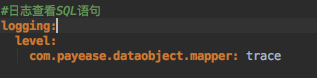
这是application.yml文件的配置
spring:

  datasource:

    driver-class-name: com.mysql.jdbc.Driver

    username: root

    password: liuxiaoming_123 #1234

    url: jdbc:mysql://rm-uf6qe0894f7hv8977o.mysql.rds.aliyuncs.com/sell?characterEncoding=utf-8&useSSL=false

    #url: jdbc:mysql://127.0.0.1/sell?characterEncoding=utf-8&useSSL=false

  jpa:

    show-sql: true

  jackson:

    default-property-inclusion: non_null

  redis:

    host: 192.168.1.183

    port: 6379

server:

  context-path: /sell

#logging:

#  pattern:

#    console: "%d - %msg%n"  #日志格式 日期 - 信息 空格

#  path: /Users/liuxiaoming/Documents/ideawork/sell_log #日志路径 默认名字spring.log

#  file: /Users/liuxiaoming/Documents/ideawork/sell_log/sell.log #日志文件+路径

#  level:  #日志级别

#    com.payease.LoggerTest: debug #日志级别指定某个类 也可以步制定类 直接在level: 后面配置

#日志查看SQL语句

logging:

  level:

    com.payease.dataobject.mapper: trace

wechat:

  mpAppId: wxd898fcb01713c658

  mpAppSecret: 47ccc303338cee6e62894fxxxxxxxxxxx

  openAppId: wx6ad144e54af67d87

  openAppSecret: 91a2ff6d38a2bbccfb7e9f9079108e2e

  mchId: 1483469312

  mchKey: 06C56A89949D617xxxxxxxxxxx

  keyPath: /var/weixin_cert/h5.p12

  notifyUrl: http://sell.natapp4.cc/sell/pay/notify

  templateId:

    orderStatus: e-Cqq67QxD6YNI41iRiqawEYdFavW_7pc7LyEMb-yeQ

#projectUrl:

#  wechatMpAuthorize: http://sell.natapp4.cc

#  wechatOpenAuthorize: http://sell.natapp4.cc

#  sell: http://sell.natapp4.cc

projectUrl:

  wechatMpAuthorize: http://127.0.0.1:8080

  wechatOpenAuthorize: http://127.0.0.1:8080

  sell: http://127.0.0.1:8080
springboot: mybatis的使用的更多相关文章
- 第五章 springboot + mybatis(转载)
本编博客转发自:http://www.cnblogs.com/java-zhao/p/5350021.html springboot集成了springJDBC与JPA,但是没有集成mybatis,所以 ...
- 第九章 springboot + mybatis + 多数据源 (AOP实现)
在第八章 springboot + mybatis + 多数据源代码的基础上,做两点修改 1.ShopDao package com.xxx.firstboot.dao; import org.spr ...
- 第五章 springboot + mybatis
springboot集成了springJDBC与JPA,但是没有集成mybatis,所以想要使用mybatis就要自己去集成.集成方式相当简单. 1.项目结构 2.pom.xml <!-- 与数 ...
- 基于Maven的Springboot+Mybatis+Druid+Swagger2+mybatis-generator框架环境搭建
基于Maven的Springboot+Mybatis+Druid+Swagger2+mybatis-generator框架环境搭建 前言 最近做回后台开发,重新抓起以前学过的SSM(Spring+Sp ...
- Docker+SpringBoot+Mybatis+thymeleaf的Java博客系统开源啦
个人博客 对于技术人员来说,拥有自己的个人博客应该是一件令人向往的事情,可以记录和分享自己的观点,想到这件事就觉得有意思,但是刚开始写博客的时候脑海中是没有搭建个人博客这一想法的,因为刚起步的时候连我 ...
- springboot mybatis 事务管理
本文主要讲述springboot提供的声明式的事务管理机制. 一.一些概念 声明式的事务管理是基于AOP的,在springboot中可以通过@Transactional注解的方式获得支持,这种方式的优 ...
- SpringBoot+Mybatis+Freemark 最简单的例子
springboot-sample 实现最简单的 SpringBoot + Mybatis + Freemarker 网页增删改查功能,适合新接触 Java 和 SpringBoot 的同学参考 代码 ...
- springboot + mybatis 前后端分离项目的搭建 适合在学习中的大学生
人生如戏,戏子多半掉泪! 我是一名大四学生,刚进入一家软件件公司实习,虽说在大学中做过好多个实训项目,都是自己完成,没有组员的配合.但是在这一个月的实习中,我从以前别人教走到了现在的自学,成长很多. ...
- springboot+mybatis+redis实现分布式缓存
大家都知道springboot项目都是微服务部署,A服务和B服务分开部署,那么它们如何更新或者获取共有模块的缓存数据,或者给A服务做分布式集群负载,如何确保A服务的所有集群都能同步公共模块的缓存数据, ...
- Java逆向工程SpringBoot + Mybatis Generator + MySQL
Java逆向工程SpringBoot+ Mybatis Generator + MySQL Meven pop.xml文件添加引用: <dependency> <groupId> ...
随机推荐
- spark standalone集群部署 实践记录
本文记录了一次搭建spark-standalone模式集群的过程,我准备了3个虚拟机服务器,三个centos系统的虚拟机. 环境准备: -每台上安装java1.8 -以及scala2.11.x (x代 ...
- SGU 194 Reactor Cooling (有容量和下界的可行流)
题意:给定上一个有容量和下界的网络,让你求出一组可行解. 析:先建立一个超级源点 s 和汇点 t ,然后在输入时记录到每个结点的下界的和,建边的时候就建立c - b的最后再建立 s 和 t , 在建立 ...
- sql语句语句中的正则查找
举例: select tncl_id from tncl where tncl_id regexp'^0065'; 有一表,数据有10万多条,其中某列数据示例如下: 100000-200000-300 ...
- div模拟键盘输入
<!DOCTYPE html> <html> <head> <meta charset="utf-8"> <meta name ...
- mysql 字段名是关键字 报错
DROP TABLE IF EXISTS `bas_dictionary`; CREATE TABLE `bas_dictionary` ( `id` ) NOT NULL AUTO_INCREMEN ...
- 常见gcc编译问题解决方法集
除非明确说明,本文内容仅针对x86/x86_64的Linux开发环境,有朋友说baidu不到,开个贴记录一下(加粗字体是关键词):用"-Wl,-Bstatic"指定链接静态库,使用 ...
- 23 DesignPatterns学习笔记:C++语言实现 --- 1.1 Factory
23 DesignPatterns学习笔记:C++语言实现 --- 1.1 Factory 2016-07-18 13:03:43 模式理解
- pandas iterrows()
按照行遍历,第一个是行索引,第二个是每一行,series类型.
- 使用unordered_map提升查找效率
在对网络数据包流(Flow)进行处理的时候,一开始为了简单使用了vector做为Flow信息的存储容器,当其中的元素达到几十万时,程序的执行速度让人无法忍受.已经对vector进行过合理的预先rese ...
- Android 线刷小白教程
Android 线刷小白教程 再说一遍,绝不使用刷机精灵等软件. 一.概念 安卓系统一般把rom芯片分成7个区,如果再加上内置sd卡这个分区,就是8个: hboot分区----------负责启动. ...