
HttpWebRequest类,及如何使用Cookie(转载)
HttpWebRequest类与HttpRequest类的区别。
HttpRequest类的对象用于服务器端,获取客户端传来的请求的信息,包括HTTP报文传送过来的所有信息。而HttpWebRequest用于客户端,拼接请求的HTTP报文并发送等。
HttpWebRequest这个类非常强大,强大的地方在于它封装了几乎HTTP请求报文里需要用到的东西,以致于能够能够发送任意的HTTP请求并获得服务器响应(Response)信息。采集信息常用到这个类。在学习这个类之前,首先有必要了解下HTTP方面的知识。
一、简单示例
我们先来一个最简单的,就是紧紧输入一个网址就获取响应。代码如下:
static void Main(string[] args)

{

    HttpWebRequest request = (HttpWebRequest)HttpWebRequest.Create("http://www.baidu.com");    //创建一个请求示例

    using (HttpWebResponse response = (HttpWebResponse)request.GetResponse())  //获取响应,即发送请求

    {

        Stream responseStream = response.GetResponseStream();

        using (StreamReader streamReader = new StreamReader(responseStream, Encoding.UTF8))

        {

            string html = streamReader.ReadToEnd();

            Console.WriteLine(html);

        }

    }

    Console.ReadKey();

}
OK,就是这么简单了,真的这么简单吗?发送一个HTTP请求真的这么简单。但是要做出很多功能就不简单了。你需要详细了解下HTTP方面的知识,比如HTTP请求报文之类的。
二、模拟登录
下面来个复杂点的,这次是获取登录之后的页面。登录之后的请求用什么实现呢?呵呵,用到是cookie。在拼接HTTP请求的时候,连着cookie也发送过去。
using System;

using System.IO;

using System.Net;

using System.Text;

using System.Threading;

namespace ConsoleApplication1

{

    class Program

    {

        static void Main(string[] args)

        {

            HttpHeader header = new HttpHeader();

            header.accept = "image/gif, image/x-xbitmap, image/jpeg, image/pjpeg, application/x-shockwave-flash, application/x-silverlight, application/vnd.ms-excel, application/vnd.ms-powerpoint, application/msword, application/x-ms-application, application/x-ms-xbap, application/vnd.ms-xpsdocument, application/xaml+xml, application/x-silverlight-2-b1, */*";

            header.contentType = "application/x-www-form-urlencoded";

            header.method = "POST";

            header.userAgent = "Mozilla/4.0 (compatible; MSIE 7.0; Windows NT 5.1; .NET CLR 2.0.50727; .NET CLR 3.0.04506.648; .NET CLR 3.5.21022)";

            header.maxTry = ;

            //在这里自己拼接一下Cookie,不用复制过来的那个GetCookie方法了,原来的那个写法还是比较严谨的

            CookieContainer cc = new CookieContainer();

            Cookie cUserName = new Cookie("cSpaceUserEmail", "742783833%40qq.com");

            cUserName.Domain = ".7soyo.com";

            Cookie cUserPassword = new Cookie("cSpaceUserPassWord", "4f270b36a4d3e5ee70b65b1778e8f793");

            cUserPassword.Domain = ".7soyo.com";

            cc.Add(cUserName);

            cc.Add(cUserPassword);

            string html = HTMLHelper.GetHtml("http://user.7soyo.com/CollectUser/List", cc, header);

            FileStream fs = new FileStream(@"D:\123.txt", FileMode.CreateNew, FileAccess.ReadWrite);

            fs.Write(Encoding.UTF8.GetBytes(html), , html.Length);

            fs.Flush();

            fs.Dispose();

            Console.WriteLine(html);

            Console.ReadKey();

        }

    }

    public class HTMLHelper

    {

        /// <summary>

        /// 获取CooKie

        /// </summary>

        /// <param name="loginUrl"></param>

        /// <param name="postdata"></param>

        /// <param name="header"></param>

        /// <returns></returns>

        public static CookieContainer GetCooKie(string loginUrl, string postdata, HttpHeader header)

        {

            HttpWebRequest request = null;

            HttpWebResponse response = null;

            try

            {

                CookieContainer cc = new CookieContainer();

                request = (HttpWebRequest)WebRequest.Create(loginUrl);

                request.Method = header.method;

                request.ContentType = header.contentType;

                byte[] postdatabyte = Encoding.UTF8.GetBytes(postdata);     //提交的请求主体的内容

                request.ContentLength = postdatabyte.Length;    //提交的请求主体的长度

                request.AllowAutoRedirect = false;

                request.CookieContainer = cc;

                request.KeepAlive = true;

                request.Timeout = ;//设置HttpWebRequest获取响应的超时时间为10000毫秒,即10秒

                //提交请求

                Stream stream;

                using (stream = request.GetRequestStream())

                {

                    stream.Write(postdatabyte, , postdatabyte.Length);     //带上请求主体

                }

                //接收响应

                using (response = (HttpWebResponse)request.GetResponse())      //正式发起请求

                {

                    response.Cookies = request.CookieContainer.GetCookies(request.RequestUri);

                    CookieCollection cook = response.Cookies;

                    //Cookie字符串格式

                    string strcrook = request.CookieContainer.GetCookieHeader(request.RequestUri);

                }

                return cc;

            }

            catch (Exception ex)

            {

                throw ex;

            }

        }

        /// <summary>

        /// 获取html

        /// </summary>

        /// <param name="getUrl"></param>

        /// <param name="cookieContainer"></param>

        /// <param name="header"></param>

        /// <returns></returns>

        public static string GetHtml(string getUrl, CookieContainer cookieContainer, HttpHeader header)

        {

            Thread.Sleep();

            HttpWebRequest httpWebRequest = null;

            HttpWebResponse httpWebResponse = null;

            try

            {

                httpWebRequest = (HttpWebRequest)HttpWebRequest.Create(getUrl);

                httpWebRequest.CookieContainer = cookieContainer;

                httpWebRequest.ContentType = header.contentType;

                httpWebRequest.ServicePoint.ConnectionLimit = header.maxTry;

                httpWebRequest.Referer = getUrl;

                httpWebRequest.Accept = header.accept;

                httpWebRequest.UserAgent = header.userAgent;

                httpWebRequest.Method = "GET";

                httpWebResponse = (HttpWebResponse)httpWebRequest.GetResponse();

                Stream responseStream = httpWebResponse.GetResponseStream();

                StreamReader streamReader = new StreamReader(responseStream, Encoding.UTF8);

                string html = streamReader.ReadToEnd();

                streamReader.Close();

                responseStream.Close();

                httpWebRequest.Abort();

                httpWebResponse.Close();

                return html;

            }

            catch (Exception e)

            {

                if (httpWebRequest != null) httpWebRequest.Abort();

                if (httpWebResponse != null) httpWebResponse.Close();

                return string.Empty;

            }

        }

    }

    public class HttpHeader

    {

        public string contentType { get; set; }

        public string accept { get; set; }

        public string userAgent { get; set; }

        public string method { get; set; }

        public int maxTry { get; set; }

    }

}
这样获取到的就是登录之后的页面了。
三、模拟表单提交
再来一个例子,运用HttpWebRequest来模拟表单的提交,先新建一个MVC项目,里面只有这些代码:
[HttpPost]

        public ActionResult Index(string userName,string userPassword)

        {

            string str = "你提交过来的用户名是:" + userName + ",密码是: " + userPassword;

            Response.Write(str);

            return View();

        }
然后启动该项目,再新建另外一个项目,用于模拟提交表单,然后注意路径填写的是刚才建的那个MVC项目。
static void Main(string[] args)

        {

            HttpWebRequest request = null;

            HttpWebResponse response = null;

            CookieContainer cc = new CookieContainer();

            request = (HttpWebRequest)WebRequest.Create("http://localhost:2539/");

            request.Method = "POST";

            request.ContentType = "application/x-www-form-urlencoded";

            request.UserAgent = "Mozilla/5.0 (Windows NT 6.1; rv:19.0) Gecko/20100101 Firefox/19.0";

            string requestForm = "userName=1693372175&userPassword=123456";     //拼接Form表单里的信息

            byte[] postdatabyte = Encoding.UTF8.GetBytes(requestForm);

            request.ContentLength = postdatabyte.Length;

            request.AllowAutoRedirect = false;

            request.CookieContainer = cc;

            request.KeepAlive = true;

            Stream stream;

            stream = request.GetRequestStream();

            stream.Write(postdatabyte, , postdatabyte.Length); //设置请求主体的内容

            stream.Close();

            //接收响应

            response = (HttpWebResponse)request.GetResponse();

            Console.WriteLine();

            Stream stream1 = response.GetResponseStream();

            StreamReader sr = new StreamReader(stream1);

            Console.WriteLine(sr.ReadToEnd());

            Console.ReadKey();

        }
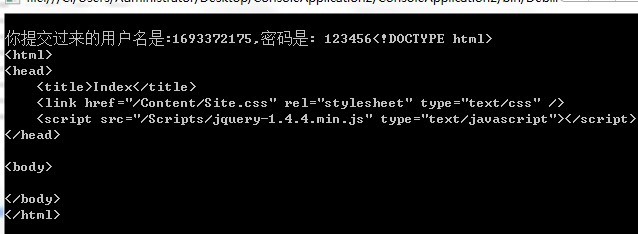
输出结果如下所示:
四、模拟上传
血的教训,注意路径不能写错,否则在对流进行操作时,Write,就会报错:
HttpWebRequest request = (HttpWebRequest)WebRequest.Create("http://localhost:9170/upload/test");
客户端:
class Program

    {

        /**

         * 如果要在客户端向服务器上传文件,我们就必须模拟一个POST multipart/form-data类型的请求

         * Content-Type必须是multipart/form-data。

         * 以multipart/form-data编码的POST请求格式与application/x-www-form-urlencoded完全不同

         * multipart/form-data需要首先在HTTP请求头设置一个分隔符,例如7d4a6d158c9:

         * 我们模拟的提交要设定 content-type不同于非含附件的post时候的content-type

         * 这里需要: ("Content-Type", "multipart/form-data; boundary=ABCD");

         * 然后,将每个字段用“--7d4a6d158c9”分隔,最后一个“--7d4a6d158c9--”表示结束。

         * 例如,要上传一个title字段"Today"和一个文件C:\1.txt,HTTP正文如下:

         *

         * --7d4a6d158c9

         * Content-Disposition: form-data; name="title"

         * \r\n\r\n

         * Today

         * --7d4a6d158c9

         * Content-Disposition: form-data; name="1.txt"; filename="C:\1.txt"

         * Content-Type: text/plain

         * 如果是图片Content-Type: application/octet-stream

         * \r\n\r\n

         * <这里是1.txt文件的内容>

         * --7d4a6d158c9

         * \r\n

         * 请注意,每一行都必须以\r\n结束value前面必须有2个\r\n,包括最后一行。

        */

        static void Main(string[] args)

        {

            string boundary = "----------" + DateTime.Now.Ticks.ToString("x");//元素分割标记

            StringBuilder sb = new StringBuilder();

            sb.Append("--" + boundary);

            sb.Append("\r\n");

            sb.Append("Content-Disposition: form-data; name=\"file1\"; filename=\"D:\\upload.xml" + "\"");

            sb.Append("\r\n");

            sb.Append("Content-Type: application/octet-stream");

            sb.Append("\r\n");

            sb.Append("\r\n");//value前面必须有2个换行

            HttpWebRequest request = (HttpWebRequest)WebRequest.Create("http://localhost:9170/upload/test");

            request.ContentType = "multipart/form-data; boundary=" + boundary;//其他地方的boundary要比这里多--

            request.Method = "POST";

            FileStream fileStream = new FileStream(@"D:\123.xml", FileMode.OpenOrCreate, FileAccess.Read);

            byte[] postHeaderBytes = Encoding.UTF8.GetBytes(sb.ToString());

            byte[] boundaryBytes = Encoding.ASCII.GetBytes("\r\n--" + boundary + "\r\n");

            //http请求总长度

            request.ContentLength = postHeaderBytes.Length + fileStream.Length + boundaryBytes.Length;

            Stream requestStream = request.GetRequestStream();

            requestStream.Write(postHeaderBytes, , postHeaderBytes.Length);

            byte[] buffer = new Byte[checked((uint)Math.Min(, (int)fileStream.Length))];

            int bytesRead = ;

            while ((bytesRead = fileStream.Read(buffer, , buffer.Length)) != )

            {

                requestStream.Write(buffer, , bytesRead);

            }

            fileStream.Dispose();

            requestStream.Write(boundaryBytes, , boundaryBytes.Length);

            WebResponse webResponse2 = request.GetResponse();

            Stream htmlStream = webResponse2.GetResponseStream();

            string HTML = GetHtml(htmlStream, "UTF-8");

            Console.WriteLine(HTML);

            htmlStream.Dispose();

        }

  }
测试服务器端地址:
public ActionResult Test()

        {

            HttpRequest request = System.Web.HttpContext.Current.Request;

            HttpFileCollection FileCollect = request.Files;

            if (FileCollect.Count > )          //如果集合的数量大于0

            {

                foreach (string str in FileCollect)

                {

                    HttpPostedFile FileSave = FileCollect[str];  //用key获取单个文件对象HttpPostedFile

                    string imgName = DateTime.Now.ToString("yyyyMMddhhmmss");

                    string AbsolutePath = FileSave.FileName;

                    FileSave.SaveAs(AbsolutePath);              //将上传的东西保存

                }

            }

            return Content("键值对数目:" + FileCollect.Count);

        }
五、如何声明HttpWebRequest使用的端口号
可以使用ServicePoint的BindIPEndPointDelegate委托,来设置HttpWebRequest使用的端口号
static void Main(string[] args)

{

    HttpWebRequest request = (HttpWebRequest)HttpWebRequest.Create("http://www.baidu.com");    //创建一个请求示例

    //绑定本机8089端口给HttpWebRequest使用

    request.ServicePoint.BindIPEndPointDelegate += new BindIPEndPoint((servicePoint, ipEndPoint, retryCount) =>

    {

        return new IPEndPoint(IPAddress.Any, );

    });

    using (HttpWebResponse response = (HttpWebResponse)request.GetResponse())  //获取响应,即发送请求

    {

        Stream responseStream = response.GetResponseStream();

        using (StreamReader streamReader = new StreamReader(responseStream, Encoding.UTF8))

        {

            string html = streamReader.ReadToEnd();

            Console.WriteLine(html);

        }

    }

    Console.ReadKey();

}
但是目前ServicePoint的BindIPEndPointDelegate委托只在.NET Framework中有作用,在.NET Core中不起作用,原因是.NET Core开发团队暂时不准备在.NET Core中引入这个功能,以后会有一个新的特性来代替BindIPEndPointDelegate委托,点击这里见详情。
HttpWebRequest类,及如何使用Cookie(转载)的更多相关文章
- HttpWebRequest类
HttpWebRequest类与HttpRequest类的区别. HttpRequest类的对象用于服务器端,获取客户端传来的请求的信息,包括HTTP报文传送过来的所有信息.而HttpWebReque ...
- C# 之 HttpWebRequest类
提供 WebRequest 类的 HTTP 特定的实现. 继承层次结构 System.Object → System.MarshalByRefObject → System.Net.We ...
- C# HttpWebRequest类
HttpWebRequest类与HttpRequest类的区别. HttpRequest类的对象用于服务器端,获取客户端传来的请求的信息,包括HTTP报文传送过来的所有信息.而HttpWebReque ...
- HttpWebRequest类与HttpRequest类的区别
HttpRequest类的对象用于服务器端,获取客户端传来的请求的信息,包括HTTP报文传送过来的所有信息.而HttpWebRequest用于客户端,拼接请求的HTTP报文并发送等. HttpWebR ...
- C#,WebRequest类、HttpWebRequest类与HttpRequest类的区别
C#,WebRequest类和HttpWebRequest类的区别? httpWebRequest是webRequest的子类,httpWebRequest是基于http协议的 . HttpWebRe ...
- C# HTTP系列1 HttpWebRequest类
系列目录 [已更新最新开发文章,点击查看详细] .NET Framework 中 System.Net 命名空间下提供了 HttpWebRequest 和 HttpWebResponse 2个 ...
- VB.NET中网络编程的另一种方案----system.net中的HttpWebRequest类的使用
VB.NET中网络编程的另一种方案---- system.net中的HttpWebRequest类的使用 在VB.net中进行网络编程,除了我之前写的随笔中的使用WinHttp组件进行编程,还有另一种 ...
- C#中调用HttpWebRequest类中Get/Post请求无故失效的诡异问题
先附代码 /// <summary> /// 客户端Http(GET) /// </summary> /// <param name="strUrl" ...
- C#利用 HttpWebRequest 类发送post请求,出现“套接字(协议/网络地址/端口)只允许使用一次”问题
声明:问题虽然已经被解决,但是并没有明白具体原理,欢迎大佬补充. 最近网站出现一个问题,在C#里面使用 HttpWebRequest 类去发送post请求,偶尔 会出现 “套接字(协议/网络地址/端 ...
随机推荐
- 多线程拷贝备份文件方法(Windows)
D:\bat\robocopy.exe D:\backupdata \\192.168.36.45\BData\ db_20170716.dmp 解释: 微软提供的robocopy.exe命令,默 ...
- javascrip 实现简单的计算器功能
页面样式 <!DOCTYPE html> <html lang="en"> <head> <meta charset="UTF- ...
- slider轮播插件的多种写法
slider轮播插件相信大家经常会用到,写法也是各种各样,大部分都是用的第三方提供的组件使用,如果想基于自己的业务特点封装个组件供自己使用的话就要自己封装组件了,网上看了大部分写法都是通过js控制do ...
- 多项式乘法,FFT与NTT
多项式: 多项式?不会 多项式加法: 同类项系数相加: 多项式乘法: A*B=C $A=a_0x^0+a_1x^1+a_2x^2+...+a_ix^i+...+a_{n-1}x^{n-1}$ $B=b ...
- input file样式美化
默认样式: <input type="file" /> 美化样式时: 将其设置为透明,设置宽高覆盖到需要用的地方,宽100%,高100% 可以用到定位 .box{ po ...
- js判断是手机还是PC端
有时接触一些手机上的适应,需要知道是pc 还是移动端 function IsPC() { var userAgentInfo = navigator.userAgent; var Agents = [ ...
- 《ArcGIS Runtime SDK for Android开发笔记》——(4)、基于Android Studio构建ArcGIS Android开发环境
1.前言 2015年1月15日,发布ArcGIS Runtime SDK for Android v10.2.5版本.从该版本开始默认支持android studio开发环境,示例代码的默认开发环境也 ...
- zabbix fast
源码安装步骤 来源它站: 官方文档:https://www.zabbix.com/documentation/2.4/manual/installation/install#from_the_sour ...
- Java关于List<String> 进行排序,重写Comparator()方法
1.对list进行排序,list中的参数类型是Stirng,参数的格式不完全一样,例如有null,"","51003","510020"等 ...
- 微信开发——微信公众平台实现消息接收以及消息的处理(Java版)
本文主要讲述了如何在微信公众平台实现消息接收以及消息的处理,使用java语言开发,现在把实现思路和代码整理出来分先给兄弟们,希望给他们带来帮助. 温馨提示: 这篇文章是依赖前几篇的文章的. 第一篇:微 ...