
使用html2canvas实现超出浏览器部分截图
之前写过一篇关于 html2canvas如何在元素隐藏的情况下生成截图 的文章,后面发现还有个坑在等着我,就是如果合成图片太大,超出了浏览器的可视区域,那么超出部分是无法截图的。在网上找到了以下方法,亲测有效~
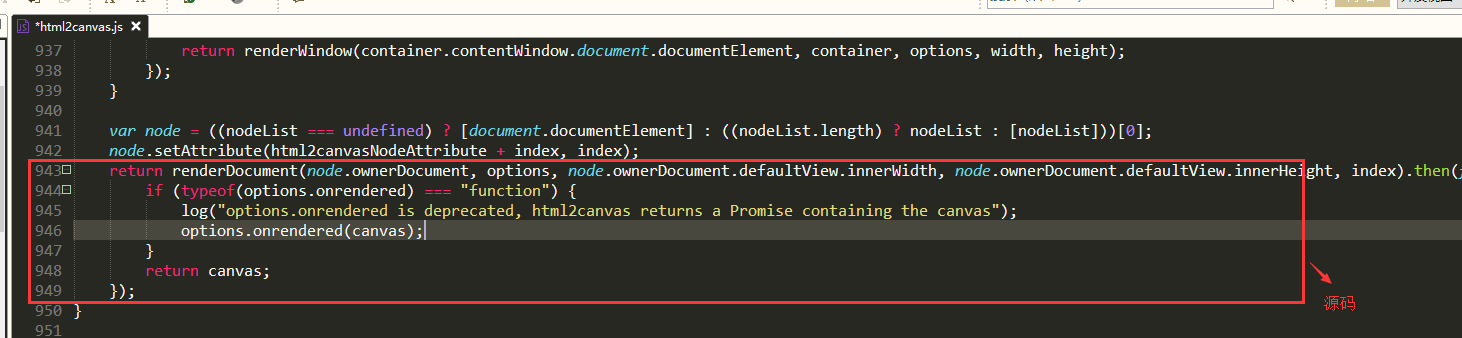
源码:
return renderDocument(node.ownerDocument, options, node.ownerDocument.defaultView.innerWidth, node.ownerDocument.defaultView.innerHeight, index).then(function(canvas) {

        if (typeof(options.onrendered) === "function") {

            log("options.onrendered is deprecated, html2canvas returns a Promise containing the canvas");

            options.onrendered(canvas);

        }

        return canvas;

    });
如下图:
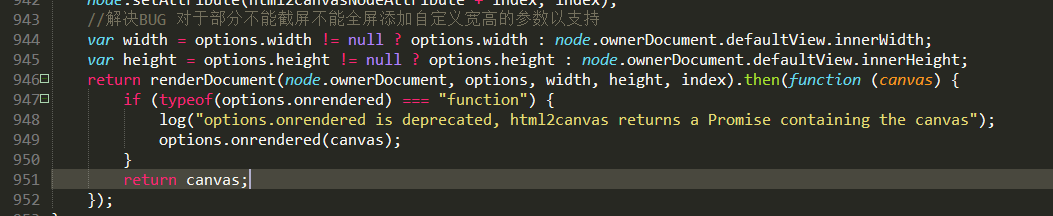
修改为(红色为改动部分):
//解决BUG 对于部分不能截屏不能全屏添加自定义宽高的参数以支持

    var width = options.width != null ? options.width : node.ownerDocument.defaultView.innerWidth;

    var height = options.height != null ? options.height : node.ownerDocument.defaultView.innerHeight;

    return renderDocument(node.ownerDocument, options, width, height, index).then(function (canvas) {

        if (typeof(options.onrendered) === "function") {

            log("options.onrendered is deprecated, html2canvas returns a Promise containing the canvas");

            options.onrendered(canvas);

        }

        return canvas;

    });
如下图:
调用:
$(".js_show_promote").click(function () {

            if(!$(this).hasClass("open")){

                var thisCapture = $(this).find(".js_moneyCode_capture"); //需要捕获的区域

                setTimeout(function(){imgToCanvas(thisCapture);},500);

            }

        });

        function imgToCanvas(captureArea) {

            var captureWidth = $(captureArea).outerWidth(),

                captureHeight = $(captureArea).outerHeight();

            html2canvas($(captureArea), {

                height: captureHeight,

                width: captureWidth,

                onrendered: function (canvas) {

                    $(".js_moneyCode_picSmall").attr("src",canvas.toDataURL()).show();

                    $(".js_pic_loading").remove();

                    $(".js_down_moneyCode_pic").attr("href",canvas.toDataURL());

                }

            });

        }
方法已介绍完毕~特别感谢@焰尾迭~提供的解决方案~关于其他更多的坑,可以看看html2canvas 踩坑总结
使用html2canvas实现超出浏览器部分截图的更多相关文章
- jquery easyui防止超出浏览器边界
var easyuiPanelOnMove=function(left,top){ if(left<0){ $(this).window('move',{ left:1 }); } if(top ...
- jquery easyui中的dialog拖动超出浏览器问题解决办法
juqery easyui当鼠标点着拖动超出浏览器后,就回不来了,拉不下的问题: //控制dialog超出浏览器回到原来的地方 var default_left; var default_top;// ...
- 解决jqueryeasyUI dialog 弹出窗体超出浏览器,导致不能关闭的bug
使用panel的onMove事件攻克了panel,dialog以及window组件在被拖动时,会超出浏览器边界而无法拖回的情况. 当窗体被拖出浏览器有边界时.$(document).width();会 ...
- python操作浏览器及截图小结
近期做网页自动化用到内容小结 1.打开浏览器1)打开默认配置的浏览器from selenium import webdriverdriver = webdriver.Firefox()"&q ...
- jqueryeasyUI dialog 弹出窗口超出浏览器,导致不能关闭的bug解决方案
jqueryeasyUI dialog 弹出窗口超出浏览器,导致不能关闭的bug解决方案 2014年8月30日 3233次浏览 相信很多前端朋友都用过jqueryeasyUI,jqueryeasyUI ...
- 大型情感剧集Selenium:9_selenium配合Pillow完成浏览器局部截图
网页截图 上次提到了selenium的四种截图方法,最终截图了整张网页.但很多时候,我们仅仅需要截图部分的内容.比如截取某个关键信息,或者现在已经不常见的截图验证码(现在都是各种按规则点击-).那么我 ...
- Chrome浏览器界面截图
常常出现这么一个场景: 网页比较长,需要滚动屏幕才能看完整.这时候如需截屏,则比较麻烦. 如下为解决方法: 推荐Chrome浏览器: 按F12打开调试页面,同时按下ctrl + shift + p, ...
- html2canvas实现浏览器截图的原理(包含源码分析的通用方法)
DevUI是一支兼具设计视角和工程视角的团队,服务于华为云DevCloud平台和华为内部数个中后台系统,服务于设计师和前端工程师. 官方网站:devui.design Ng组件库:ng-devui(欢 ...
- Cobalt Strike系列教程第五章:截图与浏览器代理
Cobalt Strike系列教程分享如约而至,新关注的小伙伴可以先回顾一下前面的内容: Cobalt Strike系列教程第一章:简介与安装 Cobalt Strike系列教程第二章:Beacon详 ...
随机推荐
- CoreText实现图文混排之文字环绕及点击算法
系列文章: CoreText实现图文混排:http://www.jianshu.com/p/6db3289fb05d CoreText实现图文混排之点击事件:http://www.jianshu.co ...
- 【jQuery】jquery-ui autocomplete智能提示
jQuery UI,简而言之,它是一个基于jQuery的前端UI框架.我们可以使用jQuery + jQuery UI非常简单方便地制作出界面美观.功能强大.跨浏览器兼容的前端html界面. Auto ...
- Python学习笔记——MySQL的基本操作(2)
1 运算符操作(配合查.修.删操作) 数据库的语法结构 查:select * from 表名 where 字段名 运算符 数字/字符; 改:update 表名 set 字段名=值,... wher ...
- Linux内存初始化(一)
一.前言 一直以来,我都非常着迷于两种电影拍摄手法:一种是慢镜头,将每一个细节全方位的展现给观众.另外一种就是快镜头,多半是反应一个时代的变迁,从非常长的时间段中,截取几个典型的snapshot,合成 ...
- PowerDesigner列名作为注释
Tools -> Execute Commands -> Edit/Run Script 执行以下脚本: Option Explicit ValidationMode = True Int ...
- EXTJS 5 学习笔记2 - Components
1. The Components Hierachy 组件体系 2. XTypes and Lazy Instantiation xtype与延迟初始化 1) 每个compo ...
- jeecg多页签的选择切换
有时候我们的页面需要多页签,多页签又引起一个问题就是只会校验初始加载的页签,所以就有了一个需求,需要把所有的页签都加载一遍,之后所有页签中需要校验的内容都会校验了,切换页签代码如下: $(docume ...
- linux c:关联变量的双for循环
举例说明: 比如打印一个倒三角形. * * * * * * * * * * 第一层循环为行数,第二层循环为每行打印的*数,且随着行数的变化,打印的*数也随着改变. 这就是关联变量的双层循环.我的做法是 ...
- tornado日志使用详解
1.需求 将http访问记录,程序自定义日志输出到文件,按天分割,保留最近30天的日志. 2.使用示例 init_logging("%s/QYK.%s.%s.log" % (log ...
- 每日英语:In Digital Era, What Does 'Watching TV' Even Mean?
We spend a full five hours and 16 minutes a day in front of a screen, and that's without even turnin ...