
python连接数据库并插入数据
1.Python创建数据库
import MySQLdb

try:

    conn = MySQLdb.connect(

        host="127.0.0.1",

        port=3306,

        user="root",

        passwd="",

       # db="juntest",#也可以在这一步显示数据库名

        charset="utf8")

    cur = conn.cursor()

    cur.execute('CREATE DATABASE IF NOT EXISTS juntestDBnew DEFAULT CHARSET utf8 COLLATE utf8_general_ci;')  #没有这个表,就创建

    conn.close()

    print u"创建数据库juntestDBnew成功! "

except MySQLdb.Error, e:

    print "Mysql Error %d: %s" % (e.args[0], e.args[1])
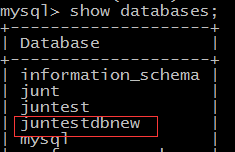
创建成功,查看
2.创建数据表
#coding=utf-8

import MySQLdb

try:

    conn = MySQLdb.connect(

        host="127.0.0.1",

        port=3306,

        user="root",

        passwd="",

       # db="juntest",另外写一种建表的方法

        charset="utf8")

    conn.select_db('juntestDBnew')#选择一个数据库

    cur = conn.cursor()

    cur.execute("drop table if exists emp_info2;")

    cur.execute("drop table if exists salary2;")

    cur.execute('''create table emp_info2(

id int not null auto_increment,

name varchar(30) not null,

sex char(4) default null,

dept varchar(10),

mobile varchar(11) not null unique,

birthday date default "0000-00-00",

primary key(id)

)engine=innodb character set utf8 comment 'employer info';

 ''')

    cur.execute('''create table salary2(

id int not null auto_increment,

emp_id int not null,

salary int not null,

primary key(id)

)engine=innodb character set utf8 comment 'employer salary info';

   ''')

    cur.close()

    conn.close()

    print u"创建数据表成功! "

except MySQLdb.Error, e:

     print "Mysql Error %d: %s" % (e.args[0], e.args[1])
查看是否成功

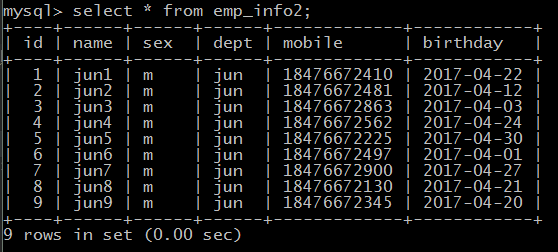
3.进行数据的插入
#coding=utf-8

import MySQLdb

import random

try:

    conn = MySQLdb.connect(

        host="127.0.0.1",

        port=3306,

        user="root",

        passwd="",

        db="juntestDBnew",#另外写一种建表的方法

        charset="utf8"

    )

    cur=conn.cursor()

    num=random.randint(10,300)

    sql="insert into emp_info2 values(%s,%s,%s,%s,%s,%s)"#这种写法自增字段和隐藏字段都要写出来

    #cur.execute(sql, (4, 'jun1', 'm', 'jun', '12345', '2017-4-30'));

    for i in  range(1,10):

        cur.execute('delete from emp_info2 where id='+str(i));

        #第一种插入

        cur.execute(sql, (i, 'jun'+str(i), 'm', 'jun', ''+str(random.randint(1,1000)), '2017-4-'+str(random.randint(1,30))));

        print u"插入第(%s)条数据成功"%i

    cur.close()

    conn.commit()

    conn.close()

except MySQLdb.Error, e:

     print "Mysql Error %d: %s" % (e.args[0], e.args[1])
python连接数据库并插入数据的更多相关文章
- python 定义一个插入数据(可以插入到每个表中)通用的方法
前提置要:想要写一个方法,这个方法是插入数据到数据表的方法,只需要提供表名称,字段名称,还有插入的值,只要调用这个方法就可以自动帮助你插入数据 以下是不断实践优化出来 原本的插入数据库中的代码应该是这 ...
- go : 连接数据库并插入数据
package main import ( "database/sql" "fmt" "log" "net/http" ...
- python 向mysql插入数据
生成随机内容用到的方法: substr是一个字符串函数,从第二个参数1,开始取字符,取到3 + floor(rand() * 75)结束 floor函数代表的是去尾法取整数. rand()函数代表的是 ...
- Java使用JDBC连接数据库逐条插入数据、批量插入数据、以及通过SQL语句批量导入数据的效率对比
测试用的示例java代码: package com.zifeiy.test.normal; import java.io.File; import java.io.FileOutputStream; ...
- python向数据库插入数据时出现乱码解决方案
中文字符串前面加u 如: title =u"你好" contents = "m" ids="13" cur.execute("IN ...
- 集群Redis使用 Python pipline大批量插入数据
class myRedis(object): def __init__(self,redis_type=None,**args): if redis_type == " ...
- 单节点Redis使用 Python pipline大批量插入数据
方法一: import redis import time filename = 'redis_resulit.txt' def openPool(): pool = redis.Connec ...
- Python中MySQL插入数据
sql = 'INSERT INTO course(class_name, credit, properties, teacher_name, college_given, classroom) ' ...
- 解决Python往MySQL插入中文时报错的问题
今天遇到一个问题,用Python往MySQL插入数据时,若数据中包含中文会报类似下面的错误: ERROR 1366: Incorrect string value: '\xE4\xB8\xAD\xE5 ...
随机推荐
- IOS Masonry自动布局
之前项目用Frame布局,这个项目登录用了VFL,后来觉得用Masonry,前天布局TableViewCell时用了下 ,觉得还不错. #import "Masonry.h" #i ...
- ef——存储过程
数据库中存在存储过程GetCategory: ALTER proc [dbo].[GetCategory] @cid int as begin select * from Categories w ...
- ASP.ENT前台更改绑定数据的日期格式
1.Eval和Bind的区别 绑定表达式 < %# Eval("字段名") %> < %# Bind("字段名") %> 区别 1.ev ...
- SqlServer常用语句
首先,写这个的原因是我其实sql语句不太行,总觉得自己写得很乱,好像也没有系统学习过,借此复习和与大家探讨 No.1 关于查询时间区间是否重叠的sql语句 问题是这样:插入之前,想查询同User是否其 ...
- iOS开发笔记18:一些编译、开发调试、打包的细节整理
1.以链库的方式引用第三方库 一些特殊场景可能会要求使用链库的方式使用第三方库,大体设置如下: ①Other Linker Flags里进行设置,格式为-l+库名称 ②Libray Search Pa ...
- Java学习--java中的集合框架、Collection接口、list接口
与数组相比:1.数组的长度固定,而集合的长度可变2.数组只能通过下表访问元素,类型固定,而有的集合可以通过任意类型查找所映射的具体对象 java集合框架:collection(list序列,queue ...
- 撩课-Java每天5道面试题第26天
161.简述一下springMVC当中的视图解析器 请求处理方法执行完成后,最终返回一个 ModelAndView 对象 对于那些返回 String,View 或 ModeMap 等类型的处理方法 S ...
- Spring中的Bean配置方式
1.IOC和DI概述 IOC(Inversion of Control):其思想是反转资源获取的方向. 传统的资源查找方式要求组件向容器发起请求查找资源. 作为回应, 容器适时的返回资源. 而应用了 ...
- MyBatis缓存通俗易懂
1.1 mybatis缓存介绍 如下图,是mybatis一级缓存和二级缓存的区别图解: Mybatis一级缓存的作用域是同一个SqlSession,在同一个sqlSession中两次执行相同的 ...
- data-id 和 id 的区别
作者:Zeropoint零点 来源:CSDN 原文:https://blog.csdn.net/qq_41648132/article/details/80364335 版权声明:本文为Zeropoi ...