
python文本挖掘输出权重,词频等信息,画出3d权重图
# -*- coding: utf-8 -*-

from pandas import read_csv

import numpy as np

from sklearn.datasets.base import Bunch

import pickle  # 导入cPickle包并且取一个别名pickle #持久化类

from sklearn.feature_extraction.text import TfidfVectorizer

import jieba

import operator  # 排序用

from sklearn import metrics

from sklearn.externals import joblib

import xlwt

def importSmallContentdata(file, data, art, label, f, Slast, Snew):

    dataset = read_csv(file)

    Sdata = dataset.values[:, :]

    print(type(Sdata))

    if f == 1:

        for line in Sdata:

            ls = []

            ls.append(line[14])

            ls.append(line[15])

            ls.append(line[16])

            ls.append(line[17])

            Slast.append(ls)

        # print(len(Slast))

        # print("需要对照的小类数据准备完毕")

    '''找到smalli不为0的装入Straindata,把数据分开'''

    for smalli in range(14, 18):

        # print(smalli)

        count = 0

        for line in Sdata:

            count = count + 1

            if line[smalli] != '' and line[smalli] != 0:

                k = 1

                ls = []

                for i in line:

                    if k == 1:

                        #art.append(i)

                        k = k + 1

                        continue

                    if k == 11:  # k为14并不代表是line[14],因为line是从0开始

                        break

                    ls.append(float(i))

                    k = k + 1

                data.append(ls)

                label.append(line[smalli])

                if f == 1:

                    Snew.append(count)

    for line in Sdata:

        art.append(line[0])

    # print("为什么都超限",len(Snew))

def getKvector(train_set, vec, n):

    class obj:

        def __init__(self):

            self.key = 0

            self.weight = 0.0

    nonzero = train_set.tdm.nonzero()

    k = 0

    lis = []

    gather = []

    p = -1

    for i in nonzero[0]:

        p = p + 1

        if k == i:

            a = obj()

            a.key = nonzero[1][p]

            a.weight = train_set.tdm[i, nonzero[1][p]]

            lis.append(a)

        else:

            lis.sort(key=lambda obj: obj.weight, reverse=True)  # 对链表内为类对象的排序

            gather.append(lis)

            while k < i:

                k = k + 1

            lis = []

            a = obj()

            a.key = nonzero[1][p]

            a.weight = train_set.tdm[i, nonzero[1][p]]

            lis.append(a)

    gather.append(lis)  # gather存储的是每条数据的事实描述的特征向量,已经从小到大排好了,只不过每个存既有key又有weight

    # 我们只要key,不再需要weight

    sj = 1

    for i in gather:

        ls = []

        for j in i:

            sj = sj + 1

            ls.append(float(j.key))

        while sj <= n:

            sj = sj + 1

            ls.append(-1)

        sj = 1

        vec.append(ls)

'''读取停用词'''

def _readfile(path):

    with open(path, "rb") as fp:

        content = fp.read()

    return content

''' 读取bunch对象'''

def _readbunchobj(path):

    with open(path, "rb") as file_obj:

        bunch = pickle.load(file_obj)

    return bunch

'''写入bunch对象'''

def _writebunchobj(path, bunchobj):

    with open(path, "wb") as file_obj:

        pickle.dump(bunchobj, file_obj)

def buildtrainbunch(bunch_path, art_train, trainlabel):

    bunch = Bunch(label=[], contents=[])

    for item1 in trainlabel:

        bunch.label.append(item1)

    # trainContentdatasave=[] #存储所有训练和测试数据的分词

    for item2 in art_train:

        item2 = str(item2)

        item2 = item2.replace("\r\n", "")

        item2 = item2.replace(" ", "")

        content_seg = jieba.cut(item2)

        save2 = ''

        for item3 in content_seg:

            if len(item3) > 1 and item3 != '\r\n':

                # trainContentdatasave.append(item3)

                save2 = save2 + "," + item3

        bunch.contents.append(save2)

    with open(bunch_path, "wb") as file_obj:

        pickle.dump(bunch, file_obj)

    print("构建训练数据文本对象结束!!!")

def buildtestbunch(bunch_path, art_test, testlabel):

    bunch = Bunch(label=[], contents=[])

    for item1 in testlabel:

        bunch.label.append(item1)

    # testContentdatasave=[] #存储所有训练和测试数据的分词

    for item2 in art_test:

        item2 = str(item2)

        item2 = item2.replace("\r\n", "")

        item2 = item2.replace(" ", "")

        content_seg = jieba.cut(item2)

        save2 = ''

        for item3 in content_seg:

            if len(item3) > 1 and item3 != '\r\n':

                # testContentdatasave.append(item3)

                save2 = save2 + "," + item3

        bunch.contents.append(save2)

    with open(bunch_path, "wb") as file_obj:

        pickle.dump(bunch, file_obj)

    print("构建测试数据文本对象结束!!!")

def vector_space(stopword_path, bunch_path, space_path):

    stpwrdlst = _readfile(stopword_path).splitlines()  # 读取停用词

    bunch = _readbunchobj(bunch_path)  # 导入分词后的词向量bunch对象

    # 构建tf-idf词向量空间对象

    tfidfspace = Bunch(label=bunch.label, tdm=[], vocabulary={})

    # 权重矩阵tdm,其中,权重矩阵是一个二维矩阵,tdm[i][j]表示,第j个词(即词典中的序号)在第i个类别中的IF-IDF值

    # 使用TfidVectorizer初始化向量空间模型

    vectorizer = TfidfVectorizer(stop_words=stpwrdlst, sublinear_tf=True, max_df=0.5, min_df=0.0001, use_idf=True,

                                 max_features=15000)

    # print(vectorizer)

    # 文本转为词频矩阵,单独保存字典文件

    tfidfspace.tdm = vectorizer.fit_transform(bunch.contents)

    tfidfspace.vocabulary = vectorizer.vocabulary_

    # 创建词袋的持久化

    _writebunchobj(space_path, tfidfspace)

    print("if-idf词向量空间实例创建成功!!!")

def testvector_space(stopword_path, bunch_path, space_path, train_tfidf_path):

    stpwrdlst = _readfile(stopword_path).splitlines()  # 把停用词变成列表

    bunch = _readbunchobj(bunch_path)

    tfidfspace = Bunch(label=bunch.label, tdm=[], vocabulary={})

    # 导入训练集的TF-IDF词向量空间  ★★

    trainbunch = _readbunchobj(train_tfidf_path)

    tfidfspace.vocabulary = trainbunch.vocabulary

    vectorizer = TfidfVectorizer(stop_words=stpwrdlst, sublinear_tf=True, max_df=0.7, vocabulary=trainbunch.vocabulary,

                                 min_df=0.001)

    tfidfspace.tdm = vectorizer.fit_transform(bunch.contents)

    _writebunchobj(space_path, tfidfspace)

    print("if-idf词向量空间实例创建成功!!!")
if __name__=="__main__":

    Stestdata = []

    Stestlabel = []

    Sart_test = []

    Slast = []

    Snew = []

    '''============================先导入数据=================================='''

    file_test = 'F:/goverment/excel operating/all_tocai_train.csv'

    importSmallContentdata(file_test, Stestdata, Sart_test, Stestlabel, 1, Slast, Snew)

    #print(Sart_test)

    # print("Stestlabel" ,len(Stestlabel))

    # print("小类导入数据完毕")

    # print("大类标签导入完毕")#共1329*4

    '''==========================================================tf-idf对Bar进行文本特征提取============================================================================'''

    # 导入分词后的词向量bunch对象

    test_bunch_path = "F:/goverment/excel operating/trainbunch.bat"

    test_space_path = "F:/goverment/excel operating/traintfdifspace.dat"

    stopword_path = "F:/goverment/excel operating/hlt_stop_words.txt"

    '''============================================================tf-idf对Sart进行文本特征提取=============================================================================='''

    buildtestbunch(test_bunch_path, Sart_test, Stestlabel)

    testvector_space(stopword_path, test_bunch_path, test_space_path, test_space_path)

    test_set = _readbunchobj(test_space_path)

    '''测试数据'''

    #获取已知 id 找 文本

    dic={}

    for i in test_set.vocabulary.keys():

        dic[test_set.vocabulary[i]]=i

    #print(dic)
test_set分为三部分

查看test_set.tdm
print(test_set.tdm)

  (0, 3836)     0.0963936202992

  (0, 3780)     0.264296259679

  (0, 3329)     0.237469184748

  (0, 3299)     0.227380842236

  (0, 2870)     0.169936848661

  (0, 2708)     0.196690909187

  (0, 2576)     0.323459018807

  (0, 2431)     0.293877639243

  (0, 2424)     0.269994966851

  (0, 2385)     0.16602904382

  (0, 2174)     0.250705638585

  (0, 2128)     0.223109589522

  (0, 1998)     0.323459018807

  (0, 1099)     0.237469184748

  (0, 795)      0.293877639243

  (0, 687)      0.306155021043

  (1, 4127)     0.158745878875

  (1, 4075)     0.187148908824

  (1, 4066)     0.275285441964

  (1, 3506)     0.325600030259

  (1, 3329)     0.271913955503

  (1, 2512)     0.30263228246

  (1, 2385)     0.190111462595

  (1, 2121)     0.370376566292

  (1, 1555)     0.325600030259

  :     :

  (1437, 790)   0.216605181177

  (1437, 784)   0.30372112351

  (1437, 558)   0.20127256985

  (1438, 4279)  0.240643793924

  (1438, 4276)  0.118606614328

  (1438, 4184)  0.148565457218

  (1438, 4107)  0.185731268834

  (1438, 4014)  0.154101569448

  (1438, 3877)  0.220155031015

  (1438, 3298)  0.245309299377

  (1438, 2933)  0.318303833306

  (1438, 2383)  0.0923818814565

  (1438, 2378)  0.213187531379

  (1438, 2092)  0.263926619628

  (1438, 2091)  0.263926619628

  (1438, 1969)  0.15613334884

  (1438, 1802)  0.144868484461

  (1438, 1714)  0.256704677923

  (1438, 1447)  0.309102127772

  (1438, 1411)  0.226077842579

  (1438, 1010)  0.116062811153

  (1438, 997)   0.263926619628

  (1438, 648)   0.15613334884

  (1438, 640)   0.157728638816

  (1438, 565)   0.232695024234
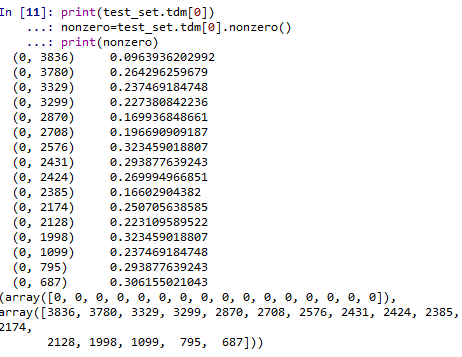
打印出分词及权重
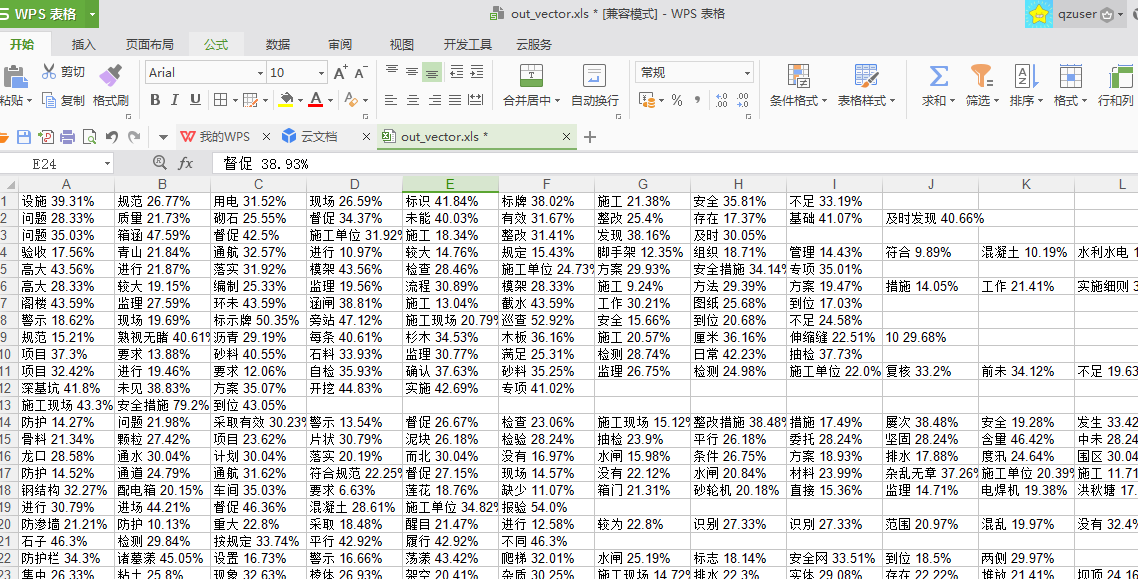
    #各个文本的词语及权重

    dataset = read_csv(file_test)

    Sdata = dataset.values[:, :]

    print(len(Sdata))

    #print(nonzero[1])

    myexcel = xlwt.Workbook()

    sheet = myexcel.add_sheet("sheet1")

    for k in range(len(Sdata)):#遍历每一条文本

        nonzero=test_set.tdm[k].nonzero()

        ls=[]

        for i in range(len(nonzero[1])):

            b=test_set.tdm[k, nonzero[1][i]]*100 #test_set.tdm[k, nonzero[1][i]]是第k条文本中,第i个权重非零的词权重

            a= dic[nonzero[1][i]] +" "+str(round(b,2))+"%"

            ls.append(a)

        for i in range(len(nonzero[1])):

            sheet.write(k,i,str(ls[i]))

    myexcel.save("out_vector.xls")
运行结果如下:
画出3d图:还可以转动呢

python文本挖掘输出权重,词频等信息,画出3d权重图的更多相关文章
- Python 日志输出中添加上下文信息
Python日志输出中添加上下文信息 除了传递给日志记录函数的参数(如msg)外,有时候我们还想在日志输出中包含一些额外的上下文信息.比如,在一个网络应用中,可能希望在日志中记录客户端的特定信息,如: ...
- Caffe 根据log信息画出loss,accuracy曲线
在执行训练的过程中,若指定了生成log信息,log信息包含初始化,网络结构初始化和训练过程随着迭代数的loss信息. 注意生成的log文件可能没有.log后缀,那么自己加上.log后缀.如我的log信 ...
- CSS3简单画出3d图形
1.气球 2.泳圈 1.2两图实现代码分别如下: <html> <head> <meta charset="utf-8"> <meta h ...
- 使用pangolin库画出轨迹
https://github.com/stevenlovegrove/Pangolin cmake_minimum_required(VERSION 2.8) project(chapter3) ) ...
- 【转】Python之向日志输出中添加上下文信息
[转]Python之向日志输出中添加上下文信息 除了传递给日志记录函数的参数(如msg)外,有时候我们还想在日志输出中包含一些额外的上下文信息.比如,在一个网络应用中,可能希望在日志中记录客户端的特定 ...
- 关于python的中国历年城市天气信息爬取
一.主题式网络爬虫设计方案(15分)1.主题式网络爬虫名称 关于python的中国城市天气网爬取 2.主题式网络爬虫爬取的内容与数据特征分析 爬取中国天气网各个城市每年各个月份的天气数据, 包括最高城 ...
- [python] 常用正则表达式爬取网页信息及分析HTML标签总结【转】
[python] 常用正则表达式爬取网页信息及分析HTML标签总结 转http://blog.csdn.net/Eastmount/article/details/51082253 标签: pytho ...
- Python日志输出——logging模块
Python日志输出——logging模块 标签: loggingpythonimportmodulelog4j 2012-03-06 00:18 31605人阅读 评论(8) 收藏 举报 分类: P ...
- python爬虫之12306网站--车站信息查询
python爬虫查询车站信息 目录: 1.找到要查询的url 2.对信息进行分析 3.对信息进行处理 python爬虫查询全拼相同的车站 目录: 1.找到要查询的url 2.对信息进行分析 3.对信息 ...
随机推荐
- 动态规划-背包问题 Knapsack
2018-03-15 13:11:12 背包问题(Knapsack problem)是一种组合优化的NP完全问题.问题可以描述为:给定一组物品,每种物品都有自己的重量和价格,在限定的总重量内,我们如何 ...
- Java IO流-字符流
2017-11-05 18:34:39 Java中的IO流按数据类型分类分为两种,一是字节流,二是字符流.字符流的出现是为了简化文本数据的读入和写出操作. 如果操作的文件是文本文件,那么使用字符流会大 ...
- SpringBoot全局异常处理方式
每个项目全局异常处理非常重要, 今天在处理项目架构的时候添加了一个全局异常处理. 大概三种异常情况: 一:在进入Controller之前,譬如请求一个不存在的地址,404错误. 二:在执行@Reque ...
- Python 实现图片上表格的写入
直接上代码:import matplotlib.pylab as pltimport numpy as npplt.figure()axes=plt.gca()y= np.random.randn(9 ...
- HDU-4336-期望dp-bit
Card Collector Time Limit: 2000/1000 MS (Java/Others) Memory Limit: 32768/32768 K (Java/Others)To ...
- gruntjs开发实例
Grunt是基于Node.js的项目构建工具.它可以自动运行你所设定的任务,如编译less,sass,压缩js,合拼文件等等. (一)安装nodejs环境,Grunt 0.4.x要求Node.js的版 ...
- 基于深度学习的恶意样本行为检测(含源码) ----采用CNN深度学习算法对Cuckoo沙箱的动态行为日志进行检测和分类
from:http://www.freebuf.com/articles/system/182566.html 0×01 前言 目前的恶意样本检测方法可以分为两大类:静态检测和动态检测.静态检测是指并 ...
- 浅析promise
Promise是一个构造函数,可以通过new 操作符获取一个promise对象,promise者,人如其名也.对,就是承诺.显示生活中,我们承诺别人一件事,一般会在将来某个时间兑现承诺.而 Promi ...
- [转载]ORACLE EXP/IMP
转载自:https://www.cnblogs.com/mengfanrong/p/3792955.html 本文对Oracle数据的导入导出 imp ,exp 两个命令进行了介绍, 并对其对应的參数 ...
- epoint:TreeView
Epoint.Web.UI.WebControls2X.EpointTreeNode 思路:就是使用递归 RootNodeText 根节点名称RootNodeUrl 根节点路径ShowRootNode ...