
变换CALayer锚点实现模拟时钟的动画
变换CALayer锚点实现模拟时钟的动画

变换锚点得需要一点理论知识,看下图就能明白:).


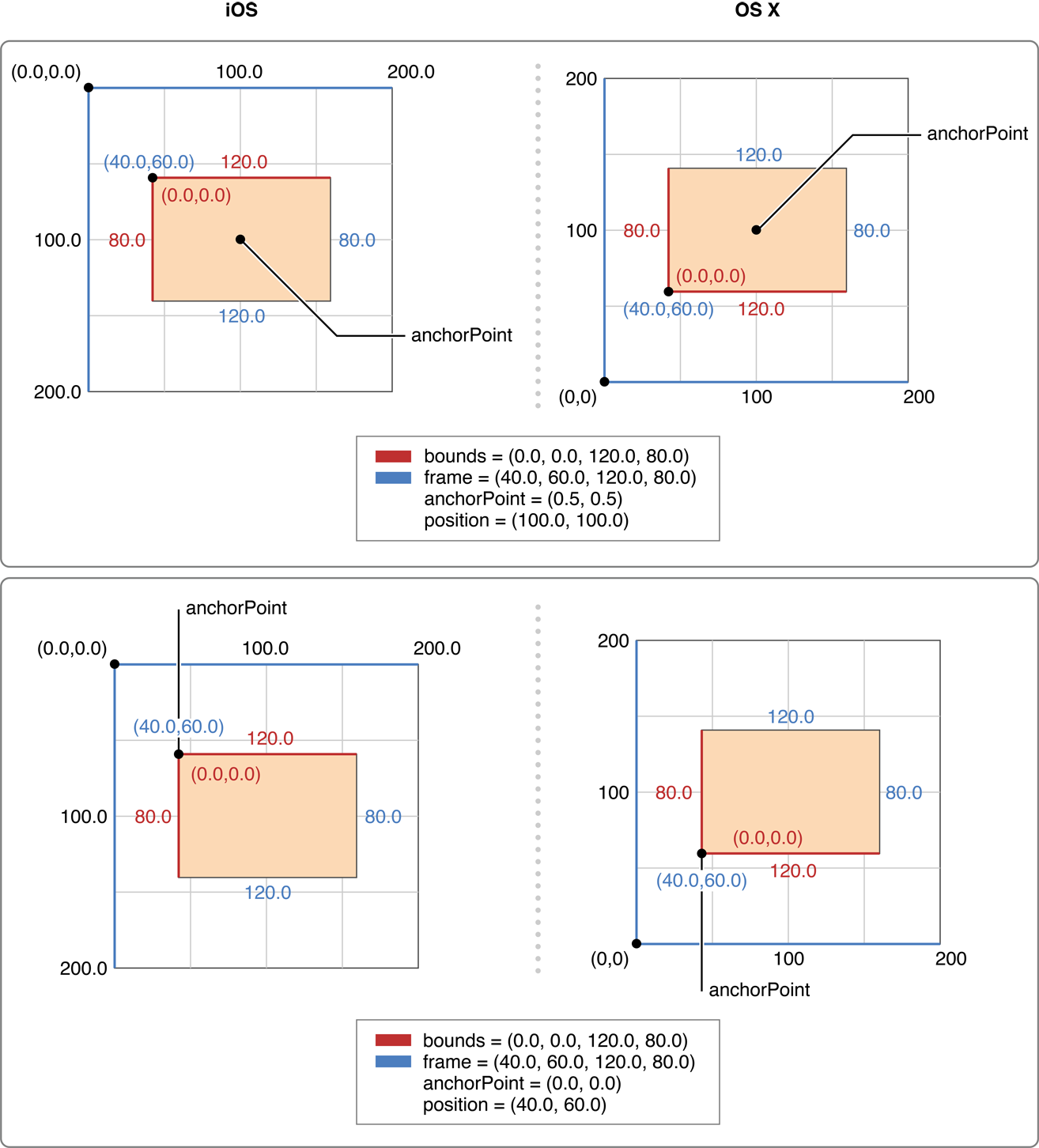
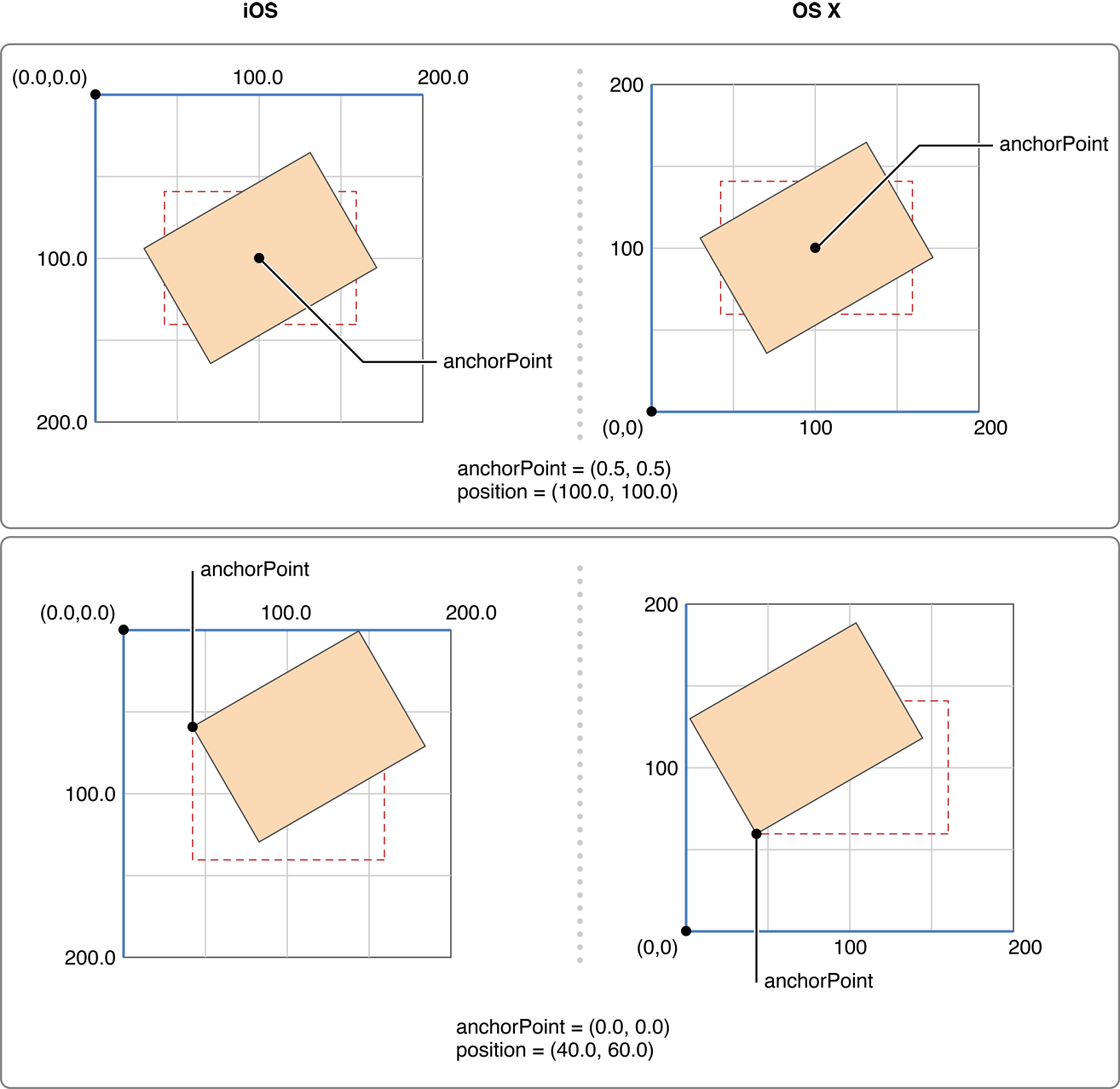
开始实现模拟时钟效果:
//

//  RootViewController.m

//

//  Copyright (c) 2014年 Y.X. All rights reserved.

//

#import "RootViewController.h"

#import "YXGCD.h"

@interface RootViewController ()

@property (nonatomic, strong) GCDTimer *timer;

@end

// 将角度转换为弧度

#define DEGREES__TO__RADIANS(d)  ((d) * M_PI / 180.f)

@implementation RootViewController

- (void)viewDidLoad

{

    [super viewDidLoad];

    // 显示参考用的view

    UIView *showView = [[UIView alloc] initWithFrame:CGRectMake(, , , )];

    showView.layer.borderWidth = .f;

    showView.layer.cornerRadius = .f;

    showView.layer.borderColor = [UIColor redColor].CGColor;

    showView.center = self.view.center;

    [self.view addSubview:showView];

    // 新建layer

    CALayer *layer = [CALayer layer];

    layer.backgroundColor = [UIColor blackColor].CGColor;

    // 重置锚点

    layer.anchorPoint = CGPointMake(.f, .f);

    // 设置layer的frame值(在showView正中间摆放)

    layer.frame = CGRectMake(showView.middleX, showView.middleY, , );

    // 添加进showView中

    [showView.layer addSublayer:layer];

    // 定时器

    _timer = [[GCDTimer alloc] initInQueue:[GCDQueue mainQueue]];

    [_timer event:^{

        static int i = ;

        // 每秒增加的角度

        layer.transform = \

            CATransform3DMakeRotation(DEGREES__TO__RADIANS((/.f) * i++), 0.0, 0.0, 1.0);

    } timeInterval:NSEC_PER_SEC];

    [_timer start];

}

@end
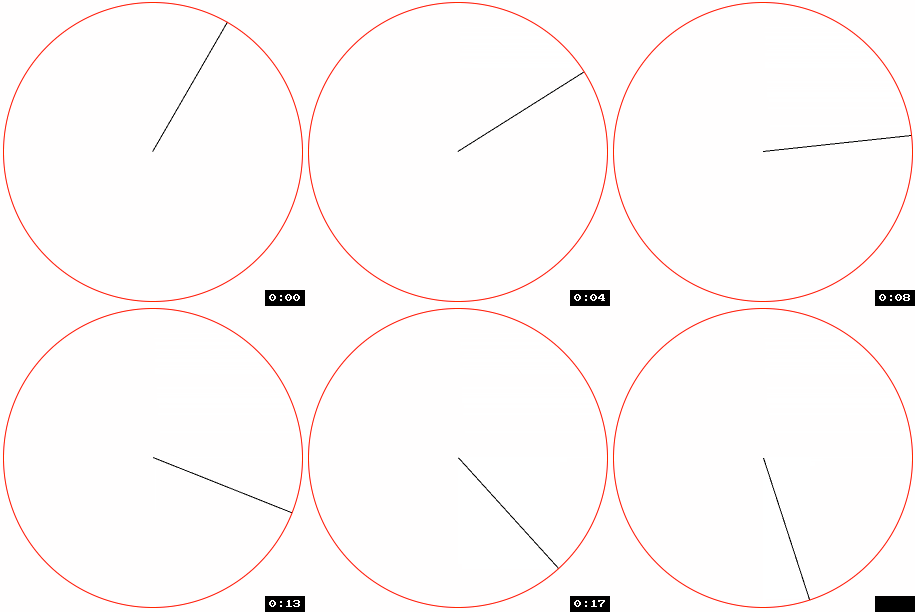
重要的代码:


以下是最终效果:
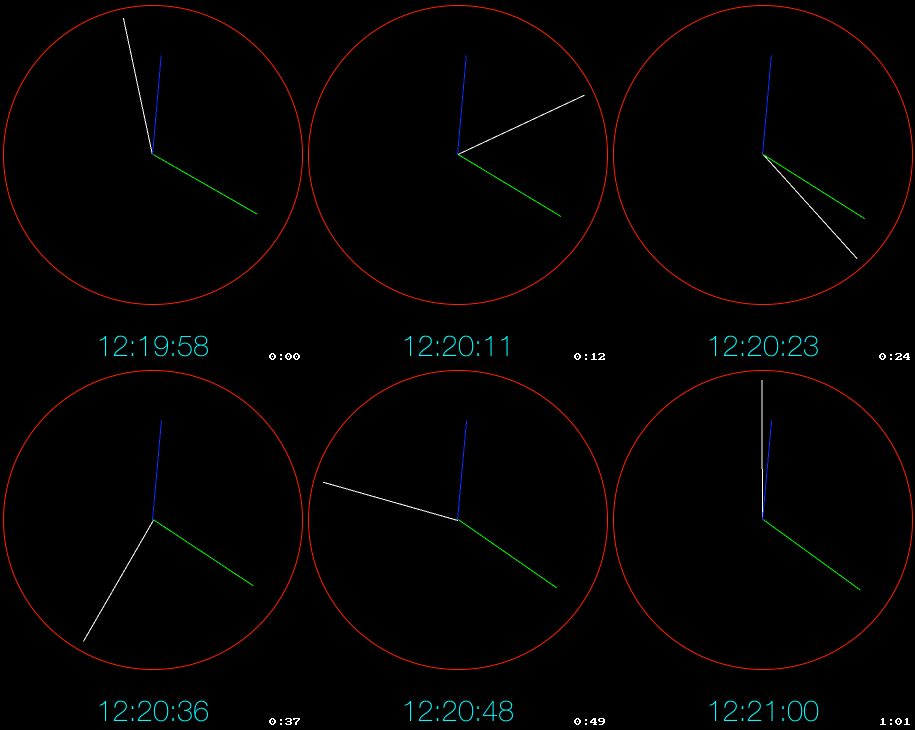
完整代码:
//

//  RootViewController.m

//

//  Copyright (c) 2014年 Y.X. All rights reserved.

//

#import "RootViewController.h"

#import "YXGCD.h"

static NSDateFormatter* _DMLogDateFormatter = nil;

@interface RootViewController ()

@property (nonatomic, strong) GCDTimer *timer;

@property (nonatomic, strong) UILabel  *timeLabel;

@end

// 将角度转换为弧度

#define DEGREES__TO__RADIANS(d)  ((d) * M_PI / 180.f)

@implementation RootViewController

- (void)viewDidLoad

{

    [super viewDidLoad];

    self.view.backgroundColor = [UIColor blackColor];

    // 日期格式

    _DMLogDateFormatter = [[NSDateFormatter alloc] init];

    [_DMLogDateFormatter setLocale:[[NSLocale alloc] initWithLocaleIdentifier:@"en_US_POSIX"]];

    [_DMLogDateFormatter setDateFormat:@"HH:mm:ss"];

    // 显示label

    _timeLabel = [[UILabel alloc] initWithFrame:CGRectMake(, , , )];

    _timeLabel.textAlignment = NSTextAlignmentCenter;

    _timeLabel.font = [UIFont fontWithName:@"HelveticaNeue-Thin" size:.f];

    _timeLabel.textColor = [UIColor cyanColor];

    _timeLabel.center = self.view.center;

    _timeLabel.y += ;

    [self.view addSubview:_timeLabel];

    // 显示参考用的view

    UIView *showView = [[UIView alloc] initWithFrame:CGRectMake(, , , )];

    showView.layer.borderWidth = .f;

    showView.layer.cornerRadius = .f;

    showView.layer.borderColor = [UIColor redColor].CGColor;

    showView.center = self.view.center;

    [self.view addSubview:showView];

    // 新建秒钟Layer

    // ----------------------------------------------------- //

    CALayer *secondLayer = [CALayer layer];

    secondLayer.backgroundColor = [UIColor whiteColor].CGColor;

    // 重置锚点

    secondLayer.anchorPoint = CGPointMake(.f, .f);

    // 设置layer的frame值(在showView正中间摆放)

    secondLayer.frame = CGRectMake(showView.middleX, showView.middleY, , );

    // 添加进showView中

    [showView.layer addSublayer:secondLayer];

    // 新建分钟Layer

    // ----------------------------------------------------- //

    CALayer *minuteLayer = [CALayer layer];

    minuteLayer.backgroundColor = [UIColor greenColor].CGColor;

    // 重置锚点

    minuteLayer.anchorPoint = CGPointMake(.f, .f);

    // 设置layer的frame值(在showView正中间摆放)

    minuteLayer.frame = CGRectMake(showView.middleX, showView.middleY, , );

    // 添加进showView中

    [showView.layer addSublayer:minuteLayer];

    // 新建时钟Layer

    // ----------------------------------------------------- //

    CALayer *hourLayer = [CALayer layer];

    hourLayer.backgroundColor = [UIColor blueColor].CGColor;

    // 重置锚点

    hourLayer.anchorPoint = CGPointMake(.f, .f);

    // 设置layer的frame值(在showView正中间摆放)

    hourLayer.frame = CGRectMake(showView.middleX, showView.middleY, , );

    // 添加进showView中

    [showView.layer addSublayer:hourLayer];

    // 定时器

    _timer = [[GCDTimer alloc] initInQueue:[GCDQueue mainQueue]];

    [_timer event:^{

        NSString *timerNow = [_DMLogDateFormatter stringFromDate:[NSDate date]];

        NSArray *timeArray = [timerNow componentsSeparatedByString:@":"];

        // 获取到时间

        float sec =  [timeArray[] intValue];

        float min =  [timeArray[] intValue] + sec / .f;

        float hour = [timeArray[] intValue] + min / .f;

        secondLayer.transform = \

            CATransform3DMakeRotation(DEGREES__TO__RADIANS(/.f)*sec + \

                                      DEGREES__TO__RADIANS(), \

                                      0.0, 0.0, 1.0);

        minuteLayer.transform = \

        CATransform3DMakeRotation(DEGREES__TO__RADIANS(/.f)*min + \

                                  DEGREES__TO__RADIANS(), \

                                  0.0, 0.0, 1.0);

        hourLayer.transform = \

        CATransform3DMakeRotation(DEGREES__TO__RADIANS(/.f)*hour + \

                                  DEGREES__TO__RADIANS(), \

                                  0.0, 0.0, 1.0);

        _timeLabel.text = [NSString stringWithFormat:@"%02d:%02d:%02d",

                           [timeArray[] intValue],

                           [timeArray[] intValue],

                           [timeArray[] intValue]];

    } timeInterval:NSEC_PER_SEC];

    [_timer start];

}

@end
RootViewController.m
变换CALayer锚点实现模拟时钟的动画的更多相关文章
- 【CSS3】纯CSS代码实现模拟时钟,+js对时功能。
使用CSS3纯代码来实现模拟时钟,及指针动画功能. 在这里主要使用到css3一些基本元素: border-radius:圆角边框,画圆形:表盘 Transform:变换,旋转,扭曲:刻度盘,指针形状 ...
- 模拟时钟(AnalogClock)和数字时钟(DigitalClock)
Demo2\clock_demo\src\main\res\layout\activity_main.xml <LinearLayout xmlns:android="http://s ...
- 一个模拟时钟的时间选择器 ClockPicker
最近开发的一个模拟时钟的时间选择器 ClockPicker,用于 Bootstrap,或者单独作为一个 jQuery 插件. 源代码托管在 GitHub 上: ClockPicker 最近项目中需要用 ...
- android脚步---数字时钟和模拟时钟
时钟UI组件是两个非常简单的组件,分为Digitalclock 和Analogclock, main.xml文件,书中程序有问题,加了两个组件,一个Button和一个<Chronometer ...
- Java多线程之sleep方法阻塞线程-模拟时钟
package org.study2.javabase.ThreadsDemo.status; import java.text.SimpleDateFormat; import java.util. ...
- css模拟时钟
css模拟时钟 思路: 画时钟数字(x,y)坐标 x = x0 + r*cos(deg) y = y0 + r*sin(deg) 知识点: 创建元素: createElement 添加元素: appe ...
- 模拟时钟(AnalogClock)
模拟时钟(AnalogClock) 显示一个带时钟和分针的表面 会随着时间的推移变化 常用属性: android:dial 可以为表面提供一个自定义的图片 下面我们直接看代码: 1.Activity ...
- Windows下编程--模拟时钟的实现
windows下编程--模拟时钟的实现: 主要可以分为几个步骤: (1) 编写按键事件处理(启动和停止时钟) (2) 编写时钟事件处理,调用显示时钟函数 (3) 编写显示时钟函数,要调用显 ...
- VC++SDK编程——模拟时钟
#include <Windows.h> #include <tchar.h> #include <math.h> typedef struct Time { in ...
随机推荐
- javac的Resolve类解读
方法1:isInitializer() /** An environment is an "initializer" if it is a constructor or * an ...
- InterView之C/CPP
CPP 引用 什么是"引用"?申明和使用"引用"要注意哪些问题? 答:引用就是某个目标变量的别名(alias),对应用的操作与对变量直接操作效果完全相同.申明一 ...
- C 标准库 - ctype.h之isalpha使用
isalpha int isalpha ( int c ); Checks whether c is an alphabetic letter. 检查给定字符是否字母字符,即是大写字母( ABCDEF ...
- C#判断字符串中是否包含一个子字符串是可以直接使用Contains()方法
1. 以前判断一个字符串中是否包含另一个子字符串时,习惯使用 IndexOf(); string str = "ABC@QQ"; if(str.IndexOf("@&qu ...
- js中字符串的替换
定义和用法 replace() 方法用于在字符串中用一些字符替换另一些字符,或替换一个与正则表达式匹配的子串. 语法 stringObject.replace(regexp/substr,replac ...
- Elastic Kibana - Install as windows service
#1 通过windows sc 服务命令安装 sc create "Kibana661" binPath= "{path}\kibana.bat" depend ...
- ssh 远程拷贝文件到本地
scp userA@192.168.0.205:/home/xinshang-toolkit/wwwroot/macheng/tianxiaohuanew-mc.dsceshi.cn/public/ ...
- C#可选参数、命名参数、参数数组
学习了C#4.0的新特性:可选参数.命名参数.参数数组. 1.可选参数,是指给方法的特定参数指定默认值,在调用方法时可以省略掉这些参数. 但要注意: (1)可选参数不能为参数列表的第1个参数,必须位于 ...
- Centos 7 ip地址
vim /etc/sysconfig/network-scripts/ifcfg-ens33 HWADDR="00:15:5D:07:F1:02" TYPE="Ether ...
- SQLServer 触发器入门
阅读目录 一:触发器的优点 二:触发器的作用 三:触发器的分类 四:触发器的工作原理 五:创建触发器 六:管理触发器 概念: 触发器(trigger)是SQL server 提供给程序员和数据分析 ...