
HBase实验(CRUD和MR入库)
前期准备
- 启动zk
- 启动HDFS
- 启动HBase
./start-hbase.sh
在HBase shell中实现CRUD操作
1. 启动命令行客户端
./hbase shell
2. 创建表
指定命名空间
school、表名student以及列族essential、additional,其中列族essential有列name、sex,列族additional有列interest
##创建命名空间

create_namespace 'school'

##创建表 creat '命名空间:表名',{NAME=>列族名,VERSION=>保存版本数量}

create 'school:student',{NAME => 'essential',VERSIONS => 3},{NAME => 'additional',VERSIONS => 3}
默认命名空间、表名teacher以及列族essential
##不指定命名空间则使用默认命名空间

create 'teacher',{NAME => 'essential'}
3. 删除、新增列族
在一个shell操作中删除表teacher的列族essential,并新增列族additional
##首先停用表teacher(新版本中不用)

disable 'teacher'

##删除列族

alter 'teacher',NAME => 'essential',METHOD => 'delete'

##或者

alter 'teacher','delete' => 'essential'

##新增列族additional,不指定版本数则默认为3

alter 'teacher', NAME => 'additional'

## 或者在新增列簇时指定版本数

alter 'teacher', NAME => 'additional',VERSIONS => 220

##添加列族additiona同时删除列族essential

alter 'teacher',{NAME => 'essential'},{NAME =>'essential',METHOD => 'delete'}

##启用表

enable 'teacher'
4. 删除表teacher
## 禁用表teacher

disable 'teacher'

## 删除表teacher

drop 'teacher'

##清空表数据

truncate 'teacher'
5. 新增数据
向student表新增至少5条数据,其中某个cell至少拥有两个版本
## put 'table name','row','Column family:column name','new value'

##插入五条数据

##第一条

put 'school:student','0001','essential:name','xiaoming'

put 'school:student','0001','essential:sex','male'

put 'school:student','0001','additional:interest','sing'

##第二条

put 'school:student','0002','essential:name','xiaodong'

put 'school:student','0002','essential:sex','male'

put 'school:student','0002','additional:interest','ball'

##此后三条以此类推

##使第一条的additional:interest有两个版本

put 'school:student','0001','additional:interest','swiming'

##查看additional列族中字段interest是两个版本的信息

get 'school:student','0001',{COLUMN=>'additional:interest',VERSIONS=>2}
6. 查看数据
#查看所有数据

scan 'school:student'

#查看前10条数据

scan 'student',{LIMIT=>10}

#查看某一行的数据

get 'student','0001',{COLUMN=>'additional',VERSIONS=>3000}
用Java API实现CRUD操作
工程结构
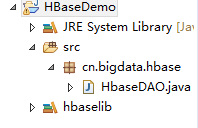
1. 导入依赖包
导入HBase安装包目录中lib目录的所有jar包
2. 调用Java API
package cn.bigdata.hbase;

import java.util.ArrayList;

import org.apache.hadoop.conf.Configuration;

import org.apache.hadoop.hbase.HBaseConfiguration;

import org.apache.hadoop.hbase.HColumnDescriptor;

import org.apache.hadoop.hbase.HTableDescriptor;

import org.apache.hadoop.hbase.KeyValue;

import org.apache.hadoop.hbase.TableName;

import org.apache.hadoop.hbase.client.HBaseAdmin;

import org.apache.hadoop.hbase.client.HTable;

import org.apache.hadoop.hbase.client.Put;

import org.apache.hadoop.hbase.client.Result;

import org.apache.hadoop.hbase.client.ResultScanner;

import org.apache.hadoop.hbase.client.Scan;

import org.apache.hadoop.hbase.util.Bytes;

public class HbaseDAO {

	public static void main(String[] args) throws Exception{

		switch (args[0]) {

        case "create":

            new HbaseDAO().createTable();

            break;

        case "put":

            new HbaseDAO().put();

            break;

        case "scan":

            new HbaseDAO().scan();

        default:

            System.out.println("first arg is " + args[0] + "enter true args");

        }

	}

	//创建表

	public void createTable() throws Exception{

		//设置配置文件

		Configuration conf = HBaseConfiguration.create();

		conf.set("hbase.zookeeper.quorum", "master:2181,slave1:2181,slave2:2181");

		//hbase客户端实例

		HBaseAdmin admin = new HBaseAdmin(conf);

		//指定表名

		TableName name = TableName.valueOf("teacher");

		//向表描述里添加表名

		HTableDescriptor desc = new HTableDescriptor(name);

		//指定列族名和版本数

		HColumnDescriptor essential = new HColumnDescriptor("essential");

		HColumnDescriptor additional = new HColumnDescriptor("additional");

		essential.setMaxVersions(3);

		additional.setMaxVersions(3);

		//向表描述里添加列族

		desc.addFamily(essential);

		desc.addFamily(additional);

		//创建表

		admin.createTable(desc);

		admin.close();

	}

	//新增数据

	public void put()throws Exception{

		//设置配置文件

		Configuration conf = HBaseConfiguration.create();

		conf.set("hbase.zookeeper.quorum", "master:2181,slave1:2181,slave2:2181");

		//得到表实例

		HTable teacher = new HTable(conf,"teacher");

		//一个Put对象需要用行键实例化,可以add多个键值对,包含行键,列族,列名,值,HBase中存储的数据类型为Byte

		//第一条数据

        Put put1 = new Put(Bytes.toBytes("rk0001"));

        put1.add(Bytes.toBytes("essential"), Bytes.toBytes("name"), Bytes.toBytes("xiaoming"));

        put1.add(Bytes.toBytes("essential"), Bytes.toBytes("sex"), Bytes.toBytes("male"));

        put1.add(Bytes.toBytes("additional"), Bytes.toBytes("interest"), Bytes.toBytes("ball"));

        //第二条数据

        Put put2 = new Put(Bytes.toBytes("rk0002"));

        put2.add(Bytes.toBytes("essential"), Bytes.toBytes("name"), Bytes.toBytes("xiaodong"));

        put2.add(Bytes.toBytes("essential"), Bytes.toBytes("sex"), Bytes.toBytes("male"));

        put2.add(Bytes.toBytes("additional"), Bytes.toBytes("interest"), Bytes.toBytes("play"));

        //第三条数据

        Put put3 = new Put(Bytes.toBytes("rk0003"));

        put3.add(Bytes.toBytes("essential"), Bytes.toBytes("name"), Bytes.toBytes("xiaohong"));

        put3.add(Bytes.toBytes("essential"), Bytes.toBytes("sex"), Bytes.toBytes("female"));

        put3.add(Bytes.toBytes("additional"), Bytes.toBytes("interest"), Bytes.toBytes("study"));

        //第四条数据

        Put put4 = new Put(Bytes.toBytes("rk0004"));

        put4.add(Bytes.toBytes("essential"), Bytes.toBytes("name"), Bytes.toBytes("xiaohua"));

        put4.add(Bytes.toBytes("essential"), Bytes.toBytes("sex"), Bytes.toBytes("female"));

        put4.add(Bytes.toBytes("additional"), Bytes.toBytes("interest"), Bytes.toBytes("sing"));

        //第五条数据

        Put put5 = new Put(Bytes.toBytes("rk0005"));

        put5.add(Bytes.toBytes("essential"), Bytes.toBytes("name"), Bytes.toBytes("xiaolong"));

        put5.add(Bytes.toBytes("essential"), Bytes.toBytes("sex"), Bytes.toBytes("male"));

        put5.add(Bytes.toBytes("additional"), Bytes.toBytes("interest"), Bytes.toBytes("box"));

        //增加第一条的一个cell版本

        put1.add(Bytes.toBytes("additional"), Bytes.toBytes("interest"), Bytes.toBytes("swimming"));

        ArrayList<Put> puts = new ArrayList<>();

        puts.add(put1);

        puts.add(put2);

        puts.add(put3);

        puts.add(put4);

        puts.add(put5);

        teacher.put(puts);

        teacher.close();

	}

	//扫描表

	@SuppressWarnings("deprecation")

	public void scan()throws Exception{

		//设置配置文件

		Configuration conf = HBaseConfiguration.create();

		conf.set("hbase.zookeeper.quorum", "master:2181,slave1:2181,slave2:2181");

		//得到表实例

		HTable teacher = new HTable(conf,"teacher");

		Scan scan = new Scan();

		//得到扫描结果

		ResultScanner rs = teacher.getScanner(scan);

		//在控制台显示

		for(Result r : rs){

			for(KeyValue kValue : r.list()) {

				System.out.print("Row Name:" + new String(kValue.getRow()) + "   ");

				System.out.print("Column Family:" + new String(kValue.getFamily())+ "   ");

				System.out.print("Key:" + new String(kValue.getQualifier())+ "   ");

				System.out.println("Value:" + new String(kValue.getValue()));

			}

        }

        rs.close();

        teacher.close();

	}

}
3. 导出hbasedemo.jar包
4. 将HBase依赖包加入到hadoop classpath中
在hadoop安装目录下找到hadoop-env.sh文件,添加 :
export HADOOP_CLASSPATH=/home/hadoop/apps/hbase/lib/*
5. 运行
#创建表

hadoop jar hbasedemo.jar cn.bigdata.hbase.HbaseDAO create

#插入数据

hadoop jar hbasedemo.jar cn.bigdata.hbase.HbaseDAO put

#扫描表

hadoop jar hbasedemo.jar cn.bigdata.hbase.HbaseDAO scan
注:也可直接在eclipse中运行(跳过3、5步骤),因为要访问zookeeper,所以要修改eclipse所在主机的hosts文件,确保可以ping通zookeeper的主机。
将MapReduce结果直接存储在HBase
1. 导入MapReduce和HBase依赖包
2. 代码实现
package cn.mr2hbase;

import java.io.IOException;

import org.apache.commons.lang.StringUtils;

import org.apache.hadoop.conf.Configuration;

import org.apache.hadoop.fs.Path;

import org.apache.hadoop.hbase.HBaseConfiguration;

import org.apache.hadoop.hbase.HColumnDescriptor;

import org.apache.hadoop.hbase.HTableDescriptor;

import org.apache.hadoop.hbase.TableName;

import org.apache.hadoop.hbase.client.HBaseAdmin;

import org.apache.hadoop.hbase.client.Put;

import org.apache.hadoop.hbase.mapreduce.TableOutputFormat;

import org.apache.hadoop.hbase.mapreduce.TableReducer;

import org.apache.hadoop.hbase.util.Bytes;

import org.apache.hadoop.io.LongWritable;

import org.apache.hadoop.io.NullWritable;

import org.apache.hadoop.io.Text;

import org.apache.hadoop.mapreduce.Job;

import org.apache.hadoop.mapreduce.Mapper;

import org.apache.hadoop.mapreduce.lib.input.FileInputFormat;

public class MRtoHBase {

	public static class Map extends Mapper<LongWritable, Text, Text, LongWritable>{

		//该步骤同一般Map程序

		@Override

		protected void map(LongWritable key, Text value, Context context)

				throws IOException, InterruptedException {

			//将读入行转化为字符串

			String line = value.toString();

			//切分字符串

			String[] words = StringUtils.split(line," ");

			//将单词写入context

			for(String word:words) {

				context.write(new Text(word), new LongWritable(1));

			}

		}

	}

	public static class Reduce extends TableReducer<Text, LongWritable, NullWritable>{

		@Override

		protected void reduce(Text key, Iterable<LongWritable> values,Context context)

				throws IOException, InterruptedException {

			long count =0;

			for(LongWritable value : values) {

				count += value.get();

			}

			//实例化Put,将单词作为主键

			Put put = new Put(Bytes.toBytes(key.toString()));

			//列族为content,key为result,value为count

			put.add(Bytes.toBytes("content"), Bytes.toBytes("result"), Bytes.toBytes(String.valueOf(count)));

			context.write(NullWritable.get(), put);

		}

	}

	//创建表

		public static void createTable(String tablename) throws Exception{

			//设置配置文件

			Configuration conf = HBaseConfiguration.create();

			conf.set("hbase.zookeeper.quorum", "master:2181,slave1:2181,slave2:2181");

			//hbase客户端实例

			HBaseAdmin admin = new HBaseAdmin(conf);

			//指定表名

			TableName name = TableName.valueOf(tablename);

			//向表描述里添加表名

			HTableDescriptor desc = new HTableDescriptor(name);

			//指定列族名和版本数

			HColumnDescriptor content = new HColumnDescriptor("content");

			content.setMaxVersions(3);

			//向表描述里添加列族

			desc.addFamily(content);

			//判断表是否存在

			if(admin.tableExists(tablename)){

	            System.out.println("table exists,trying recreate table !");

	            admin.disableTable(tablename);

	            admin.deleteTable(tablename);

	        }

	        System.out.println("Create new table: "+ tablename);

			//创建表

			admin.createTable(desc);

			admin.close();

		}

	public static void main(String[] args) throws Exception{

		String tablename = "WC";

		//创建表

		createTable(tablename);

		//配置文件

		Configuration conf = new Configuration();

		conf.set(TableOutputFormat.OUTPUT_TABLE, tablename);

		Job job = Job.getInstance(conf);

		//设置整个job所调用类的jar包路径

		job.setJarByClass(MRtoHBase.class);

		//设置该作业所使用的mapper和reducer类

		job.setMapperClass(Map.class);

		job.setReducerClass(Reduce.class);

		//指定mapper输出数据的k-v类型,和reduce输出类型一样,可缺省

		job.setMapOutputKeyClass(Text.class);

		job.setOutputValueClass(LongWritable.class);

		//指定reduce输出到Hbase

		job.setOutputKeyClass(Text.class);

		job.setOutputValueClass(LongWritable.class);

		//指定输入数据存放路径

		FileInputFormat.setInputPaths(job, new Path(args[0]));

		//指定输出到HBase

		job.setOutputFormatClass(TableOutputFormat.class);

		//将job提交给集群运行,参数为true表示提示运行进度

		System.exit(job.waitForCompletion(true)?0:1);

	}

}
3. 导出hbasedemo.jar包
4.修改Yarn配置文件
修改集群中所有主机Hadoop配置目录下的Yarn-site.xml配置文件,添加以下属性,将Hbaselib目录下的依赖包路径配置到Yarn的class path中
<property>

    <name>mapreduce.application.classpath</name>

        <value>

            /home/hadoop/app/hbase-0.96.2-hadoop2/lib/*

    </value>

</property>
5. 运行
#在集群主机上运行

hadoop jar mrtohbase.jar cn.mr2hbase.MRtoHBase /wc/srcdata
HBase实验(CRUD和MR入库)的更多相关文章
- Mac 下用IDEA时maven,ant打包 (mr 入库hbase)
现在非常喜欢IDEA,之前在mac 上用的eclipse 经常出现无缘无故的错误.所以转为IDEA. 不过新工具需要学习成本,手头上的项目就遇到了很多问题,现列举如下: 背景描述 在hadoop 开 ...
- Hbase实验:java创建和删除table
开启zookeeper.hadoop.hbase: 打开eclipse创一个java project,然后导入所需jar包: 写好java代码,运行create,然后去hbase shell里查看: ...
- 【hbase】——HBase 写优化之 BulkLoad 实现数据快速入库
1.为何要 BulkLoad 导入?传统的 HTableOutputFormat 写 HBase 有什么问题? 我们先看下 HBase 的写流程: 通常 MapReduce 在写HBase时使用的是 ...
- HBase Bulk Loading
将数据导入到HBase有三种方式:(1) Mapreduce,输出为TableOutputFormat.(2) 用HBase API .(3)Bulk Loading.对于大量的数据入库,第三种数据是 ...
- HBase RowKey与索引设计
1. HBase的存储形式 hbase的内部使用KeyValue的形式存储,其key时rowKey:family:column:logTime,value是其存储的内容. 其在region内大多以升序 ...
- HBase 查询导致RegionServer OOM故障复盘
背景:我司作为某运营商公司的技术咨询公司,发现有第三方开发公司在使用HBase 1.1.2 (HDP 2.4.2.258版本)一段时间使用正常后,从某一天开始报OOM,从而导致RegionServer ...
- Oracle数据迁移至HBase操作记录
Oracle数据迁移至HBase操作记录 @(HBase) 近期需要把Oracle数据库中的十几张表T级别的数据迁移至HBase中,过程中遇到了许多苦难和疑惑,在此记录一下希望能帮到一些有同样需求的兄 ...
- hbase官方文档(转)
FROM:http://www.just4e.com/hbase.html Apache HBase™ 参考指南 HBase 官方文档中文版 Copyright © 2012 Apache Soft ...
- HBase官方文档
HBase官方文档 目录 序 1. 入门 1.1. 介绍 1.2. 快速开始 2. Apache HBase (TM)配置 2.1. 基础条件 2.2. HBase 运行模式: 独立和分布式 2.3. ...
随机推荐
- TR-069: ACS Discovery
ACS Discovery 原文链接:http://www.qacafe.com/knowledgebase/tr-069-training-series-acs-discovery/ In TR-0 ...
- 中兴u880e精简教程
精简软件请参考此处 (A代表可以删除,B代表建议别删除.)删或留你做主. Accounts AndSyncSettings.apk 账户与同步设置 A alarming.apk 闹钟时钟 A Appl ...
- 认识Applet和Ajax
一.Applet 1.Applet的定义:Applet是采用Java编程语言编写的小应用程序,该程序可以包含在HTML(标准通用标记语言的一个应用)页中,与在页中包含图像的方式大致相同. Java写出 ...
- Alpha冲刺一(7/10)
前言 队名:拖鞋旅游队 组长博客:https://www.cnblogs.com/Sulumer/p/10013652.html 作业博客:https://edu.cnblogs.com/campus ...
- Javascript中的prototype与继承
通常来说,javascript中的对象就是一个指向prototype的指针和一个自身的属性列表.javascript创建对象时采用了写时复制的理念. 只有构造器才具有prototype属性,原型链继承 ...
- JAVA四则运算算法
一.程序要求 解析一般数学算式,实现简单的带括号的加减乘除运算. 二.基本思路 前面两篇介绍了直接解析字符串和用数组容器辅助解析的两种方式,这次再介绍最常用的解析算法——解析后缀表达式(逆波兰表达式) ...
- windows下Java调用mysql的客户端备份和恢复
这种东西没啥好聊的,其实就是Java执行dos界面下的命令,不过有些要注意就是了,真实dos下面的命令和java调用的windows系统的接口其实还是有一点不同. /** * @param hostI ...
- L3-011 直捣黄龙 (30 分)
本题是一部战争大片 —— 你需要从己方大本营出发,一路攻城略地杀到敌方大本营.首先时间就是生命,所以你必须选择合适的路径,以最快的速度占领敌方大本营.当这样的路径不唯一时,要求选择可以沿途解放最多城镇 ...
- 【idea】如何破解idea
1.IntelliJ IDEA官网下载 https://www.jetbrains.com/idea/download/ 2.安装IntelliJ IDEA 3.永久破解 在http://idea.l ...
- Spring Cloud 入门 之 Eureka 篇(一)
原文地址:Spring Cloud 入门 之 Eureka 篇(一) 博客地址:http://www.extlight.com 一.前言 Spring Cloud 是一系列框架的有序集合.它利用 Sp ...