
android 开发 简单的小计算器
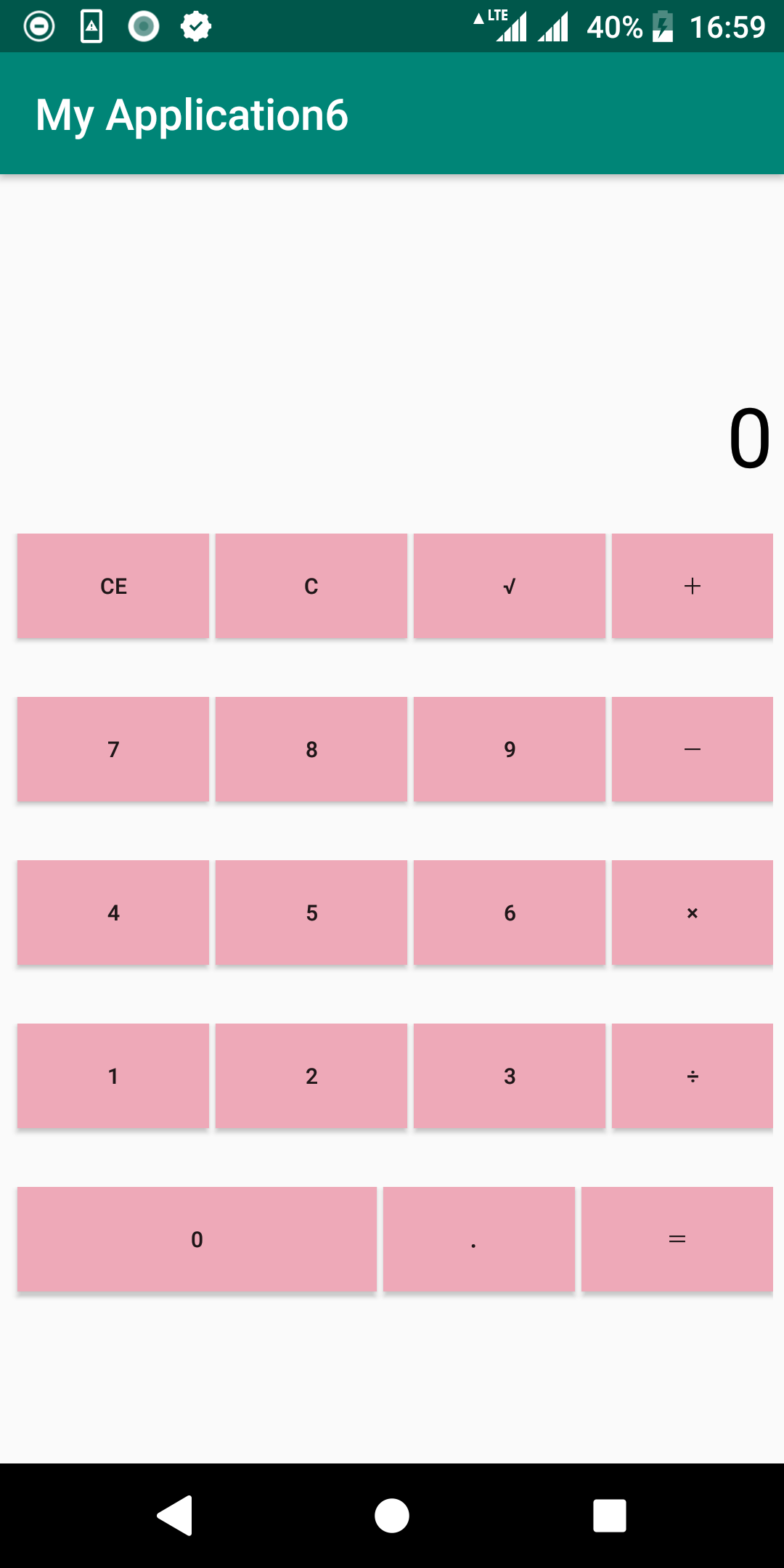
↑大致效果
项目构成:
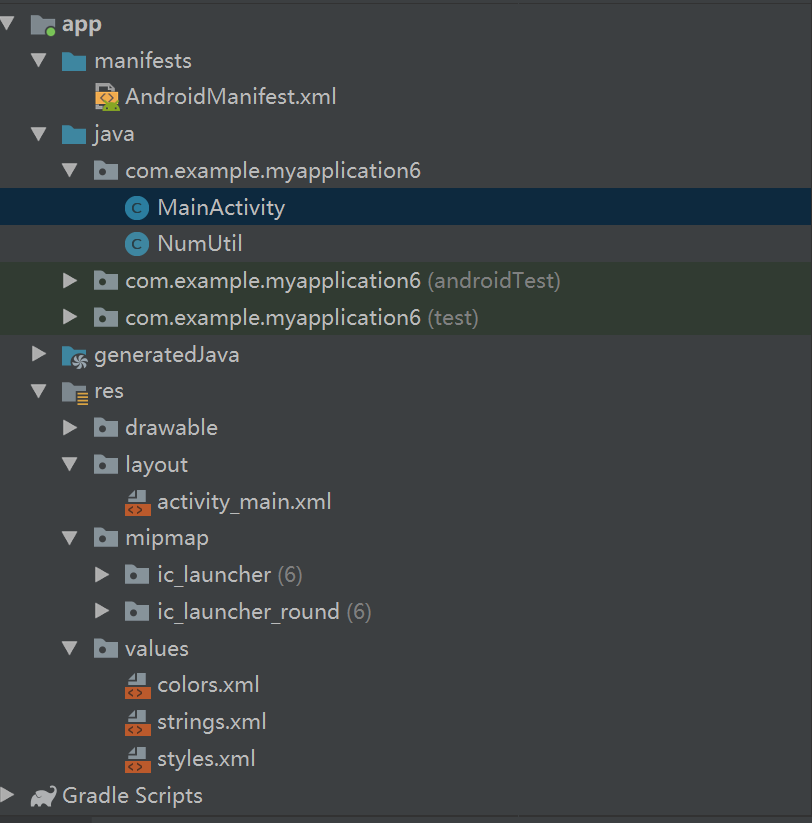
随便写的,用的线性布局
activity_main.xml
<?xml version="1.0" encoding="utf-8"?>

<android.support.constraint.ConstraintLayout

    xmlns:android="http://schemas.android.com/apk/res/android"

    xmlns:tools="http://schemas.android.com/tools"

    android:layout_width="match_parent"

    android:layout_height="match_parent"

    tools:context=".MainActivity">

    <LinearLayout xmlns:android="http://schemas.android.com/apk/res/android"

        android:layout_width="match_parent"

        android:layout_height="match_parent"

        android:gravity="top|center"

        android:orientation="vertical"

        android:padding="5dp">

        <ScrollView

            android:layout_width="match_parent"

            android:layout_height="wrap_content">

            <LinearLayout

                android:layout_width="match_parent"

                android:layout_height="wrap_content"

                android:orientation="vertical"

                android:showDividers="middle">

                <LinearLayout

                    android:layout_width="match_parent"

                    android:layout_height="wrap_content"

                    android:orientation="vertical">

                    <TextView

                        android:layout_marginBottom="20dp"

                        android:id="@+id/tv_result"

                        android:layout_width="match_parent"

                        android:layout_height="wrap_content"

                        android:gravity="right|bottom"

                        android:lines="3"

                        android:maxLines="3"

                        android:scrollbars="vertical"

                        android:textColor="#000000"

                        android:textSize="38dp" />

                </LinearLayout>

                <LinearLayout

                    android:layout_width="match_parent"

                    android:layout_height="wrap_content"

                    android:orientation="vertical"

                    android:showDividers="middle">

                    <LinearLayout

                        android:layout_width="match_parent"

                        android:layout_height="75dp"

                        android:orientation="horizontal"

                        android:showDividers="middle">

                        <Button

                            android:id="@+id/btn_cancel"

                            style="@style/btn_cal"

                            android:text="CE" />

                        <Button

                            android:id="@+id/btn_clear"

                            style="@style/btn_cal"

                            android:text="C" />

                        <Button

                            android:id="@+id/btn_sqrt"

                            style="@style/btn_cal"

                            android:text="√" />

                        <Button

                            android:id="@+id/btn_plus"

                            style="@style/btn_cal"

                            android:text="+" />

                    </LinearLayout>

                    <LinearLayout

                        android:layout_width="match_parent"

                        android:layout_height="75dp"

                        android:orientation="horizontal"

                        android:showDividers="middle">

                        <Button

                            android:id="@+id/btn_seven"

                            style="@style/btn_cal"

                            android:text="7" />

                        <Button

                            android:id="@+id/btn_eight"

                            style="@style/btn_cal"

                            android:text="8" />

                        <Button

                            android:id="@+id/btn_nine"

                            style="@style/btn_cal"

                            android:text="9" />

                        <Button

                            android:id="@+id/btn_minus"

                            style="@style/btn_cal"

                            android:text="-" />

                    </LinearLayout>

                    <LinearLayout

                        android:layout_width="match_parent"

                        android:layout_height="75dp"

                        android:orientation="horizontal"

                        android:showDividers="middle">

                        <Button

                            android:id="@+id/btn_four"

                            style="@style/btn_cal"

                            android:text="4" />

                        <Button

                            android:id="@+id/btn_five"

                            style="@style/btn_cal"

                            android:text="5" />

                        <Button

                            android:id="@+id/btn_six"

                            style="@style/btn_cal"

                            android:text="6" />

                        <Button

                            android:id="@+id/btn_multiply"

                            style="@style/btn_cal"

                            android:text="×" />

                    </LinearLayout>

                    <LinearLayout

                        android:layout_width="match_parent"

                        android:layout_height="75dp"

                        android:orientation="horizontal"

                        android:showDividers="middle">

                        <Button

                            android:id="@+id/btn_one"

                            style="@style/btn_cal"

                            android:text="1" />

                        <Button

                            android:id="@+id/btn_two"

                            style="@style/btn_cal"

                            android:text="2" />

                        <Button

                            android:id="@+id/btn_three"

                            style="@style/btn_cal"

                            android:text="3" />

                        <Button

                            android:id="@+id/btn_divide"

                            style="@style/btn_cal"

                            android:text="÷" />

                    </LinearLayout>

                    <LinearLayout

                        android:layout_width="match_parent"

                        android:layout_height="75dp"

                        android:orientation="horizontal"

                        android:showDividers="middle">

                        <Button

                            android:id="@+id/btn_zero"

                            style="@style/btn_cal"

                            android:layout_weight="2"

                            android:text="0" />

                        <Button

                            android:id="@+id/btn_dot"

                            style="@style/btn_cal"

                            android:text="." />

                        <Button

                            android:id="@+id/btn_equal"

                            style="@style/btn_cal"

                            android:text="=" />

                    </LinearLayout>

                </LinearLayout>

            </LinearLayout>

        </ScrollView>

    </LinearLayout>

</android.support.constraint.ConstraintLayout>
Main_activiity类:
package com.example.myapplication6; import android.support.v7.app.AppCompatActivity;
import android.os.Bundle;
import android.util.Log;
import android.view.View;
import android.widget.Button;
import android.widget.TextView; public class MainActivity extends AppCompatActivity {
double sum = 0.0;
double temp = 0.0;
int op = -1;
double step = 1;
boolean positive = true;
boolean flag = true;
TextView tv = null;
Button sqrt = null;
Button C = null;
Button CE = null;
Button dot = null;
Button num1 = null;
Button num2 = null;
Button num3 = null;
Button num4 = null;
Button num5 = null;
Button num6 = null;
Button num7 = null;
Button num8 = null;
Button num9 = null;
Button num0 = null;
Button plus = null;
Button subtract = null;
Button multiply = null;
Button divide = null;
Button equal = null;
NumUtil numUtil = new NumUtil();
@Override
protected void onCreate(Bundle savedInstanceState) {
super.onCreate(savedInstanceState);
setContentView(R.layout.activity_main);
final TextView tv=(TextView) findViewById(R.id.tv_result);
num0 = (Button) findViewById(R.id.btn_zero);
num0.setOnClickListener(new View.OnClickListener() { @Override
public void onClick(View v) {
// TODO Auto-generated method stub
if(temp < 0.00000001 && temp > 0.0)
tv.setText("0");
else{
if(flag){
temp *= 10;
}else {
step /= 10;
}
tv.setText(numUtil._tv(temp));
}
}
});
num1 = (Button) findViewById(R.id.btn_one);
num1.setOnClickListener(new View.OnClickListener() { @Override
public void onClick(View v) {
// TODO Auto-generated method stub
if(flag){
temp *= 10;
temp += 1;
}else {
step /= 10;
temp += step * 1.0;
}
tv.setText(numUtil._tv(temp));
}
});
num2 = (Button) findViewById(R.id.btn_two);
num2.setOnClickListener(new View.OnClickListener() { @Override
public void onClick(View v) {
// TODO Auto-generated method stub
if(flag){
temp *= 10;
temp += 2;
}else {
step /= 10;
temp += step * 2;
}
tv.setText(numUtil._tv(temp));
}
});
num3 = (Button) findViewById(R.id.btn_three);
num3.setOnClickListener(new View.OnClickListener() { @Override
public void onClick(View v) {
// TODO Auto-generated method stub
if(flag){
temp *= 10;
temp += 3;
}else {
step /= 10;
temp += step * 3;
}
tv.setText(numUtil._tv(temp));
}
});
num4 = (Button) findViewById(R.id.btn_four);
num4.setOnClickListener(new View.OnClickListener() { @Override
public void onClick(View v) {
// TODO Auto-generated method stub
if(flag){
temp *= 10;
temp += 4;
}else {
step /= 10;
temp += step * 4;
}
tv.setText(numUtil._tv(temp));
}
});
num5 = (Button) findViewById(R.id.btn_five);
num5.setOnClickListener(new View.OnClickListener() { @Override
public void onClick(View v) {
// TODO Auto-generated method stub
if(flag){
temp *= 10;
temp += 5;
}else {
step /= 10;
temp += step * 5;
}
tv.setText(numUtil._tv(temp));
}
});
num6 = (Button) findViewById(R.id.btn_six);
num6.setOnClickListener(new View.OnClickListener() { @Override
public void onClick(View v) {
// TODO Auto-generated method stub
if(flag){
temp *= 10;
temp += 6;
}else {
step /= 10;
temp += step * 6;
}
tv.setText(numUtil._tv(temp));
}
});
num7 = (Button) findViewById(R.id.btn_seven);
num7.setOnClickListener(new View.OnClickListener() { @Override
public void onClick(View v) {
// TODO Auto-generated method stub
if(flag){
temp *= 10;
temp += 7;
}else {
step /= 10;
temp += step * 7;
}
tv.setText(numUtil._tv(temp));
}
});
num8 = (Button) findViewById(R.id.btn_eight);
num8.setOnClickListener(new View.OnClickListener() { @Override
public void onClick(View v) {
// TODO Auto-generated method stub
if(flag){
temp *= 10;
temp += 8;
}else {
step /= 10;
temp += step * 8;
}
tv.setText(numUtil._tv(temp));
}
});
num9 = (Button) findViewById(R.id.btn_nine);
num9.setOnClickListener(new View.OnClickListener() { @Override
public void onClick(View v) {
// TODO Auto-generated method stub
if(flag){
temp *= 10;
temp += 9;
}else {
step /= 10;
temp += step * 9;
}
tv.setText(numUtil._tv(temp));
}
});
dot = (Button) findViewById(R.id.btn_dot);
dot.setOnClickListener(new View.OnClickListener() { @Override
public void onClick(View v) {
// TODO Auto-generated method stub
if(flag){
flag = false;
tv.setText(numUtil._tv(temp)+".");
}
}
});
equal = (Button) findViewById(R.id.btn_equal);
equal.setOnClickListener(new View.OnClickListener() {
@Override
public void onClick(View v) {
// TODO Auto-generated method stub
if(op == -1){
sum = temp;
}else if(op == 1){
sum += temp;
}else if(op == 2){
sum -= temp;
}else if(op == 3){
sum *= temp;
}else if(op == 4){
sum /= temp;
}
tv.setText(numUtil._tv(sum));
positive = true;
flag = true;
sum = 0.0;
temp = 0.0;
step = 1.0;
op = -1;
}
});
plus = (Button) findViewById(R.id.btn_plus);
plus.setOnClickListener(new View.OnClickListener() {
@Override
public void onClick(View v) {
// TODO Auto-generated method stub
tv.setText("+");
if(op == -1){
sum = temp;
temp = 0.0;
}else{
if(op == 1){
sum += temp;
}else if(op == 2){
sum -= temp;
}else if(op == 3){
sum *= temp;
}else if(op == 4){
sum /= temp;
}
}
op = 1;
temp = 0.0;
positive = true;
flag = true;
}
});
subtract = (Button) findViewById(R.id.btn_minus);
subtract.setOnClickListener(new View.OnClickListener() {
@Override
public void onClick(View v) {
// TODO Auto-generated method stub
tv.setText("-");
if(op == -1){
sum = temp;
temp = 0.0;
}else{
if(op == 1){
sum += temp;
}else if(op == 2){
sum -= temp;
}else if(op == 3){
sum *= temp;
}else if(op == 4){
sum /= temp;
}
}
op = 2;
temp = 0.0;
positive = true;
flag = true;
}
});
multiply = (Button) findViewById(R.id.btn_multiply);
multiply.setOnClickListener(new View.OnClickListener() {
@Override
public void onClick(View v) {
// TODO Auto-generated method stub
tv.setText("×");
if(op == -1){
sum = temp;
temp = 0.0;
}else{
if(op == 1){
sum += temp;
}else if(op == 2){
sum -= temp;
}else if(op == 3){
sum *= temp;
}else if(op == 4){
sum /= temp;
}
}
op = 3;
temp = 0.0;
positive = true;
flag = true;
}
});
divide = (Button) findViewById(R.id.btn_divide);
divide.setOnClickListener(new View.OnClickListener() {
@Override
public void onClick(View v) {
// TODO Auto-generated method stub
tv.setText("÷");
if(op == -1){
sum = temp;
temp = 0.0;
}else{
if(op == 1){
sum += temp;
}else if(op == 2){
sum -= temp;
}else if(op == 3){
sum *= temp;
}else if(op == 4){
sum /= temp;
}
}
op = 4;
temp = 0.0;
positive = true;
flag = true;
}
});
C = (Button) findViewById(R.id.btn_cancel);
C.setOnClickListener(new View.OnClickListener() {
@Override
public void onClick(View v) {
// TODO Auto-generated method stub
tv.setText(" ");
positive = true;
flag = true;
temp = 0.0;
}
});
CE = (Button) findViewById(R.id.btn_clear);
CE.setOnClickListener(new View.OnClickListener() {
@Override
public void onClick(View v) {
// TODO Auto-generated method stub
tv.setText(" ");
positive = true;
flag = true;
sum = 0.0;
temp = 0.0;
step = 1.0;
op = -1;
}
});
sqrt = (Button) findViewById(R.id.btn_sqrt);
sqrt.setOnClickListener(new View.OnClickListener() {
@Override
public void onClick(View v) {
// TODO Auto-generated method stub
if(op == -1){
sum = temp;
}else if(op == 1){
sum += temp;
}else if(op == 2){
sum -= temp;
}else if(op == 3){
sum *= temp;
}else if(op == 4){
sum /= temp;
}
sum = Math.sqrt(sum);
tv.setText(numUtil._tv(sum));
positive = true;
flag = true;
sum = 0.0;
temp = 0.0;
step = 1.0;
op = -1;
}
});
} }
NumUtil工具类:
package com.example.myapplication6;

public class NumUtil {

    public double toDouble(String str){

        return 0.0;

    }

    public String _tv(double x){

        double t = x - (int) x;

        if(t < 0)

            t = -t;

        if(t < 0.00000001)

            return String.valueOf((int)x);

        else{

            String temp = String.format("%.7f", x);

            for(int i = temp.length() -1; i >= 0; i--){

                if(temp.substring(i,i+1).equals("0")){

                    continue;

                }else{

                    if(i + 1 < temp.length()){

                        temp = temp.substring(0,i+1);

                    }

                    break;

                }

            }

            return temp;

        }

    }

}
按钮的垃圾设定
<style name="btn_cal">

        <item name="android:layout_marginLeft">3dp</item>

        <item name="android:layout_width">wrap_content</item>

        <item name="android:layout_height">wrap_content</item>

        <item name="android:background">#EEA9B8</item>

        <item name="android:textSize">30px</item>

    </style>
不太好弄的地方就是对于小数点后的处理了,剩下的随便写写就完事了
android 开发 简单的小计算器的更多相关文章
- Android开发效率的小技巧
提高eclipse使用效率(二) 提高Android开发效率的小技巧 XML文件的代码提示 adt中也有xml文件的代码提示,为了让提示来的更加猛烈,我们还要设置一下 打开eclipse - Wi ...
- 几款Android开发人员必备小工具
在这里我介绍一下我常常在Android Studio里面使用的小工具吧,这些工具都能够在plugin里面搜索到. (当然了哈.我也是从网上找的.用着挺方便的,在这里总结一下) Gsonformat: ...
- 我对android开发的一点小感悟小看法
“Android”,“Android开发”等等这些词成了时下最热的词,也是时下大众最关注最吸引人眼球的话题,当然,最热门的行业也意味着高薪,好的就业环境,但同时也意味着强大的竞争力! Android系 ...
- 新人学习Android开发遇到的小问题总结
1. IDE搭建: 搭建android的IDE时,先注意是什么版本的系统,64/32位系统. 通常使用的是Eclipse for android,Android Studio由于还需要FQ,网速慢,所 ...
- Android开发中的小技巧
转自:http://blog.csdn.net/guxiao1201/article/details/40655661 简单介绍: startActivities (Intent[] intents) ...
- 提高eclipse使用效率(二) 提高Android开发效率的小技巧
XML文件的代码提示 adt中也有xml文件的代码提示,为了让提示来的更加猛烈,我们还要设置一下 打开eclipse - Window - Preferences,在右边的目录树中切换到XML - X ...
- Android 开发中常用小技巧
TextView中的getTextSize返回值是以像素(px)为单位的, 而setTextSize()是以sp为单位的. 所以如果直接用返回的值来设置会出错,解决办法是 用setTextSize() ...
- 提高eclipse使用效率(二)—— 提高Android开发效率的小技巧
XML文件的代码提示 adt中也有xml文件的代码提示,为了让提示来的更加猛烈,我们还要设置一下 打开eclipse - Window - Preferences,在右边的目录树中切换到XML - X ...
- android 开发 简单的页面布局
package com.example.test; import android.app.Activity; import android.os.Bundle; import android.view ...
随机推荐
- 【转】从Mac/OS和iOS开放源码浅谈UNIX家谱
阅读数:1245 苹果公司在各类开源项目中长期贡献着自己的力量,但其UNIX系统技术一直都属于闭源阵营(这一点可以从NUX OS阵营和家谱图中得到答案).然而,以封闭闻名的苹果公司,2017年国庆期间 ...
- idea提示,格式化代码,清除不使用的包快捷键,maven自动导jar包
一.提示快捷键 idea默认快捷键是ctrl+space,通常和别的软件快捷键冲突,所以将快捷键修改为alt+/ 二.格式化快捷键ctrl+alt+l,通常和qq.tim快捷键冲突,请修改qq或者ti ...
- WSAStartup function
[WSAStartup function] Parameters wVersionRequested [in] The highest version of Windows Sockets speci ...
- 64 位 win7 使用PLSQL Developer(转)
由于 PLSQL Developer 没有64位版本,所以在64位系统上运行该程链接64位Oracle时就会报错,笔者为这个问题纠结了好几天,后来通过请教Google + 动手实践,终于搞定了这个问题 ...
- mongodb查询速度慢是什么原因?
mongodb查询速度慢是什么原因? 通过mongodb客户端samus代码研究解决问题 最近有项目需要用到mongodb,于是在网上下载了mongodb的源码,根据示例写了测试代码, ...
- Differential expression analysis for paired RNA-seq data 成对RNA-seq数据的差异表达分析
Differential expression analysis for paired RNA-seq data 抽象背景:RNA-Seq技术通过产生序列读数并在不同生物条件下计数其频率来测量转录本丰 ...
- http头部信息
1.常见的返回码 100: 请服务器端继续返回 200:成功 301:永久重定向 存的地址永久的改变了 301 302 : 暂时重定向 302仍然使用老得url 401 : 无法找到资源file n ...
- 无脑无负担网站架构-- Application Request Route的一些应用
首先作为一个.net 程序员,多数情况你懒的整什么架构啊.框架啊.还有那命令行的linux,别说linux也有桌面,那个桌面用起来更让人抓狂,一直不明白居然有人说喜欢上linux的命令行,装B还是SB ...
- Jenkins执行selenium报错unknown error: cannot find Chrome binary
问题描述:在Pycharm中执行selenium测试用例,可以正常运行, 集成在Jenkins中,构建时,发现构建成功,但是查看Console Output,报错:unknown error: can ...
- ASP.NET 4(和ASP.NET MVC 2)中输出HTML编码的新语法<%:%>
今天的文章介绍了ASP.NET 4中引入的一个小而且非常有用的新语法功能 - 这是在代码块中自动对输出进行HTML编码的功能.这有助于保护您的应用程序和站点免受跨站点脚本注入(XSS)和HTML注入攻 ...