
GridEh Lookup
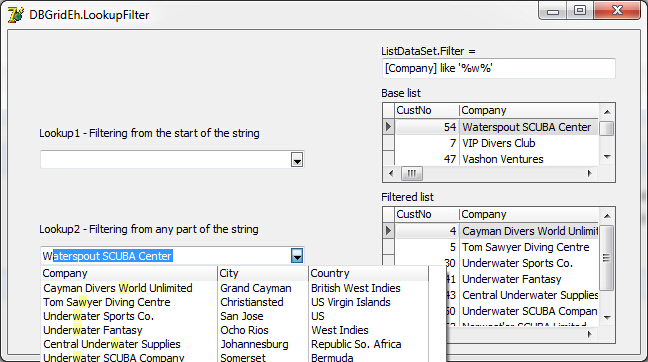
Flexible adjustment of a lookup inplace editor
没有输入拼音码搜索功能。

Drop-Down Forms
这个比较符合中国人的习惯,搜索框,不错,点下来箭头才能弹出,能不能输入字母进入搜索。
EhLib allows to create Drop-down Forms that can be shown on pressing of edit button in the text editors.
GridEh的列有这个事件
curGrid->Columns->Items[]->DropDownFormParams->DropDownForm;

__property TCustomForm* DropDownForm ;

__property UnicodeString DropDownFormClassName ;

__property TDropDownAlign Align ;

__property TDropDownPassParamsEh PassParams ;

__property UnicodeString PassFieldNames ;

__property UnicodeString AssignBackFieldNames ;

__property int FormWidth ;

__property int FormHeight ;

__property bool SaveFormSize ;

void __fastcall TFrm::DBGridEh1Columns0OpenDropDownForm(TCustomDBGridEh *Grid, TColumnEh *Column, TEditButtonEh *Button, TCustomForm *&DropDownForm, TDynVarsEh *DynParams)

TDBLookupComboboxEh
Search panel
DBGridEh can display a special panel to search and filter the data in the grid.
curGrid->SearchPanel->FilterOnTyping,以下属性,很好用。
__property bool Enabled ;

__property bool PersistentShowing ;

__property TShortCut ShortCut;

__property TSearchPanelLocationEh;

__property bool FilterOnTyping;//输入字母实时过滤

__property bool FilterEnabled;

Data grouping
Grid allows to group data using columns as a criterion of grouping.
It is allowed to display a grid summarizing the records for each group, and the overall record summarizing the bottom of the grid.
需要用到MemTableEh1,DataSetDriverEh1,用普通的adoquery和fdmemtable,clientdataset不能显示。用memtableeh就可以分组了。
DBGridEh2->DataGrouping
    __property bool Active  ;

    __property TGridDataGroupLevelsEh* GroupLevels  ;

    __property TGridDataGroupFootersEh* Footers  ;

    __property TGridDataGroupFootersDefValuesEh* FootersDefValues  ;

    __property bool GroupPanelVisible  ;

    __property bool DefaultStateExpanded  ;

    __property TGridDataGroupRowDefValuesEh* GroupRowDefValues  ;

    __property bool ShiftFolldataGroupRow  ;
From http://ymg97526.blog.163.com/blog/static/173658160201122695449603/
procedure TForm1.FormCreate(Sender: TObject);

var i:Integer;

begin

//DBGridEh1.Flat:=True;

DBGridEh1.ColumnDefValues.Title.Alignment:=taCenter;

DBGridEh1.DataSource:=DataSource1;

DataSource1.DataSet:=MemTableEh1;

MemTableEh1.DataDriver:=DataSetDriverEh1;

MemTableEh1.CachedUpdates:=True;

MemTableEh1.FetchAllOnOpen:=True; //打开获取所有记录

DataSetDriverEh1.ProviderDataSet:=ADOQuery1;

ADOQuery1.ConnectionString:='Provider=Microsoft.Jet.OLEDB.4.0;'+

          'Data Source=f:\mcmygs.mdb;'+

          'Persist Security Info=False;'+

          'Jet OLEDB:Database Password=123456';

ADOQuery1.Close;

ADOQuery1.SQL.Text:='Select cyear,cmonth,fphm,bhsje,se,jshj from zyfp';

ADOQuery1.Open;

MemTableEh1.Active:=True;

DBGridEh1.DataGrouping.Active:=True;

//DBGridEh1.DataGrouping.DefaultStateExpanded:=True; //默认为展开状态

DBGridEh1.DataGrouping.GroupPanelVisible:=True;

DBGridEh1.DataGrouping.GroupLevels.Add.Column:=DBGridEh1.Columns[];

DBGridEh1.DataGrouping.GroupLevels.Add.Column:=DBGridEh1.Columns[];

//DBGridEh1.Columns[0].Visible:=False;

//DBGridEh1.Columns[1].Visible:=False;

DBGridEh1.DataGrouping.Font.Style:=[fsBold];

//DBGridEh1.DataGrouping.Color:=clSkyBlue;

DBGridEh1.TitleFont.Color:=clBlue;

DBGridEh1.GridLineColors.DarkColor:=clRed;

//DBGridEh1.GridLineColors.BrightColor:=clBlack;

DBGridEh1.ColumnDefValues.Title.Alignment:=taCenter;

for i:= to MemTableEh1.Fields.Count- do

  begin

    if MemTableEh1.Fields[i].DataType=ftFloat then

       DBGridEh1.Columns[i].DisplayFormat:='#,###,###.00';

  end;

end;

DropDown filter list
Grid allows to filter data using a droped down list box where users can select items for filtering using checkboxes.
DBGridEh2->STFilter->Visible;
还是要用MemTableEh1才起作用。
    __property bool InstantApply  ;

    __property bool Local  ;

    __property TSTFilterLocationEh Location  ;

    __property bool Visible  ;

    __property TColor HorzLineColor  ;

    __property int RowHeight  ;

    __property int RowLines  ;

    __property TColor VertLineColor  ;

    __property TDBGridFilterButtonDrawTimeEh FilterButtonDrawTime  ;

ObjectInspector Form
Global function to display a ObjectInspector-like Form.
This is a simple ObjectInspector that can be used to debug
property setting at run-time。
TObjectInspectorEh
添加Common\ObjectInspectorEh.pas文件,写2行代码就OK,我只能说太方便了。
TRect rect(, , , );

ShowObjectInspectorForm(curGrid, rect, false);

GridEh Lookup的更多相关文章
- SQL Server-聚焦移除Bookmark Lookup、RID Lookup、Key Lookup提高SQL查询性能(六)
前言 前面几节都是讲的基础内容,本节我们讲讲索引性能优化,当对大数据进行处理时首先想到的就是索引,一旦遇到这样的问题则手忙脚乱,各种查资料,为何平常不扎实基本功呢,我们由浅入深,简短的内容,深入的理解 ...
- Salesforce的sharing Rule 不支持Lookup型字段解决方案
Salesforce 中 sharing rule 并不支持Look up 字段 和 formula 字段.但在实际项目中,有时会需要在sharing rule中直接取Look up型字段的值,解决方 ...
- eclipse调试(debug)的时候,出现Source not found,Edit Source Lookup Path,一闪而过
问题描述 使用Eclipse调试代码的时候,打了断点,经常出现Source not found,网上找了半天,大部分提示点击Edit Source Lookup Path,添加被调试的工程,然而往往没 ...
- mongodb 3.x 之实用新功能窥看[2] ——使用$lookup做多表关联处理
这篇我们来看mongodb另一个非常有意思的东西,那就是$lookup,我们知道mongodb是一个文档型的数据库,而且它也是最像关系型数据库的 一种nosql,但是呢,既然mongodb是无模式的, ...
- Lookup component 用法
Lookup component 类似于Tsql的join子句, select a.* ,b.* from dbo.tis a left join dbo. tdes b on a.code=b.co ...
- [SharePoint]javascript client object model 获取lookup 类型的field的值,包括user类型(单人或者多人)的值。how to get the multiple user type/lookup type field value by Javascript client object model
1. how to get value var context = new SP.ClientContext.get_current(); var web = context.get_web(); v ...
- [SharePoint 2010] Modify lookup mapping with PowerShell
SharePoint支持将列表保存成列表模板,但当列表包含Lookup字段时,通过模板创建的列表会丢失Lookup字段的信息. 通过PowerShell,可以修改Lookup字段的xml内容. Fun ...
- Informatica Lookup Transformation组件的Connect 与Unconnected类型用法
Informatica Lookup Transformation组件的Connect 与Unconnected类型用法及区别:下面是通一个Lookup在不同Mapping中的使用: 1. Conne ...
- AX 2012 两种lookup 的显示方式
第一种:只能单选的lookup: 代码: public void BusinessUnitLookup(FormStringControl _formstrcontroll) { //OMOperat ...
随机推荐
- 过滤器系列(三)—— RSQF
这个过滤器本身是一篇论文中提出的过滤器的简化版本,去掉了计数功能,我觉得简化版本应用的可能也很广,专门写一篇简化版本的RSQF.RSQF全称是rank-and-select based filter, ...
- Java中字符串比较的注意点
Java中必须使用string1.equals(string2)来进行判断 补充如果: string s1=new String("Hello"); string s2=new S ...
- FindBugs插件的安装与使用
转载:http://www.cnblogs.com/kayfans/archive/2012/06/18/2554022.html 1 什么是FindBugs FindBugs 是一个静态分析工具,它 ...
- Spring的注解@Qualifier(二十五)
转载:https://www.cnblogs.com/smileLuckBoy/p/5801678.html 近期在捯饬spring的注解,现将遇到的问题记录下来,以供遇到同样问题的童鞋解决~ 先说明 ...
- Python - learn note(1)
1. 下载安装Python 2.7(为了向下兼容以前的版本), Python 3.5(VS2015不支持配置3.6的环境) 教程 需要使用VS2015进行开发,必须勾选上后面两项: 2. VS2015 ...
- mysql 索引原理及查询优化
一 介绍 为何要有索引? 一般的应用系统,读写比例在10:1左右,而且插入操作和一般的更新操作很少出现性能问题,在生产环境中,我们遇到最多的,也是最容易出问题的,还是一些复杂的查询操作,因此对查询语句 ...
- layers框架
- L3-013 非常弹的球 (30 分)
刚上高一的森森为了学好物理,买了一个“非常弹”的球.虽然说是非常弹的球,其实也就是一般的弹力球而已.森森玩了一会儿弹力球后突然想到,假如他在地上用力弹球,球最远能弹到多远去呢?他不太会,你能帮他解决吗 ...
- ubuntu系统无法ssh登录--安装openssh
与红帽子系列的Linux发行版不同,Ubuntu系统安装后并不能直接进行ssh登录.需要手动安装openssh才行. Ubuntu安装openssh命令如下: sudo apt-get install ...
- Android开发入门
教我徒弟Android开发入门(一) 教我徒弟Android开发入门(二) 教我徒弟Android开发入门(三) 出处:http://www.cnblogs.com/kexing/tag/Androi ...