
GridEh Lookup
Flexible adjustment of a lookup inplace editor
没有输入拼音码搜索功能。

Drop-Down Forms
这个比较符合中国人的习惯,搜索框,不错,点下来箭头才能弹出,能不能输入字母进入搜索。
EhLib allows to create Drop-down Forms that can be shown on pressing of edit button in the text editors.
GridEh的列有这个事件
curGrid->Columns->Items[]->DropDownFormParams->DropDownForm;

__property TCustomForm* DropDownForm ;

__property UnicodeString DropDownFormClassName ;

__property TDropDownAlign Align ;

__property TDropDownPassParamsEh PassParams ;

__property UnicodeString PassFieldNames ;

__property UnicodeString AssignBackFieldNames ;

__property int FormWidth ;

__property int FormHeight ;

__property bool SaveFormSize ;

void __fastcall TFrm::DBGridEh1Columns0OpenDropDownForm(TCustomDBGridEh *Grid, TColumnEh *Column, TEditButtonEh *Button, TCustomForm *&DropDownForm, TDynVarsEh *DynParams)

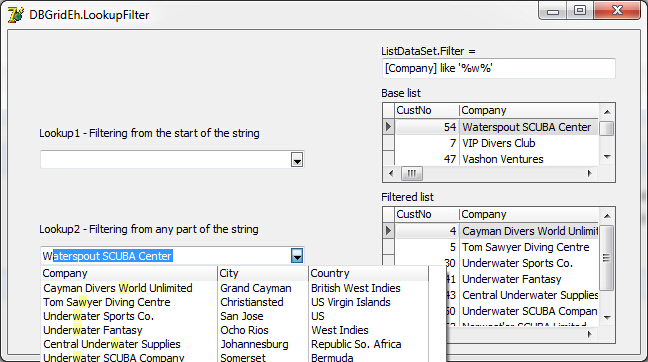
TDBLookupComboboxEh
Search panel
DBGridEh can display a special panel to search and filter the data in the grid.
curGrid->SearchPanel->FilterOnTyping,以下属性,很好用。
__property bool Enabled ;

__property bool PersistentShowing ;

__property TShortCut ShortCut;

__property TSearchPanelLocationEh;

__property bool FilterOnTyping;//输入字母实时过滤

__property bool FilterEnabled;

Data grouping
Grid allows to group data using columns as a criterion of grouping.
It is allowed to display a grid summarizing the records for each group, and the overall record summarizing the bottom of the grid.
需要用到MemTableEh1,DataSetDriverEh1,用普通的adoquery和fdmemtable,clientdataset不能显示。用memtableeh就可以分组了。
DBGridEh2->DataGrouping
    __property bool Active  ;

    __property TGridDataGroupLevelsEh* GroupLevels  ;

    __property TGridDataGroupFootersEh* Footers  ;

    __property TGridDataGroupFootersDefValuesEh* FootersDefValues  ;

    __property bool GroupPanelVisible  ;

    __property bool DefaultStateExpanded  ;

    __property TGridDataGroupRowDefValuesEh* GroupRowDefValues  ;

    __property bool ShiftFolldataGroupRow  ;
From http://ymg97526.blog.163.com/blog/static/173658160201122695449603/
procedure TForm1.FormCreate(Sender: TObject);

var i:Integer;

begin

//DBGridEh1.Flat:=True;

DBGridEh1.ColumnDefValues.Title.Alignment:=taCenter;

DBGridEh1.DataSource:=DataSource1;

DataSource1.DataSet:=MemTableEh1;

MemTableEh1.DataDriver:=DataSetDriverEh1;

MemTableEh1.CachedUpdates:=True;

MemTableEh1.FetchAllOnOpen:=True; //打开获取所有记录

DataSetDriverEh1.ProviderDataSet:=ADOQuery1;

ADOQuery1.ConnectionString:='Provider=Microsoft.Jet.OLEDB.4.0;'+

          'Data Source=f:\mcmygs.mdb;'+

          'Persist Security Info=False;'+

          'Jet OLEDB:Database Password=123456';

ADOQuery1.Close;

ADOQuery1.SQL.Text:='Select cyear,cmonth,fphm,bhsje,se,jshj from zyfp';

ADOQuery1.Open;

MemTableEh1.Active:=True;

DBGridEh1.DataGrouping.Active:=True;

//DBGridEh1.DataGrouping.DefaultStateExpanded:=True; //默认为展开状态

DBGridEh1.DataGrouping.GroupPanelVisible:=True;

DBGridEh1.DataGrouping.GroupLevels.Add.Column:=DBGridEh1.Columns[];

DBGridEh1.DataGrouping.GroupLevels.Add.Column:=DBGridEh1.Columns[];

//DBGridEh1.Columns[0].Visible:=False;

//DBGridEh1.Columns[1].Visible:=False;

DBGridEh1.DataGrouping.Font.Style:=[fsBold];

//DBGridEh1.DataGrouping.Color:=clSkyBlue;

DBGridEh1.TitleFont.Color:=clBlue;

DBGridEh1.GridLineColors.DarkColor:=clRed;

//DBGridEh1.GridLineColors.BrightColor:=clBlack;

DBGridEh1.ColumnDefValues.Title.Alignment:=taCenter;

for i:= to MemTableEh1.Fields.Count- do

  begin

    if MemTableEh1.Fields[i].DataType=ftFloat then

       DBGridEh1.Columns[i].DisplayFormat:='#,###,###.00';

  end;

end;

DropDown filter list
Grid allows to filter data using a droped down list box where users can select items for filtering using checkboxes.
DBGridEh2->STFilter->Visible;
还是要用MemTableEh1才起作用。
    __property bool InstantApply  ;

    __property bool Local  ;

    __property TSTFilterLocationEh Location  ;

    __property bool Visible  ;

    __property TColor HorzLineColor  ;

    __property int RowHeight  ;

    __property int RowLines  ;

    __property TColor VertLineColor  ;

    __property TDBGridFilterButtonDrawTimeEh FilterButtonDrawTime  ;

ObjectInspector Form
Global function to display a ObjectInspector-like Form.
This is a simple ObjectInspector that can be used to debug
property setting at run-time。
TObjectInspectorEh
添加Common\ObjectInspectorEh.pas文件,写2行代码就OK,我只能说太方便了。
TRect rect(, , , );

ShowObjectInspectorForm(curGrid, rect, false);

GridEh Lookup的更多相关文章
- SQL Server-聚焦移除Bookmark Lookup、RID Lookup、Key Lookup提高SQL查询性能(六)
前言 前面几节都是讲的基础内容,本节我们讲讲索引性能优化,当对大数据进行处理时首先想到的就是索引,一旦遇到这样的问题则手忙脚乱,各种查资料,为何平常不扎实基本功呢,我们由浅入深,简短的内容,深入的理解 ...
- Salesforce的sharing Rule 不支持Lookup型字段解决方案
Salesforce 中 sharing rule 并不支持Look up 字段 和 formula 字段.但在实际项目中,有时会需要在sharing rule中直接取Look up型字段的值,解决方 ...
- eclipse调试(debug)的时候,出现Source not found,Edit Source Lookup Path,一闪而过
问题描述 使用Eclipse调试代码的时候,打了断点,经常出现Source not found,网上找了半天,大部分提示点击Edit Source Lookup Path,添加被调试的工程,然而往往没 ...
- mongodb 3.x 之实用新功能窥看[2] ——使用$lookup做多表关联处理
这篇我们来看mongodb另一个非常有意思的东西,那就是$lookup,我们知道mongodb是一个文档型的数据库,而且它也是最像关系型数据库的 一种nosql,但是呢,既然mongodb是无模式的, ...
- Lookup component 用法
Lookup component 类似于Tsql的join子句, select a.* ,b.* from dbo.tis a left join dbo. tdes b on a.code=b.co ...
- [SharePoint]javascript client object model 获取lookup 类型的field的值,包括user类型(单人或者多人)的值。how to get the multiple user type/lookup type field value by Javascript client object model
1. how to get value var context = new SP.ClientContext.get_current(); var web = context.get_web(); v ...
- [SharePoint 2010] Modify lookup mapping with PowerShell
SharePoint支持将列表保存成列表模板,但当列表包含Lookup字段时,通过模板创建的列表会丢失Lookup字段的信息. 通过PowerShell,可以修改Lookup字段的xml内容. Fun ...
- Informatica Lookup Transformation组件的Connect 与Unconnected类型用法
Informatica Lookup Transformation组件的Connect 与Unconnected类型用法及区别:下面是通一个Lookup在不同Mapping中的使用: 1. Conne ...
- AX 2012 两种lookup 的显示方式
第一种:只能单选的lookup: 代码: public void BusinessUnitLookup(FormStringControl _formstrcontroll) { //OMOperat ...
随机推荐
- 安装GraphicsMagick
环境 CentOS7/CentOS7.1 x64 1.检查yum 2.检查是否安装zlib,下载地址:http://www.zlib.net/ 3.安装libpng,下载地址:http://www. ...
- jspf、jsp小记
jsp页面:
- Java Web编程的主要组件技术——Hibernate核心组件
参考书籍:<J2EE开源编程精要15讲> Hibernate配置文件 1) hibernate.cfg.xml <?xml version='1.0' encoding='UTF-8 ...
- istringstream、ostringstream、stringstream类介绍
本文转载自: http://www.cnblogs.com/gamesky/archive/2013/01/09/2852356.html 一.C++的输入输出分为三种: (1)基于控制台的I/O ( ...
- Linux:关于设置PS1提示符输入长命令格式出现的问题及解决
关于设置PS1提示符命令输出格式出现的问题解决 正确的格式 \[\e[;;32m\]xxxx #如果只是改变提示符而不改变命令,在后面加一个结束符. \[\e[;;32m\]xxxx \[\e[0m ...
- Linux:LNMP架构的搭建
LNMP架构的搭建 centos6.8-i686 MySQL PHP Nginx 搭建前先安装一些必要的rpm和php组件(全新系统) yum install -y wget gcc vim* lib ...
- 通过Ftp put命令上传导致文件损坏的解决办法
通过Linux命令行向在一台Windows FTP服务器上传文件.然后在另一台Windows客户机登录FTP服务器下载,但是下载后的文件大小变了,exe文件错误了不能正确执行.刻意打包的文件(.rar ...
- IOS NSBundle 的理解和 mainBundle 类方法详解
常看到类似的 NSString *file = [[NSBundle mainBundle] pathForResource:name ofType:nil]; 这样的代码,用来获取 file 的完全 ...
- MarkDown格式作业模板
发布的随笔可复制下面的MarkDowm模板 注意事项 标题第XX次作业替换成相应的第一次作业.第二次作业...... 代码托管的链接一定要换成自己的项目 码云提交历史截图必须是自己每周的提交截图 #& ...
- Properties集合小应用--限制用户对软件的使用次数
我们可以注意到一些付费软件可以试用一定的次数,超过限制次数后,就必须到官网购买正版才能继续使用. 这里就简单地模拟一下这种效果的实现. * 需求:记录程序的启动次数,当启动次数超过3次后,要求使用者注 ...