
Spring cloud Hystrix的配置属性优先级和详解
Hystrix配置属性详解
Hystrix可以配置属性的有以下类型:
- Execution:控制HystrixCommand.run() 的如何执行
- Fallback: 控制HystrixCommand.getFallback() 如何执行
- Circuit Breaker: 控制断路器的行为
- Metrics: 捕获和HystrixCommand 和 HystrixObservableCommand 执行信息相关的配置属性
- Request Context:设置请求上下文的属性
- Collapser Properties:设置请求合并的属性
- Thread Pool Properties:设置线程池的属性
Execution
以下属性控制HystrixCommand.run() 的如何执行
1. execution.isolation.strategy
表示HystrixCommand.run()的执行时的隔离策略,有以下两种策略
- 1 THREAD: 在单独的线程上执行,并发请求受线程池中的线程数限制
- 2 SEMAPHORE: 在调用线程上执行,并发请求量受信号量计数限制
在默认情况下,推荐HystrixCommands 使用 thread 隔离策略,HystrixObservableCommand 使用 semaphore 隔离策略。
只有在高并发(单个实例每秒达到几百个调用)的调用时,才需要修改HystrixCommands 的隔离策略为semaphore 。semaphore 隔离策略通常只用于非网络调用
默认值:THREAD,
// 设置所有实例的默认值

hystrix.command.default.execution.isolation.strategy=..

// 设置实例HystrixCommandKey的此属性值

hystrix.command.HystrixCommandKey.execution.isolation.strategy=...
2. execution.isolation.thread.timeoutInMilliseconds
设置调用者执行的超时时间(单位毫秒)
默认值:1000
// 设置所有实例的默认值

hystrix.command.default.execution.isolation.thread.timeoutInMilliseconds=...

// 设置实例HystrixCommandKey的此属性值

hystrix.command.HystrixCommandKey.execution.isolation.thread.timeoutInMilliseconds=...
3.execution.isolation.thread.interruptOnTimeout
表示设置是否在执行超时时,中断HystrixCommand.run() 的执行
默认值:true
// 设置所有实例的默认值

hystrix.command.default.execution.isolation.thread.interruptOnTimeout=...

// 设置实例HystrixCommandKey的此属性值

hystrix.command.HystrixCommandKey.execution.isolation.thread.interruptOnTimeout=...
4.execution.isolation.thread.interruptOnCancel
表示设置是否在取消任务执行时,中断HystrixCommand.run() 的执行
默认值:false
// 设置所有实例的默认值

hystrix.command.default.execution.isolation.thread.interruptOnCancel=...

// 设置实例HystrixCommandKey的此属性值

hystrix.command.HystrixCommandKey.execution.isolation.thread.interruptOnCancel
当HystrixCommand.run()使用SEMAPHORE的隔离策略时,设置最大的并发量
默认值:10
// 设置所有实例的默认值

hystrix.command.default.execution.isolation.semaphore.maxConcurrentRequests=...

// 设置实例HystrixCommandKey的此属性值

hystrix.command.HystrixCommandKey.execution.isolation.semaphore.maxConcurrentRequests=...
Fallback
以下属性控制HystrixCommand.getFallback() 如何执行。这些属性对隔离策略THREAD 和SEMAPHORE都起作用.
1. fallback.isolation.semaphore.maxConcurrentRequests
此属性设置从调用线程允许HystrixCommand.getFallback()方法允许的最大并发请求数
如果达到最大的并发量,则接下来的请求会被拒绝并且抛出异常.
默认值:10
// 设置所有实例的默认值

hystrix.command.default.fallback.isolation.semaphore.maxConcurrentRequests=...

// 设置实例HystrixCommandKey的此属性值

hystrix.command.HystrixCommandKey.fallback.isolation.semaphore.maxConcurrentRequests=...
2. fallback.enabled
是否开启fallback功能
默认值:true
// 设置所有实例的默认值

hystrix.command.default.fallback.enabled=...

// 设置实例HystrixCommandKey的此属性值

hystrix.command.HystrixCommandKey.fallback.enabled=...
Circuit Breaker
控制断路器的行为
1. circuitBreaker.enabled
是否开启断路器功能
默认值:true
// 设置所有实例的默认值

hystrix.command.default.circuitBreaker.enabled=...

// 设置实例HystrixCommandKey的此属性值

hystrix.command.HystrixCommandKey.circuitBreaker.enabled=...
2. circuitBreaker.requestVolumeThreshold
该属性设置滚动窗口中将使断路器跳闸的最小请求数量
如果此属性值为20,则在窗口时间内(如10s内),如果只收到19个请求且都失败了,则断路器也不会开启。
默认值:20
// 设置所有实例的默认值

hystrix.command.default.circuitBreaker.requestVolumeThreshold=...

// 设置实例HystrixCommandKey的此属性值

hystrix.command.HystrixCommandKey.circuitBreaker.requestVolumeThreshold=...
4. circuitBreaker.errorThresholdPercentage
设置失败百分比的阈值。如果失败比率超过这个值,则断路器跳闸并且进入fallback逻辑
默认值:50
// 设置所有实例的默认值

hystrix.command.default.circuitBreaker=...

// 设置实例HystrixCommandKey的此属性值

hystrix.command.HystrixCommandKey.circuitBreaker.errorThresholdPercentage=...
5. circuitBreaker.forceOpen
如果设置true,则强制使断路器跳闸,则会拒绝所有的请求.此值会覆盖circuitBreaker.forceClosed的值
默认值:false
// 设置所有实例的默认值

hystrix.command.default.circuitBreaker.forceOpen=...

// 设置实例HystrixCommandKey的此属性值

hystrix.command.HystrixCommandKey.circuitBreaker.forceOpen=...
6. circuitBreaker.forceClosed
如果设置true,则强制使断路器进行关闭状态,此时会允许执行所有请求,无论是否失败的次数达到circuitBreaker.errorThresholdPercentage值
默认值:false
// 设置所有实例的默认值

hystrix.command.default.circuitBreaker.forceClosed=...

// 设置实例HystrixCommandKey的此属性值

hystrix.command.HystrixCommandKey.circuitBreaker.forceClosed=...
Metrics
捕获和HystrixCommand 和 HystrixObservableCommand 执行信息相关的配置属性
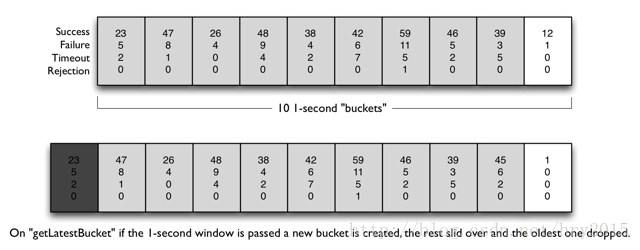
1. metrics.rollingStats.timeInMilliseconds
设置统计滚动窗口的时间长度
如果此值为10s,将窗口分成10个桶,每个桶表示1s时间,则统计信息如下图:
默认值: 10000
// 设置所有实例的默认值

hystrix.command.default.metrics.rollingStats.timeInMilliseconds=....

// 设置实例HystrixCommandKey的此属性值

hystrix.command.HystrixCommandKey.metrics.rollingStats.timeInMilliseconds=...
2. metrics.rollingStats.numBuckets
设置统计滚动窗口的桶数量,
注意:以下配置必须成立,否则会抛出异常。
metrics.rollingStats.timeInMilliseconds % metrics.rollingStats.numBuckets == 0
如:10000/10、10000/20是正确的配置,但是10000/7错误的
在高并发的环境里,每个桶的时间长度建议大于100ms
默认值:10
// 设置所有实例的默认值

hystrix.command.default.metrics.rollingStats.numBuckets=...

// 设置实例HystrixCommandKey的此属性值

hystrix.command.HystrixCommandKey.metrics.rollingStats.numBuckets=...
3. metrics.rollingPercentile.enabled
设置执行延迟是否被跟踪,并且被计算在失败百分比中。如果设置为false,则所有的统计数据返回-1
默认值: true

// 设置所有实例的默认值

hystrix.command.default.metrics.rollingPercentile.enabled=...

// 设置实例HystrixCommandKey的此属性值

hystrix.command.HystrixCommandKey.metrics.rollingPercentile.enabled=...
4. metrics.rollingPercentile.timeInMilliseconds
此属性设置统计滚动百分比窗口的持续时间
默认值:60000
// 设置所有实例的默认值

hystrix.command.default.metrics.rollingPercentile.timeInMilliseconds=...

// 设置实例HystrixCommandKey的此属性值

hystrix.command.HystrixCommandKey.metrics.rollingPercentile.timeInMilliseconds=...
5. metrics.rollingPercentile.numBuckets
设置统计滚动百分比窗口的桶数量
注意:以下配置必须成立,否则会抛出异常。
metrics.rollingPercentile.timeInMilliseconds % metrics.rollingPercentile.numBuckets == 0
如: 60000/6、60000/60是正确的配置,但是10000/7错误的
在高并发的环境里,每个桶的时间长度建议大于1000ms
默认值:6
// 设置所有实例的默认值

hystrix.command.default.metrics.rollingPercentile.numBuckets=...

// 设置实例HystrixCommandKey的此属性值

hystrix.command.HystrixCommandKey.metrics.rollingPercentile.numBuckets=...
6. metrics.rollingPercentile.bucketSize
此属性设置每个桶保存的执行时间的最大值。如果桶数量是100,统计窗口为10s,如果这10s里有500次执行,只有最后100次执行会被统计到bucket里去
默认值:100
// 设置所有实例的默认值

hystrix.command.default.metrics.rollingPercentile.bucketSize=...

// 设置实例HystrixCommandKey的此属性值

hystrix.command.HystrixCommandKey.metrics.rollingPercentile.bucketSize=...
7. metrics.healthSnapshot.intervalInMilliseconds
采样时间间隔
默认值:500
// 设置所有实例的默认值

hystrix.command.default.metrics.healthSnapshot.intervalInMilliseconds=...

// 设置实例HystrixCommandKey的此属性值

hystrix.command.HystrixCommandKey.metrics.healthSnapshot.intervalInMilliseconds=...
Request Context
此属性控制HystrixCommand使用到的Hystrix的上下文
1. requestCache.enabled
是否开启请求缓存功能
默认值:true
// 设置所有实例的默认值

hystrix.command.default.requestCache.enabled=...

// 设置实例HystrixCommandKey的此属性值

hystrix.command.HystrixCommandKey.requestCache.enabled=...
2. requestLog.enabled
表示是否开启日志,打印执行HystrixCommand的情况和事件
默认值:true
// 设置所有实例的默认值

hystrix.command.default.requestLog.enabled=...

// 设置实例HystrixCommandKey的此属性值

hystrix.command.HystrixCommandKey.requestLog.enabled=...
Collapser Properties
设置请求合并的属性
1. maxRequestsInBatch
设置同时批量执行的请求的最大数量
默认值:Integer.MAX_VALUE

// 设置所有实例的默认值

hystrix.collapser.default.maxRequestsInBatch=...

// 设置实例HystrixCommandKey的此属性值

hystrix.collapser.HystrixCollapserKey.maxRequestsInBatch=...
2. timerDelayInMilliseconds
批量执行创建多久之后,再触发真正的请求
默认值:10
// 设置所有实例的默认值

hystrix.collapser.default.timerDelayInMilliseconds=...

// 设置实例HystrixCommandKey的此属性值

hystrix.collapser.HystrixCollapserKey.timerDelayInMilliseconds=...
3. requestCache.enabled
是否对HystrixCollapser.execute() 和 HystrixCollapser.queue()开启请求缓存
默认值:true
// 设置所有实例的默认值

hystrix.collapser.default.requestCache.enabled=...

// 设置实例HystrixCommandKey的此属性值

hystrix.collapser.HystrixCollapserKey.requestCache.enabled=...
Thread Pool Properties
设置Hystrix Commands的线程池行为,大部分情况线程数量是10。
线程池数量的计算公式如下:
最高峰时每秒的请求数量 × 99%命令执行时间 + 喘息空间设置线程池数量的主要原则是保持线程池越小越好,因为它是减轻负载并防止资源在延迟发生时被阻塞的主要工具
1. coreSize
设置线程池的core的大小
默认值:10
// 设置所有实例的默认值

hystrix.threadpool.default.coreSize=...

// 设置实例HystrixCommandKey的此属性值

hystrix.threadpool.HystrixThreadPoolKey.coreSize=...
2. maximumSize
设置最大的线程池的大小,只有设置allowMaximumSizeToDivergeFromCoreSize时,此值才起作用
默认值:10
// 设置所有实例的默认值

hystrix.threadpool.default.maximumSize=...

// 设置实例HystrixCommandKey的此属性值

hystrix.threadpool.HystrixThreadPoolKey.maximumSize=...
3. maxQueueSize
设置最大的BlockingQueue队列的值。如果设置-1,则使用SynchronousQueue队列,如果设置正数,则使用LinkedBlockingQueue队列
默认值:-1
// 设置所有实例的默认值

hystrix.threadpool.default.maxQueueSize=...

// 设置实例HystrixCommandKey的此属性值

hystrix.threadpool.HystrixThreadPoolKey.maxQueueSize=...
4. queueSizeRejectionThreshold
因为maxQueueSize值不能被动态修改,所有通过设置此值可以实现动态修改等待队列长度。即等待的队列的数量大于queueSizeRejectionThreshold时(但是没有达到maxQueueSize值),则开始拒绝后续的请求进入队列。
如果设置-1,则属性不启作用
默认值:5
// 设置所有实例的默认值

hystrix.threadpool.default.queueSizeRejectionThreshold=...

// 设置实例HystrixCommandKey的此属性值

hystrix.threadpool.HystrixThreadPoolKey.queueSizeRejectionThreshold=...
5. keepAliveTimeMinutes
设置线程多久没有服务后,需要释放(maximumSize-coreSize )个线程
默认值:1
// 设置所有实例的默认值

hystrix.threadpool.default.keepAliveTimeMinutes=...

// 设置实例HystrixCommandKey的此属性值

hystrix.threadpool.HystrixThreadPoolKey.keepAliveTimeMinutes=...
6. allowMaximumSizeToDivergeFromCoreSize
设置allowMaximumSizeToDivergeFromCoreSize值为true时,maximumSize才有作用
默认值:false
// 设置所有实例的默认值

hystrix.threadpool.default.allowMaximumSizeToDivergeFromCoreSize=....

// 设置实例HystrixCommandKey的此属性值

hystrix.threadpool.HystrixThreadPoolKey.allowMaximumSizeToDivergeFromCoreSize=...
7. metrics.rollingStats.timeInMilliseconds
设置滚动窗口的时间
默认值:10000
// 设置所有实例的默认值

hystrix.threadpool.default.metrics.rollingStats.timeInMilliseconds=true

// 设置实例HystrixCommandKey的此属性值

hystrix.threadpool.HystrixThreadPoolKey.metrics.rollingStats.timeInMilliseconds=true
8. metrics.rollingStats.numBuckets
设置滚动静态窗口分成的桶的数量
配置的值必须满足如下条件:
metrics.rollingStats.timeInMilliseconds % metrics.rollingStats.numBuckets == 0
默认值:10
建议每个桶的时间长度大于100ms
// 设置所有实例的默认值

hystrix.threadpool.default.metrics.rollingStats.numBuckets=...

// 设置实例HystrixCommandKey的此属性值

hystrix.threadpool.HystrixThreadPoolProperties.metrics.rollingStats.numBuckets=...
Spring cloud Hystrix的配置属性优先级和详解的更多相关文章
- Spring Cloud:使用Ribbon实现负载均衡详解(下)
在上一篇文章(Spring Cloud:使用Ribbon实现负载均衡详解(上))中,我对 Ribbon 做了一个介绍,Ribbon 可以实现直接通过服务名称对服务进行访问.这一篇文章我详细分析一下如何 ...
- Spring4.X + spring MVC + Mybatis3 零配置应用开发框架搭建详解(1) - 基本介绍
Spring4.X + spring MVC + Mybatis3 零配置应用开发框架搭建详解(1) - 基本介绍 spring集成 mybatis Spring4.x零配置框架搭建 两年前一直在做后 ...
- Spring Cloud:使用Ribbon实现负载均衡详解(上)
1. 什么是 Ribbon? Spring Cloud Ribbon 是一套实现客户端负载均衡的工具.注意是客户端,当然也有服务端的负载均衡工具,我们后面再介绍.可以认为 Ribbon 就是一个负载均 ...
- Spring AOP及事务配置三种模式详解
Spring AOP简述 Spring AOP的设计思想,就是通过动态代理,在运行期对需要使用的业务逻辑方法进行增强. 使用场景如:日志打印.权限.事务控制等. 默认情况下,Spring会根据被代理的 ...
- Spring cloud Hystrix使用@HystrixCommand使用Hystrix组件及@EnableCircuitBreaker原理介绍
通过@HystrixCommand注解实现在Spring Cloud使用Hystrix组件相关的工程 cloud-registration-center:注册中心 cloud-service-hyst ...
- Spring Cloud Config(配置中心)
每天学习一点点 编程PDF电子书.视频教程免费下载:http://www.shitanlife.com/code 一.简介 Spring Cloud Config为分布式系统中的外部配置提供服务器和客 ...
- spring cloud: Hystrix(二):简单使用@HystrixCommand的commandProperties配置@HistrixProperty隔离策略
spring cloud: Hystrix(二):简单使用@HystrixCommand的commandProperties配置@HistrixProperty隔离策略 某电子商务网站在一个黑色星期五 ...
- 微服务架构之spring cloud hystrix&hystrix dashboard
在前面介绍spring cloud feign中我们已经使用过hystrix,只是没有介绍,spring cloud hystrix在spring cloud中起到保护微服务的作用,不会让发生的异常无 ...
- Spring Cloud Hystrix理解与实践(一):搭建简单监控集群
前言 在分布式架构中,所谓的断路器模式是指当某个服务发生故障之后,通过断路器的故障监控,向调用方返回一个错误响应,这样就不会使得线程因调用故障服务被长时间占用不释放,避免故障的继续蔓延.Spring ...
随机推荐
- WPF——RenderTransform特效
WPF: RenderTransform特效 WPF中的变形(RenderTransform)类是为了达到直接去改变某个Silverlight对象的形状(比如缩放.旋转一个元素)的目的而设计的,Ren ...
- PrestaShop 1.7 用户用户结账的时候出现承运人错误
出现承运人的错误:Unfortunately, there are no carriers available for your delivery address. 如何解决这个错误? 请参考下面的解 ...
- 初识webservice 服务
1.获取电话号码归属地查询 首先访问: http://www.webxml.com.cn/zh_cn/web_services.aspx ①新建一个MyEclipse项目(WebService) ht ...
- 知识梳理——HTML篇
浏览器内核: IE: trident Fixfox: gecko Safari: webkit Opera: 以前是presto,现已改用Google Chrome的Blink Chrome: Bli ...
- vue.js利用vue.router创建前端路由
node.js方式: 利用node.js安装vue-router模块 cnpm install vue-router 安装完成后我们引入这个模板! 下载vue-router利用script引入方式: ...
- bzoj4129
题解: 树上+可修改莫队 莫队的每一块 可以用一个栈 每一次dfs个数>sqrt(n)(自己选的)的时候就可以跳出了 然后不要忘记分出来最后一块 代码: #include<bits/std ...
- 怎样使用visio画数据库模型图
怎样使用visio画数据库模型图 计算机专业的学生在做程序的需求分析文档或者毕业设计的时候,针对自己开发的系统,肯定少不了要画数据库的模型图.许多同学喜欢用word实现,当然,word可以满足 ...
- zabbix利用python脚本发送钉钉报警
#!/usr/bin/python # -*- coding: utf-8 -*- import requests import json import sys import os headers = ...
- backports移植rtlwifi驱动
/************************************************************************ * backports移植rtlwifi驱动 * 说 ...
- 毕业了-java二叉树层次遍历算法
/*************************************** * 时间:2017年6月23日 * author:lcy * 内容:二叉树的层次遍历 * 需要借助队列这个数据结构,直 ...