
提高Android Studio的Build速度实践
1.在下面的目录创建gradle.properties文件
/home/<username>/.gradle/ (Linux)

/Users/<username>/.gradle/ (Mac)

C:\Users\<username>\.gradle (Windows)
在文件夹中添加
# Project-wide Gradle settings.

# IDE (e.g. Android Studio) users:

# Settings specified in this file will override any Gradle settings

# configured through the IDE.

# For more details on how to configure your build environment visit

# http://www.gradle.org/docs/current/userguide/build_environment.html

# The Gradle daemon aims to improve the startup and execution time of Gradle.

# When set to true the Gradle daemon is to run the build.

# TODO: disable daemon on CI, since builds should be clean and reliable on servers

org.gradle.daemon=true

# Specifies the JVM arguments used for the daemon process.

# The setting is particularly useful for tweaking memory settings.

# Default value: -Xmx10248m -XX:MaxPermSize=256m

org.gradle.jvmargs=-Xmx2048m -XX:MaxPermSize=512m -XX:+HeapDumpOnOutOfMemoryError -Dfile.encoding=UTF-8

# When configured, Gradle will run in incubating parallel mode.

# This option should only be used with decoupled projects. More details, visit

# http://www.gradle.org/docs/current/userguide/multi_project_builds.html#sec:decoupled_projects

org.gradle.parallel=true

# Enables new incubating mode that makes Gradle selective when configuring projects.

# Only relevant projects are configured which results in faster builds for large multi-projects.

# http://www.gradle.org/docs/current/userguide/multi_project_builds.html#sec:configuration_on_demand

org.gradle.configureondemand=true
以上配置的目的: 增大gradle运行的java虚拟机的大小,让gradle在编译的时候使用独立进程,让gradle可以平行的运行。
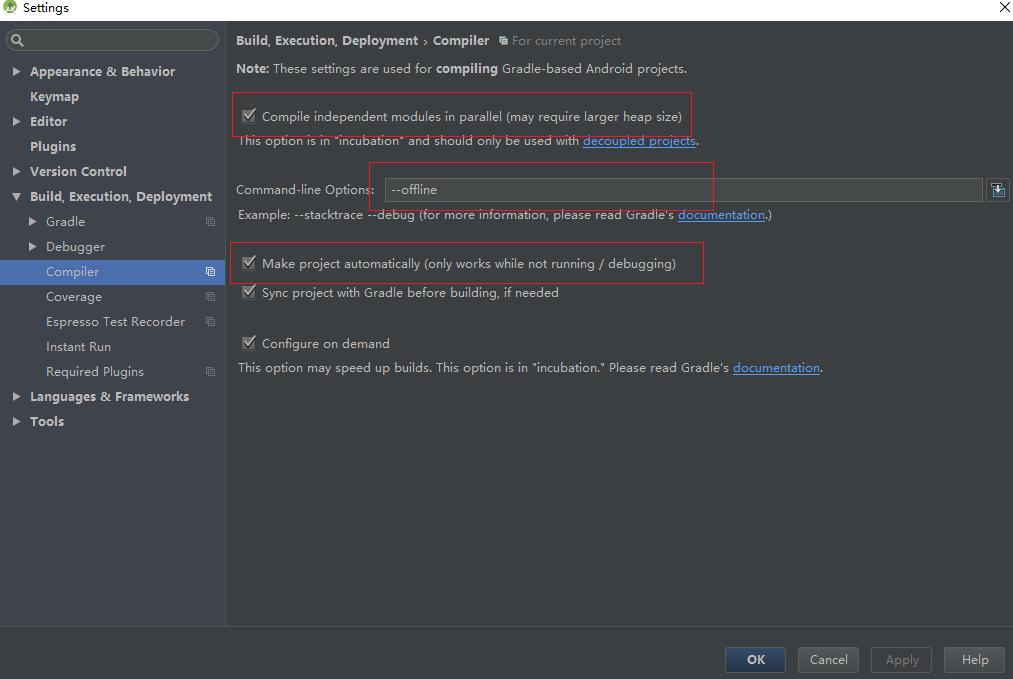
2. Android studio中配置
开启offline模式

提高Android Studio的Build速度实践的更多相关文章
- android studio Gradle Build速度加快方法
设置离线编译就可以解决这个问题了.如下图所示:
- 加快Android Studio的编译速度
从Eclipse切换到Android Studio后,感觉Android Studio的build速度比Eclipse慢很多,以下几个方法可以提高Android Studio的编译速度 使用Gradl ...
- 【转】实践最有效的提高Android Studio运行、编译速度方案
原文:https://blog.csdn.net/xwh_1230/article/details/60961723 实践最有效的提高Android Studio运行.编译速度方案 最有效提升Andr ...
- 解决Android Studio Gradle Build Running慢的问题
Android Studio方便好用,但是Android Studio Gradle Build Running很慢 解决方法: C:\Users\你的用户名\.gradle 目录下新建一个文件名为 ...
- 解决Android Studio Gradle Build特别慢的问题
解决Android Studio Gradle Build 特别慢的问题 C:\Users\你的用户名\.gradle目录下新建一个文件名为gradle.properties的文件.内容为:org.g ...
- Android Studio 的 build 过程
如图, 编译器将源代码(包括 Application Module 及其所依赖的所有 Library 源代码)转换成 DEX(Dalvik Executable)文件(其中包括运行在 Android ...
- Android Studio优化编译速度
随着Android Studio的不断完善,其安卓开发者阵营也基本从Eclipse转移到了Android Studio,毕竟Android Studio是谷歌亲力亲为开发的官方开发软件.不过其最重要的 ...
- 本地搭建 Gradle 服务器,提高 Android Studio Gradle 下载速度
AndroidStudio 更新以后,在公司网会卡在下载 Gradle 的地方,下载 Gradle 速度很慢. 看到别人的博客提供的解决办法本地搭建一个 Gradle 的服务器,然后把 Android ...
- 加速 Android Studio 的编译速度 2.2
Android studio 2.2 当中有一项新的功能:Dex In Process. 这项功能可以动态的加快编译速度,以及提高Instant Run 的效率. 那么怎么来使用这项新功能呢?你只需要 ...
随机推荐
- 从e.getMessage()为null看Java异常机制
问题:自定义异常触发了,但是自定义的提示信息RuntimeException却没有带过来. throw new RuntimeException("不允许插入报价主项和报价子项同时重复的记录 ...
- Linux内核分析第一周-通过分析汇编代码理解计算机是如何工作的
首先,我们先写一个简单的C语言程序,如下: int g(int x) { return x +3; } int f(int x) { return g(x); } int main(void) { r ...
- ExtJS发送POST请求 参数格式为JSON
背景 这要从我比较懒说起.技术框架ExtJS + resteasy,默认请求方式是ajax get,这后台方法就要写很多@QueryParam来获取参数.我比较喜欢前台用ajax post请求,后台方 ...
- 【Java----统计字符串匹配个数】
org.apache.commons.lang3.StringUtils包带的工具类 StringUtils.countMatches(context, keyword);
- NOI导刊 2009 提高二
开灯 题目大意 对编号为\([i \times a]\)的灯进行操作,找出操作数为奇数的那一个 题目分析 难度: 入门 因为看到操作数为奇数,因此直接进行位运算,做亦或和 打砖块 题目分析 第一眼看上 ...
- 自己喜欢用的一个初始化的common.css
body, div, dl, dt, dd, ul, ol, li, h1, h2, h3, h4, h5, h6, pre, form, fieldset, input, p, blockquote ...
- 雷林鹏分享:Ruby 迭代器
Ruby 迭代器 迭代器是集合支持的方法.存储一组数据成员的对象称为集合.在 Ruby 中,数组和散列可以称之为集合. 迭代器返回集合的所有元素,一个接着一个.在这里我们将讨论两种迭代器,each 和 ...
- Appium 自动化测试(6) -- 使用Appium操作YY语音例子
#!/usr/bin/env python # -*- coding: utf-8 -*- import os import unittest from appium import webdriver ...
- linux下运行jar
方式一: java -jar XXX.jar 特点:当前ssh窗口被锁定,可按CTRL + C打断程序运行,或直接关闭窗口,程序退出 那如何让窗口不锁定? 方式二: java -jar XXX.jar ...
- Oracle 9i & 10g编程艺术-深入数据库体系结构-学习笔记(持续更新中)
--20170322 --1.0 --更新表的统计信息begin dbms_stats.set_table_stats(user,'EMP',numrows => 10000);end; beg ...