
bootstrap-paginator分页示例 源码 MVC
准备
1.数据:bootstrap包(含分页插件bootstrap-paginator.js)
2.技术方案:ajax动态加载分页、部分视图、BLL取数
代码
模板页
@{

    Layout = null;

}

<!DOCTYPE html>

<html>

<head>

    <meta name="viewport" content="width=device-width" />

    <title>@ViewBag.Title</title>

    <script src="~/Content/Scripts/jquery/jquery-2.1.1.min.js"></script>

    <link href="~/Content/Scripts/bootstrap-3.3.7-dist/css/bootstrap.min.css" rel="stylesheet" />

    <script src="~/Content/Scripts/bootstrap-3.3.7-dist/js/bootstrap.min.js"></script>

    <script src="~/Content/Scripts/bootstrap-3.3.7-dist/js/bootstrap-paginator.js"></script>

    @RenderSection("scripts")

</head>

<body>

    <div class="container" style="width:auto;margin:0 0px;">

        @RenderBody()

    </div>

</body>

</html>
主页
@using LeaRun.Entity;

@{

    ViewBag.Title = "View1";

    Layout = "~/Views/Shared/_Layout.cshtml";

}

@section scripts{

    <script type="text/javascript">

        var limit = 20;

        function initTable() {

            $.ajax({

                url: '../SystemSetup/LoadData',

                type: 'post',

                data: { page: 1, limit: limit },

                dataType: 'html',

                success: function (data) {

                    $("#data_table").html(data);

                    var pageCount = $('#datatotle').val(); //总页数

                    var options = {

                        bootstrapMajorVersion: 3, //版本

                        currentPage: 1, //当前页数

                        totalPages: pageCount, //总页数

                        numberOfPages: 5,

                        itemTexts: function (type, page, current) {

                            switch (type) {

                                case "first":

                                    return "首页";

                                case "prev":

                                    return "上一页";

                                case "next":

                                    return "下一页";

                                case "last":

                                    return "末页";

                                case "page":

                                    return page;

                            }

                        },//点击事件,用于通过Ajax来刷新整个list列表

                        onPageClicked: function (event, originalEvent, type, page) {

                            $.ajax({

                                url: '../SystemSetup/LoadData',

                                type: 'post',

                                data: { page: page, limit: limit },

                                dataType: 'html',

                                success: function (data) {

                                    $("#data_table").html(data);

                                }

                            });

                        }

                    };

                    $('#pageLimit').bootstrapPaginator(options);

                }

            });

        }

        $(function () {

            initTable();

        });

    </script>

}

<div class="row clearfix">

    <div class="col-md-12 column">

        <table class="table">

            <thead>

                <tr>

                    <th>

                        编号

                    </th>

                    <th>

                        名称

                    </th>

                    <th>

                        菜单

                    </th>

                    <th>

                        等级

                    </th>

                    <th>

                        启用

                    </th>

                    <th>

                        创建时间

                    </th>

                </tr>

            </thead>

            <tbody id="data_table">

            </tbody>

        </table>

        <div class="col-md-12 column text-center">

            <ul id="pageLimit"></ul>

        </div>

    </div>

</div>
分页
@using LeaRun.Entity;

@{

    #region

    List<Base_Module>

    data = ViewBag.Data as List<Base_Module>;

    if (data == null)

    {

        data = new List<Base_Module>();

    }

    int btotel = ViewBag.BTotel;

    #endregion

}

<input id="datatotle" type="text" hidden="hidden" value="@ViewBag.Totle"/>

@for (int i = 0; i < data.Count; i++)

{

    <tr class="@(i%2==0?"active":"")">

        <td>

            @(btotel++)

        </td>

        <td>

            @data[i].FullName

        </td>

        <td>

            @data[i].Location

        </td>

        <td>

            @data[i].Level

        </td>

        <td>

            @(data[i].Enabled == 1 ? "启用" : "未启用")

        </td>

        <td>

            @(Convert.ToDateTime(data[i].CreateDate).ToString("yyyy-MM-dd"))

        </td>

    </tr>

}
Controller
using LeaRun.Business;

using LeaRun.Business.BaseUtility;

using LeaRun.Entity;

using LeaRun.Utilities;

using System.Collections.Generic;

using System.Web.Mvc;

namespace LeaRun.WebApp.Controllers

{

    public class SystemSetupController : Controller

    {

        public Base_ModuleBll base_modulebll = new Base_ModuleBll();

        public ActionResult Index()

        {

            return View();

        }

        public ActionResult LoadData(int page, int limit)

        {

            int total = 0;

            List<Base_Module> list = base_modulebll.GetList(out total, page: page, rows: limit);

            ViewBag.Data = list;

            ViewBag.Totle = total;

            ViewBag.BTotel = (page - 1) * limit + 1;

            return PartialView("LoadData");

        }

    }

}
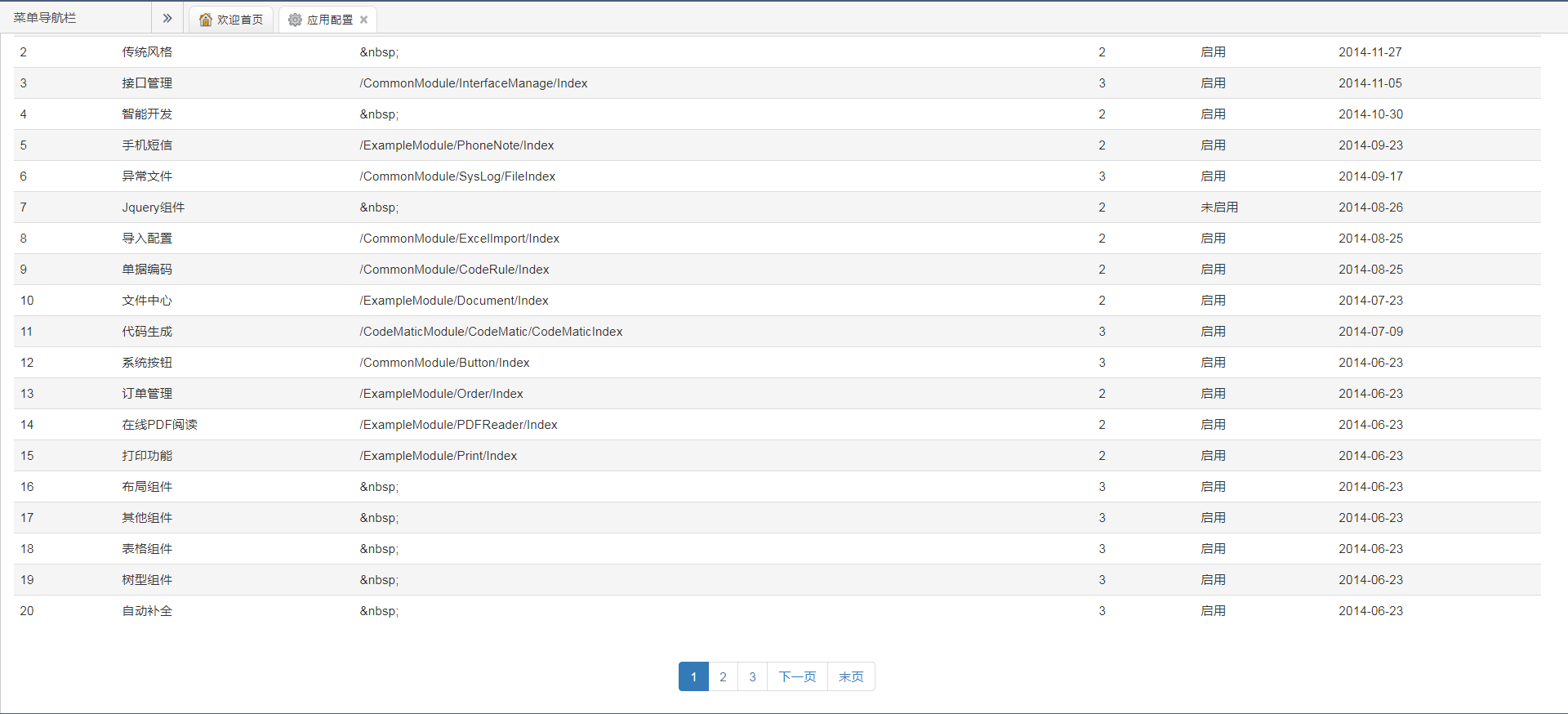
效果
bootstrap-paginator分页示例 源码 MVC的更多相关文章
- Bootstrap Paginator分页插件
Bootstrap Paginator分页插件使用示例 最近做的asp.netMVC项目中需要对数据列表进行分类,这个本来就是基于bootstrap开发的后台,因此也就想着bootstrap是否有分页 ...
- Tyrion中文文档(含示例源码)
Tyrion是一个基于Python实现的支持多个WEB框架的Form表单验证组件,其完美的支持Tornado.Django.Flask.Bottle Web框架.Tyrion主要有两大重要动能: 表单 ...
- 安卓图表引擎AChartEngine(三) - 示例源码折线图、饼图和柱状图
折线图: package org.achartengine.chartdemo.demo.chart; import java.util.ArrayList; import java.util.Lis ...
- Asp.Net Web Api 2 实现多文件打包并下载文件示例源码_转
一篇关于Asp.Net Web Api下载文件的文章,之前我也写过类似的文章,请见:<ASP.NET(C#) Web Api通过文件流下载文件到本地实例>本文以这篇文章的基础,提供了Byt ...
- 安卓图表引擎AChartEngine(二) - 示例源码概述和分析
首先看一下示例中类之间的关系: 1. ChartDemo这个类是整个应用程序的入口,运行之后的效果显示一个list. 2. IDemoChart接口,这个接口定义了三个方法, getName()返回值 ...
- Bootstrap Paginator分页插件+ajax 实现动态无刷新分页
之前做分页想过做淘宝的那个,但是因为是后台要求不高,就Bootstrap Paginator插件感觉还蛮容易上手,所以就选了它. Bootstrap Paginator分页插件下载地址: Downlo ...
- Visual Studio 2015开发Qt项目实战经验分享(附项目示例源码)
Visual Studio 2015开发Qt项目实战经验分享(附项目示例源码) 转 https://blog.csdn.net/lhl1124281072/article/details/800 ...
- Tyrion 中文文档(含示例源码)
原文出处: Mr.Seven Tyrion是一个基于Python实现的支持多个WEB框架的Form表单验证组件,其完美的支持Tornado.Django.Flask.Bottle Web框架.Ty ...
- Bootstrap导航栏navbar源码分析
1.本文目地:分析bootstrap导航栏及其响应式的实现方式,提升自身css水平 先贴一个bootstrap的导航栏模板 http://v3.bootcss.com/examples/navbar- ...
随机推荐
- 【干货】利用MVC5+EF6搭建博客系统(二)测试添加数据、集成Autofac依赖注入
PS:如果图片模糊,鼠标右击复制图片网址,然后在浏览器中打开即可. 一.测试仓储层.业务层是否能实现对数据库表的操作 1.在52MVCBlog.IRepository程序集下创建IsysUserInf ...
- 提升 PLSQL 开发性能漫谈
本文内容摘自<剑破冰山--Oracle开发艺术>一书,有删改. 1.触发器尽量考虑内部代码过程封装(解析次数) 2.避免动态 SQL 动态 SQL 和普通 SQL 在执行过程中最大的差别在 ...
- Perl的子程序
子程序(subroutine) perl中的子程序其实就是自定义函数.它使用sub关键字开头,表示声明一个子程序 子程序名称有独立的名称空间,不会和其它名称冲突 Perl中的子程序中可以定义.引用.修 ...
- Perl列表相关函数
内置的列表函数有: grep, join, map, qw//, reverse, sort, unpack join:将多个元素使用给定字符串联起来join grep:从列表中筛选符合条件的元素执行 ...
- [转]win10中安装JDK8以及环境配置
本文转自:https://blog.csdn.net/yangsummer2426/article/details/80499775 1. 首先下载jdk,网址如下: http://www. ...
- 面试官:"谈谈分库分表吧?"
原文链接:面试官:"谈谈分库分表吧?" 面试官:“有并发的经验没?” 应聘者:“有一点.” 面试官:“那你们为了处理并发,做了哪些优化?” 应聘者:“前后端分离啊,限流啊 ...
- 挑战常规--为什么不应该使用Jsonp进行跨域
常规跨域的方法 常见跨域的方法有: 添加Access-Control-Allow-Origin 后台服务器代理 Jsonp 1.2两种方法都是安全可靠的,3是不安全不可靠的 Json的本质 Json本 ...
- JavaScript机器学习之线性回归
译者按: AI时代,不会机器学习的JavaScript开发者不是好的前端工程师. 原文: Machine Learning with JavaScript : Part 1 译者: Fundebug ...
- 常见js面试题
包含内容: Array indexOf(). 数组扁平化 isArray() 数组的去重 Object.is() Array.filter 用一行代码实现数组扁平化? JavaScript isArr ...
- vue从入门到进阶:自定义指令directive,插件的封装以及混合mixins(七)
一.自定义指令directive 除了核心功能默认内置的指令 (v-model 和 v-show),Vue 也允许注册自定义指令.注意,在 Vue2.0 中,代码复用和抽象的主要形式是组件.然而,有的 ...