
WebRequest/HttpWebRequest/HttpRequest/WebClient/HttpClient的区别
1.WebRequest和HttpWebRequest
WebRequest 的命名空间是: System.Net ,它是HttpWebRequest的抽象父类(还有其他子类如FileWebRequest ,FtpWebRequest),WebRequest的子类都用于从web获取资源。HttpWebRequest利用HTTP 协议和服务器交互,通常是通过 GET 和 POST 两种方式来对数据进行获取和提交
一个栗子:
        static void Main(string[] args)

        {

            // 创建一个WebRequest实例(默认get方式)

            HttpWebRequest request = (HttpWebRequest)WebRequest.Create("http://www.baidu.com");

            //可以指定请求的类型

            //request.Method = "POST";

            HttpWebResponse response = (HttpWebResponse)request.GetResponse();

            Console.WriteLine(response.StatusDescription);

            // 接收数据

            Stream dataStream = response.GetResponseStream();

            StreamReader reader = new StreamReader(dataStream);

            string responseFromServer = reader.ReadToEnd();

            Console.WriteLine(responseFromServer);

            // 关闭stream和response

            reader.Close();

            dataStream.Close();

            response.Close();

        }
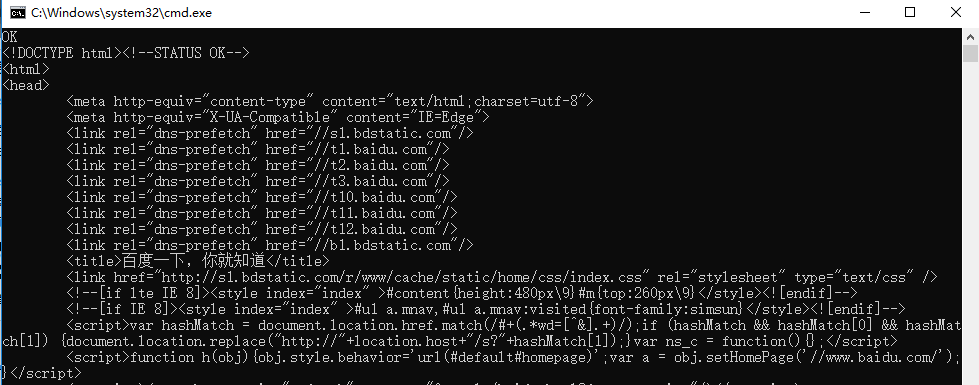
运行后输出百度网页的html字符串,如下:
2.HttpRequest
- HttpRequest类的命名空间是:System.Web,它是一个密封类,其作用是让服务端读取客户端发送的请求,我们最熟悉的HttpRequest的实例应该是WebForm中Page类的属性Request了,我们可以轻松地从Request属性的QueryString,Form,Cookies集合获取数据中,也可以通过Request["Key"]获取自定义数据,一个栗子:
            protected void Page_Load(object sender, EventArgs e)

            {

                //从Request中获取商品Id

                string rawId = Request["ProductID"];

                int productId;

                if (!String.IsNullOrEmpty(rawId) && int.TryParse(rawId, out productId))

                {

                    //把商品放入购物车

                    using (ShoppingCartActions usersShoppingCart = new ShoppingCartActions())

                    {

                        usersShoppingCart.AddToCart(productId);

                    }

                }

                else

                {

                    throw new Exception("Tried to call AddToCart.aspx without setting a ProductId.");

                }

                //跳转到购物车页面

                Response.Redirect("ShoppingCart.aspx");

            }
3.WebClient
命名空间是System.Net,WebClient很轻量级的访问Internet资源的类,在指定uri后可以发送和接受数据。WebClient提供了 DownLoadData,DownLoadFile,UploadData,UploadFile 方法,同时通过了这些方法对应的异步方法,通过WebClient我们可以很方便地上传和下载文件。
简单使用:
static void Main(string[] args)

{

            WebClient wc = new WebClient();

            wc.BaseAddress = "http://www.baidu.com/";   //设置根目录

            wc.Encoding = Encoding.UTF8;                //设置按照何种编码访问,如果不加此行,获取到的字符串中文将是乱码

            string str = wc.DownloadString("/");        //字符串形式返回资源

            Console.WriteLine(str);

            //----------------------以下为OpenRead()以流的方式读取----------------------

            wc.Headers.Add("Accept", "image/gif, image/x-xbitmap, image/jpeg, image/pjpeg, application/x-shockwave-flash, application/vnd.ms-excel, application/vnd.ms-powerpoint, application/msword, */*");

            wc.Headers.Add("Accept-Language", "zh-cn");

            wc.Headers.Add("UA-CPU", "x86");

            //wc.Headers.Add("Accept-Encoding","gzip, deflate");    //因为我们的程序无法进行gzip解码所以如果这样请求获得的资源可能无法解码。当然我们可以给程序加入gzip处理的模块 那是题外话了。

            wc.Headers.Add("User-Agent", "Mozilla/4.0 (compatible; MSIE 6.0; Windows NT 5.2; SV1; .NET CLR 1.1.4322; .NET CLR 2.0.50727)");

            //Headers   用于添加添加请求的头信息

            Stream objStream = wc.OpenRead("?tn=98050039_dg&ch=1");             //获取访问流

            StreamReader _read = new StreamReader(objStream, Encoding.UTF8);    //新建一个读取流,用指定的编码读取,此处是utf-8

            Console.Write(_read.ReadToEnd());                                   //输出读取到的字符串

            //------------------------DownloadFile下载文件-------------------------------

            wc.DownloadFile("http://www.baidu.com/img/shouye_b5486898c692066bd2cbaeda86d74448.jpg", @"D:\123.jpg"); //将远程文件保存到本地

            //------------------------DownloadFile下载到字节数组-------------------------------
             byte[] bytes = wc.DownloadData("http://www.baidu.com/img/shouye_b5486898c692066bd2cbaeda86d74448.gif");
             FileStream fs = new FileStream(@"E:\123.gif", FileMode.Create);
             fs.Write(bytes, , bytes.Length); fs.Flush();
             WebHeaderCollection whc = wc.ResponseHeaders;
             //获取响应头信息
             foreach (string s in whc) {
                Console.WriteLine(s + ":" + whc.Get(s));
               }
             Console.ReadKey();
}
一个使用WebClient下载文件的栗子:
        static void Main(string[] args)

        {

            WebClient wc = new WebClient();

            //直接下载

            Console.WriteLine("直接下载开始。。。");

            wc.DownloadFile("http://www.kykan.cn/d/file/djgz/20170506/8e207019d3a8e6114bfc7f50710211c1.xlsx", @"D:\ku.xlsx");

            Console.WriteLine("直接下载完成!!!");   //下载完成后输出 下载完成了吗?

            //异步下载

            wc.DownloadFileAsync(new Uri("http://www.kykan.cn/d/file/djgz/20170506/8e207019d3a8e6114bfc7f50710211c1.xlsx"), @"D:\ku.xlsx");

            wc.DownloadFileCompleted += DownCompletedEventHandler;

            Console.WriteLine("do something else...");

            Console.ReadKey();

        }

        public static void DownCompletedEventHandler(object sender, AsyncCompletedEventArgs e)

        {

            Console.WriteLine("异步下载完成!");

        }
4.HttpClient
HttpClient是.NET4.5引入的一个HTTP客户端库,其命名空间为 System.Net.Http 。.NET 4.5之前我们可能使用WebClient和HttpWebRequest来达到相同目的。HttpClient利用了最新的面向任务模式,使得处理异步请求非常容易。
下边是一个使用控制台程序异步请求接口的栗子:
        static void Main(string[] args)

        {

            const string GetUrl = "http://xxxxxxx/api/UserInfo/GetUserInfos";//查询用户列表的接口,Get方式访问

            const string PostUrl = "http://xxxxxxx/api/UserInfo/AddUserInfo";//添加用户的接口,Post方式访问

            //使用Get请求

            GetFunc(GetUrl);

            UserInfo user = new UserInfo { Name = "jack", Age =  };

            string userStr = JsonHelper.SerializeObject(user);//序列化

            //使用Post请求

            PostFunc(PostUrl, userStr);

            Console.ReadLine();

        }

        /// <summary>

        /// Get请求

        /// </summary>

        /// <param name="path"></param>

        static async void GetFunc(string path)

        {

            //消息处理程序

            HttpClientHandler handler = new HttpClientHandler() { AutomaticDecompression = DecompressionMethods.GZip };

            HttpClient httpClient = new HttpClient();

            //异步get请求

            HttpResponseMessage response = await httpClient.GetAsync(path);

            //确保响应正常,如果响应不正常EnsureSuccessStatusCode()方法会抛出异常

            response.EnsureSuccessStatusCode();

            //异步读取数据,格式为String

            string resultStr = await response.Content.ReadAsStringAsync();

            Console.WriteLine(resultStr);

        }

        /// <summary>

        /// Post请求

        /// </summary>

        /// <param name="path"></param>

        /// <param name="data"></param>

        static async void PostFunc(string path, string data)

        {

            HttpClientHandler handler = new HttpClientHandler() { AutomaticDecompression = DecompressionMethods.GZip };

            HttpClient httpClient = new HttpClient(handler);

            //HttpContent是HTTP实体正文和内容标头的基类。

            HttpContent httpContent = new StringContent(data, Encoding.UTF8, "text/json");

            //httpClient.DefaultRequestHeaders.Authorization = new AuthenticationHeaderValue("BasicAuth", Ticket);//验证请求头赋值

            //httpContent.Headers.Add(string name,string value) //添加自定义请求头

            //发送异步Post请求

            HttpResponseMessage response = await httpClient.PostAsync(path, httpContent);

            response.EnsureSuccessStatusCode();

            string resultStr = await response.Content.ReadAsStringAsync();

            Console.WriteLine(resultStr);

        }

    }
注意:因为HttpClient有预热机制,第一次进行访问时比较慢,所以我们最好不要用到HttpClient就new一个出来,应该使用单例或其他方式获取HttpClient的实例。上边的栗子为了演示方便直接new的HttpClient实例。
HttpClient还有很多其他功能,如附带Cookie,请求拦截等,可以参考https://www.cnblogs.com/wywnet/p/httpclient.html
参考文章:
1.https://www.cnblogs.com/wywnet/p/httpclient.html
2.https://www.cnblogs.com/kissdodog/archive/2013/02/19/2917004.html
WebRequest/HttpWebRequest/HttpRequest/WebClient/HttpClient的区别的更多相关文章
- HttpRequest,WebRequest,HttpWebRequest,WebClient,HttpClient 之间的区别
HttpRequest,WebRequest,HttpWebRequest,WebClient,HttpClient 今天我们来聊一下他们之间的关系与区别. HttpRequest 类 .NET Fr ...
- WebClient, HttpClient, HttpWebRequest ,RestSharp之间的区别与抉择
NETCore提供了三种不同类型用于生产的REST API: HttpWebRequest;WebClient;HttpClient,开源社区创建了另一个名为RestSharp的库.如此多的http库 ...
- HttpWebRequest和WebClient的区别
HttpWebRequest和WebClient的区别(From Linzheng): 1,HttpWebRequest是个抽象类,所以无法new的,需要调用HttpWebRequest.Creat ...
- HttpWebRequest 改为 HttpClient 踩坑记-请求头设置
HttpWebRequest 改为 HttpClient 踩坑记-请求头设置 Intro 这两天改了一个项目,原来的项目是.net framework 项目,里面处理 HTTP 请求使用的是 WebR ...
- Linux中用HttpWebRequest或WebClient访问远程https路径
要想在Linux中用HttpWebRequest或WebClient访问远程https路径,需要作如下处理: 1,更新linux根证书(只需一次,在安装mono或安装jexus独立版后执行) sudo ...
- webrequest、httpwebrequest、webclient、HttpClient 四个类的区别
一.在 framework 开发环境下: webrequest.httpwebreques 都是基于Windows Api 进行包装, webclient 是基于webrequest 进行包装:(经 ...
- webrequest HttpWebRequest webclient/HttpClient
webrequest(abstract类,不可直接用) <--- (继承)---- HttpWebRequest(更好的控制请求) <--- (继承)---- webclient (简单快 ...
- .net学习笔记----HttpRequest,WebRequest,HttpWebRequest区别
WebRequest是一个虚类/基类,HttpWebRequest是WebRequest的具体实现 HttpRequest类的对象用于服务器端,获取客户端传来的请求的信息,包括HTTP报文传送过来的所 ...
- HttpWebRequest、WebClient、RestSharp、HttpClient区别和用途
HttpWebRequest 已经不推荐直接使用了,这已经作为底层机制,不适合业务代码使用,比如写爬虫的时候WebClient 不想为http细节处理而头疼的coder而生,由于内部已经处理了通用设置 ...
随机推荐
- 区间DP,数位DP
dp(动态规划)顾名思义便是动态的一种规划,而这种规划往往会跟状态,状态转移方程,记忆化搜索扯上关系,当然DP也是各个OI考试的必考点和常考点,在毒瘤出题人的折磨下,出现了许许多多的动态规划,有线性, ...
- Codeforces510 C. Fox And Names
Codeforces题号:#510C 出处: Codeforces 主要算法:判环+拓扑 难度:4.2 思路分析: 要是把这道题联系到图上就很容易想了. 如何建图?由于最后要求名字满足字典序,所以不妨 ...
- IDEA中Maven项目使用Junit4单元测试的写法
IDEA默认是安装了junit控件的,直接使用就好了 在maven项目的pom.xml文件中添加依赖 <dependency> <groupId>junit</group ...
- HNOI2019 退役记
窗外风雨大作. 凌晨两点又被噩梦惊醒,朦胧中看见书桌的灯还亮着. 走近书桌,有一个人正在敲打着键盘,屏幕上是一些似曾相识的东西. 被水浸湿的头发随意地搭在额头上,鼻梁上架着一副眼镜,镜片上全是小水珠, ...
- rt-thread中动态内存分配之小内存管理模块方法的一点理解
@2019-01-18 [小记] rt-thread中动态内存分配之小内存管理模块方法的一点理解 > 内存初始化后的布局示意 lfree指向内存空闲区首地址 /** * @ingroup Sys ...
- dasd
https://www.crifan.com/use_pyinstaller_to_package_python_to_single_executable_exe/ http://blog.csdn. ...
- POJ 2672 Tarjan + 缩点 + 拓扑思想
Going from u to v or from v to u? Time Limit: 2000MS Memory Limit: 65536K Total Submissions: 17383 ...
- centos7下mysql半同步复制原理安装测试详解
原理简介: 在MySQL5.5之前,MySQL的复制其实都是异步复制(见下图),主库和从库的数据之间存在一定的延迟,这样存在一个隐患:当在主库上写入一个事务并提交成功,而从库尚未得到主库推送的BinL ...
- Mybatis中org.apache.ibatis.binding.BindingException错误问题总结
1. Mybatis出现多个参数,但是多个参数中没有使用@Param注解进行修饰 2. Xml文件中字段名和PO绑定时候,字段写错了 3.XML中<foreach/>标签中的colleac ...
- 生命不息,折腾不止 ~ 旧PC改造之家庭影音
前言引入 之前把在校园陪伴多年的旧电脑由Win装成了Linux,的确不卡了,基本上日常办公也够了(大项目还是吃不消,日常捣鼓倒是够了),然后把真正的工作游戏本也改成了Linux,那么旧电脑又变成闲置机 ...