
jQuery validdate插件的使用
跟着书上的例子做的时候发现很奇怪,在script标签中用message重写提示消息,没有反应,不知道是不是引入的metadata.js文件有问题,于是用了菜鸟教程的cdn和教程,魔改了一下
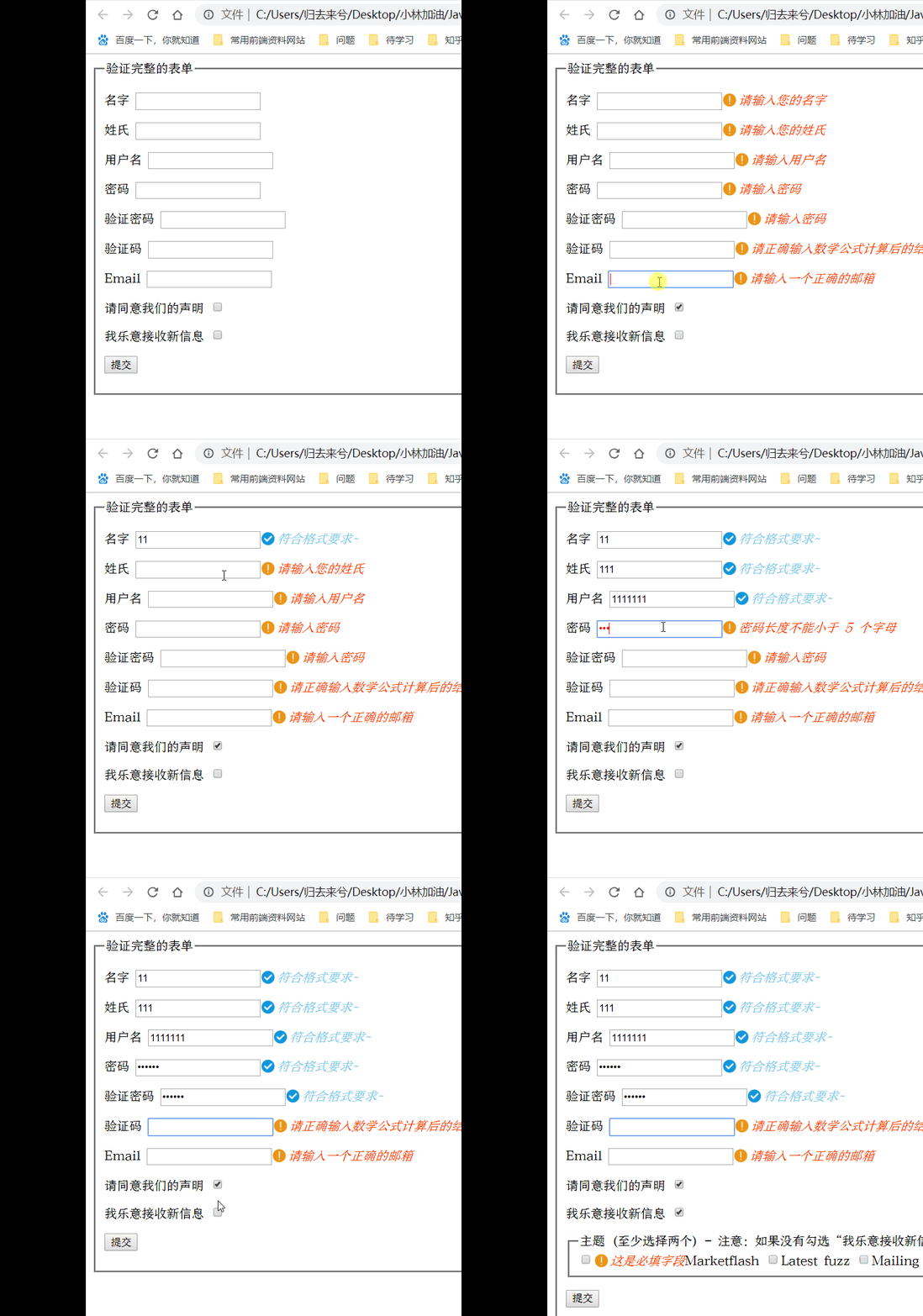
<!DOCTYPE html>

<html>

<head>

<meta charset="utf-8">

<title>jquery-validation-demo</title>

<script src="http://static.runoob.com/assets/jquery-validation-1.14.0/lib/jquery.js"></script>

<script src="http://static.runoob.com/assets/jquery-validation-1.14.0/dist/jquery.validate.min.js"></script>

<script src="messages_zh_cn.js"></script>

<script src="http://malsup.github.io/jquery.form.js"></script>

<script>

$().ready(function() {

// 在键盘按下并释放及提交后验证提交表单

  $("#signupForm").validate({

        rules: {

          firstname: "required",

          lastname: "required",

          username: {

            required: true,

            minlength: 6

          },

          password: {

            required: true,

            minlength: 5

          },

          confirm_password: {

            required: true,

            minlength: 5,

            equalTo: "#password"

          },

          email: {

            required: true,

            email: true

          },

          "topic[]": {

            required: "#newsletter:checked",

            minlength: 2

          },

        agree: "required",

        vercode:{

          formula:"7+9",

        }

        },

        messages: {

          firstname: "请输入您的名字",

          lastname: "请输入您的姓氏",

          username: {

            required: "请输入用户名",

            minlength: "用户名长度不能小于{0}个字符"

          },

          password: {

            required: "请输入密码",

            minlength: "密码长度不能小于 {0} 个字母"

          },

          confirm_password: {

            required: "请输入密码",

            minlength: "密码长度不能小于{0}个字母",

            equalTo: "两次密码输入不一致"

          },

          email: "请输入一个正确的邮箱",

          agree: "请接受我们的声明",

          topic: "请选择两个主题"

        },

    errorElement:"em",

    success:function(label){

      //label指向上面那个错误信息提示标签,没指定就默认是label

      // console.log(label.parent()[0].childNodes[3].getAttribute("type"));

      console.log(label[0].parentNode.childNodes[3].getAttribute("type"));

      // var forLabel = label.parent()[0].childNodes[1].getAttribute("for");

      var btnSuccess = label[0].parentNode.childNodes[3].getAttribute("type");

      if(btnSuccess !== "checkbox"){

        label.text("符合格式要求~")

           .addClass("success");

      }else{

        label.removeClass("error");

      }

    }

    });

    $("#newsletter").click(function(){

        var isChecked = $("#newsletter").prop("checked");

        if(isChecked){

            $("#newsletter_topics").show();

        }else{

            $("#newsletter_topics").hide();

        }

    });

    $.validator.addMethod(

      "formula",//该验证方法的名称,就像required

      function(value,ele,param){//验证规则

        return value == eval(param);

      },

      '请正确输入数学公式计算后的结果!'//验证的提示信息

    );

});

</script>

<style>

.error{

    color:red;

}

em.error{

    color: orangered;

    background: url(error.png) no-repeat;

    background-size: contain;

    padding-left: 21px;

}

em.success{

    color: skyblue;

    background: url("correct (1).png") no-repeat;

    background-size: contain;

    padding-left: 21px;

}

</style>

</head>

<body>

<form class="cmxform" id="signupForm" method="get" action="">

  <fieldset>

    <legend>验证完整的表单</legend>

    <p>

      <label for="firstname">名字</label>

      <input id="firstname" name="firstname" type="text">

    </p>

    <p>

      <label for="lastname">姓氏</label>

      <input id="lastname" name="lastname" type="text">

    </p>

    <p>

      <label for="username">用户名</label>

      <input id="username" name="username" type="text">

    </p>

    <p>

      <label for="password">密码</label>

      <input id="password" name="password" type="password">

    </p>

    <p>

      <label for="confirm_password">验证密码</label>

      <input id="confirm_password" name="confirm_password" type="password">

    </p>

    <p>

      <label for="vercode">验证码</label>

      <input id="vercode" name="vercode" type="password">

    </p>

    <p>

      <label for="email">Email</label>

      <input id="email" name="email" type="email">

    </p>

    <p>

      <label for="agree">请同意我们的声明</label>

      <input type="checkbox" class="checkbox" id="agree" name="agree">

    </p>

    <p>

      <label for="newsletter">我乐意接收新信息</label>

      <input type="checkbox" class="checkbox" id="newsletter" name="newsletter">

    </p>

    <fieldset style="display:none;" id="newsletter_topics">

      <legend>主题 (至少选择两个) - 注意:如果没有勾选“我乐意接收新信息”以下选项会隐藏,但我们这里作为演示让它可见</legend>

      <label for="topic_marketflash">

        <input type="checkbox" id="topic_marketflash" value="marketflash" name="topic[]">Marketflash

      </label>

      <label for="topic_fuzz">

        <input type="checkbox" id="topic_fuzz" value="fuzz" name="topic[]">Latest fuzz

      </label>

      <label for="topic_digester">

        <input type="checkbox" id="topic_digester" value="digester" name="topic[]">Mailing list digester

      </label>

      <label for="topic" class="error" style="display:none">至少选择两个</label>

    </fieldset>

    <p>

      <input class="submit" type="submit" value="提交">

    </p>

  </fieldset>

</form>

</body>

</html>
在success中有点闲的将按钮和输入框的确认样式分开了,因为觉得吧,按钮也用“符合格式”有点奇怪
再过几天开始学Vue.js辣!之前一直不敢碰,感觉基础不牢学的会很慢,现在至少有入门的感觉了~
jQuery validdate插件的使用的更多相关文章
- 深入学习jQuery自定义插件
原文地址:jQuery自定义插件学习 1.定义插件的方法 对象级别的插件扩展,即为jQuery类的实例增加方法, 调用:$(选择器).函数名(参数); $(‘#id’).myPlugin(o ...
- [jQuery]jQuery DataTables插件自定义Ajax分页实现
前言 昨天在博客园的博问上帮一位园友解决了一个问题,我觉得有必要记录一下,万一有人也遇上了呢. 问题描述 园友是做前端的,产品经理要求他使用jQuery DataTables插件显示一个列表,要实现分 ...
- 使用jQuery.form插件,实现完美的表单异步提交
传送门:异步编程系列目录…… 时间真快,转眼一个月快结束了,一个月没写博客了!手开始生了,怎么开始呢…… 示例下载:使用jQuery.form插件,实现完美的表单异步提交.rar 月份的尾巴,今天的主 ...
- 为jQuery写插件
很多场合,我们都会调用jQuery的插件去完成某个功能,比如slider. 如下图,做一个div,通过“$( "#slider" ).slider();”的方式直接将div变成sl ...
- bootstrap-简洁实用的jQuery手风琴插件
前端 <html lang="zh"> <head> <meta charset="UTF-8"> <meta htt ...
- 推荐15款响应式的 jQuery Lightbox 插件
利用现代 Web 技术,网络变得越来越轻巧与.模态框是突出展现内容的重要形式,能够让用户聚焦到重要的内容上去.在这个列表中,我们编制了15款响应式的 jQuery 灯箱库,这将有助于开发人员创建和设计 ...
- Chocolat.js – 响应式的 jQuery Lightbox 插件
Chocolat.js 使您能够显示一个或多个图像在同一页面上.给用户展示一组图片缩略图,可以显示全页或块.Chocolat.js 可以很好地处理所有主要的浏览器.它在下面这些浏览器测试通过:IE7+ ...
- 让网站动起来!12款优秀的 jQuery 动画插件推荐
如今,大多数设计师和开发人员被要客户要求开发动态的网站.创造视觉震撼和醒目的动态网站是艰巨的任务,因为它需要大量的努力和创造力.在网络上有大量的工具和插件可用于创建网站动画.许多开发人员正在使用 HT ...
- 一个强大的jquery分页插件
点击这里查看效果 这个分页插件使用方便,引用keleyidivpager.js和keleyidivpager.css文件,然后在htm(或者php,aspx,jsp等)页面中对分页总数,参数名,前缀后 ...
随机推荐
- C++ 中用cin方式获取输入的几种常用方式
一.前言 在C++程序的编写过程中,可能会经常用到cin方式用来捕获输入设备的输入信息.细分的话,主要的方式有:cin>>.cin.get.cin.getline.在借助键盘等字符输入设备 ...
- 【druid 】数据库连接池
一.数据库连接池架构 二.数据库连接池的过滤器 spi的思想,加载配置文件的Filter druid.filters.default=com.alibaba.druid.filter.stat.Sta ...
- oracle错误汇总2
http://blog.itpub.net/30430420/viewspace-1799925/ ============================= 现象!!!!!!!!!!!!!!!!!S ...
- 工控随笔_21_西门子_WinCC的VBS脚本_10_对象_01
最近有点小忙,各种事情,心情也不是很好,烦心事特别多,因此最近更新的比较慢. 不敢再松懈了,今天正好有点时间,就继续看了一下VBScript中关于对象的一些内容. 一.对象 OOP是编程规模发展到一定 ...
- python爬虫学习笔记(一)——环境配置(windows系统)
在进行python爬虫学习前,需要进行如下准备工作: python3+pip官方配置 1.Anaconda(推荐,包括python和相关库) [推荐地址:清华镜像] https://mirrors ...
- 使用命令行执行jmeter的方法
1. 简介 使用非 GUI 模式,即命令行模式运行 JMeter 测试脚本能够大大缩减所需要的系统资 本文介绍windows下以命令行模式运行的方法. 1.1. 命令介绍 jmeter -n -t & ...
- 分布式job-任务调度(一)
什么是任务调度: 任务调度:在单位时间内,去调用某个方法或者执行某段代码 java实现方式: 方法一(使用线程实现): public static void ThreadTskScheduling() ...
- Visual studio 调试发布到IIS站点方式一
在项目开发过程中,前端项目可能调用多个API接口,并且这些API接口是在同一个资源解决方案下的,一个资源解决方案下只能设置一个启动项目.那么问题来了,某个API业务需求变更或有BUG,解决后是需要调试 ...
- 支持向量机(SVM)原理阐述
支持向量机(Support Vector Machine, SVM)是一种二分类模型.给定训练集D = {(x1,y1), (x2,y2), ..., (xm,ym)},分类学习的最基本的想法即是找到 ...
- Linux常用的命令以及配置
cat /etc/group nobody:x:500:用户组 : 口令 : 用户组编号 #查看用户信息 stunnel4:x:118:123::/var/run/stunnel4:/usr/sbin ...