
💈 A Cross-Thread Call Helper Class
Conmajia © 2012, 2018
Published on August 5th, 2012
Updated on February 2nd, 2019
Introduction
While working on background threads, you may encounter updating values of frontend GUI controls. Then you probably will face one particular problem: invalid operation between threads. As shown in figure 1, this issue throws an InvalidOperationException. It occurs every time when accesses properties/methods from other threads but the one which owns them.
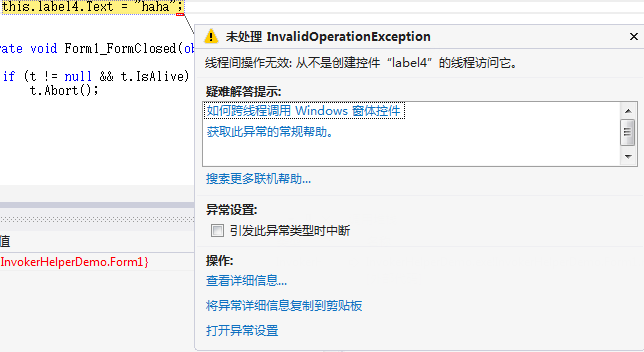
In .NET Framework, version 2.0 as I refer, every Control class contains an InvokeRequired property and an Invoke method to accomplish cross-thread operations. Some typical call code is listed below.
public void DoWork() {

    if (control.InvokeRequired) {

        control.Invoke(DoWork);

    }

    else {

        // do work

    }

}
My Approach
I wrote a helper class InvokeHelper which granted me the power to access assets between different threads. The class has 3 methods:
Invoke()- to call methods of a control.
InvokeHelper.Invoke(<control>, "<method>"[, <param1>[,<param2>,...]]);
Get()- to get properties of a control.
InvokeHelper.Get(<control>, "<property>");
Set()- to set properties of a control.
InvokeHelper.Set(<control>, "<property>", <value>);
Demonstration
In the demo, I used a forever looping background thread (t) to show how the InvokeHelper helps threads to interact. Thread t updates the frontend thread (the GUI) every 500 milliseconds.
Thread t;

private void button1_Click(object sender, EventArgs e) {

    if(t == null) {

        t = new Thread(multithread);

        t.Start();

        label4.Text = string.Format("Thread state:\n{0}", t.ThreadState.ToString());

    }

}

public void DoWork(string msg) {

    this.label3.Text = string.Format("Invoke method: {0}", msg);

}

int count = 0;

void multithread() {

    while(true) {

        InvokeHelper.Set(this.label1, "Text", string.Format("Set value: {0}", count));

        InvokeHelper.Set(this.label1, "Tag", count);

        string value = InvokeHelper.Get(this.label1, "Tag")

            .ToString();

        InvokeHelper.Set(this.label2, "Text", string.Format("Get value: {0}", value));

        InvokeHelper.Invoke(this, "DoWork", value);

        Thread.Sleep(500);

        count++;

    }

}
Results shown in animated figure 2. Obviously, the frontend is not blocked despite t never stops.
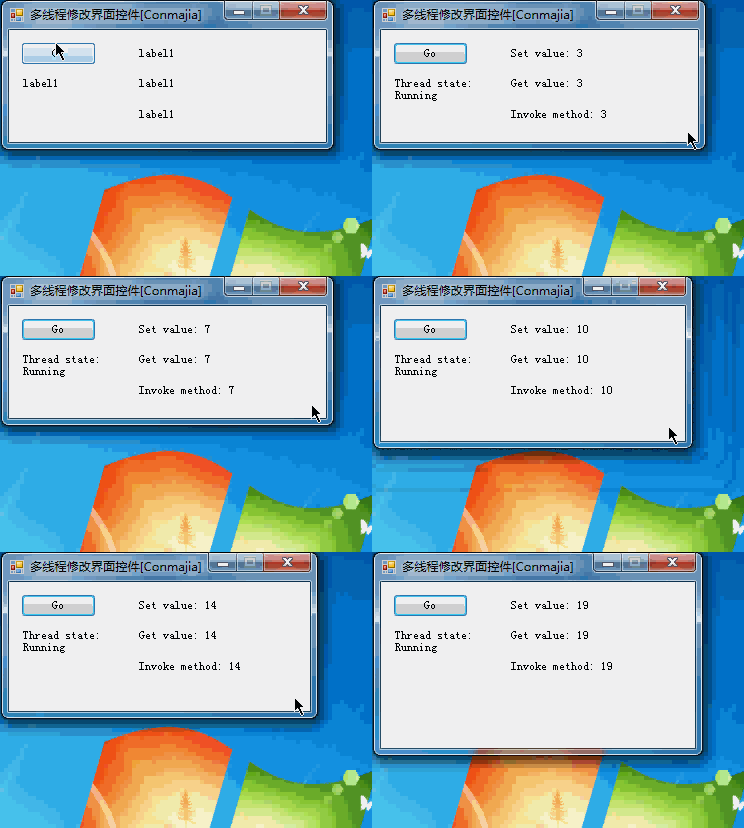
InvokeHelper Demonstration (animation)Other Approaches
There is a built-in option in the VisualStudio IDE that disables the cross-thread access check: CheckForIllegalCrossThreadCalls. I found it slightly slower than my helper class. Figure 3 shows the test result.
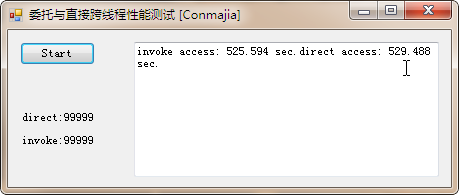
CheckForIllegalCrossThreadCallsThe whole procedure of the test is recorded in figure 4. (The video lasts for 8'51")
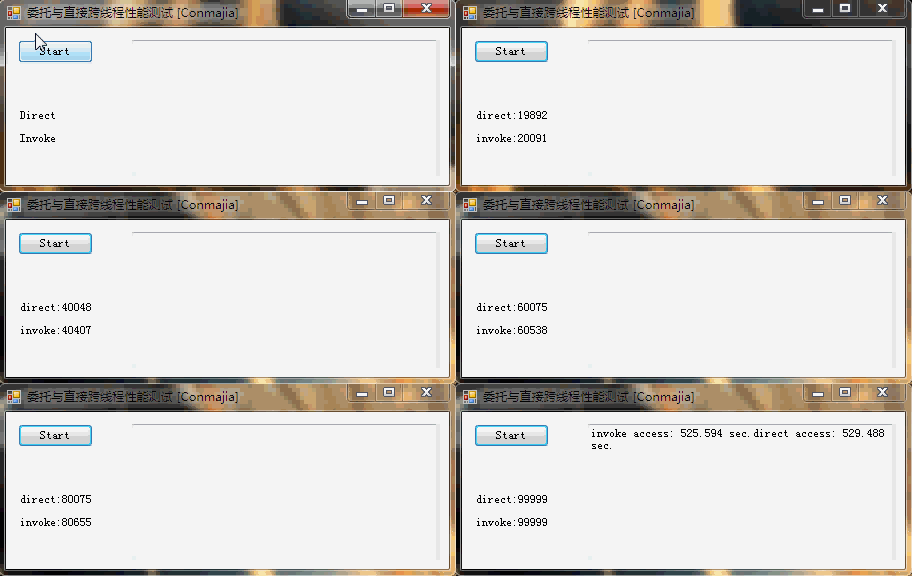
CheckForIllegalCrossThreadCalls (8'51")Appendix
Source code of the InvokeHelper is listed below. Zipped .NET project files: Download
public class InvokeHelper {

  private delegate object MethodInvoker(Control control, string methodName, params object[] args);

  private delegate object PropertyGetInvoker(Control control, object noncontrol, string propertyName);

  private delegate void PropertySetInvoker(Control control, object noncontrol, string propertyName, object value);

  private static PropertyInfo GetPropertyInfo(Control control, object noncontrol, string propertyName) {

    if (control != null && !string.IsNullOrEmpty(propertyName)) {

      PropertyInfo pi = null;

      Type t = null;

      if (noncontrol != null) t = noncontrol.GetType();

      else t = control.GetType();

      pi = t.GetProperty(propertyName);

      if (pi == null) throw new InvalidOperationException(string.Format("Can't find property {0} in {1}.", propertyName, t.ToString()));

      return pi;

    } else throw new ArgumentNullException("Invalid argument.");

  }

  public static object Invoke(Control control, string methodName, params object[] args) {

    if (control != null && !string.IsNullOrEmpty(methodName))

      if (control.InvokeRequired) return control.Invoke(new MethodInvoker(Invoke), control, methodName, args);

      else {

        MethodInfo mi = null;

        if (args != null && args.Length > 0) {

          Type[] types = new Type[args.Length];

          for (int i = 0; i
References
- Sergiu Josan, Making Controls Thread-safely, May 2009
- vicoB, Extension of safeInvoke, July 2010
The End. \(\Box\)
💈 A Cross-Thread Call Helper Class的更多相关文章
- update the UI property cross thread
this.Invoke((MethodInvoker)delegate { txtResult.Text = sbd.ToString(); // runs on UI thread });
- Flink - Checkpoint
Flink在流上最大的特点,就是引入全局snapshot, CheckpointCoordinator 做snapshot的核心组件为, CheckpointCoordinator /** * T ...
- [转]How to display the data read in DataReceived event handler of serialport
本文转自:https://stackoverflow.com/questions/11590945/how-to-display-the-data-read-in-datareceived-event ...
- c#子线程线程中操作窗体更新的报错
用 在执行上传时,由于操作较长窗体界面卡住,于是用task解决 Task t1 = new Task(manage.UploadData); t1.Start(); 结果不卡了,程序也传完了,运行到更 ...
- 进程创建过程详解 CreateProcess
转载请您注明出处:http://www.cnblogs.com/lsh123/p/7405796.html 0x01 CreateProcessW CreateProcess的使用有ANSI版本的Cr ...
- C#委托+回调详解
今天写不完,明天会接着写的,,,, 学习C#有一段时间了,不过C#的委托+回调才这两天才会用,以前只是知道怎么用.前面的一篇文章,函数指针,其实是为这个做铺垫的,说白了委托就相当于C语言中的函数指针, ...
- windows中的进程和线程
今天咱们就聊聊windows中的进程和线程 2016-09-30 在讨论windows下的进程和线程时,我们先回顾下通用操作系统的进程和线程.之所以称之为通用是因为一贯的本科或者其他教材都是这么说的: ...
- [MethodImpl(MethodImplOptions.Synchronized)]、lock(this)与lock(typeof(...))
对于稍微有点经验的.NET开发人员来说,倘若被问及如何保持线程同步,我想很多人都能说好好几种.在众多的线程同步的可选方式中,加锁无疑是最为常用的.如果仅仅是基于方法级别的线程同步,使用System.R ...
- Xamarin.Forms客户端第一版
Xamarin.Forms客户端第一版 作为TerminalMACS的一个子进程模块,目前完成第一版:读取展示手机基本信息.联系人信息.应用程序本地化. 功能简介 详细功能说明 关于TerminalM ...
- [源码解析] 深度学习流水线并行 PipeDream(5)--- 通信模块
[源码解析] 深度学习流水线并行 PipeDream(5)--- 通信模块 目录 [源码解析] 深度学习流水线并行 PipeDream(5)--- 通信模块 0x00 摘要 0x01 前言 0x02 ...
随机推荐
- CCF系列之最优灌溉(201412-4)
试题编号:201412-4试题名称:最优灌溉时间限制: 1.0s内存限制: 256.0MB 问题描述 雷雷承包了很多片麦田,为了灌溉这些麦田,雷雷在第一个麦田挖了一口很深的水井,所有的麦田都从这口井来 ...
- mybatis_SQL映射(2)
文章摘录自:http://blog.csdn.net/y172158950/article/details/17258377 1. sql的重用:定义一个sql片段,可在任何SQL语句中重用该片段. ...
- xss防御
http://blog.csdn.net/ghsau/article/details/17027893
- CentOS 7安装
使用U盘安装 1.CentOS 7系统镜像制作U盘启动盘 1).下载CentOS 7系统镜像 下载地址:http://mirrors.aliyun.com/centos/7/isos/x86_64/ ...
- svn checkout The XML response contains invalid XML
svn checkout 报错:The XML response contains invalid XML 待解决? ---目前没有找到好的解决方法,svn数据库中存的log入手应该可以,有时间再去看 ...
- JavaScript 函数创建思想
//定义一个函数的步骤//1.开辟一个新的空间地址//2.把函数体里面的代码当做字符串存储到空间里面(一个函数如果只定义了,没有执行的话,这个函数没有任何意义)//3.在把我们的地址给我们的函数名fu ...
- 重拾Python(2):如何安装第三方库(Windows)
使用python进行数据分析或者数据处理时,往往需要使用一些库,而使用库之前必须安装它.Anaconda内置了很多常用的第三方库,可以满足绝大部分需求,比如numpy.pandas.matplotli ...
- Apache配置虚拟主机后,不能访问localhost
解决方法:将localhost设为虚拟域名 重要的是要注释掉httpd.conf文件的ServerName localhost:80
- 【转】sed正则表达式
1 正则表达式简介 正则表达式(Regular Expression) 是一种描述文本(或字符串)模式的工具.正则表达式常用于查找文本的场合.想想一下我们日常生活中的例子,假如你想从电话本里找一个联系 ...
- jenkins插件安装与升级[三]
标签(linux): jenkins 笔者Q:972581034 交流群:605799367.有任何疑问可与笔者或加群交流 默认的插件 Folders Plugin OWASP Markup Form ...