
pytorch深度学习60分钟闪电战
https://pytorch.org/tutorials/beginner/deep_learning_60min_blitz.html
官方推荐的一篇教程
Tensors
#Construct a 5x3 matrix, uninitialized:

x = torch.empty(5, 3)

#Construct a randomly initialized matrix:

x = torch.rand(5, 3)

# Construct a matrix filled zeros and of dtype long:

x = torch.zeros(5, 3, dtype=torch.long)

# Construct a tensor directly from data:

x = torch.tensor([5.5, 3])

# create a tensor based on an existing tensor. These methods will reuse properties of the input tensor, e.g. dtype, unless new values are provided by user

x = x.new_ones(5, 3, dtype=torch.double)      # new_* methods take in sizes

print(x)

x = torch.randn_like(x, dtype=torch.float)    # override dtype!    #沿用了x已有的属性,只是修改dtype

print(x)                                      # result has the same size
tensor操作的语法有很多写法,以加法为例
#1

x = x.new_ones(5, 3, dtype=torch.double)

y = torch.rand(5, 3)

print(x + y)

#2

print(torch.add(x, y))

#3

result = torch.empty(5, 3)

torch.add(x, y, out=result)

print(result)

##注意以_做后缀的方法,都会改变原始的变量

#4 Any operation that mutates a tensor in-place is post-fixed with an _. For example: x.copy_(y), x.t_(), will change x.

# adds x to y

y.add_(x)

print(y)
改变tensor的size,使用torch.view:
x = torch.randn(4, 4)

y = x.view(16)

z = x.view(-1, 8)  # the size -1 is inferred from other dimensions

print(x.size(), y.size(), z.size())

输出如下:

torch.Size([4, 4]) torch.Size([16]) torch.Size([2, 8])
numpy array和torch tensor的相互转换
- torch tensor转换为numpy array
a = torch.ones(5)

print(a)

输出tensor([1., 1., 1., 1., 1.])

#torch tensor--->numpy array

b = a.numpy()

print(b)

输出[1. 1. 1. 1. 1.]

#注意!:a,b同时发生了变化

a.add_(1)

print(a)

print(b)

输出tensor([2., 2., 2., 2., 2.])

   [2. 2. 2. 2. 2.]
- numpy array转换为torch tensor
a = np.ones(5)

b = torch.from_numpy(a)

np.add(a, 1, out=a)
所有的cpu上的tensor,除了chartensor,都支持和numpy之间的互相转换.
All the Tensors on the CPU except a CharTensor support converting to NumPy and back.
CUDA Tensors
Tensors can be moved onto any device using the .to method.
#let us run this cell only if CUDA is available

#We will use ``torch.device`` objects to move tensors in and out of GPU

if torch.cuda.is_available():

    device = torch.device("cuda")          # a CUDA device object

    y = torch.ones_like(x, device=device)  # directly create a tensor on GPU

    x = x.to(device)                       # or just use strings ``.to("cuda")``

    z = x + y

    print(z)

    print(z.to("cpu", torch.double))       # ``.to`` can also change dtype together!

--->

tensor([0.6635], device='cuda:0')

tensor([0.6635], dtype=torch.float64)
AUTOGRAD
The autograd package provides automatic differentiation for all operations on Tensors. It is a define-by-run framework, which means that your backprop is defined by how your code is run, and that every single iteration can be different.
Generally speaking, torch.autograd is an engine for computing vector-Jacobian product
.requires_grad属性设为true,则可以追踪tensor上的所有操作(比如加减乘除)
torch.Tensor is the central class of the package. If you set its attribute .requires_grad as True, it starts to track all operations on it. When you finish your computation you can call .backward() and have all the gradients computed automatically. The gradient for this tensor will be accumulated into .grad attribute.
autograd包实现自动的求解梯度.
神经网络
torch.nn包可以用来构建神经网络.
nn依赖autogard来不断地更新model中各层的参数. nn.Module包含layers,forward方法.
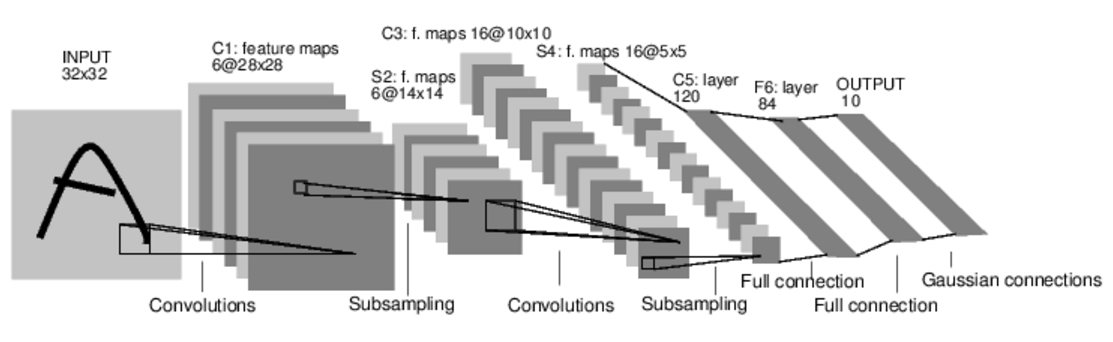
典型的神经网络的训练过程如下:
- 定义一个神经网络,含learnable parameters或者叫weights
- 对数据集的所有数据作为Input输入网络
- 计算loss
- 反向传播计算weights的梯度
- 更新weights,一个典型的简单规则:weight = weight - learning_rate * gradient
定义网络
import torch

import torch.nn as nn

import torch.nn.functional as F

class Net(nn.Module):

    def __init__(self):

        super(Net, self).__init__()

        # 1 input image channel, 6 output channels, 5x5 square convolution

        # kernel

        self.conv1 = nn.Conv2d(1, 6, 5)    #输入是1个矩阵,输出6个矩阵,filter是5*5矩阵.即卷积层1使用6个filter.

        self.conv2 = nn.Conv2d(6, 16, 5)   #输入是6个矩阵,输出16个矩阵,filter是5*5矩阵.即卷积层2使用16个filter.

        # an affine operation: y = Wx + b

        self.fc1 = nn.Linear(16 * 5 * 5, 120)   #全连接层,fc=fullconnect  作用是分类

        self.fc2 = nn.Linear(120, 84)

        self.fc3 = nn.Linear(84, 10)

    def forward(self, x):

        # Max pooling over a (2, 2) window

        x = F.max_pool2d(F.relu(self.conv1(x)), (2, 2))

        # If the size is a square you can only specify a single number

        x = F.max_pool2d(F.relu(self.conv2(x)), 2)

        x = x.view(-1, self.num_flat_features(x))

        x = F.relu(self.fc1(x))

        x = F.relu(self.fc2(x))

        x = self.fc3(x)

        return x

    def num_flat_features(self, x):

        size = x.size()[1:]  # all dimensions except the batch dimension

        num_features = 1

        for s in size:

            num_features *= s

        return num_features

net = Net()

print(net)

输出如下:

Net(

  (conv1): Conv2d(1, 6, kernel_size=(5, 5), stride=(1, 1))

  (conv2): Conv2d(6, 16, kernel_size=(5, 5), stride=(1, 1))

  (fc1): Linear(in_features=400, out_features=120, bias=True)

  (fc2): Linear(in_features=120, out_features=84, bias=True)

  (fc3): Linear(in_features=84, out_features=10, bias=True)

)
你只需要定义forward函数,backward函数(即计算梯度的函数)是autograd包自动定义的.你可以在forward函数里使用任何tensor操作.
model的参数获取.
params = list(net.parameters())

print(len(params))

print(params[0].size())  # conv1's .weight

输出如下:

10

torch.Size([6, 1, 5, 5])
以MNIST识别为例,输入图像为3232.我们用一个随机的3232输入演示一下.
input = torch.randn(1, 1, 32, 32)

out = net(input)

print(out)

输出如下:

tensor([[ 0.0659, -0.0456,  0.1248, -0.1571, -0.0991, -0.0494,  0.0046, -0.0767,

         -0.0345,  0.1010]], grad_fn=<AddmmBackward>)

#清空所有的parameter的gradient buffer.用随机的梯度反向传播。

#Zero the gradient buffers of all parameters and backprops with random gradients:

net.zero_grad()

out.backward(torch.randn(1, 10))
回忆一下部分概念
- torch.Tensor - A multi-dimensional array with support for autograd operations like backward(). Also holds the gradient w.r.t. the tensor.
- nn.Module - Neural network module. Convenient way of encapsulating parameters, with helpers for moving them to GPU, exporting, loading, etc.
- nn.Parameter - A kind of Tensor, that is automatically registered as a parameter when assigned as an attribute to a Module.
- autograd.Function - Implements forward and backward definitions of an autograd operation. Every Tensor operation creates at least a single Function node that connects to functions that created a Tensor and encodes its history.
损失函数
nn package有好几种损失函数.以nn.MSELoss为例
output = net(input)

target = torch.randn(10)  # a dummy target, for example

target = target.view(1, -1)  # make it the same shape as output

criterion = nn.MSELoss()

loss = criterion(output, target)

print(loss)

输出

tensor(0.6918, grad_fn=<MseLossBackward>)
Now, if you follow loss in the backward direction, using its .grad_fn attribute, you will see a graph of computations that looks like this:
input -> conv2d -> relu -> maxpool2d -> conv2d -> relu -> maxpool2d
-> view -> linear -> relu -> linear -> relu -> linear
-> MSELoss
-> loss
print(loss.grad_fn)  # MSELoss

print(loss.grad_fn.next_functions[0][0])  # Linear

print(loss.grad_fn.next_functions[0][0].next_functions[0][0])  # ReLU

输出如下:

<MseLossBackward object at 0x7ff3406e1be0>

<AddmmBackward object at 0x7ff3406e1da0>

<AccumulateGrad object at 0x7ff3406e1da0>
反向传播
调用loss.backward()重新计算梯度
#首先清空现有的gradient buffer

net.zero_grad()     # zeroes the gradient buffers of all parameters

print('conv1.bias.grad before backward')

print(net.conv1.bias.grad)

loss.backward()

print('conv1.bias.grad after backward')

print(net.conv1.bias.grad)

输出如下:

conv1.bias.grad before backward

tensor([0., 0., 0., 0., 0., 0.])

conv1.bias.grad after backward

tensor([-0.0080,  0.0043, -0.0006,  0.0142, -0.0017, -0.0082])
更新权重
最常见的是使用随机梯度下降法更新权重:
weight = weight - learning_rate * gradient
简单实现如下
learning_rate = 0.01

for f in net.parameters():

    f.data.sub_(f.grad.data * learning_rate)
torch.optim包封装了各种各样的优化方法, SGD, Nesterov-SGD, Adam, RMSProp等等.
import torch.optim as optim

# create your optimizer

optimizer = optim.SGD(net.parameters(), lr=0.01)

# in your training loop:

optimizer.zero_grad()   # zero the gradient buffers

output = net(input)

loss = criterion(output, target)

loss.backward()

optimizer.step()    # Does the update
训练一个分类器
并行计算
pytorch深度学习60分钟闪电战的更多相关文章
- 【PyTorch深度学习60分钟快速入门 】Part1:PyTorch是什么?
0x00 PyTorch是什么? PyTorch是一个基于Python的科学计算工具包,它主要面向两种场景: 用于替代NumPy,可以使用GPU的计算力 一种深度学习研究平台,可以提供最大的灵活性 ...
- 【PyTorch深度学习60分钟快速入门 】Part4:训练一个分类器
太棒啦!到目前为止,你已经了解了如何定义神经网络.计算损失,以及更新网络权重.不过,现在你可能会思考以下几个方面: 0x01 数据集 通常,当你需要处理图像.文本.音频或视频数据时,你可以使用标准 ...
- 【PyTorch深度学习60分钟快速入门 】Part5:数据并行化
在本节中,我们将学习如何利用DataParallel使用多个GPU. 在PyTorch中使用多个GPU非常容易,你可以使用下面代码将模型放在GPU上: model.gpu() 然后,你可以将所有张 ...
- 【PyTorch深度学习60分钟快速入门 】Part3:神经网络
神经网络可以通过使用torch.nn包来构建. 既然你已经了解了autograd,而nn依赖于autograd来定义模型并对其求微分.一个nn.Module包含多个网络层,以及一个返回输出的方法f ...
- 【PyTorch深度学习60分钟快速入门 】Part0:系列介绍
说明:本系列教程翻译自PyTorch官方教程<Deep Learning with PyTorch: A 60 Minute Blitz>,基于PyTorch 0.3.0.post4 ...
- 【PyTorch深度学习60分钟快速入门 】Part2:Autograd自动化微分
在PyTorch中,集中于所有神经网络的是autograd包.首先,我们简要地看一下此工具包,然后我们将训练第一个神经网络. autograd包为张量的所有操作提供了自动微分.它是一个运行式定义的 ...
- [PyTorch入门之60分钟入门闪击战]之入门
深度学习60分钟入门 来源于这里. 本文目标: 在高层次上理解PyTorch的Tensor库和神经网络 训练一个小型的图形分类神经网络 本文示例运行在ipython中. 什么是PyTorch PyTo ...
- 对比学习:《深度学习之Pytorch》《PyTorch深度学习实战》+代码
PyTorch是一个基于Python的深度学习平台,该平台简单易用上手快,从计算机视觉.自然语言处理再到强化学习,PyTorch的功能强大,支持PyTorch的工具包有用于自然语言处理的Allen N ...
- PyTorch深度学习实践——反向传播
反向传播 课程来源:PyTorch深度学习实践--河北工业大学 <PyTorch深度学习实践>完结合集_哔哩哔哩_bilibili 目录 反向传播 笔记 作业 笔记 在之前课程中介绍的线性 ...
随机推荐
- 【爆料】-《昆士兰大学毕业证书》Queensland一模一样原件
☞昆士兰大学毕业证书[微/Q:2544033233◆WeChat:CC6669834]UC毕业证书/联系人Alice[查看点击百度快照查看][留信网学历认证&博士&硕士&海归& ...
- ASP.NET Core在CentOS上的最小化部署实践
引言 本文从Linux小白的视角, 在CentOS 7.x服务器上搭建一个Nginx-Powered AspNet Core Web准生产应用. 在开始之前,我们还是重温一下部署原理,正 ...
- JPushDemo【极光推送集成,基于v3.1.8版本】
版权声明:本文为HaiyuKing原创文章,转载请注明出处! 前言 这个Demo只是记录极光推送的集成,不能运行. 使用步骤 一.项目组织结构图 注意事项: 1. 导入类文件后需要change包名以 ...
- 对Tomcat 8.0进行JVM层面的优化(基于Oracle JDK 8)
目录 1 Tomcat的内存调优 1.1 Tomcat的内存占用 1.2 内存配置相关参数 1.3 内存调优实践 1.4 验证配置效果 2 GC策略调优实践 Tomcat容器是运行在JVM上的, 其默 ...
- Java8新特性之二:方法引用
上一节介绍了Java8新特性中的Lambda表达式,本小节继续讲解Java8的新特性之二:方法引用.方法引用其实也离不开Lambda表达式. 1.方法引用的使用场景 我们用Lambda表达式来实现匿名 ...
- Netty源码—二、server启动(2)
我们在使用Netty的时候的初始化代码一般如下 EventLoopGroup bossGroup = new NioEventLoopGroup(); EventLoopGroup workerGro ...
- Linux 系统调用过程详细分析
内核版本:Linux-4.19 操作系统通过系统调用为运行于其上的进程提供服务. 那么,在应用程序内,调用一个系统调用的流程是怎样的呢? 我们以一个假设的系统调用 xyz() 为例,介绍一次系统调用的 ...
- C# 错误:空对象不能转换为值类型
最近在做项目的时候出现了一个错误 当从数据库中获取值的时候 报错:空对象不能转换为值类型 因为数据库你查询数据的时候不是所有的字段都是存在数据的,有些字段可能是Null值,也就是没有数据 当你在类型转 ...
- Google XSS Challenge
https://xss-game.appspot.com/level1 https://xss-game.appspot.com/level1 payload: <svg onload=aler ...
- 泛微oa几个常用的js
泛微OA,常用JS 为满足一些简单需求,我从网上借鉴了大量的代码,其中几个是非常好用的. (1).取值判断 通过jQuery('#field1234').val()取字段的值,field1234对应字 ...