
JDBC (一)
1 JDBC 简介
- sun公司为了简化、统一对数据库的操作,定义了一套java操作数据库的规范,称之为JDBC。
- 数据库厂商的驱动就是对JDBC的实现。
- 没有JDBC之前 vs 有JDBC之后
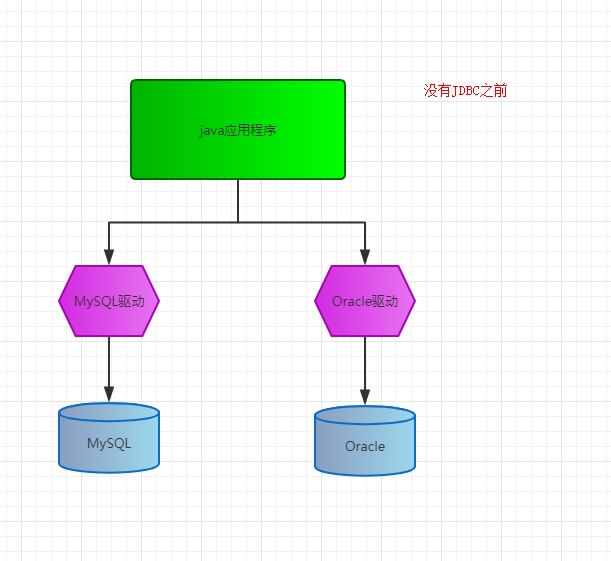
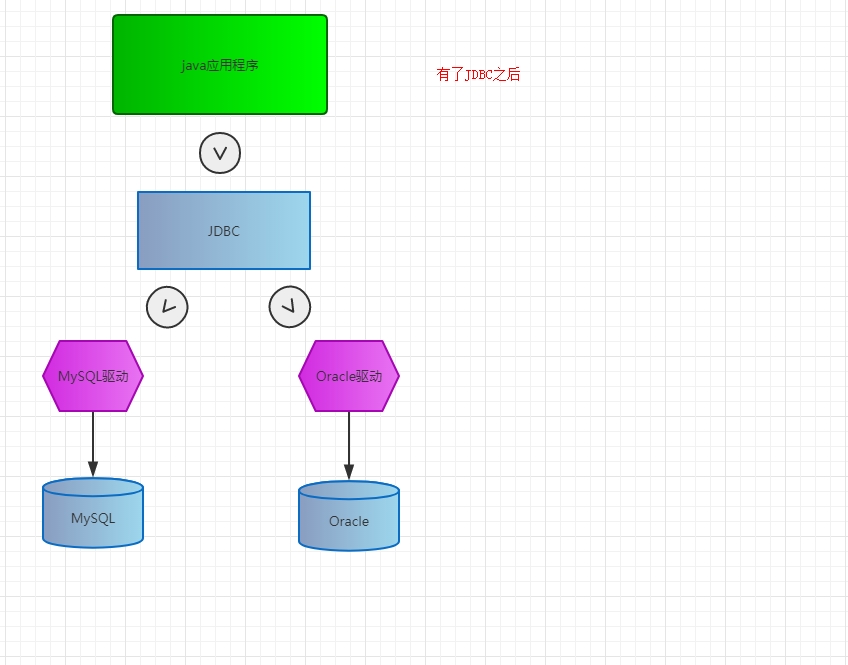
- JDBC的全称:Java Data Base Connectivity,java数据库连接,它主要有接口组成。
- 组成JDBC的2个包:
- ①java.sql
- ②javax.sql
- 开发JDBC的应用需要以上的2个包的支持外,还需要导入相应的数据库实现(即数据库的驱动)。
2 JDBC的编码步骤
- 示例:user.sql
CREATE DATABASE jdbc;
USE jdbc;
CREATE TABLE USER(
    id INT PRIMARY KEY AUTO_INCREMENT,
    NAME ),
    PASSWORD ),
    email ),
    birthday DATE
);
INSERT INTO USER VALUES (NULL,'admin','admin','123@qq.com','2012-05-22');
- 前提:导入数据库驱动
- ①注册数据库驱动
- ②获取和数据库的连接
- ③创建代表SQL语句的对象
- ④执行SQL语句
- ⑤如果是查询语句,需要遍历结果集
- ⑥释放资源
- 示例:
package com;

import java.sql.*;

/**
 * 2017/11/8
 * 说明:JDBC示例
 */
public class JDBCDemo1 {
    public static void main(String[] args) throws ClassNotFoundException, SQLException {
        //1.注册mysql驱动
        Class.forName("com.mysql.jdbc.Driver");

        //2 获取数据库的连接
        String url = "jdbc:mysql://localhost:3306/jdbc";
        String username = "root";
        String password = "root";
        Connection conn = DriverManager.getConnection(url,username,password);

        //3.创建代表SQL的对象
        Statement stmt = conn.createStatement();

        //4.执行SQL语句
        ResultSet rs = stmt.executeQuery("select * from user");
        //5.遍历结果集
        while(rs.next()){
            int id = rs.getInt(1);
            String name = rs.getString(2);
            String pass = rs.getString(3);
            String email = rs.getString(4);
            Date date = rs.getDate(5);
            System.out.println("id="+id+",username:"+name+",password="+pass+",email="+email+",date="+date);
        }

        //6.释放资源
        rs.close();
        stmt.close();
        conn.close();

    }

}

3 JDBC中常用的接口详解
3.1 DriverManager
- 注册驱动
- 获取与数据库的连接
 String url = "jdbc:mysql://localhost:3306/jdbc";
 String username = "root";
 String password = "root";
 Connection conn = DriverManager.getConnection(url,username,password);
  Properties properties = new Properties();
  properties.setProperty("user","root");
  properties.setProperty("password","root");
  Connection conn = DriverManager.getConnection("jdbc:mysql://localhost:3306/jdbc",properties);
Connection conn = DriverManager.getConnection("jdbc:mysql://localhost:3306/jdbc?user=root&password=root");
3.2 Connection
- JDBC程序中的Connection,它用于代表数据库的连接,Collection是数据库编程中的最重要的一个对象,客户端和数据库的所有交互都是通过Connection对象完成的。
- 常用的方法:
- 创建一个向数据库发送SQL的Statement对象,如果多次执行相同的SQL语句,使用PreparedStatement对象更有效。
Statement createStatement() throws SQLException
- 创建向数据库发送预编译SQL的PreparedStatement对象
PreparedStatement prepareStatement(String sql) throws SQLException
- 创建执行存储过程的CallableStatement对象
CallableStatement prepareCall(String sql) throws SQLException
- 设置事务是否自动提交
void setAutoCommit(boolean autoCommit) throws SQLException
- 提交事务
void commit() throws SQLException
- 回滚事务
void rollback() throws SQLException
3.3 Statement
- 代表SQL语句对象。可以向数据库发送任何的SQL语句。
- 常用方法:
- 执行给定的SQL语句,该语句返回单个ResultSet对象
ResultSet executeQuery(String sql) throws SQLException
- 一般是DML语句,insert、update、delete
int executeUpdate(String sql) throws SQLException
- 用于向数据库发送任意的SQL语句,如果是查询语句,就返回true,如果不是查询语句,就返回false
boolean execute(String sql) throws SQLException
- 将多条SQL语句加入到批处理
void addBatch(String sql) throws SQLException
- 执行批处理
int[] executeBatch() throws SQLException
4 释放占用的资源
- 示例:
package com;

import java.sql.*;
import java.util.Properties;

/**
 * 2017/11/8
 * 说明:JDBC示例
 */
public class JDBCDemo1 {
    public static void main(String[] args)  {

        Connection conn  = null;
        Statement stmt = null;
        ResultSet rs = null;

        try {
            //1.注册mysql驱动
            Class.forName("com.mysql.jdbc.Driver");

            //2 获取数据库的连接
            conn = DriverManager.getConnection("jdbc:mysql://localhost:3306/jdbc?user=root&password=root");

            //3.创建代表SQL的对象
            stmt = conn.createStatement();

            //4.执行SQL语句
            rs = stmt.executeQuery("select * from user");
            //5.遍历结果集
            while(rs.next()){
                int id = rs.getInt(1);
                String name = rs.getString(2);
                String pass = rs.getString(3);
                String email = rs.getString(4);
                Date date = rs.getDate(5);
                System.out.println("id="+id+",username:"+name+",password="+pass+",email="+email+",date="+date);
            }
        }catch (Exception e){
            e.printStackTrace();
        }finally {
            //6.释放资源
            if(rs != null){
                try {
                    rs.close();
                } catch (SQLException e) {
                    e.printStackTrace();
                }
            }
            if(stmt != null){
                try {
                    stmt.close();
                } catch (SQLException e) {
                    e.printStackTrace();
                }
            }

            if(conn != null){
                try {
                    conn.close();
                } catch (SQLException e) {
                    e.printStackTrace();
                }
            }
        }

    }

}
5 JDBC进行CRUD操作
5.1 新建JDBC工具类
- ①在src下新建jdbc.properties文件
jdbc.driver=com.mysql.jdbc.Driver
jdbc.url=jdbc:mysql://localhost:3306/jdbc
jdbc.user=root
jdbc.password=root
- ②新建JDBCUtil.java文件
package util;

import java.io.IOException;
import java.io.InputStream;
import java.sql.*;
import java.util.Properties;

/**
 * 2017/11/8
 * 说明:JDBC的工具类
 */
public class JDBCUtil {
    private static String driverClass;
    private static String url;
    private static String user;
    private static String password;
    static {
        InputStream is = JDBCUtil.class.getClassLoader().getResourceAsStream("jdbc.properties");
        Properties pro = new Properties();
        try {
            pro.load(is);
            driverClass = pro.getProperty("jdbc.driver");
            url= pro.getProperty("jdbc.url");
            user=pro.getProperty("jdbc.user");
            password=pro.getProperty("jdbc.password");
            Class.forName(driverClass);

        } catch (Exception e) {
           throw new RuntimeException(e);
        }

    }

    /**
     * 获取数据库连接
     * @return
     * @throws ClassNotFoundException
     * @throws SQLException
     */
    public static Connection getConnection() throws ClassNotFoundException, SQLException {

        //2 获取数据库的连接
        Connection conn = DriverManager.getConnection(url,user,password);
        return conn;
    }

    /**
     * 释放资源
     * @param rs
     * @param stmt
     * @param conn
     */
    public static void release(ResultSet rs, Statement stmt ,Connection conn){
        if(rs != null){
            try {
                rs.close();
            } catch (SQLException e) {
                e.printStackTrace();
            }
        }
        if(stmt != null){
            try {
                stmt.close();
            } catch (SQLException e) {
                e.printStackTrace();
            }
        }

        if(conn != null){
            try {
                conn.close();
            } catch (SQLException e) {
                e.printStackTrace();
            }
        }
    }

}
5.2 使用JDBCUtil工具类进行CRUD
package com;

import org.junit.Test;
import util.JDBCUtil;

import java.sql.Connection;
import java.sql.Date;
import java.sql.ResultSet;
import java.sql.Statement;

/**
 * 2017/11/8
 * 说明:
 */
public class JDBCDemo2 {

    @Test
    public void testAdd(){
        Connection conn = null;
        Statement stmt = null;
        ResultSet rs = null;
        try {
            conn = JDBCUtil.getConnection();
            stmt = conn.createStatement();
            int count = stmt.executeUpdate("insert into user VALUES (NULL ,'root','root','root@163.com','2017-8-18')");
            System.out.println("更新的条数:"+count);
        }catch (Exception e){
            e.printStackTrace();
        }finally {
            JDBCUtil.release(rs,stmt,conn);
        }

    }

    @Test
    public void testUpdate(){
        Connection conn = null;
        Statement stmt = null;
        ResultSet rs = null;
        try {
            conn = JDBCUtil.getConnection();
            stmt = conn.createStatement();
            int count = stmt.executeUpdate("update user set password = 'hehe' where id = 2");
            System.out.println("更新的条数:"+count);
        }catch (Exception e){
            e.printStackTrace();
        }finally {
            JDBCUtil.release(rs,stmt,conn);
        }

    }

    @Test
    public void testDelete(){
        Connection conn = null;
        Statement stmt = null;
        ResultSet rs = null;
        try {
            conn = JDBCUtil.getConnection();
            stmt = conn.createStatement();
            int count = stmt.executeUpdate("delete from user where id = 2");
            System.out.println("更新的条数:"+count);
        }catch (Exception e){
            e.printStackTrace();
        }finally {
            JDBCUtil.release(rs,stmt,conn);
        }
    }

    @Test
    public void testQuery(){
        Connection conn = null;
        Statement stmt = null;
        ResultSet rs = null;
        try {
            conn = JDBCUtil.getConnection();
            stmt = conn.createStatement();
            rs = stmt.executeQuery("SELECT id,name,password,email,birthday from user");
            while(rs.next()){
                int id = rs.getInt(1);
                String name = rs.getString(2);
                String password= rs.getString(3);
                String email = rs.getString(4);
                Date birthday = rs.getDate(5);
                System.out.println("id="+id+",name="+name+",password="+password+",email="+email+",birthday="+birthday);

            }
        }catch (Exception e){
            e.printStackTrace();
        }finally {
            JDBCUtil.release(rs,stmt,conn);
        }
    }

}
6 SQL注入
- 防止SQL注入:
- ①对用户表单的输入域过滤:防止一些特殊的字符
- ②对密码进行加密:MD5加密
- ③使用PreparedStatement接口
7 PreparedStatement接口
- ①在数据库中,SQL语句也需要先编译再执行,而PreparedStatement接口支持预编译SQL。
- ②支持参数占位符 一个?表示一个参数。
- 示例:
  @Test
    public void testAdd(){
        Connection conn = null;
        PreparedStatement stmt = null;
        ResultSet rs = null;
        try {
            conn = JDBCUtil.getConnection();
            stmt = conn.prepareStatement("insert into user VALUES (?,?,?,?,?)");
            stmt.setObject(1,null);
            stmt.setString(2,"哈哈");
            stmt.setString(3,"呵呵");
            stmt.setString(4,"123@163.com");
            stmt.setDate(5,new java.sql.Date(new Date().getTime()));

            int count = stmt.executeUpdate();
            System.out.println("更新了"+count+"条");

        }catch (Exception e){
            e.printStackTrace();
        }finally {
            JDBCUtil.release(rs,stmt,conn);
        }

    }
JDBC (一)的更多相关文章
- Java数据库连接技术——JDBC
大家好,今天我们学习了Java如何连接数据库.之前学过.net语言的数据库操作,感觉就是一通百通,大同小异. JDBC是Java数据库连接技术的简称,提供连接各种常用数据库的能力. JDBC API ...
- 玩转spring boot——结合AngularJs和JDBC
参考官方例子:http://spring.io/guides/gs/relational-data-access/ 一.项目准备 在建立mysql数据库后新建表“t_order” ; -- ----- ...
- [原创]java使用JDBC向MySQL数据库批次插入10W条数据测试效率
使用JDBC连接MySQL数据库进行数据插入的时候,特别是大批量数据连续插入(100000),如何提高效率呢?在JDBC编程接口中Statement 有两个方法特别值得注意:通过使用addBatch( ...
- JDBC MySQL 多表关联查询查询
public static void main(String[] args) throws Exception{ Class.forName("com.mysql.jdbc.Driver&q ...
- JDBC增加删除修改
一.配置程序--让我们程序能找到数据库的驱动jar包 1.把.jar文件复制到项目中去,整合的时候方便. 2.在eclipse项目右击"构建路径"--"配置构建路径&qu ...
- JDBC简介
jdbc连接数据库的四个对象 DriverManager 驱动类 DriverManager.registerDriver(new com.mysql.jdbc.Driver());不建议使用 ...
- JDBC Tutorials: Commit or Rollback transaction in finally block
http://skeletoncoder.blogspot.com/2006/10/jdbc-tutorials-commit-or-rollback.html JDBC Tutorials: Com ...
- FineReport如何用JDBC连接阿里云ADS数据库
在使用FineReport连接阿里云的ADS(AnalyticDB)数据库,很多时候在测试连接时就失败了.此时,该如何连接ADS数据库呢? 我们只需要手动将连接ads数据库需要使用到的jar放置到%F ...
- JDBC基础
今天看了看JDBC(Java DataBase Connectivity)总结一下 关于JDBC 加载JDBC驱动 建立数据库连接 创建一个Statement或者PreparedStatement 获 ...
- Spring学习记录(十四)---JDBC基本操作
先看一些定义: 在Spring JDBC模块中,所有的类可以被分到四个单独的包:1.core即核心包,它包含了JDBC的核心功能.此包内有很多重要的类,包括:JdbcTemplate类.SimpleJ ...
随机推荐
- Linux进程关系(转载)
Linux的进程相互之间有一定的关系.比如说,在Linux进程基础中,我们看到,每个进程都有父进程,而所有的进程以init进程为根,形成一个树状结构.我们在这里讲解进程组和会话,以便以更加丰富的方式了 ...
- MySQL并发复制系列二:多线程复制 2016
并发复制(Parallel Replication) 系列二: Enhanced Multi-threaded Slaves作者:沃趣科技MySQL数据库工程师 麻鹏飞 首先梳理下传统MySQL/M ...
- CTF---安全杂项入门第二题 A记录
A记录分值:20 来源: sammie 难度:中 参与人数:2255人 Get Flag:566人 答题人数:621人 解题通过率:91% 他在看什么视频,好像很好看,不知道是什么网站的. 还好我截取 ...
- UVA 1030 - Image Is Everything【模拟+思维+迭代更新】
题目链接:uva 1030 - Image Is Everything 题目大意:有一个最大为n*n*n的立方体的一个不规整立体,由若干个1*1*1的小正方体构成(每一个小正方体被涂成不同的颜色),给 ...
- COGS 2482. Franky的胡子【二分,高精度】
2482. Franky的胡子 ☆ 输入文件:beard.in 输出文件:beard.out 简单对比 时间限制:1 s 内存限制:128 MB [题目描述] Franky很苦恼他一直 ...
- 树状数组-HDU1541-Stars一维树状数组 POJ1195-Mobile phones-二维树状数组
树状数组,学长很早之前讲过,最近才重视起来,enmmmm... 树状数组(Binary Indexed Tree(B.I.T), Fenwick Tree)是一个查询和修改复杂度都为log(n)的数据 ...
- Codeforces780C
题解:n个气球 从1到n染色,如果a.b和c是不同的正方形,a和b在它们之间有一条直接的路径,b和c之间有一条直接的路径,然后在这三个方块上的气球颜色是不同的. AC代码 #include <s ...
- [学习OpenCV攻略][011][显示图片]
学习资料: http://www.opencv.org.cn/opencvdoc/2.3.2/html/doc/tutorials/tutorials.html 包含头文件 core.hpp:包含 ...
- [国嵌攻略][061][2440LCD驱动设计]
LCD初始化 1.引脚初始化 2.时序初始化 VBPD(vertical back porch):表示在一帧图像开始时,垂直同步信号以后的无效的行数 VFBD(vertical front porch ...
- UE4 径向模糊radiu blur
hlsl代码为: float2 ScreenMult = ; ; ] = {-0.08,-0.05,-0.03,-0.02,-0.01,0.01,0.02,0.03,0.05,0.08}; float ...