
vsCode_1.27.2
User Settings:
一,当前行高亮显示:

"editor.renderLineHighlight": "line",
二,如何呈现空白字符(一般选none,这样会比较清爽)

"editor.renderWhitespace": "none"

"editor.renderWhitespace": "all"
三,窗口失去焦点自动保存
"files.autoSave": "onFocusChange",
四,通过使用鼠标滚轮同时按住 Ctrl 可缩放编辑器的字体
"editor.mouseWheelZoom": true,
五,图标的显示

"workbench.iconTheme": "vscode-great-icons",
六,主题色(这里选择了"Solarized Dark")

"workbench.colorTheme": "Default Dark+"
七,打开新窗口的页面(建议用“newUntitledFile”)

"workbench.startupEditor": "newUntitledFile",
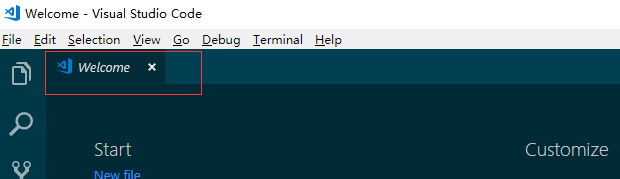
"workbench.startupEditor": "welcomePage",
{

    "workbench.colorTheme": "Solarized Dark",

    "editor.quickSuggestions": {

        "strings": true

    },

    "workbench.settings.editor": "json",

    //文件搜索区域配置

    "search.exclude": {

        "**/node_modules": false,

        "**/bower_components": true,

        "**/dist":true,

        "**/build":true,

        "**/elehukouben":true,

        "**/.git":true,

        "**/.gitignore":true,

        "**/.svn":true,

        "**/.DS_Store":true,

        "**/.idea":true,

        "**/.vscode":false,

        "**/yarn.lock":true,

        "**/tmp":true

    },

    //配置emmet是否启用tab展开缩写

    "emmet.triggerExpansionOnTab": true,

    //配置emmet对文件类型的支持,比如vue后缀文件按照html文件来进行emmet扩写

    "emmet.syntaxProfiles": {

        "vue-html":"html",

        "vue":"html",

        "javascript":"javascriptreact",

        // xml类型文件默认都是单引号,开启对非单引号的emmet识别

        "xml":{

            "attr_quotes":"single"

        }

    },

    "editor.tabSize": 2,

    "extensions.autoUpdate": false,

    // 行太长自动换行

    "editor.wordWrap": "on",

    "editor.lineHeight": 24,

    "editor.cursorBlinking": "smooth",

    //Ctrl+Shift+V:粘贴并格式化

    "editor.formatOnPaste": true,

    // 窗口失去焦点自动保存

    "files.autoSave": "onFocusChange",

    //通过使用鼠标滚轮同时按住 Ctrl 可缩放编辑器的字体

    "editor.mouseWheelZoom": true,

    "editor.snippetSuggestions": "inline",

    "workbench.iconTheme": "vscode-great-icons",

    //New Window,打开untitled-1

    "workbench.startupEditor": "newUntitledFile",

    //将在保存文件时修剪尾随空白

    "files.trimTrailingWhitespace": true,

    "vetur.format.defaultFormatter.html": "js-beautify-html",

    "files.associations": {

        "*.vue":"vue",

        "*.wxss":"css"

    },

    //在react的jsx中添加对emmet的支持

    "emmet.includeLanguages": {

        "jsx-sublime-babel-tags":"javascriptreact"

    },

    //是否开启eslint检测

    "eslint.enable": true,

    //文件保存时,是否自动根据eslint进行格式化

    "eslint.autoFixOnSave": true,

    //eslint配置文件

    "eslint.options": {

        "plugins":[

            "html",

            "javascript",

            {

                "language":"vue",

                "autoFix":true

            },

            "vue"

        ]

    },

    //eslint能够识别的文件后缀类型

    "eslint.validate": [

        "javascript",

        "javascriptreact",

        "html",

        "vue",

        "typescript",

        "typescriptreact"

    ],

}
vsCode_1.27.2的更多相关文章
- CSharpGL(27)讲讲清楚OpenGL坐标变换
CSharpGL(27)讲讲清楚OpenGL坐标变换 在理解OpenGL的坐标变换问题的路上,有好几个难点和易错点.且OpenGL秉持着程序难以调试.难点互相纠缠的特色,更让人迷惑.本文依序整理出关于 ...
- Amazon Interview | Set 27
Amazon Interview | Set 27 Hi, I was recently interviewed for SDE1 position for Amazon and got select ...
- CentOS7 编译安装LVS 互为主备 (实测 笔记 Centos 7.0 + ipvsadm 1.27 + keepalived 1.2.15 )
环境: 系统硬件:vmware vsphere (CPU:2*4核,内存2G,双网卡) LVS服务器(两台): 系统:Centos7.0 64位(LVS+keepalived) LvsMaster:1 ...
- ORA-12899: value too large for column (actual: 27, maximum: 20)
导入数据时报错以下错误,这是因为原来的数据库是GBK的,每个汉字两个字节,但新数据库是UTF-8的,每个汉字是三个字节,导致超过长度了. ORA-12899: value too large for ...
- 背水一战 Windows 10 (27) - 控件(文本类): TextBlock
[源码下载] 背水一战 Windows 10 (27) - 控件(文本类): TextBlock 作者:webabcd 介绍背水一战 Windows 10 之 控件(文本类) TextBlock 示例 ...
- Internet Download Manager 6.27.1 中文特别版(IDM)
软件介绍: 软件名称:Internet Download Manager(IDM) 软件大小:5.09M软件语言:简体中文 软件官网:http://www.internetdownloadmanage ...
- CentOS6.3 编译安装LAMP(4):编译安装 PHP5.3.27
所需源码包: /usr/local/src/PHP-5.3.27/libmcrypt-2.5.8.tar.gz /usr/local/src/PHP-5.3.27/mhash-0.9.9.9.tar. ...
- NYOJ题目27水池数目
--------------------------------------------- 这道题有点坑,也怪我总是有点马虎,按照正常人的思维0是表示有水池啊竟然是1表示有水池,最坑的是写反了竟然还能 ...
- 腾讯QQ认证空间4月27日已全面开放申请,欲进军自媒体
今天看到卢松松的博客上爆出,腾讯QQ认证空间4月27日已全面开放申请的消息,这一消息出来, 马浩周根据提示方法进行申请,下面先说说腾讯QQ认证空间的申请方法: QQ认证空间开放申请公告地址:http: ...
随机推荐
- ASP.NET MVC Castle Windsor 教程
一.[转]ASP.NET MVC中使用Castle Windsor 二.[转]Castle Windsor之组件注册 平常用Inject比较多,今天接触到了Castle Windsor.本篇就来体验其 ...
- vue form表单绑定事件与方法
使用v-on绑定事件 <button @click="hello">Hello</button><br /> <button @click ...
- 【Intel AF 2.1 学习笔记三】
AF中自带一些Css矢量图标,使用时需要设置class,例如下面代码显示一个左箭头图标: <a class="icon left"></a> AF中可用的图 ...
- 【WP8】仿QQ提示消息
WP版的QQ提示消息的时候从顶部滑入,3秒后从顶部滑出,本文模仿该效果实现一个MessageToastManager类用于显示提示消息 思路很简单,就是动画而已,支持配置颜色和回掉 // ****** ...
- Mac OS终端中设置颜色高亮和自动补全
已测试通过,原文:http://blog.csdn.net/songjinshi/article/details/8945809 一.颜色高亮显示 针对terminal采用bash模式: 编辑 ~/. ...
- sar监控工具详解
转自http://www.cnblogs.com/Amaranthus/p/3745680.html SAR NAME: SAR报告,收集,保存系统活动信息 语法: sar [ -A ] [ -b ...
- 和我一起学《HTTP权威指南》——连接管理
连接管理 1.TCP连接 几乎所有的HTTP通信都是由TCP/IP承载的. 浏览网页时客户端执行的操作: 如浏览http://www.joes-hardware.com:80/power-tools. ...
- VS或编译的时候不生成Release文件夹
今天在编译第三方类的时候,总是发布的时候报没有第三方类库的的Release版本 解决方案: Build=>Configuration Manager=>Release 编译=>配置管 ...
- Docker容器的生命周期管理
https://blog.csdn.net/u010278923/article/details/78751306
- 使用InternetGetConnectedState判断本地网络状态(C#举例)
函数原型:函数InternetGetConnectedState返回本地系统的网络连接状态. 语法: BOOL InternetGetConnectedState( __out LPDWORD lpd ...