
JAVA NIO学习记录2-非阻塞式网络通信
一、阻塞与非阻塞
传统的IO 流都是阻塞式的。也就是说,当一个线程调用read() 或write() 时,该线程被阻塞,直到有一些数据被读取或写入,该线程在此期间不能执行其他任务。因此,在完成网络通信进行IO 操作时,由于线程会阻塞,所以服务器端必须为每个客户端都提供一个独立的线程进行处理,当服务器端需要处理大量客户端时,性能急剧下降。
Java NIO 是非阻塞模式的。当线程从某通道进行读写数据时,若没有数据可用时,该线程可以进行其他任务。线程通常将非阻塞IO 的空闲时间用于在其他通道上执行IO 操作,所以单独的线程可以管理多个输入和输出通道。因此,NIO 可以让服务器端使用一个或有限几个线程来同时处理连接到服务器端的所有客户端。
二、选择器(Selector)
选择器(Selector)是SelectableChannle 对象的多路复用器,Selector 可以同时监控多个SelectableChannel 的IO 状况,也就是说,利用Selector 可使一个单独的线程管理多个Channel。Selector 是非阻塞IO 的核心。
SelectableChannle 的结构如下图:

选择器(Selector)的应用
创建Selector :通过调用Selector.open() 方法创建一个Selector。

向选择器注册通道:SelectableChannel.register(Selector sel, int ops)
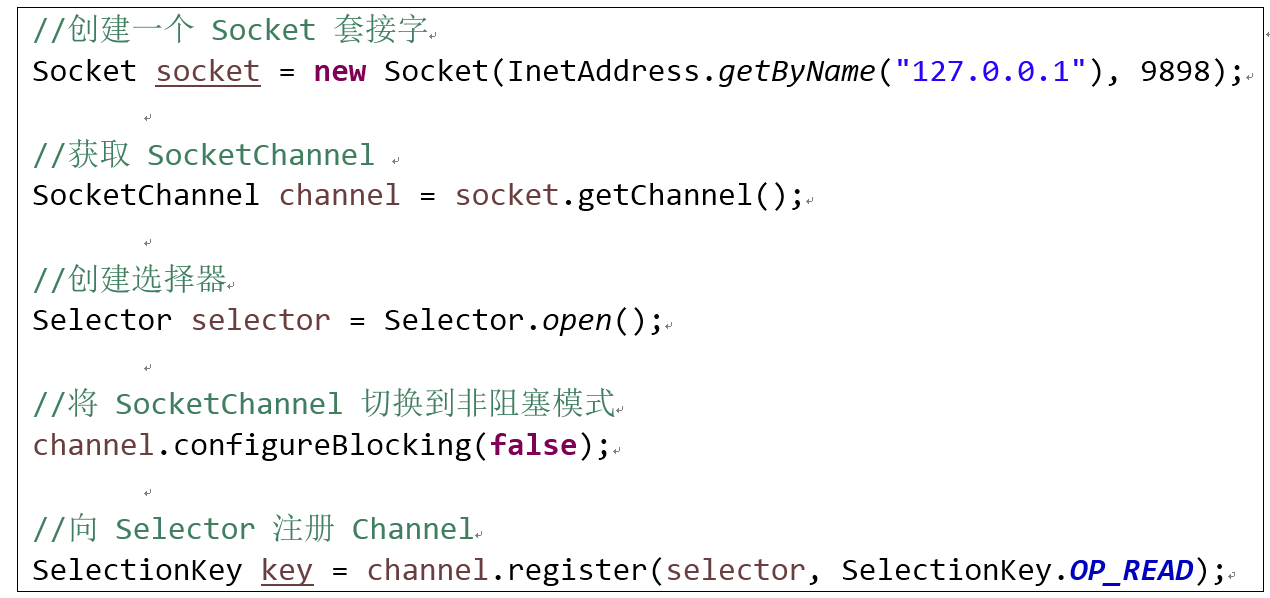
当调用register(Selector sel, int ops) 将通道注册选择器时,选择器对通道的监听事件,需要通过第二个参数ops 指定。
可以监听的事件类型(可使用SelectionKey 的四个常量表示):
读: SelectionKey.OP_READ (1)
写: SelectionKey.OP_WRITE (4)
连接: SelectionKey.OP_CONNECT(8)
接收: SelectionKey.OP_ACCEPT (16)
若注册时不止监听一个事件,则可以使用“位或”操作符连接。

SelectionKey:表示SelectableChannel 和Selector 之间的注册关系。每次向选择器注册通道时就会选择一个事件(选择键)。选择键包含两个表示为整数值的操作集。操作集的每一位都表示该键的通道所支持的一类可选择操作。
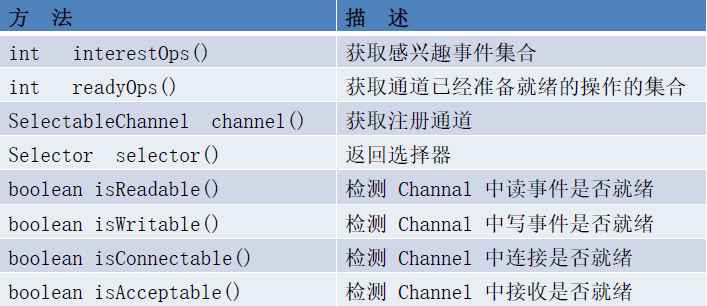
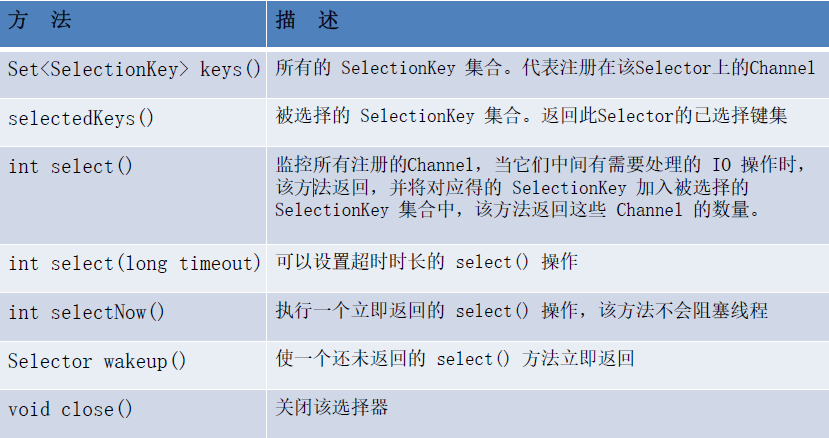
Selector 的常用方法
SocketChannel
Java NIO中的SocketChannel是一个连接到TCP网络套接字的通道。
操作步骤:
打开SocketChannel
读写数据
关闭SocketChannel
Java NIO中的ServerSocketChannel 是一个可以监听新进来的TCP连接的通道,就像标准IO中的ServerSocket一样。
DatagramChannel
Java NIO中的DatagramChannel是一个能收发UDP包的通道。
操作步骤:
打开DatagramChannel
接收/发送数据
代码分析:
阻塞式IO:
package com.atguigu.nio;

import java.io.IOException;

import java.net.InetSocketAddress;

import java.nio.ByteBuffer;

import java.nio.channels.FileChannel;

import java.nio.channels.ServerSocketChannel;

import java.nio.channels.SocketChannel;

import java.nio.file.Paths;

import java.nio.file.StandardOpenOption;

import org.junit.Test;

/*

 * 一、使用 NIO 完成网络通信的三个核心:

 *

 * 1. 通道(Channel):负责连接

 *

 *        java.nio.channels.Channel 接口:

 *             |--SelectableChannel

 *                 |--SocketChannel

 *                 |--ServerSocketChannel

 *                 |--DatagramChannel

 *

 *                 |--Pipe.SinkChannel

 *                 |--Pipe.SourceChannel

 *

 * 2. 缓冲区(Buffer):负责数据的存取

 *

 * 3. 选择器(Selector):是 SelectableChannel 的多路复用器。用于监控 SelectableChannel 的 IO 状况

 *

 */

/**

 * 阴塞式IO:服务端读取客户端数据

 * @author Administrator

 *

 */

public class TestBlockingNIO {

    //客户端

    @Test

    public void client() throws IOException{

        //1. 获取通道

        SocketChannel sChannel = SocketChannel.open(new InetSocketAddress("127.0.0.1", 9898));

        FileChannel inChannel = FileChannel.open(Paths.get("1.jpg"), StandardOpenOption.READ);

        //2. 分配指定大小的缓冲区

        ByteBuffer buf = ByteBuffer.allocate(1024);

        //3. 读取本地文件,并发送到服务端

        while(inChannel.read(buf) != -1){

            buf.flip();

            sChannel.write(buf);

            buf.clear();

        }

        //4. 关闭通道

        inChannel.close();

        sChannel.close();

    }

    //服务端

    @Test

    public void server() throws IOException{

        //1. 获取通道

        ServerSocketChannel ssChannel = ServerSocketChannel.open();

        FileChannel outChannel = FileChannel.open(Paths.get("2.jpg"), StandardOpenOption.WRITE, StandardOpenOption.CREATE);

        //2. 绑定连接

        ssChannel.bind(new InetSocketAddress(9898));

        //3. 获取客户端连接的通道

        SocketChannel sChannel = ssChannel.accept();

        //4. 分配指定大小的缓冲区

        ByteBuffer buf = ByteBuffer.allocate(1024);

        //5. 接收客户端的数据,并保存到本地

        while(sChannel.read(buf) != -1){

            buf.flip();

            outChannel.write(buf);

            buf.clear();

        }

        //6. 关闭通道

        sChannel.close();

        outChannel.close();

        ssChannel.close();

    }

}
package com.atguigu.nio;

import java.io.IOException;

import java.net.InetSocketAddress;

import java.nio.ByteBuffer;

import java.nio.channels.FileChannel;

import java.nio.channels.ServerSocketChannel;

import java.nio.channels.SocketChannel;

import java.nio.file.Paths;

import java.nio.file.StandardOpenOption;

import org.junit.Test;

/**

 * 阴塞式IO:服务端读取客户端数据并向客户端发送数据

 * @author Administrator

 *

 */

public class TestBlockingNIO2 {

    //客户端

    @Test

    public void client() throws IOException{

        SocketChannel sChannel = SocketChannel.open(new InetSocketAddress("127.0.0.1", 9898));

        FileChannel inChannel = FileChannel.open(Paths.get("1.jpg"), StandardOpenOption.READ);

        ByteBuffer buf = ByteBuffer.allocate(1024);

        while(inChannel.read(buf) != -1){

            buf.flip();

            sChannel.write(buf);

            buf.clear();

        }

        sChannel.shutdownOutput();

        //接收服务端的反馈

        int len = 0;

        while((len = sChannel.read(buf)) != -1){

            buf.flip();

            System.out.println(new String(buf.array(), 0, len));

            buf.clear();

        }

        inChannel.close();

        sChannel.close();

    }

    //服务端

    @Test

    public void server() throws IOException{

        ServerSocketChannel ssChannel = ServerSocketChannel.open();

        FileChannel outChannel = FileChannel.open(Paths.get("2.jpg"), StandardOpenOption.WRITE, StandardOpenOption.CREATE);

        ssChannel.bind(new InetSocketAddress(9898));

        SocketChannel sChannel = ssChannel.accept();

        ByteBuffer buf = ByteBuffer.allocate(1024);

        while(sChannel.read(buf) != -1){

            buf.flip();

            outChannel.write(buf);

            buf.clear();

        }

        //发送反馈给客户端

        buf.put("服务端接收数据成功".getBytes());

        buf.flip();

        sChannel.write(buf);

        sChannel.close();

        outChannel.close();

        ssChannel.close();

    }

}
非阻塞式IO:
package com.atguigu.nio;

import java.io.IOException;

import java.net.InetSocketAddress;

import java.nio.ByteBuffer;

import java.nio.channels.SelectionKey;

import java.nio.channels.Selector;

import java.nio.channels.ServerSocketChannel;

import java.nio.channels.SocketChannel;

import java.util.Date;

import java.util.Iterator;

import java.util.Scanner;

import org.junit.Test;

/*

 * 一、使用 NIO 完成网络通信的三个核心:

 *

 * 1. 通道(Channel):负责连接

 *

 *        java.nio.channels.Channel 接口:

 *             |--SelectableChannel

 *                 |--SocketChannel

 *                 |--ServerSocketChannel

 *                 |--DatagramChannel

 *

 *                 |--Pipe.SinkChannel

 *                 |--Pipe.SourceChannel

 *

 * 2. 缓冲区(Buffer):负责数据的存取

 *

 * 3. 选择器(Selector):是 SelectableChannel 的多路复用器。用于监控 SelectableChannel 的 IO 状况

 *

 */

/**

 * 非阻塞IO:给Socket通道注册选择器,通过轮询来处理客户端请求

 * @author Administrator

 *

 */

public class TestNonBlockingNIO {

    //客户端

    @Test

    public void client() throws IOException{

        //1. 获取通道

        SocketChannel sChannel = SocketChannel.open(new InetSocketAddress("127.0.0.1", 9898));

        //2. 切换非阻塞模式

        sChannel.configureBlocking(false);

        //3. 分配指定大小的缓冲区

        ByteBuffer buf = ByteBuffer.allocate(1024);

        //4. 发送数据给服务端

        Scanner scan = new Scanner(System.in);

        while(scan.hasNext()){

            String str = scan.next();

            buf.put((new Date().toString() + "\n" + str).getBytes());

            buf.flip();

            sChannel.write(buf);

            buf.clear();

        }

        //5. 关闭通道

        sChannel.close();

    }

    //服务端

    @Test

    public void server() throws IOException{

        //1. 获取通道

        ServerSocketChannel ssChannel = ServerSocketChannel.open();

        //2. 切换非阻塞模式

        ssChannel.configureBlocking(false);

        //3. 绑定连接

        ssChannel.bind(new InetSocketAddress(9898));

        //4. 获取选择器

        Selector selector = Selector.open();

        //5. 将通道注册到选择器上, 并且指定“监听接收事件”

        ssChannel.register(selector, SelectionKey.OP_ACCEPT);

        //6. 轮询式的获取选择器上已经“准备就绪”的事件

        while(selector.select() > 0){

            //7. 获取当前选择器中所有注册的“选择键(已就绪的监听事件)”

            Iterator<SelectionKey> it = selector.selectedKeys().iterator();

            while(it.hasNext()){

                //8. 获取准备“就绪”的是事件

                SelectionKey sk = it.next();

                //9. 判断具体是什么事件准备就绪

                if(sk.isAcceptable()){

                    //10. 若“接收就绪”,获取客户端连接

                    SocketChannel sChannel = ssChannel.accept();

                    //11. 切换非阻塞模式

                    sChannel.configureBlocking(false);

                    //12. 将该通道注册到选择器上

                    sChannel.register(selector, SelectionKey.OP_READ);

                }else if(sk.isReadable()){

                    //13. 获取当前选择器上“读就绪”状态的通道

                    SocketChannel sChannel = (SocketChannel) sk.channel();

                    //14. 读取数据

                    ByteBuffer buf = ByteBuffer.allocate(1024);

                    int len = 0;

                    while((len = sChannel.read(buf)) > 0 ){

                        buf.flip();

                        System.out.println(new String(buf.array(), 0, len));

                        buf.clear();

                    }

                }

                //15. 取消选择键 SelectionKey

                it.remove();

            }

        }

    }

}
package com.atguigu.nio;

import java.io.IOException;

import java.net.InetSocketAddress;

import java.nio.ByteBuffer;

import java.nio.channels.DatagramChannel;

import java.nio.channels.SelectionKey;

import java.nio.channels.Selector;

import java.util.Date;

import java.util.Iterator;

import java.util.Scanner;

import org.junit.Test;

/**

 * 非阻塞IO:datagram通道接收发送数据

 * @author Administrator

 *

 */

public class TestNonBlockingNIO2 {

    @Test

    public void send() throws IOException{

        DatagramChannel dc = DatagramChannel.open();

        dc.configureBlocking(false);

        ByteBuffer buf = ByteBuffer.allocate(1024);

        Scanner scan = new Scanner(System.in);

        while(scan.hasNext()){

            String str = scan.next();

            buf.put((new Date().toString() + ":\n" + str).getBytes());

            buf.flip();

            dc.send(buf, new InetSocketAddress("127.0.0.1", 9898));

            buf.clear();

        }

        dc.close();

    }

    @Test

    public void receive() throws IOException{

        DatagramChannel dc = DatagramChannel.open();

        dc.configureBlocking(false);

        dc.bind(new InetSocketAddress(9898));

        Selector selector = Selector.open();

        dc.register(selector, SelectionKey.OP_READ);

        while(selector.select() > 0){

            Iterator<SelectionKey> it = selector.selectedKeys().iterator();

            while(it.hasNext()){

                SelectionKey sk = it.next();

                if(sk.isReadable()){

                    ByteBuffer buf = ByteBuffer.allocate(1024);

                    dc.receive(buf);

                    buf.flip();

                    System.out.println(new String(buf.array(), 0, buf.limit()));

                    buf.clear();

                }

            }

            it.remove();

        }

    }

}
三、管道(Pipe)
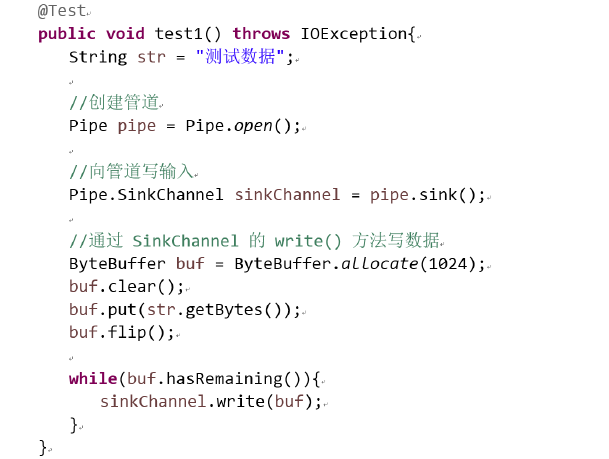
Java NIO 管道是2个线程之间的单向数据连接。Pipe有一个source通道和一个sink通道。数据会被写到sink通道,从source通道读取。

向管道写数据
从管道读取数据
从读取管道的数据,需要访问source通道。

调用source通道的read()方法来读取数据

代码分析:
package com.atguigu.nio;

import java.io.IOException;

import java.nio.ByteBuffer;

import java.nio.channels.Pipe;

import org.junit.Test;

/**

 * 管道是2个线程之间的单向数据连接。Pipe有一个source通道和一个sink通道。数据会被写到sink通道,从source通道读取。

 * 类似的有管道输入流,管道输出流

 * @author Administrator

 *

 */

public class TestPipe {

    @Test

    public void test1() throws IOException{

        //1. 获取管道

        Pipe pipe = Pipe.open();

        //2. 将缓冲区中的数据写入管道

        ByteBuffer buf = ByteBuffer.allocate(1024);

        Pipe.SinkChannel sinkChannel = pipe.sink();

        buf.put("通过单向管道发送数据".getBytes());

        buf.flip();

        sinkChannel.write(buf);

        //3. 读取缓冲区中的数据

        Pipe.SourceChannel sourceChannel = pipe.source();

        buf.flip();

        int len = sourceChannel.read(buf);

        System.out.println(new String(buf.array(), 0, len));

        sourceChannel.close();

        sinkChannel.close();

    }

}
四、NIO.2 –Path、Paths、Files
随着JDK 7 的发布,Java对NIO进行了极大的扩展,增强了对文件处理和文件系统特性的支持,以至于我们称他们为NIO.2。因为NIO 提供的一些功能,NIO已经成为文件处理中越来越重要的部分。
Path 与Paths
java.nio.file.Path 接口代表一个平台无关的平台路径,描述了目录结构中文件的位置。
Paths 提供的get() 方法用来获取Path 对象:
Path get(String first, String … more) : 用于将多个字符串串连成路径。
Path常用方法:
boolean endsWith(String path) : 判断是否以path 路径结束
boolean startsWith(String path) : 判断是否以path 路径开始
boolean isAbsolute() : 判断是否是绝对路径
Path getFileName() : 返回与调用Path 对象关联的文件名
Path getName(int idx) : 返回的指定索引位置idx 的路径名称
int getNameCount() : 返回Path 根目录后面元素的数量
Path getParent() :返回Path对象包含整个路径,不包含Path 对象指定的文件路径
Path getRoot() :返回调用Path 对象的根路径
Path resolve(Path p) :将相对路径解析为绝对路径
Path toAbsolutePath() : 作为绝对路径返回调用Path 对象
String toString() :返回调用Path 对象的字符串表示形式
java.nio.file.Files 用于操作文件或目录的工具类。
Files
Files常用方法:
Path copy(Path src, Path dest, CopyOption … how) : 文件的复制
Path createDirectory(Path path, FileAttribute<?> … attr) : 创建一个目录
Path createFile(Path path, FileAttribute<?> … arr) : 创建一个文件
void delete(Path path) : 删除一个文件
Path move(Path src, Path dest, CopyOption…how) : 将src 移动到dest 位置
long size(Path path) : 返回path 指定文件的大小
Files常用方法:用于判断
boolean exists(Path path, LinkOption … opts) : 判断文件是否存在
boolean isDirectory(Path path, LinkOption … opts) : 判断是否是目录
boolean isExecutable(Path path) : 判断是否是可执行文件
boolean isHidden(Path path) : 判断是否是隐藏文件
boolean isReadable(Path path) : 判断文件是否可读
boolean isWritable(Path path) : 判断文件是否可写
boolean notExists(Path path, LinkOption … opts) : 判断文件是否不存在
public static <A extends BasicFileAttributes> A readAttributes(Path path,Class<A> type,LinkOption... options) : 获取与path 指定的文件相关联的属性。
Files常用方法:用于操作内容
SeekableByteChannel newByteChannel(Path path, OpenOption…how) : 获取与指定文件的连接,how 指定打开方式。
DirectoryStream newDirectoryStream(Path path) : 打开path 指定的目录
InputStream newInputStream(Path path, OpenOption…how):获取InputStream 对象
OutputStream newOutputStream(Path path, OpenOption…how) : 获取OutputStream 对象
自动资源管理
Java 7 增加了一个新特性,该特性提供了另外一种管理资源的方式,这种方式能自动关闭文件。这个特性有时被称为自动资源管理(Automatic Resource Management, ARM),该特性以try 语句的扩展版为基础。自动资源管理主要用于,当不再需要文件(或其他资源)时,可以防止无意中忘记释放它们。
自动资源管理基于try 语句的扩展形式:
try(需要关闭的资源声明){

//可能发生异常的语句

}catch(异常类型变量名){

//异常的处理语句

}

……

finally{

//一定执行的语句

}
try 代码块结束时,自动释放资源。因此不需要显示的调用close() 方法。该形式也称为“带资源的try 语句”。
注意:
①try 语句中声明的资源被隐式声明为final ,资源的作用局限于带资源的try 语句
②可以在一条try 语句中管理多个资源,每个资源以“;” 隔开即可。
③需要关闭的资源,必须实现了AutoCloseable 接口或其子接口Closeable
代码分析:
package com.atguigu.nio;

import java.io.IOException;

import java.nio.ByteBuffer;

import java.nio.channels.FileChannel;

import java.nio.channels.SeekableByteChannel;

import java.nio.file.DirectoryStream;

import java.nio.file.Files;

import java.nio.file.LinkOption;

import java.nio.file.Path;

import java.nio.file.Paths;

import java.nio.file.StandardCopyOption;

import java.nio.file.StandardOpenOption;

import java.nio.file.attribute.BasicFileAttributes;

import java.nio.file.attribute.DosFileAttributeView;

import org.junit.Test;

/**

 * Paths中的方法使用

 * @author Administrator

 *

 */

public class TestNIO_2 {

    /**

     * JAVA7新特性:TWR

     * 自动资源管理:自动关闭实现 AutoCloseable 接口的资源

     */

    @Test

    public void test8(){

        try(FileChannel inChannel = FileChannel.open(Paths.get("1.jpg"), StandardOpenOption.READ);

                FileChannel outChannel = FileChannel.open(Paths.get("2.jpg"), StandardOpenOption.WRITE, StandardOpenOption.CREATE)){

            ByteBuffer buf = ByteBuffer.allocate(1024);

            inChannel.read(buf);

        }catch(IOException e){

        }

    }

    /*

        Files常用方法:用于操作内容

            SeekableByteChannel newByteChannel(Path path, OpenOption…how) : 获取与指定文件的连接,how 指定打开方式。

            DirectoryStream newDirectoryStream(Path path) : 打开 path 指定的目录

            InputStream newInputStream(Path path, OpenOption…how):获取 InputStream 对象

            OutputStream newOutputStream(Path path, OpenOption…how) : 获取 OutputStream 对象

     */

    /**

     * SeekableByteChannel接口,允许我们定位到文件的任意位置进行读写。注意这里的写,不是新增式的插入,而是覆盖,当然在文件末尾的写,是新增。

     * 读取文件夹下的所有Path

     * @throws IOException

     */

    @Test

    public void test7() throws IOException{

        SeekableByteChannel newByteChannel = Files.newByteChannel(Paths.get("1.jpg"), StandardOpenOption.READ);

        DirectoryStream<Path> newDirectoryStream = Files.newDirectoryStream(Paths.get("e:/"));

        for (Path path : newDirectoryStream) {

            System.out.println(path);

        }

    }

    /*

        Files常用方法:用于判断

            boolean exists(Path path, LinkOption … opts) : 判断文件是否存在

            boolean isDirectory(Path path, LinkOption … opts) : 判断是否是目录

            boolean isExecutable(Path path) : 判断是否是可执行文件

            boolean isHidden(Path path) : 判断是否是隐藏文件

            boolean isReadable(Path path) : 判断文件是否可读

            boolean isWritable(Path path) : 判断文件是否可写

            boolean notExists(Path path, LinkOption … opts) : 判断文件是否不存在

            public static <A extends BasicFileAttributes> A readAttributes(Path path,Class<A> type,LinkOption... options) : 获取与 path 指定的文件相关联的属性。

     */

    /**

     * 查看设置判断文件基本属性

     * @throws IOException

     */

    @Test

    public void test6() throws IOException{

        Path path = Paths.get("e:/nio/hello7.txt");

        System.out.println(Files.exists(path, LinkOption.NOFOLLOW_LINKS));

        BasicFileAttributes readAttributes = Files.readAttributes(path, BasicFileAttributes.class, LinkOption.NOFOLLOW_LINKS);

        System.out.println(readAttributes.creationTime());

        System.out.println(readAttributes.lastModifiedTime());

        DosFileAttributeView fileAttributeView = Files.getFileAttributeView(path, DosFileAttributeView.class, LinkOption.NOFOLLOW_LINKS);

        fileAttributeView.setHidden(false);

    }

    /*

        Files常用方法:

            Path copy(Path src, Path dest, CopyOption … how) : 文件的复制

            Path createDirectory(Path path, FileAttribute<?> … attr) : 创建一个目录

            Path createFile(Path path, FileAttribute<?> … arr) : 创建一个文件

            void delete(Path path) : 删除一个文件

            Path move(Path src, Path dest, CopyOption…how) : 将 src 移动到 dest 位置

            long size(Path path) : 返回 path 指定文件的大小

     */

    /**

     * 获取文件大小

     * @throws IOException

     */

    @Test

    public void test5() throws IOException{

        Path path1 = Paths.get("e:/nio/hello2.txt");

        Path path2 = Paths.get("e:/nio/hello7.txt");

        System.out.println(Files.size(path2));

//        Files.move(path1, path2, StandardCopyOption.ATOMIC_MOVE);

    }

    /**

    *创建目录文件及删除

    */

    @Test

    public void test4() throws IOException{

        Path dir = Paths.get("e:/nio/nio2");

        Files.createDirectory(dir);

        Path file = Paths.get("e:/nio/nio2/hello3.txt");

        Files.createFile(file);

        Files.deleteIfExists(file);

    }

    /**

     * 文件的复制

     * @throws IOException

     */

    @Test

    public void test3() throws IOException{

        Path path1 = Paths.get("e:/nio/hello.txt");

        Path path2 = Paths.get("e:/nio/hello2.txt");

        Files.copy(path1, path2, StandardCopyOption.REPLACE_EXISTING);

    }

    /*

        Paths 提供的 get() 方法用来获取 Path 对象:

            Path get(String first, String … more) : 用于将多个字符串串连成路径。

        Path 常用方法:

            boolean endsWith(String path) : 判断是否以 path 路径结束

            boolean startsWith(String path) : 判断是否以 path 路径开始

            boolean isAbsolute() : 判断是否是绝对路径

            Path getFileName() : 返回与调用 Path 对象关联的文件名

            Path getName(int idx) : 返回的指定索引位置 idx 的路径名称

            int getNameCount() : 返回Path 根目录后面元素的数量

            Path getParent() :返回Path对象包含整个路径,不包含 Path 对象指定的文件路径

            Path getRoot() :返回调用 Path 对象的根路径

            Path resolve(Path p) :将相对路径解析为绝对路径

            Path toAbsolutePath() : 作为绝对路径返回调用 Path 对象

            String toString() : 返回调用 Path 对象的字符串表示形式

     */

    @Test

    public void test2(){

        Path path = Paths.get("e:/nio/hello.txt");

        System.out.println(path.getParent());

        System.out.println(path.getRoot());

        Path newPath = path.resolve("e:/hello.txt");

        System.out.println(newPath);

        Path path2 = Paths.get("1.jpg");

        Path newPath2 = path2.toAbsolutePath();

        System.out.println(newPath2);

        System.out.println(path.toString());

    }

    /**

     * Paths中的一些辅助方法:endsWith,startsWith,isAbsolute,getFileName,getNameCount,getName

     */

    @Test

    public void test1(){

        Path path = Paths.get("e:/", "nio/hello.txt");

        System.out.println(path.endsWith("hello.txt"));

        System.out.println(path.startsWith("e:/"));

        System.out.println(path.isAbsolute());

        System.out.println(path.getFileName());

        for (int i = 0; i < path.getNameCount(); i++) {

            System.out.println(path.getName(i));

        }

    }

}
JAVA NIO学习记录2-非阻塞式网络通信的更多相关文章
- Java基础——NIO(二)非阻塞式网络通信与NIO2新增类库
一.NIO非阻塞式网络通信 1.阻塞与非阻塞的概念 传统的 IO 流都是阻塞式的.也就是说,当一个线程调用 read() 或 write() 时,该线程被阻塞,直到有一些数据被读取或写入,该线程在 ...
- Java IO(3)非阻塞式输入输出(NIO)
在上篇<Java IO(2)阻塞式输入输出(BIO)>的末尾谈到了什么是阻塞式输入输出,通过Socket编程对其有了大致了解.现在再重新回顾梳理一下,对于只有一个“客户端”和一个“服务器端 ...
- 4.NIO的非阻塞式网络通信
/*阻塞 和 非阻塞 是对于 网络通信而言的*/ /*原先IO通信在进行一些读写操作 或者 等待 客户机连接 这种,是阻塞的,必须要等到有数据被处理,当前线程才被释放*/ /*NIO 通信 是将这个阻 ...
- NIO 的非阻塞式网络通信
1.阻塞与非阻塞 ① 传统的 IO 流都是阻塞式的.也就是说,当一个线程调用 read() 或 write()时, 该线程被阻塞,直到有一些数据被读取或写入,该线程在此期间不能执行其他任务. 因 ...
- JAVA NIO学习三:NIO 的非阻塞式网络通信
紧接着上一章,我们继续来研究NIO,上一章中我们讲了NIO 中最常见的操作即文件通道的操作,但实际上NIO的主要用途还是在于网络通信,那么这个时候就会涉及到选择器,这一章我们就会对其进行讲解操作. 一 ...
- JAVA NIO学习记录1-buffer和channel
什么是NIO? Java NIO(New IO)是从Java 1.4版本开始引入的一个新的IO API,可以替代标准的Java IO API.NIO与原来的IO有同样的作用和目的,但是使用的方式完全不 ...
- Java NIO学习与记录(一):初识NIO
初识 工作中有些地方用到了netty,netty是一个NIO框架,对于NIO却不是那么熟悉,这个系列的文章是我在学习NIO时的一个记录,也期待自己可以更好的掌握NIO. 一.NIO是什么? 非阻塞式I ...
- Java NIO 学习总结 学习手册
原文 并发编程网(翻译):http://ifeve.com/java-nio-all/ 源自 http://tutorials.jenkov.com/java-nio/index.html Java ...
- Socket-IO 系列(三)基于 NIO 的同步非阻塞式编程
Socket-IO 系列(三)基于 NIO 的同步非阻塞式编程 缓冲区(Buffer) 用于存储数据 通道(Channel) 用于传输数据 多路复用器(Selector) 用于轮询 Channel 状 ...
随机推荐
- FastAdmin 插件的 Git 开发流程(简明)
FastAdmin 插件的 Git 开发流程(简明) cms zip 安装 包安装 删除 addons 里的 cms 使用 mklink 软链接到 cms 插件 Git 仓库 修改 cms 插件 gi ...
- Oracle 存储过程发送邮件
CREATE OR REPLACE PROCEDURE PROCSENDEMAIL(P_TXT VARCHAR2, ...
- 使用js提交form表单的两种方法
提交form表单的时候瑶族一些简单的验证,验证完后才能提交,避免无效提交. 1.当输入用户名和密码为空的时候,需要判断.这时候就用到了校验用户名和密码,这个需要在前端页面写:有两种方法,一种是用sub ...
- 设置新时间校正服务器NTP SERVER
时间校正服务器IP : 10.*.*.* 适用系统:windows server 2008/windows 7 net stop w32time net start w32time w32tm /qu ...
- Angular 4 表单校验2
1. 将表单的方法移动到单独的ts文件夹中 2. code export function mobileValidator(control: FormControl): any { const myr ...
- 从Exchager数据交换到基于trade-off的系统设计
可以使用JDK提供的Exchager类进行同步交换:进行数据交换的双方将互相等待对方,直到双方的数据都准备完毕,才进行交换.Exchager类很少用到,但理解数据交换的时机却十分重要,这是一个基于tr ...
- selenium APi
1.查看浏览器的名字方法:name实例:drvier.name 2.删除浏览器所以的cookies方法:delete_all_cookies()实例:driver.delete_all_cookies ...
- Java-Runoob-高级教程-实例-数组:08. Java 实例 – 数组填充
ylbtech-Java-Runoob-高级教程-实例-数组:08. Java 实例 – 数组填充 1.返回顶部 1. Java 实例 - 数组填充 Java 实例 以下实例我们通过 Java Ut ...
- 如何使input双击时不显示历史记录
原文地址:http://highping.iteye.com/blog/359428 HTML的输入框可以拥有自动完成的功能,当你往输入框输入内容的时候,浏览器会从你以前的同名输入框的历史记录中查找出 ...
- Java 运算符-=,+=混合计算详解
+=与-=运算符混合计算解析: int x = 3; x += x -= x -= x += x -= x; 详解:算数运算按运算符优先级运算,从右至左计算. 1. x=x-x; 实际为 3 - 3 ...