
ElasticSearch(七):ElasticSearch集群的搭建
由于资源有限,使用是一台机器上安装三个elasticSearch服务端组成的集群。
1. 安装elasticSearch6.3.2
将原本安装的elasticSearch6.3.2复制两份,分别重新命名,如下:

2. 修改配置文件
进入elasticSearch的config目录,打开 elasticsearch.yml文件,修改如下信息:
需要注意的是:
默认所有节点都会存储数据。
如果你是一台机器上多个es服务器,那么必须指定不同的tcp端口。
# ======================== Elasticsearch Configuration =========================

#

# NOTE: Elasticsearch comes with reasonable defaults for most settings.

#       Before you set out to tweak and tune the configuration, make sure you

#       understand what are you trying to accomplish and the consequences.

#

# The primary way of configuring a node is via this file. This template lists

# the most important settings you may want to configure for a production cluster.

#

# Please consult the documentation for further information on configuration options:

# https://www.elastic.co/guide/en/elasticsearch/reference/index.html

#

# ---------------------------------- Cluster -----------------------------------

#

# Use a descriptive name for your cluster: 集群名,其余节点都是通过这个名字来找到集群

cluster.name: zskj

#

# ------------------------------------ Node ------------------------------------

# Use a descriptive name for the node:

# 节点名

node.name: node

#

# Add custom attributes to the node:

#

#node.attr.rack: r1

#

# ----------------------------------- Paths ------------------------------------

#

# Path to directory where to store the data (separate multiple locations by comma):

#

#path.data: /path/to/data

#

# Path to log files:

#

#path.logs: /path/to/logs

#

# ----------------------------------- Memory -----------------------------------

#

# Lock the memory on startup:

#

#bootstrap.memory_lock: true

#

# Make sure that the heap size is set to about half the memory available

# on the system and that the owner of the process is allowed to use this

# limit.

#

# Elasticsearch performs poorly when the system is swapping the memory.

#

# ---------------------------------- Network -----------------------------------

#

# Set the bind address to a specific IP (IPv4 or IPv6):

# 节点的ip地址

network.host: 127.0.0.1

#

# Set a custom port for HTTP:

# 端口

http.port: 9200

# tcp端口。

transport.tcp.port: 9300

#

# For more information, consult the network module documentation.

#

# --------------------------------- Discovery ----------------------------------

#

# Pass an initial list of hosts to perform discovery when new node is started:

# The default list of hosts is ["127.0.0.1", "[::1]"]

# elasticSearch集群的地址。这里使用的是一台机器的不同端口。

discovery.zen.ping.unicast.hosts: ["127.0.0.1:9300", "127.0.0.1:9301", "127.0.0.1:9302"]

#

# Prevent the "split brain" by configuring the majority of nodes (total number of master-eligible nodes / 2 + 1):

# 预防脑裂,建议为总集群数一半 + 1

discovery.zen.minimum_master_nodes: 2

#

# For more information, consult the zen discovery module documentation.

#

# ---------------------------------- Gateway -----------------------------------

#

# Block initial recovery after a full cluster restart until N nodes are started:

#

#gateway.recover_after_nodes: 3

#

# For more information, consult the gateway module documentation.

#

# ---------------------------------- Various -----------------------------------

#

# Require explicit names when deleting indices:

#

#action.destructive_requires_name: true

# 跨域

http.cors.enabled: true

http.cors.allow-origin: "*"
需要特别注意的是:
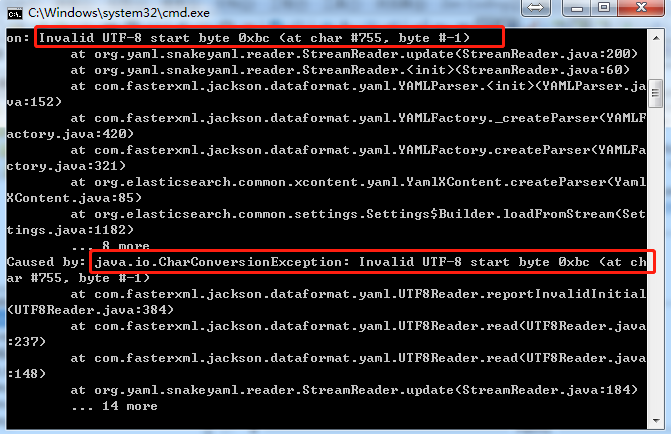
1. 如果你的elasticSearch节点在 elasticsearch.yml中添加了中文之后,导致elasticSearch无法启动,就必须把yml文件中的中文删除,然后就可以重启启动了。报错信息如下:
2. 配置文件书写的时候需要注意:属性必须定格写,之后是一个“:”,之后空格,然后是属性值。不能使用tab键。
3. 启动集群
分别启动三个elasticSearch节点即可启动集群。
4. 一个小的技巧
如果你也是和我一样,使用的是一台机器的三个elasticSearch服务端,每次都需要点到文件中,点击elasticsearch.bat,确实挺麻烦,那么你可以试试批处理。
右键创建一个文件,命名为xxxx.bat即可。使用记事本打开,然后写入如下命令,保存即可。
@echo off

title ES集群启动工具

REM 切换命令行目录为当前BAT所在目录

cd /d E:\ElasticSearch\elasticsearch-6.3.2\bin

start elasticsearch.bat

echo elasticsearch1正在启动。。。

cd /d E:\ElasticSearch\elasticsearch-6.3.2_02\bin

start elasticsearch.bat

echo elasticsearch2正在启动。。。

cd /d E:\ElasticSearch\elasticsearch-6.3.2_03\bin

start elasticsearch.bat

echo elasticsearch3正在启动。。。
作用就是:分别自动切换到三个elasticSearch的目录,然后自动点击 elasticsearch.bat,启动服务端。
如果你还安装了head插件,每次点开启动也挺麻烦,可以直接在批处理后面添加语句即可:当elasticSearch服务端完全启动之后,点击任意键启动head插件
echo 任意键继续启动head插件

pause

cd /d E:\ElasticSearch\head

call grunt server
综上:你只需要双击你的批处理工具 xxxx.bat就可以完成集群的启动了,如果你在多台服务器上,那么还是一个一个启动吧。
ElasticSearch(七):ElasticSearch集群的搭建的更多相关文章
- ElasticSearch高可用集群环境搭建和分片原理
1.ES是如何实现分布式高并发全文检索 2.简单介绍ES分片Shards分片技术 3.为什么ES主分片对应的备分片不在同一台节点存放 4.索引的主分片定义好后为什么不能做修改 5.ES如何实现高可用容 ...
- hadoop(七) - hadoop集群环境搭建
一. 前言: hadoop2.0已经公布了稳定版本号了,添加了非常多特性,比方HDFS HA.YARN等.最新的hadoop-2.4.1又添加了YARN HA 注意:apache提供的hadoop-2 ...
- ElasticSearch 集群环境搭建,安装ElasticSearch-head插件,安装错误解决
ElasticSearch-5.3.1集群环境搭建,安装ElasticSearch-head插件,安装错误解决 说起来甚是惭愧,博主在写这篇文章的时候,还没有系统性的学习一下ES,只知道可以拿来做全文 ...
- 全文搜索引擎 Elasticsearch 入门:集群搭建
本文主要介绍什么是 ElasticSearch 以及为什么需要它,如何在本机安装部署 ElasticSearch 实例,同时会演示安装 ElasticSearch 插件,以及如何在本地部署多实例集群, ...
- Elasticsearch(ES)集群的搭建
1. 概述 Elasticsearch(ES)集群支持分片和副本,能够很容易的实现负载均衡.扩容.容灾.高可用. 今天我们就来聊一下,Elasticsearch(ES)集群是如何搭建的. 2. 场景介 ...
- Elasticsearch高级之-集群搭建,数据分片
目录 Elasticsearch高级之-集群搭建,数据分片 一 广播方式 二 单播方式 三 选取主节点 四 什么是脑裂 五 错误识别 Elasticsearch高级之-集群搭建,数据分片 es使用两种 ...
- 原创 | 手摸手带您学会 Elasticsearch 单机、集群、插件安装(图文教程)
欢迎关注笔者的公众号: 小哈学Java, 每日推送 Java 领域干货文章,关注即免费无套路附送 100G 海量学习.面试资源哟!! 个人网站: https://www.exception.site/ ...
- Elasticsearch系列---生产集群部署(上)
概要 本篇开始介绍Elasticsearch生产集群的搭建及相关参数的配置. ES集群的硬件特性 我们从开始编程就接触过各种各样的组件,而每种功能的组件,对硬件要求的特性都不太相同,有的需要很强的CP ...
- 1.ElasticSearch系列之集群部署
第一步:安装JDK JDK要求jdk1.8+,不安装也可以,ES自带JDK 第二步:系统配置 2.1 禁用交换区 sudo swapoff -a 2.2 开最大文件数的限制 编辑文件 /etc/sec ...
- 使用Spring Data ElasticSearch+Jsoup操作集群数据存储
使用Spring Data ElasticSearch+Jsoup操作集群数据存储 1.使用Jsoup爬取京东商城的商品数据 1)获取商品名称.价格以及商品地址,并封装为一个Product对象,代码截 ...
随机推荐
- [转]TOMCAT启动提示NB: JAVA_HOME should point to a JDK not a JRE解决
来源:http://blog.csdn.net/caozhongyan/article/details/6602759 本人使用的Tomcat版本为apache-tomcat-6.0.18(用的是解压 ...
- [NOI2018]你的名字(68pts)
SAM真让人头秃. 题面 https://www.luogu.org/problemnew/show/P4770 首先考虑 l=1,r=∣S∣的做法 如果对于ION2018的子串不用判重的话,对ION ...
- python-day43--单表查询之关键字执行优先级(重点)
一.关键字的执行优先级(重点) 1.关键字执行优先级 from where #约束条件(在数据产生之前执行) group by #分组 没有分组则默认一组 按照select后的字段取得一张新的虚拟表, ...
- http 中的 Get 与 Post
GET 和 POST 是 HTTP 请求的两种基本方法 —— Http 定义了(客户端.浏览器)与服务器交互的不同方法,最基本的方法有4种, 分别是GET,POST,PUT,DELETE.(HTTP协 ...
- 第一个 MVC 应用程序(下半部分)
2.4 创建一个简单的数据录入应用程序 本章的其余部分将通过一个简单的数据录入应用程序来考查 MVC 的更多基本特性.本小节打算分步进行,目的是演示 MVC 的运用. B1.设计一个数据模型 在 MV ...
- 应用多种变形CSS3
<!DOCTYPE html><html xmlns="http://www.w3.org/1999/xhtml"><head> < ...
- Oracle数据库的“健康指示器”——事件(events)
Oracle数据库“赢在”在架构,这话还是有道理的,除了锁(lock)这个最大的架构上的“赢点”之外,Oracle事件(event)也是另外一个很重要的架构上的“赢点”,因为当今的Oracle数据库, ...
- darktrace 亮点是使用的无监督学习(贝叶斯网络、聚类、递归贝叶斯估计)发现未知威胁——使用无人监督 机器学习反而允许系统发现罕见的和以前看不见的威胁,这些威胁本身并不依赖 不完善的训练数据集。 学习正常数据,发现异常!
先说说他们的产品:企业免疫系统(基于异常发现来识别威胁) 可以看到是面向企业内部安全的! 优点整个网络拓扑的三维可视化企业威胁级别的实时全局概述智能地聚类异常泛频谱观测 - 高阶网络拓扑;特定群集,子 ...
- sql语句:查询、排序、不区分大小写查询,及联合使用
1.不排序时的查找语句: offset message 为表名,talker 为列名. 此语句的意思是:从message 表中查找 talker 等于wxid_0930479303212的数据,从第 ...
- constexpr和常量表达式的注意事项
1.常量表达式,是指其值不可改变,且在编译阶段就已经得出计算结果的表达式,例如字面值就是常量表达式. 2.判断是否是常量表达式,要关注数据类型是否是const类型,初始值是否是在编译阶段就得到的. 3 ...