
微服务之springCloud-docker-hystrix-dashboard-turbine(九)
简介
Hystrix的主要优点之一是它收集关于每个HystrixCommand的一套指标。Hystrix仪表板以有效的方式显示每个断路器的运行状况,通过Hystrix Dashboard我们可以在直观地看到各Hystrix Command的断路器是否打开,请求响应时间, 请求失败率,请求超时个数等等数据。但是只使用Hystrix Dashboard的话, 你只能看到单个应用内的服务信息, 这明显不够. 我们需要一个工具能让我们汇总系统内多个服务的数据并显示到Hystrix Dashboard上, 这个工具就是Turbine,这节我们讨论一下,怎么用turbine+hystrix-dashboard监听两个消费者服务
一、监听模块microservice-consumer-movie-feign-with-hystrix断路器的运行状况
这个模块在前面博客中讨论,这里就不写怎么创建了
http://www.cnblogs.com/520playboy/p/8066618.html
二、监听模块microservice-consumer-movie-ribbon-with-hystrix1断路器的运行状况
2.1、创建模块microservice-consumer-movie-ribbon-with-hystrix1
项目结构如下:

2.2、pom.xml文件
<?xml version="1.0" encoding="UTF-8"?>

<project xmlns="http://maven.apache.org/POM/4.0.0"

         xmlns:xsi="http://www.w3.org/2001/XMLSchema-instance"

         xsi:schemaLocation="http://maven.apache.org/POM/4.0.0 http://maven.apache.org/xsd/maven-4.0.0.xsd">

    <parent>

        <artifactId>microservice-spring-cloud</artifactId>

        <groupId>com.jacky</groupId>

        <version>1.0-SNAPSHOT</version>

    </parent>

    <modelVersion>4.0.0</modelVersion>

    <artifactId>microservice-consumer-movie-ribbon-with-hystrix1</artifactId>

    <packaging>jar</packaging>

    <properties>

        <project.build.sourceEncoding>UTF-8</project.build.sourceEncoding>

        <project.reporting.outputEncoding>UTF-8</project.reporting.outputEncoding>

        <java.version>1.8</java.version>

    </properties>

    <dependencies>

        <dependency>

            <groupId>org.springframework.boot</groupId>

            <artifactId>spring-boot-starter-web</artifactId>

        </dependency>

        <dependency>

            <groupId>org.springframework.cloud</groupId>

            <artifactId>spring-cloud-starter-eureka</artifactId>

        </dependency>

        <dependency>

            <groupId>org.springframework.boot</groupId>

            <artifactId>spring-boot-starter-actuator</artifactId>

        </dependency>

        <dependency>

            <groupId>org.springframework.cloud</groupId>

            <artifactId>spring-cloud-starter-hystrix</artifactId>

        </dependency>

        <dependency>

            <groupId>org.springframework.cloud</groupId>

            <artifactId>spring-cloud-starter-zipkin</artifactId>

        </dependency>

    </dependencies>

    <build>

        <plugins>

            <plugin>

                <groupId>com.spotify</groupId>

                <artifactId>docker-maven-plugin</artifactId>

                <executions>

                    <!--设置在执行maven 的install时构建镜像-->

                    <execution>

                        <id>build-image</id>

                        <phase>install</phase>

                        <goals>

                            <goal>build</goal>

                        </goals>

                    </execution>

                </executions>

                <configuration>

                    <!--安装了docker的主机,并且打开了api remote接口设置-->

                    <dockerHost>http://192.168.6.130:5678</dockerHost>

                    <pushImage>true</pushImage><!--设置上传镜像到私有仓库,需要docker设置指定私有仓库地址-->

                    <!--镜像名称-->

                    <imageName>${docker.repostory}/${docker.image.prefix}/${project.artifactId}:${project.version}</imageName>

                    <!--镜像的基础版本-->

                    <baseImage>java:openjdk-8-jdk-alpine</baseImage>

                    <!--镜像启动参数-->

                    <entryPoint>["java", "-jar", "/${project.build.finalName}.jar"]</entryPoint>

                    <resources>

                        <resource>

                            <targetPath>/</targetPath>

                            <directory>${project.build.directory}</directory>

                            <include>${project.build.finalName}.jar</include>

                        </resource>

                    </resources>

                </configuration>

            </plugin>

        </plugins>

    </build>

</project>
2.3、配置文件application.yml
spring:

  application:

    name: microservice-consumer-movie-ribbon-with-hystrix1

  sleuth:

    sampler:

      percentage: 1.0

  #zipkin:

    #base-url: http://localhost:7788

server:

  port: 8010

eureka:

  client:

    healthcheck:

      enabled: true

    serviceUrl:

      defaultZone: http://jacky:admin@peer1:8761/eureka/,http://jacky:admin@peer2:8762/eureka/,http://jacky:admin@peer3:8763/eureka/

  instance:

    prefer-ip-address: true

    instance-id: ${spring.application.name}:${spring.cloud.client.ipAddress}:${spring.application.instance_id:${server.port}}

hystrix.command.default.execution.isolation.thread.timeoutInMilliseconds: 5000

#security:

  #oauth2:

   # resource:

    #  id: microservice-consumer-movie-ribbon-with-hystrix1

     # user-info-uri: http://localhost:9999/uaa/user

      #prefer-token-info: false
2.4、实体类User.java
package com.jacky.cloud.entity;

import java.math.BigDecimal;

public class User {

  private Long id;

  private String username;

  private String name;

  private Short age;

  private BigDecimal balance;

  public Long getId() {

    return this.id;

  }

  public void setId(Long id) {

    this.id = id;

  }

  public String getUsername() {

    return this.username;

  }

  public void setUsername(String username) {

    this.username = username;

  }

  public String getName() {

    return this.name;

  }

  public void setName(String name) {

    this.name = name;

  }

  public Short getAge() {

    return this.age;

  }

  public void setAge(Short age) {

    this.age = age;

  }

  public BigDecimal getBalance() {

    return this.balance;

  }

  public void setBalance(BigDecimal balance) {

    this.balance = balance;

  }

}
2.5、控制层MovieController.java
package com.jacky.cloud.controller;

import com.netflix.hystrix.contrib.javanica.annotation.HystrixProperty;

import org.springframework.beans.factory.annotation.Autowired;

import org.springframework.web.bind.annotation.GetMapping;

import org.springframework.web.bind.annotation.PathVariable;

import org.springframework.web.bind.annotation.RestController;

import org.springframework.web.client.RestTemplate;

import com.jacky.cloud.entity.User;

import com.netflix.hystrix.contrib.javanica.annotation.HystrixCommand;

@RestController

public class MovieController {

  @Autowired

  private RestTemplate restTemplate;

  @GetMapping("/movie/{id}")

  @HystrixCommand(groupKey="UserGroup1", commandKey = "findUserByIdCommand1",commandProperties = {

          @HystrixProperty(name = "execution.isolation.thread.timeoutInMilliseconds", value = "1000"),

          @HystrixProperty(name = "execution.timeout.enabled", value = "false")},fallbackMethod = "findByIdFallback")

  public User findById(@PathVariable Long id) {

    return this.restTemplate.getForObject("http://microservice-provider-user/simple/" + id, User.class);

  }

  /**

   * fallback方法

   * @param id

   * @return

     */

  public User findByIdFallback(Long id) {

    User user = new User();

    user.setId(5L);

    return user;

  }

}
2.6、启动类
package com.jacky.cloud;

import org.springframework.boot.SpringApplication;

import org.springframework.boot.autoconfigure.SpringBootApplication;

import org.springframework.cloud.client.circuitbreaker.EnableCircuitBreaker;

import org.springframework.cloud.client.loadbalancer.LoadBalanced;

import org.springframework.cloud.netflix.eureka.EnableEurekaClient;

import org.springframework.context.annotation.Bean;

import org.springframework.web.client.RestTemplate;

@SpringBootApplication

@EnableEurekaClient

@EnableCircuitBreaker       //映入断路器注解

public class ConsumerMovieRibbonApplication {

  @Bean

  @LoadBalanced

  public RestTemplate restTemplate() {

    return new RestTemplate();

  }

  public static void main(String[] args) {

    SpringApplication.run(ConsumerMovieRibbonApplication.class, args);

  }

}
三、创建hystrix+turbine模块(microservice-hystrix-turbine1)
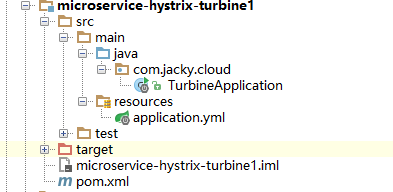
项目结构如下:
3.1、pom.xml文件
<?xml version="1.0" encoding="UTF-8"?>

<project xmlns="http://maven.apache.org/POM/4.0.0"

         xmlns:xsi="http://www.w3.org/2001/XMLSchema-instance"

         xsi:schemaLocation="http://maven.apache.org/POM/4.0.0 http://maven.apache.org/xsd/maven-4.0.0.xsd">

    <parent>

        <artifactId>microservice-spring-cloud</artifactId>

        <groupId>com.jacky</groupId>

        <version>1.0-SNAPSHOT</version>

    </parent>

    <modelVersion>4.0.0</modelVersion>

    <artifactId>microservice-hystrix-turbine1</artifactId>

    <packaging>jar</packaging>

    <properties>

        <project.build.sourceEncoding>UTF-8</project.build.sourceEncoding>

    </properties>

    <dependencies>

        <dependency>

            <groupId>org.springframework.cloud</groupId>

            <artifactId>spring-cloud-starter-turbine</artifactId>

        </dependency>

        <dependency>

            <groupId>org.springframework.cloud</groupId>

            <artifactId>spring-cloud-netflix-turbine</artifactId>

        </dependency>

        <dependency>

            <groupId>org.springframework.boot</groupId>

            <artifactId>spring-boot-starter-actuator</artifactId>

        </dependency>

        <dependency>

            <groupId>org.springframework.cloud</groupId>

            <artifactId>spring-cloud-starter-hystrix-dashboard</artifactId>

        </dependency>

    </dependencies>

    <build>

        <plugins>

            <plugin>

                <groupId>com.spotify</groupId>

                <artifactId>docker-maven-plugin</artifactId>

                <executions>

                    <!--设置在执行maven 的install时构建镜像-->

                    <execution>

                        <id>build-image</id>

                        <phase>install</phase>

                        <goals>

                            <goal>build</goal>

                        </goals>

                    </execution>

                </executions>

                <configuration>

                    <!--安装了docker的主机,并且打开了api remote接口设置-->

                    <dockerHost>http://192.168.6.130:5678</dockerHost>

                    <pushImage>true</pushImage><!--设置上传镜像到私有仓库,需要docker设置指定私有仓库地址-->

                    <!--镜像名称-->

                    <imageName>${docker.repostory}/${docker.image.prefix}/${project.artifactId}:${project.version}</imageName>

                    <!--镜像的基础版本-->

                    <baseImage>java:openjdk-8-jdk-alpine</baseImage>

                    <!--镜像启动参数-->

                    <entryPoint>["java", "-jar", "/${project.build.finalName}.jar"]</entryPoint>

                    <resources>

                        <resource>

                            <targetPath>/</targetPath>

                            <directory>${project.build.directory}</directory>

                            <include>${project.build.finalName}.jar</include>

                        </resource>

                    </resources>

                </configuration>

            </plugin>

        </plugins>

    </build>

</project>
3.2、配置文件application.yml
server:

  port: 8031

spring:

  application:

    name: microservice-hystrix-turbine

eureka:

  client:

    serviceUrl:

      defaultZone: http://jacky:admin@peer1:8761/eureka/,http://jacky:admin@peer2:8762/eureka/,http://jacky:admin@peer3:8763/eureka/

  instance:

    prefer-ip-address: true

turbine:

  aggregator:

    clusterConfig: default     #指定聚合哪些集群,多个使用”,”分割,默认为default。可使用http://.../turbine.stream?cluster={clusterConfig之一}访问

    #配置Eureka中的serviceId列表,表明监控哪些服务

  appConfig: microservice-consumer-movie-feign-with-hystrix,microservice-consumer-movie-ribbon-with-hystrix1

  #1. clusterNameExpression指定集群名称,默认表达式appName;此时:turbine.aggregator.clusterConfig需要配置想要监控的应用名称;

  #2. 当clusterNameExpression: default时,turbine.aggregator.clusterConfig可以不写,因为默认就是default;

  #3. 当clusterNameExpression: metadata[‘cluster’]时,假设想要监控的应用配置了eureka.instance.metadata-map.cluster: ABC,则需要配置,同时turbine.aggregator.clusterConfig: ABC

  clusterNameExpression: "'default'"
3.3、启动类
package com.jacky.cloud;

import org.springframework.boot.SpringApplication;

import org.springframework.boot.autoconfigure.SpringBootApplication;

import org.springframework.cloud.netflix.hystrix.dashboard.EnableHystrixDashboard;

import org.springframework.cloud.netflix.turbine.EnableTurbine;

@EnableTurbine

@EnableHystrixDashboard

@SpringBootApplication

public class TurbineApplication {

  public static void main(String[] args) {

    SpringApplication.run(TurbineApplication.class, args);

  }

}
四、启动
- 启动 microservice-provider-user
- 启动 microservice-consumer-movie-feign-with-hystrix
- 启动microservice-consumer-movie-ribbon-with-hystrix1
- 启动microservice-hystrix-turbine
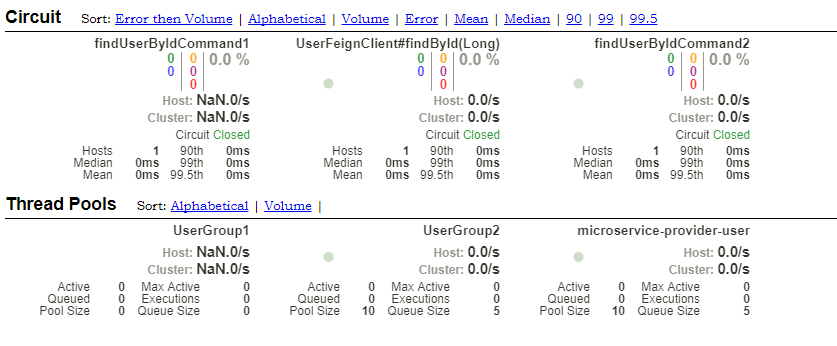
五、测试

微服务之springCloud-docker-hystrix-dashboard-turbine(九)的更多相关文章
- 微服务熔断限流Hystrix之流聚合
简介 上一篇介绍了 Hystrix Dashboard 监控单体应用的例子,在生产环境中,监控的应用往往是一个集群,我们需要将每个实例的监控信息聚合起来分析,这就用到了 Turbine 工具.Turb ...
- 我对微服务、SpringCloud、k8s、Istio的一些杂想
一.微服务与SOA “微服务”是一个名词,没有这个名词之前也有“微服务”,一个朗朗上口的名词能让大家产生一个认知共识,这对推动一个事务的发展挺重要的,不然你叫微服务他叫小服务的大家很难集中到一个点上. ...
- 微服务、SpringCloud、k8s、Istio杂谈
一.微服务与SOA “微服务”是一个名词,没有这个名词之前也有“微服务”,一个朗朗上口的名词能让大家产生一个认知共识,这对推动一个事务的发展挺重要的,不然你叫微服务他叫小服务的大家很难集中到一个点上. ...
- 微服务之SpringCloud基础
SpringCloud微服务基础 微服务架构--SpringCloud网站架构模式 单点应用/分布式系统面向于服务架构(SOA) /微服务架构web项目三层架构1.控制层2.业务逻辑层3.数据访问层传 ...
- 微服务和SpringCloud入门
微服务和SpringCloud入门 微服务是什么 微服务的核心是将传统的一站式应用,根据业务拆分成一个一个的服务,彻底去耦合,每个微服务提供单个业务功能的服务,一个服务做一件事情,从技术角度看就是一种 ...
- F版本SpringCloud1—大白话为啥要有微服务?啥是微服务?SpringCloud为什么有那么多组件?
前言 为什么要有微服务呢? 什么是微服务? SpringCloud 中为什么会有那么多的组件? ...... 作为SpringCloud教程的第一篇,不讲解具体的技术使用,通过一个通俗易懂的小故事,来 ...
- 微服务项目的docker自动化部署流程
目录 微服务的Docker自动化部署 制作JDK1.8的Docker镜像 Docker常用命令介绍 制作image的一般流程 将本地的image上传至私人仓库 使用Maven插件实现自动化docker ...
- 庐山真面目之十二微服务架构基于Docker搭建Consul集群、Ocelot网关集群和IdentityServer版本实现
庐山真面目之十二微服务架构基于Docker搭建Consul集群.Ocelot网关集群和IdentityServer版本实现 一.简介 在第七篇文章<庐山真面目之七微服务架构Consul ...
- Taurus.MVC 微服务框架 入门开发教程:项目部署:6、微服务应用程序Docker部署实现多开。
系列目录: 本系列分为项目集成.项目部署.架构演进三个方向,后续会根据情况调整文章目录. 开源地址:https://github.com/cyq1162/Taurus.MVC 本系列第一篇:Tauru ...
- springcloud-知识点总结(三):Hystrix & Dashboard & turbine & Zuul & SpringCloud Config
1.Hystrix断路器简介 Hystrix断路器简介 hystrix对应的中文名字是“豪猪”,豪猪周身长满了刺,能保护自己不受天敌的伤害,代表了一种防御机制,这与hystrix本身的功能不谋而合,因 ...
随机推荐
- Android Studio 2.3 正式版新功能,你不来看看?!
2017.3.3 Google老大发布了Android Studio 2.3正式版. 在许多2.3beta版本的基础上修复了bug然后推出了正式版.提供了一些新特性,和对部分已有功能的修改完善. Bu ...
- 字符集不同导致的ORA-00972
使用ssh登录RAC的两个节点,分别执行相同的sql语句,发现其中一个报错ora-00972: 检查后发现,左侧节点的客户端使用的字符集是SecureCRT的默认字符集,右侧使用的是UTF-8
- 【转】Tesla Model S的设计失误
Tesla Model S的设计失误 这幅美丽的图片,就是红极一时的Tesla电动车Model S的内景.然而你有没有发现,其中有一些不大对劲的地方?虽然我看好电动汽车,它们环保,安静,运动敏捷,然而 ...
- 在C语言中除法运算为什么没有小数部分?
原文链接: http://wenda.tianya.cn/question/4e096f010317a93d 除法运算符" / ",如果是两个整数相除结果为整数如果需要保留小数时 ...
- SQL Server 2008 R2占用内存越来越大两种解决方法
SQL Server 2008 R2运行越久,占用内存会越来越大. 第一种:有了上边的分析结果,解决方法就简单了,定期重启下SQL Server 2008 R2数据库服务即可,使用任务计划定期执行下边 ...
- 复习下C 链表操作(单向链表)
Object-C 作为C 的包装语言(运行时.消息机制).如果不熟悉C 的话实在玩得太肤浅. 随便深入oc 内部都会接触到C. runtime .GCD.Block.消息机制... 所有强大的功能无不 ...
- ssh转发
ssh有3种转发:本地转发,远程转发,动态转发. 1.本地转发:当client和ssh-client的方向一致的时候,就是本地转发. 限制:1)client直接访问server被防火墙阻挡.2)ssh ...
- 怎么设置Linux swap分区?方法教程
如何设置Linux swap分区 看到不少朋友问linux下swap分区的问题,收集到一篇 不错的文章 ,分享下. 什么是Swap?Swap,即交换区,除了安装Linux的时候,有多少人关心过它呢?其 ...
- ubuntu for win10 里运行net core
花了点时间在ubuntu for win10里运行net core 按官网上ubuntun10.14装的net core指令 ...... ...... sudo apt-get install do ...
- 译: 3. Axis2快速入门指南
本指南的目的是让您尽快使用Axis2开始创建服务和客户端.我们将采用一个简单的StockQuote服务,向您展示可以创建和部署它的一些不同方式,以及快速查看Axis2附带的一个或两个实用程序.然后,我 ...